Skip to content
  • Categories
  • Recent
  • Popular
  • Support
  • MyRoute-app
Collapse
Brand Logo

MRA Community Forum

  1. Home
  2. The MyRoute-app
  3. [App] Problems, Bugs and other Issues
  4. Rerouting around a road block whilst out riding

Rerouting around a road block whilst out riding

Scheduled Pinned Locked Moved [App] Problems, Bugs and other Issues
rerouting
12 Posts 4 Posters 2.3k Views 2 Watching
  • Oldest to Newest
  • Newest to Oldest
  • Most Votes
Reply
  • Reply as topic
Log in to reply
This topic has been deleted. Only users with topic management privileges can see it.
  • dungbeetle Offline
    dungbeetle Offline
    dungbeetle
    wrote on last edited by
    #1

    Hi everyone,
    Please see the attached picture below.

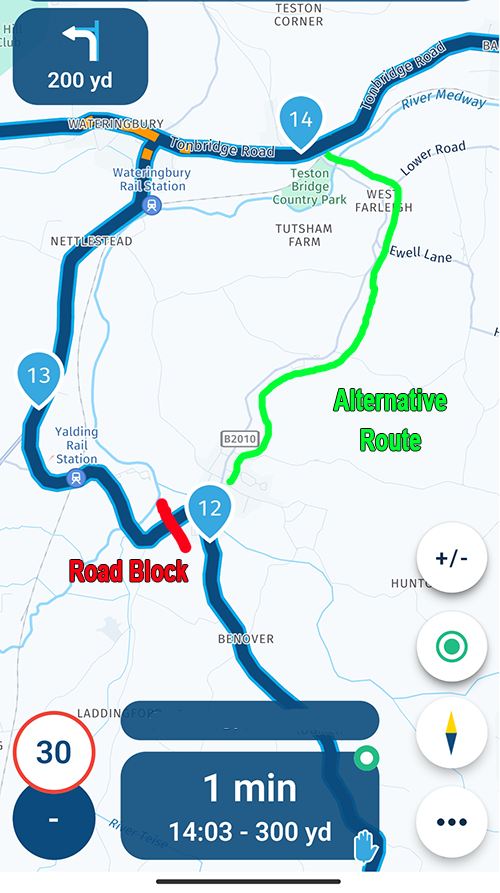
    Whilst out riding I encountered a road block (red) which prevented the original 12, 13, 14 waypoint route from being taken.

    I couldn't figure out how to reroute along the alternative (green) route shown.

    Things I tried:

    1. Select and drag point 13 onto the green route road. Did not work, it could not be moved. I could only delete point 13. That might have worked in this case routing directly to 14, but I wanted to add a new waypoint 13 on the new green route as just skipping a waypoint may not always take the desired new route to 14.
    2. Add a new waypoint on the green route road. This created an incorrectly numbered and out of sequence waypoint which could not be reordered in the waypoints list on the mobile app. (I know this can be done on the PC version when planning.)

    Does anyone know how to make this kind of course correction on the phone app whilst out riding? Is there a way to either drag and relocate an existing waypoint, or create a new 'in sequence' waypoint after deleting the old one?

    Thanks for any suggestions you might have.
    Road block example.png

    Con Hennekens 1 Reply Last reply
    0
    • dungbeetle dungbeetle

      Hi everyone,
      Please see the attached picture below.

      Whilst out riding I encountered a road block (red) which prevented the original 12, 13, 14 waypoint route from being taken.

      I couldn't figure out how to reroute along the alternative (green) route shown.

      Things I tried:

      1. Select and drag point 13 onto the green route road. Did not work, it could not be moved. I could only delete point 13. That might have worked in this case routing directly to 14, but I wanted to add a new waypoint 13 on the new green route as just skipping a waypoint may not always take the desired new route to 14.
      2. Add a new waypoint on the green route road. This created an incorrectly numbered and out of sequence waypoint which could not be reordered in the waypoints list on the mobile app. (I know this can be done on the PC version when planning.)

      Does anyone know how to make this kind of course correction on the phone app whilst out riding? Is there a way to either drag and relocate an existing waypoint, or create a new 'in sequence' waypoint after deleting the old one?

      Thanks for any suggestions you might have.

      Road block example.png

      Con Hennekens Offline
      Con Hennekens Offline
      Con Hennekens
      Alpha tester
      wrote on last edited by
      #2

      @dungbeetle, The easiest way for this is NOT to add or drag waypoints, but to skip to WP 14. I think you disabled the "upcoming waypoint" tile in your screenlayout settings. Tap that tile to skip a waypoint. Or longpress waypoint 14 to continue from there.

      I am just an enthusiastic MRA user, and hope you will be one too!

      Most motorcycle problems are caused by the nut that connects the handlebar to the saddle.

      Check out RideSleepRepeat.eu, a biker community for sharing stays across Europe

      1 Reply Last reply
      0
      • RetiredWingMan Offline
        RetiredWingMan Offline
        RetiredWingMan
        Valued contributor
        wrote on last edited by
        #3

        @dungbeetle assuming you were already past wp12, skipping 13 & 14 should have sent you up the green route.

        2010 GL1800 Goldwing using Samsung Galaxy S20 5G Android 13.

        1 Reply Last reply
        0
        • nomko Offline
          nomko Offline
          nomko
          Banned
          wrote on last edited by
          #4

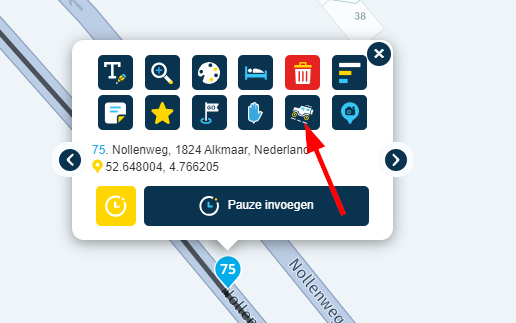
          As mentioned by @RetiredWingMan, keep the route as it is and set waypoints 13 and 14 to Skip, see red arrow screenshot and my apologies for having this menu in Dutch.

          I've had similar issues on routes i edited/created, by using the Skip command/mode you can straighten out a route.
          690a026e-70c9-4dfa-bd28-3e2c7be5dac8-image.png

          Con Hennekens 1 Reply Last reply
          0
          • nomko nomko

            As mentioned by @RetiredWingMan, keep the route as it is and set waypoints 13 and 14 to Skip, see red arrow screenshot and my apologies for having this menu in Dutch.

            I've had similar issues on routes i edited/created, by using the Skip command/mode you can straighten out a route.

            690a026e-70c9-4dfa-bd28-3e2c7be5dac8-image.png

            Con Hennekens Offline
            Con Hennekens Offline
            Con Hennekens
            Alpha tester
            wrote on last edited by Con Hennekens
            #5

            @Nomko-Nomden, for that you need the planning platform, so you would need to stop Navigation, and is hardly something you would do on the road. Besides that, it will only draw straight routelines from 12 to 13, and 13 to 14. Not exactly a solution. Besides the besides, the Navigation does not support the skipping of waypoints that way (yet). So it will still route you over WP 13 πŸ˜‰

            @RetiredWingMan said in Rerouting around a road block whilst out riding:

            assuming you were already past wp12, skipping 13 & 14 should have sent you up the green route.

            That depends where 15 is, I can't see that in the screenshot since the routeline goes both directions πŸ˜‰

            Anyways: just driving up the green road would eventually lead to auto-skip WP 13, if you use that feature, and else you need to skip it manually.

            I am just an enthusiastic MRA user, and hope you will be one too!

            Most motorcycle problems are caused by the nut that connects the handlebar to the saddle.

            Check out RideSleepRepeat.eu, a biker community for sharing stays across Europe

            nomko 1 Reply Last reply
            0
            • dungbeetle Offline
              dungbeetle Offline
              dungbeetle
              wrote on last edited by dungbeetle
              #6

              Many thanks to all for your replies. πŸ‘

              The ability to plot a quick diversion on the fly whilst travelling would be a great addition. πŸ™‚

              Con Hennekens 1 Reply Last reply
              0
              • dungbeetle dungbeetle

                Many thanks to all for your replies. πŸ‘

                The ability to plot a quick diversion on the fly whilst travelling would be a great addition. πŸ™‚

                Con Hennekens Offline
                Con Hennekens Offline
                Con Hennekens
                Alpha tester
                wrote on last edited by Con Hennekens
                #7

                @dungbeetle said in Rerouting around a road block whilst out riding:

                The ability to plot a quick diversion on the fly whilst travelling would be a great addition.

                You can do that in two different ways:

                • longpress any point on the map to ad it as a waypoint.
                • go into the menu (3 dots) and choose "add stopover" (or whatever the second option is called in English πŸ˜‰ )

                In both scenarios the app will try to place the new waypoint logically between the existing ones.

                I am just an enthusiastic MRA user, and hope you will be one too!

                Most motorcycle problems are caused by the nut that connects the handlebar to the saddle.

                Check out RideSleepRepeat.eu, a biker community for sharing stays across Europe

                RetiredWingMan 1 Reply Last reply
                0
                • Con Hennekens Con Hennekens

                  @dungbeetle said in Rerouting around a road block whilst out riding:

                  The ability to plot a quick diversion on the fly whilst travelling would be a great addition.

                  You can do that in two different ways:

                  • longpress any point on the map to ad it as a waypoint.
                  • go into the menu (3 dots) and choose "add stopover" (or whatever the second option is called in English πŸ˜‰ )

                  In both scenarios the app will try to place the new waypoint logically between the existing ones.

                  RetiredWingMan Offline
                  RetiredWingMan Offline
                  RetiredWingMan
                  Valued contributor
                  wrote on last edited by
                  #8

                  @Con-Hennekens interesting that you can long press on the map to add a waypoint ... but you can't long press on the planned route to add an extra waypoint on route. That seems to be tied up or reserved for skipping waypoints.

                  2010 GL1800 Goldwing using Samsung Galaxy S20 5G Android 13.

                  Con Hennekens 1 Reply Last reply
                  0
                  • RetiredWingMan RetiredWingMan

                    @Con-Hennekens interesting that you can long press on the map to add a waypoint ... but you can't long press on the planned route to add an extra waypoint on route. That seems to be tied up or reserved for skipping waypoints.

                    Con Hennekens Offline
                    Con Hennekens Offline
                    Con Hennekens
                    Alpha tester
                    wrote on last edited by
                    #9

                    @RetiredWingMan. indeed, I have not noticed that before. But why would you want to add a waypoint at a location you are already passing? I have not tried, but I am convinced that you can add such a waypoint through the search function though.

                    I am just an enthusiastic MRA user, and hope you will be one too!

                    Most motorcycle problems are caused by the nut that connects the handlebar to the saddle.

                    Check out RideSleepRepeat.eu, a biker community for sharing stays across Europe

                    RetiredWingMan 1 Reply Last reply
                    0
                    • Con Hennekens Con Hennekens

                      @Nomko-Nomden, for that you need the planning platform, so you would need to stop Navigation, and is hardly something you would do on the road. Besides that, it will only draw straight routelines from 12 to 13, and 13 to 14. Not exactly a solution. Besides the besides, the Navigation does not support the skipping of waypoints that way (yet). So it will still route you over WP 13 πŸ˜‰

                      @RetiredWingMan said in Rerouting around a road block whilst out riding:

                      assuming you were already past wp12, skipping 13 & 14 should have sent you up the green route.

                      That depends where 15 is, I can't see that in the screenshot since the routeline goes both directions πŸ˜‰

                      Anyways: just driving up the green road would eventually lead to auto-skip WP 13, if you use that feature, and else you need to skip it manually.

                      nomko Offline
                      nomko Offline
                      nomko
                      Banned
                      wrote on last edited by
                      #10

                      @Con-Hennekens said in Rerouting around a road block whilst out riding:

                      @Nomko-Nomden, for that you need the planning platform

                      Ja tuurlijk! Kan niet in de app πŸ˜‰

                      1 Reply Last reply
                      0
                      • Con Hennekens Con Hennekens

                        @RetiredWingMan. indeed, I have not noticed that before. But why would you want to add a waypoint at a location you are already passing? I have not tried, but I am convinced that you can add such a waypoint through the search function though.

                        RetiredWingMan Offline
                        RetiredWingMan Offline
                        RetiredWingMan
                        Valued contributor
                        wrote on last edited by
                        #11

                        @Con-Hennekens my thought was that, as in the example about, to get around a blockage, you may want to skip one or more points and add a point to assist with getting around the blockage.

                        2010 GL1800 Goldwing using Samsung Galaxy S20 5G Android 13.

                        Con Hennekens 1 Reply Last reply
                        0
                        • RetiredWingMan RetiredWingMan

                          @Con-Hennekens my thought was that, as in the example about, to get around a blockage, you may want to skip one or more points and add a point to assist with getting around the blockage.

                          Con Hennekens Offline
                          Con Hennekens Offline
                          Con Hennekens
                          Alpha tester
                          wrote on last edited by
                          #12

                          @RetiredWingMan, yes, but when the route is already recalculated over an alternative road, adding a waypoint to that alternative road it has already chosen is not really meaningful. Of you want to force a recalculation over a different road, that is possible given the existing features.

                          I am just an enthusiastic MRA user, and hope you will be one too!

                          Most motorcycle problems are caused by the nut that connects the handlebar to the saddle.

                          Check out RideSleepRepeat.eu, a biker community for sharing stays across Europe

                          1 Reply Last reply
                          0

                          Hello! It looks like you're interested in this conversation, but you don't have an account yet.

                          Getting fed up of having to scroll through the same posts each visit? When you register for an account, you'll always come back to exactly where you were before, and choose to be notified of new replies (either via email, or push notification). You'll also be able to save bookmarks and upvote posts to show your appreciation to other community members.

                          With your input, this post could be even better πŸ’—

                          Register Login
                          Reply
                          • Reply as topic
                          Log in to reply
                          • Oldest to Newest
                          • Newest to Oldest
                          • Most Votes


                          ACTIVE USERS
                          RetiredWingMan
                          RetiredWingMan
                          Con Hennekens
                          Con Hennekens
                          nomko
                          nomko
                          dungbeetle
                          dungbeetle
                          POPULAR TOPICS
                          • "The selected profile only works in the HERE / TomTom map"
                            Rob Verhoeff
                            Rob Verhoeff
                            0
                            19
                            282

                          • Google maps and Streetview
                            Stevedo 6 0
                            Stevedo 6 0
                            1
                            20
                            795

                          • Carpuride BMW unit stalling or restarting
                            siebo vd berg
                            siebo vd berg
                            0
                            17
                            531

                          • Transport modes?
                            John S Parry
                            John S Parry
                            0
                            3
                            75

                          • Sena 30K Headset with MESH and navigation instructions
                            Peter Zehentreiter
                            Peter Zehentreiter
                            0
                            2
                            11

                          • New Zealand Routes
                            Marinus van Deudekom
                            Marinus van Deudekom
                            1
                            2
                            20

                          • Navigation Route Line Colour
                            Rob Verhoeff
                            Rob Verhoeff
                            5
                            5
                            928

                          • Little issues, night mode in tunnel, recalculation
                            Hubert Thoring
                            Hubert Thoring
                            0
                            11
                            105

                          MY GROUPS
                          • Login

                          • Login or register to search.
                          • First post
                            Last post
                          0
                          • Categories
                          • Recent
                          • Popular
                          • Support
                          • MyRoute-app