
Trying to get a route from MRA onto my Zumo XT, has no waypoints
-

It's been a while since I've done this. (Mice ate my motorcycle wiring harness). I've made many routes and put them on an old Zumo 220, long dead and my current GPS, a Zumo XT. I've done it successfully before.
But now when export it via the Connector, and import it via Trip PIanner app on he Zumo XT itself, I only get a start and end waypoint on the GPS. I need the waypoints, because we're stopping for lunch, then going to an aircraft museum, then a motel. Right now, I can only see the starting location near my house and the end location, the motel.
I can't recall the the terminology, but there used to be 2 types, beginning and end were one type, and anything in the middle was a different type.
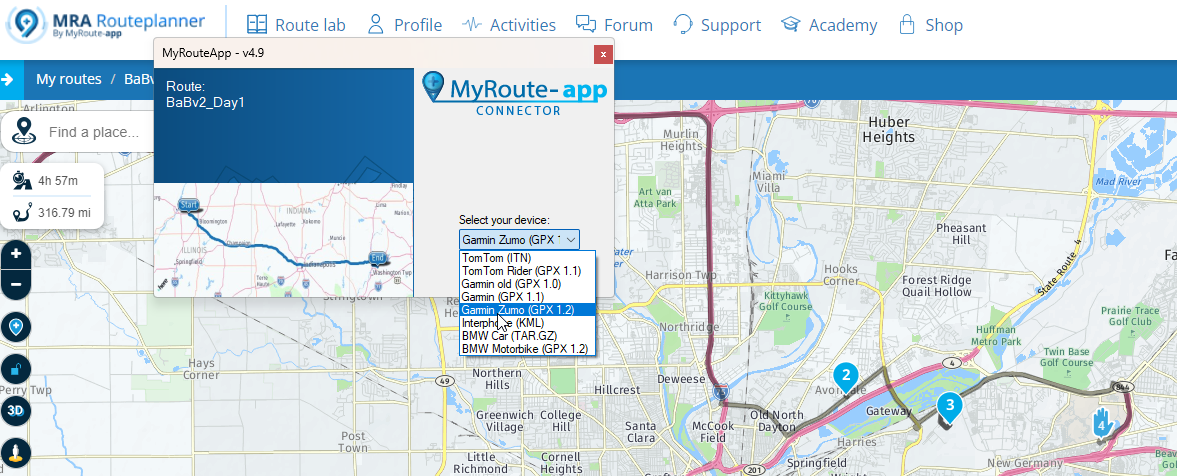
I tried Garmin Zumo XT 1.2 and also GPX 1.1, the result was the same, no middle waypoints. What's happening here? See attached file. You can see my export options but also see Waypoint #2 (lunch), Waypoint #3 (the Dayton OH Air Force Museum and the endpoint/Waypoint #4, the motel. Yet when I import the gpx via the Trip Planner interface on the Garmin, I only see start and end. Why?
This first day is quite simple, only 4 points total, other days in curvy road areas have 20 or more waypoints. Help!
-
It's been a while since I've done this. (Mice ate my motorcycle wiring harness). I've made many routes and put them on an old Zumo 220, long dead and my current GPS, a Zumo XT. I've done it successfully before.
But now when export it via the Connector, and import it via Trip PIanner app on he Zumo XT itself, I only get a start and end waypoint on the GPS. I need the waypoints, because we're stopping for lunch, then going to an aircraft museum, then a motel. Right now, I can only see the starting location near my house and the end location, the motel.
I can't recall the the terminology, but there used to be 2 types, beginning and end were one type, and anything in the middle was a different type.
I tried Garmin Zumo XT 1.2 and also GPX 1.1, the result was the same, no middle waypoints. What's happening here? See attached file. You can see my export options but also see Waypoint #2 (lunch), Waypoint #3 (the Dayton OH Air Force Museum and the endpoint/Waypoint #4, the motel. Yet when I import the gpx via the Trip Planner interface on the Garmin, I only see start and end. Why?
This first day is quite simple, only 4 points total, other days in curvy road areas have 20 or more waypoints. Help!

@Chris-Smith With GPX 1.2 you only see Via points (hand shape) so add Via points for your stops.
-

@Chris-Smith
Does this help you?
https://forum.myrouteapp.com/post/34562 -
@Chris-Smith With GPX 1.2 you only see Via points (hand shape) so add Via points for your stops.
@Nick-Carthew OK dumb question. Will it still give you turn by turn directions, despite the fact that the waypoints that mark where to turn at don't show on the screen?
-
@Chris-Smith
Does this help you?
https://forum.myrouteapp.com/post/34562
@Jack-van-Tilburg It tells me what I already know, how to load them.
The problem was I couldn't figure out where all the waypoints went. So when I loaded the routes as GPX 1.1, the waypoints showed.
But I did notice on 2 of the days, the routes I made on the web were not the same as the routes loaded into the GPS, the GPS found a 'better way', a more direct route. It bypassed. I added another waypoint in MRA to make the GPS run the same route as MRA.
-
It's been a while since I've done this. (Mice ate my motorcycle wiring harness). I've made many routes and put them on an old Zumo 220, long dead and my current GPS, a Zumo XT. I've done it successfully before.
But now when export it via the Connector, and import it via Trip PIanner app on he Zumo XT itself, I only get a start and end waypoint on the GPS. I need the waypoints, because we're stopping for lunch, then going to an aircraft museum, then a motel. Right now, I can only see the starting location near my house and the end location, the motel.
I can't recall the the terminology, but there used to be 2 types, beginning and end were one type, and anything in the middle was a different type.
I tried Garmin Zumo XT 1.2 and also GPX 1.1, the result was the same, no middle waypoints. What's happening here? See attached file. You can see my export options but also see Waypoint #2 (lunch), Waypoint #3 (the Dayton OH Air Force Museum and the endpoint/Waypoint #4, the motel. Yet when I import the gpx via the Trip Planner interface on the Garmin, I only see start and end. Why?
This first day is quite simple, only 4 points total, other days in curvy road areas have 20 or more waypoints. Help!

You have to import the route into the XT. Go to journey in the XT and choos Import via the menu
-
@Nick-Carthew OK dumb question. Will it still give you turn by turn directions, despite the fact that the waypoints that mark where to turn at don't show on the screen?
@Chris-Smith said in Trying to get a route from MRA onto my Zumo XT, has no waypoints:
@Nick-Carthew OK dumb question. Will it still give you turn by turn directions, despite the fact that the waypoints that mark where to turn at don't show on the screen?
Yes it will.
-
@Jack-van-Tilburg It tells me what I already know, how to load them.
The problem was I couldn't figure out where all the waypoints went. So when I loaded the routes as GPX 1.1, the waypoints showed.
But I did notice on 2 of the days, the routes I made on the web were not the same as the routes loaded into the GPS, the GPS found a 'better way', a more direct route. It bypassed. I added another waypoint in MRA to make the GPS run the same route as MRA.

@Chris-Smith that can be correct. In the 1.1 Version you see the shapingpoints (not waypoints), but the XT calculate its own route. So, if you have only a few shapingpoints in your route, the deviation might be a lot more, as if you force the XT the calculate the route by more shapingpoints. That means: go back to your routeplanning and add more shapingpoints. When you transfer the new route, it will be all right.
If you transfer the 1.2 version, you only have to set the re-calculation in "off" position, set back, reLex and ride your route

Hello! It looks like you're interested in this conversation, but you don't have an account yet.
Getting fed up of having to scroll through the same posts each visit? When you register for an account, you'll always come back to exactly where you were before, and choose to be notified of new replies (either via email, or push notification). You'll also be able to save bookmarks and upvote posts to show your appreciation to other community members.
With your input, this post could be even better 💗
Register Login-
 0964
0964
-
 1826
1826
-
08321
-
0558
-
 012440
-
 0387
0387
-
0524
-
 013641