Major flaw with re-routing in MyRoute Nav!
-
This is related to a previous topic I posted ‘How does MyRoute Nav re-route’. I have been a user of the MyRoute app for a few years now and love it. Alongside the app I used a TomTom satnav, however I thought why not use the MyRoute Nav on my phone along side the MyRoute app so I made the change. Overall it’s ok, however I have found a major flaw in the Nav app! When I took a wrong turn using my TomTom it would automatically re-route me to the nearest point further down the road which was perfect. However with the MyRoute Nav if you take a wrong turn using a planned route with multiple waypoints it tries to turn you around back to any waypoints you have missed. The only way to overcome this is to go into the options and use the ‘skip’ option, enter the number of points you want to skip and then you can continue along your planned route. This to me is no good when you are riding a motorbike, having to stop every time you take a wrong turn or take a slight detour to then mess about removing your gloves to skip waypoints makes the MyRoute Nav unfit for purpose in my opinion! Will be contacting MyRoute support and going back to a dedicated satnav.
-

Hi Craig,
We're aware of this. In order for our Navigation users to get a more enjoyable experience from the Navigation App we've rolled out an update on iOS that allows for automatically skipping waypoints in a fashion that's consistent with what you describe.
kind regards,
Timo
-
This is related to a previous topic I posted ‘How does MyRoute Nav re-route’. I have been a user of the MyRoute app for a few years now and love it. Alongside the app I used a TomTom satnav, however I thought why not use the MyRoute Nav on my phone along side the MyRoute app so I made the change. Overall it’s ok, however I have found a major flaw in the Nav app! When I took a wrong turn using my TomTom it would automatically re-route me to the nearest point further down the road which was perfect. However with the MyRoute Nav if you take a wrong turn using a planned route with multiple waypoints it tries to turn you around back to any waypoints you have missed. The only way to overcome this is to go into the options and use the ‘skip’ option, enter the number of points you want to skip and then you can continue along your planned route. This to me is no good when you are riding a motorbike, having to stop every time you take a wrong turn or take a slight detour to then mess about removing your gloves to skip waypoints makes the MyRoute Nav unfit for purpose in my opinion! Will be contacting MyRoute support and going back to a dedicated satnav.

Hi @Craig-4. My reply to your question was based on my experience with my Apple iPhone. As you can see from Timo’s reply, there is now an update for iOS phones that addresses this issue. This is what I love about MRA, I hope this new update restores your faith in this great company.


-
This is related to a previous topic I posted ‘How does MyRoute Nav re-route’. I have been a user of the MyRoute app for a few years now and love it. Alongside the app I used a TomTom satnav, however I thought why not use the MyRoute Nav on my phone along side the MyRoute app so I made the change. Overall it’s ok, however I have found a major flaw in the Nav app! When I took a wrong turn using my TomTom it would automatically re-route me to the nearest point further down the road which was perfect. However with the MyRoute Nav if you take a wrong turn using a planned route with multiple waypoints it tries to turn you around back to any waypoints you have missed. The only way to overcome this is to go into the options and use the ‘skip’ option, enter the number of points you want to skip and then you can continue along your planned route. This to me is no good when you are riding a motorbike, having to stop every time you take a wrong turn or take a slight detour to then mess about removing your gloves to skip waypoints makes the MyRoute Nav unfit for purpose in my opinion! Will be contacting MyRoute support and going back to a dedicated satnav.
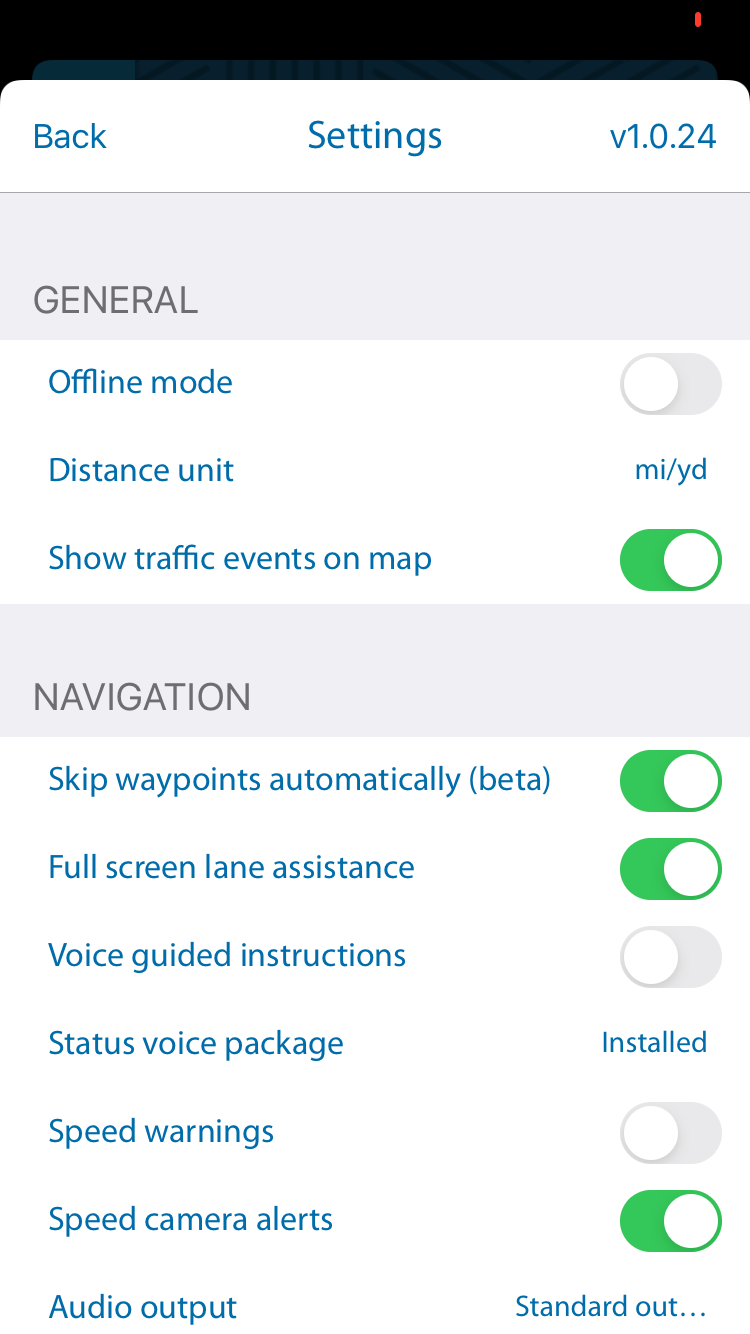
@Craig-4 The new feature can be found under Navigation Preferences and is turned on by default.
-
@Craig-4 The new feature can be found under Navigation Preferences and is turned on by default.
@Nick-Carthew for some reason I don’t have this update, looked to see if the update was pending but nothing. Not sure where you are based but maybe a delay for the UK. If the update works that will be great to see!

-
@Craig-4 The new feature can be found under Navigation Preferences and is turned on by default.
@Nick-Carthew sorted the update, deleted the app and downloaded it again.
-
Hi Craig,
We're aware of this. In order for our Navigation users to get a more enjoyable experience from the Navigation App we've rolled out an update on iOS that allows for automatically skipping waypoints in a fashion that's consistent with what you describe.
kind regards,
Timo
-
@Nick-Carthew for some reason I don’t have this update, looked to see if the update was pending but nothing. Not sure where you are based but maybe a delay for the UK. If the update works that will be great to see!
@Craig-4 said in Major flaw with re-routing in MyRoute Nav!:
@Nick-Carthew for some reason I don’t have this update, looked to see if the update was pending but nothing. Not sure where you are based but maybe a delay for the UK. If the update works that will be great to see!
I'm in deepest darkest Devon @Craig-4. When I saw the post on the MRA Facebook page relating to this update I immediately went to update my phone but Apple has moved where the updates used to be

I know you've already done it, but for future (unless they change it again!) Open the App Store, go to 'Today' and click on your profile pic, then click purchases. You'll find the updates there. -
Hi Craig,
We're aware of this. In order for our Navigation users to get a more enjoyable experience from the Navigation App we've rolled out an update on iOS that allows for automatically skipping waypoints in a fashion that's consistent with what you describe.
kind regards,
Timo
@Timo-Martosatiman-MRA
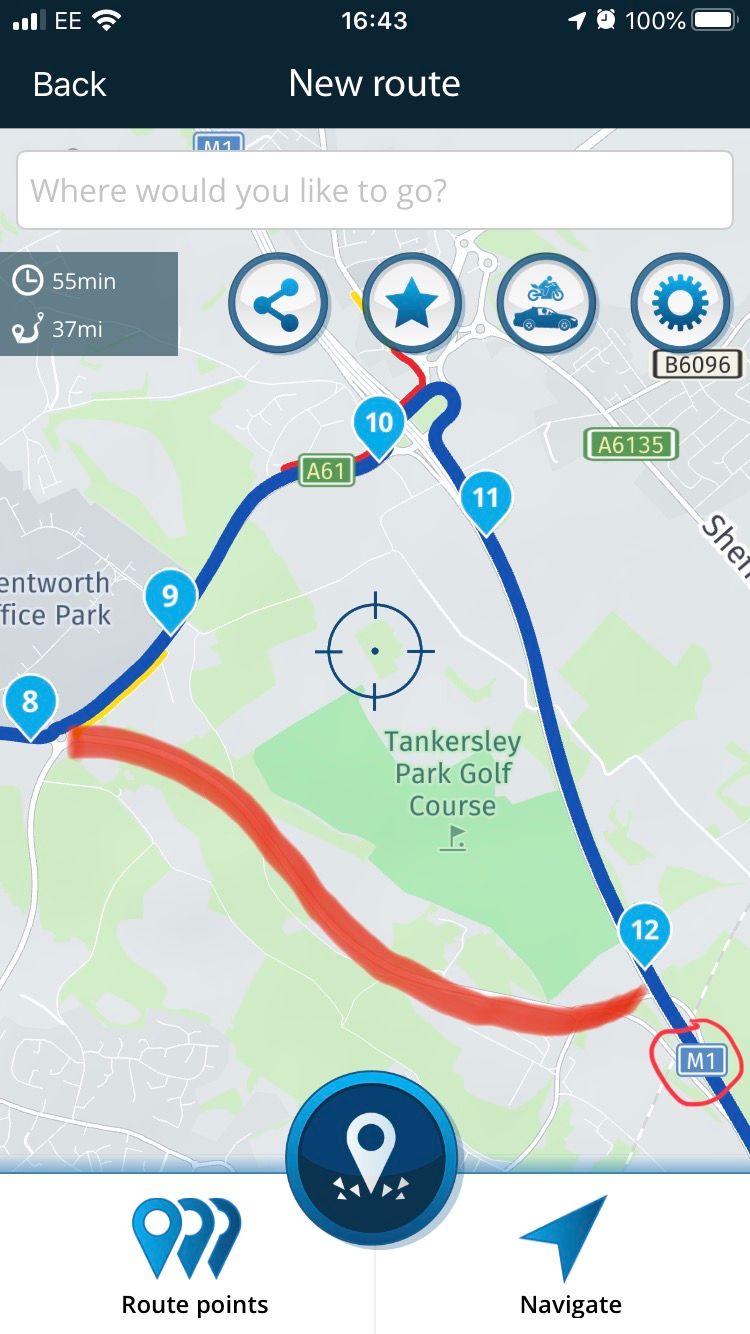
Hi Timo, hope you are well. As mentioned in a previous reply I tried the new feature for skipping waypoints but unfortunately it doesn’t appear to work. The attached picture shows a planned route I used for the test, instead of following the route to waypoint 9 I drove down the road I’ve highlighted in red which takes you to the M1 motorway back onto the planned route. After taking the road in red a message popped up on the Nav saying it will skip the waypoint as I appear to be ignoring it, at this point I thought it would then re-route to the M1 but it didn’t. In fact for the next 10 miles the same message came up several times but the Nav was just trying to turn me around and take me back to the missed waypoints. I continued to the finish point of the route and it was still trying to turn me around. I really want this to work, however I will be leading a group of 20 bikers soon on a 3 day ride so can’t afford to have any mistakes so I will be going back to using MRA with a dedicated satnav.I look forward to hearing your feedback, many thanks, Craig.
-
@Timo-Martosatiman-MRA
Hi Timo, hope you are well. As mentioned in a previous reply I tried the new feature for skipping waypoints but unfortunately it doesn’t appear to work. The attached picture shows a planned route I used for the test, instead of following the route to waypoint 9 I drove down the road I’ve highlighted in red which takes you to the M1 motorway back onto the planned route. After taking the road in red a message popped up on the Nav saying it will skip the waypoint as I appear to be ignoring it, at this point I thought it would then re-route to the M1 but it didn’t. In fact for the next 10 miles the same message came up several times but the Nav was just trying to turn me around and take me back to the missed waypoints. I continued to the finish point of the route and it was still trying to turn me around. I really want this to work, however I will be leading a group of 20 bikers soon on a 3 day ride so can’t afford to have any mistakes so I will be going back to using MRA with a dedicated satnav.I look forward to hearing your feedback, many thanks, Craig.
@Craig-4 Can You share your test route on here please.
Always willing to help if I can.
Triumph Tiger 1200 XRT called Tina.
MRA Navigation Next and SilverFox BJ8 -
@Craig-4 Can You share your test route on here please.
@Nick-Carthew lol, if I knew how I would. Can you point me in the right direct. Cheers.
-
@Nick-Carthew lol, if I knew how I would. Can you point me in the right direct. Cheers.
@Craig-4 First off, make sure that the route is set to public. You do this under ‘route properties’ on the right of your route in your library. You can then either choose share and copy the link or open the route and copy the URL then paste it into a a post on here.
Always willing to help if I can.
Triumph Tiger 1200 XRT called Tina.
MRA Navigation Next and SilverFox BJ8 -
@Craig-4 First off, make sure that the route is set to public. You do this under ‘route properties’ on the right of your route in your library. You can then either choose share and copy the link or open the route and copy the URL then paste it into a a post on here.
@Nick-Carthew everday’s a school day!
https://www.myrouteapp.com/en/social/route/2854350?mode=share
Hopefully if Grand Master has taught me well this will work!
-
@Nick-Carthew everday’s a school day!
https://www.myrouteapp.com/en/social/route/2854350?mode=share
Hopefully if Grand Master has taught me well this will work!
@Craig-4 Ha Ha
 You learn fast grasshopper.
Thanks for sharing it. I just wanted to check that there wasn’t any glaringly obvious clangers, and there isn’t. I wonder if it might be to do with skipping 4 RPs? I will do a similar test myself tomorrow to see if I can repeat your findings and I’ll let you know. Thanks again
This might need looking at @Timo-Martosatiman-MRAAlways willing to help if I can.
Triumph Tiger 1200 XRT called Tina.
MRA Navigation Next and SilverFox BJ8 -
@Craig-4 Ha Ha
You learn fast grasshopper.
Thanks for sharing it. I just wanted to check that there wasn’t any glaringly obvious clangers, and there isn’t. I wonder if it might be to do with skipping 4 RPs? I will do a similar test myself tomorrow to see if I can repeat your findings and I’ll let you know. Thanks again
This might need looking at @Timo-Martosatiman-MRA
@Craig-4 I tried two small test routes today and both were successful. I deliberately missed 2 and then 3 route points on the first route and 4 on my second test route. It tried redirecting me until i was back on track but no U-turns.
Always willing to help if I can.
Triumph Tiger 1200 XRT called Tina.
MRA Navigation Next and SilverFox BJ8 -
@Craig-4 I tried two small test routes today and both were successful. I deliberately missed 2 and then 3 route points on the first route and 4 on my second test route. It tried redirecting me until i was back on track but no U-turns.
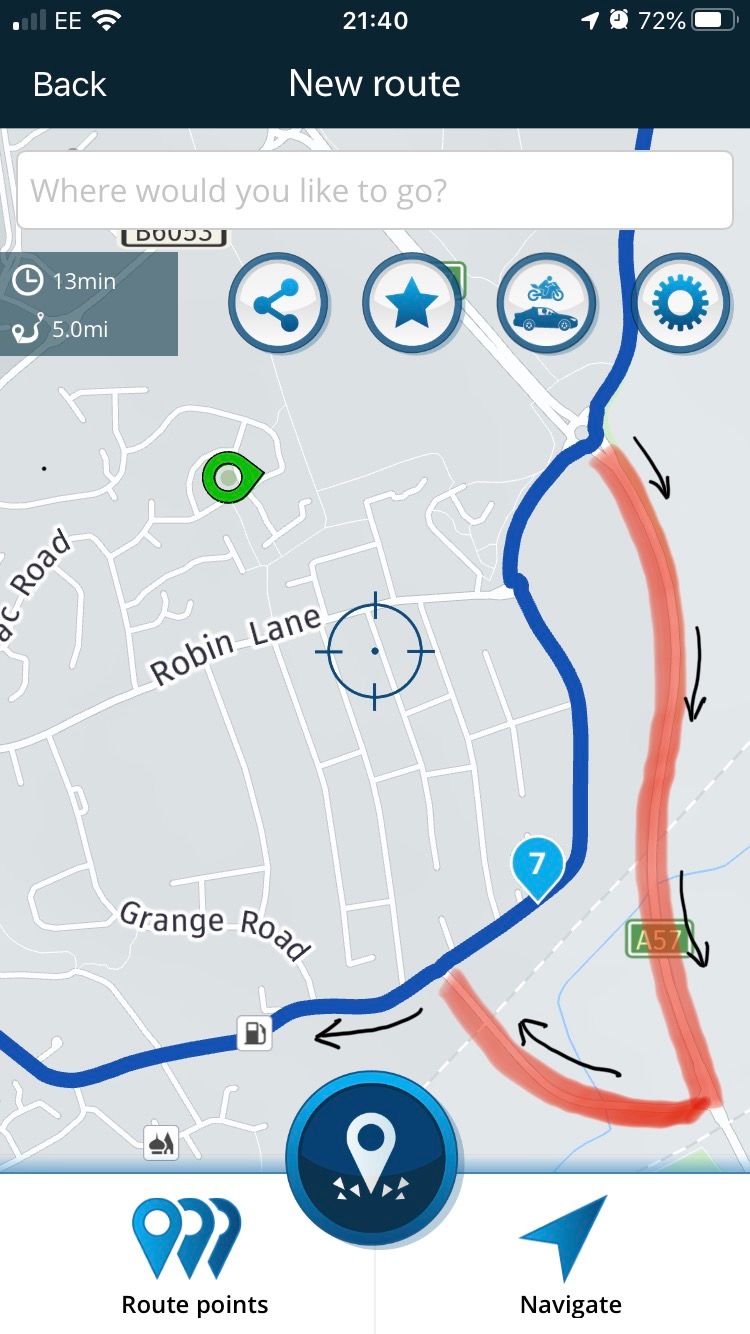
@Nick-Carthew very strange, don’t know why mine doesn’t want to play ball! I tried again today, now this time it did skip waypoint 7 a few hundred yards down the road. My concern is that it was telling me to turn right towards 7 which I might have done if I didn’t know the area. My TomTom would just ignore WP 7 and turn me left straight away to rejoin the route. When I’m leading 20 bikers the last thing I need is turning down some narrow road only to then tell them all they have to do a U turn!
-
@Nick-Carthew very strange, don’t know why mine doesn’t want to play ball! I tried again today, now this time it did skip waypoint 7 a few hundred yards down the road. My concern is that it was telling me to turn right towards 7 which I might have done if I didn’t know the area. My TomTom would just ignore WP 7 and turn me left straight away to rejoin the route. When I’m leading 20 bikers the last thing I need is turning down some narrow road only to then tell them all they have to do a U turn!
@Craig-4 I have absolutely no idea how it works and as far as I’m concerned, it’s black magic. Perhaps 7 was too close to where you rejoined your route for the algorithms to kick in??
I fully appreciate what you’re saying regarding leading a group out though, highly embarrassing. This new feature is in beta mode at the moment and I’m sure that the boffins in the MRA lab will be made aware of any issues that might crop up and be onto them.
I use MRA Nav alongside my TT because I like the ability to attach notes to coloured route points and read them out. Very handy for little snippets of information about the castle you’re visiting or to alert you of a tricky section of road.
I have every faith that if there are issues, they’ll be sorted soon.
All the best Nick
Hello! It looks like you're interested in this conversation, but you don't have an account yet.
Getting fed up of having to scroll through the same posts each visit? When you register for an account, you'll always come back to exactly where you were before, and choose to be notified of new replies (either via email, or push notification). You'll also be able to save bookmarks and upvote posts to show your appreciation to other community members.
With your input, this post could be even better 💗
Register Login-
 034212
-
 2241363
-
 01153
01153
-
0850
-
 1866
1866
-
 015208
-
2640
-
 722288