Missed Waypoints
-

@Tony-Gallagher Looking at the manual for your Garmin, it seems there is no facility to skip waypoints.
-
@Tony-Gallagher Looking at the manual for your Garmin, it seems there is no facility to skip waypoints.
@pad-0 Thank you, I tried everything I could see but wondered if I was missing something, being fairly new to all this it's good to get confirmation.
Hans, I guess I'll be going Zumo shopping, I appreciate your time.
Tony
-
@pad-0 Thank you, I tried everything I could see but wondered if I was missing something, being fairly new to all this it's good to get confirmation.
Hans, I guess I'll be going Zumo shopping, I appreciate your time.
Tony
@tony-gallagher Just to be sure, with a route installed and active on your Nuvi, there should be a 3 bar icon on the navigation screen. Click it and scroll through all the ions on the resultant screen. If there is any ‘skip’ tool, it will be there (likely one of the last). It might be greyed out, but at least it would indicate the possibility.
One annoyance of my Zūmo 390 is that you have to access that screen to skip a waypoint as Garmin didn’t put it on the navigation screen or provide the possibility to put it there!
From @Hans-van-de-Ven-MRA-Master’s comment, it seems the XT has that sorted. I know several people who have one and are very happy with it. It’s an impressive bit of kit and the one I’d go for were I buying now.
-
@tony-gallagher Just to be sure, with a route installed and active on your Nuvi, there should be a 3 bar icon on the navigation screen. Click it and scroll through all the ions on the resultant screen. If there is any ‘skip’ tool, it will be there (likely one of the last). It might be greyed out, but at least it would indicate the possibility.
One annoyance of my Zūmo 390 is that you have to access that screen to skip a waypoint as Garmin didn’t put it on the navigation screen or provide the possibility to put it there!
From @Hans-van-de-Ven-MRA-Master’s comment, it seems the XT has that sorted. I know several people who have one and are very happy with it. It’s an impressive bit of kit and the one I’d go for were I buying now.

In the XT it pops-up when you miss a viapoint
BMW BMW Connected Ride Navigator/Garmin Zumo XT3/XT2/XT//Tourstart/ MyRouteapp (The App)/...
Een dag niet gelachen is een dag niet geleefd / Een route is net zo goed als deze uitgezet is. -
In the XT it pops-up when you miss a viapoint
-
@hans-van-de-ven-mra-master
 . Garmin discover common sense at last!
@pad-0 There are no icons, greyed out or otherwise to "skip" on the Nuvi.
I am trying with Navigation and downloaded maps to my iPhone at the moment. The "skip missed waypoints automatically" option does not appear to work but I do have a "skip" and "choose number of waypoints" option which appeared to work better.
We shall see........so much to learn.
Holding off on the XT at the moment until I understand both apps a little better. No doubt there will be more questions.
-
@pad-0 There are no icons, greyed out or otherwise to "skip" on the Nuvi.
I am trying with Navigation and downloaded maps to my iPhone at the moment. The "skip missed waypoints automatically" option does not appear to work but I do have a "skip" and "choose number of waypoints" option which appeared to work better.
We shall see........so much to learn.
Holding off on the XT at the moment until I understand both apps a little better. No doubt there will be more questions.
@tony-gallagher said in Missed Waypoints:
The "skip missed waypoints automatically" option does not appear to work but I do have a "skip" and "choose number of waypoints" option which appeared to work better.The autoskip function for MRA Navigation will only kick in when you are closer to the next waypoint.
It will also only skip one waypoint automatically. To skip more than one waypoint use the skip button as you mentioned above.Always willing to help if I can.
Triumph Tiger 1200 XRT called Tina.
MRA Navigation Next and SilverFox BJ8 -
@tony-gallagher said in Missed Waypoints:
The "skip missed waypoints automatically" option does not appear to work but I do have a "skip" and "choose number of waypoints" option which appeared to work better.The autoskip function for MRA Navigation will only kick in when you are closer to the next waypoint.
It will also only skip one waypoint automatically. To skip more than one waypoint use the skip button as you mentioned above.
@nick-carthew he has a Garmin device though, don't think he is using MRA Navigation
I am never lost...I just like to visit places I have not planned to go to
-
@nick-carthew he has a Garmin device though, don't think he is using MRA Navigation
@paul-hedges, @Tony-Gallagher says, above:
@tony-gallagher said in Missed Waypoints:
@pad-0 There are no icons, greyed out or otherwise to "skip" on the Nuvi.
I am trying with Navigation and downloaded maps to my iPhone at the moment. The "skip missed waypoints automatically" option does not appear to work but I do have a "skip" and "choose number of waypoints" option which appeared to work better.
We shall see........so much to learn.
Holding off on the XT at the moment until I understand both apps a little better. No doubt there will be more questions. -
Hi all, just to clarify I was using the MyRoute app on my old Nuvi which was clunky and restricting, at least the way I was trying to use it. I also have the Navigation app and after Nick's post I have been experimenting with it today on my iPad, understanding how and when the automatic skip function works has been most helpful, I feel as if I am making some progress.
I suspect I will wind up with an XT at some point but wanted to be as sure as possible that I could achieve the routing that I wanted first.
Thanks to everyone for taking the trouble to respond. -
Hi all, just to clarify I was using the MyRoute app on my old Nuvi which was clunky and restricting, at least the way I was trying to use it. I also have the Navigation app and after Nick's post I have been experimenting with it today on my iPad, understanding how and when the automatic skip function works has been most helpful, I feel as if I am making some progress.
I suspect I will wind up with an XT at some point but wanted to be as sure as possible that I could achieve the routing that I wanted first.
Thanks to everyone for taking the trouble to respond.
The GPX1.2 when used with the Garmin Zumo XT displays only the Via Points but you also get the full route based on the Shaping Points but they are not displayed on the Garmin Zumo XT map.
You get a visible countdown when approaching Via Points.
You also get full navigation directions for the complete route.Using the GPX1.1 with the Garmin Zumo XT is similar to the above but both the Via Points and the Shaping Points are visible on the XT map.
Personally I never use Via Points as I prefer the simplicity of Shaping Points and 95% of the time I prefer to travel alone.
I never know in advance when I will get hungry/thirsty or need to stretch my legs.
As others have said Garmin have nailed it with the Zumo XT.You don’t stop riding when you get old, you get old when you stop riding.
-
The GPX1.2 when used with the Garmin Zumo XT displays only the Via Points but you also get the full route based on the Shaping Points but they are not displayed on the Garmin Zumo XT map.
You get a visible countdown when approaching Via Points.
You also get full navigation directions for the complete route.Using the GPX1.1 with the Garmin Zumo XT is similar to the above but both the Via Points and the Shaping Points are visible on the XT map.
Personally I never use Via Points as I prefer the simplicity of Shaping Points and 95% of the time I prefer to travel alone.
I never know in advance when I will get hungry/thirsty or need to stretch my legs.
As others have said Garmin have nailed it with the Zumo XT.
@steve-lynch Could you (or anyone) please enlighten me as to the need for .gpx 1.2 if 1.1 works with the XT? I had the impression that 1.2 had been created specifically for the XT (and BMW derivatives etc, presumably?) as 1.0 and 1.1 didn't work well with it???
Hands up, I am merely curious here. I
 ️my ‘outdated’ Zūmo 390. It does all I need and more.
 -
Hi all, just to clarify I was using the MyRoute app on my old Nuvi which was clunky and restricting, at least the way I was trying to use it. I also have the Navigation app and after Nick's post I have been experimenting with it today on my iPad, understanding how and when the automatic skip function works has been most helpful, I feel as if I am making some progress.
I suspect I will wind up with an XT at some point but wanted to be as sure as possible that I could achieve the routing that I wanted first.
Thanks to everyone for taking the trouble to respond.
@tony-gallagher said in Missed Waypoints:
I suspect I will wind up with an XT at some point but wanted to be as sure as possible that I could achieve the routing that I wanted first.
Have you considered a TomTom @Tony-Gallagher? I never have any problems with my TT Rider 500
-
@steve-lynch Could you (or anyone) please enlighten me as to the need for .gpx 1.2 if 1.1 works with the XT? I had the impression that 1.2 had been created specifically for the XT (and BMW derivatives etc, presumably?) as 1.0 and 1.1 didn't work well with it???
Hands up, I am merely curious here. I
️my ‘outdated’ Zūmo 390. It does all I need and more.
@pad-0
I would say that the Garmin GPX1.2 is almost a combination of a Tom Tom like Track (because the Shaping Points are not visible) with Garmin Via Point Flags that give a distance countdown to the “Stops” as you approach them.
I guess the point of GPX1.2 is for users that like to focus on pre-planned Via Point “Stops”.
Personally I stick to GPX1.1 with just Shaping Points for the reasons mentioned in the above post.@Nick-Carthew
I have a Tom Tom 550 that I used happily for many years.
However due to my ageing eyes I was seduced by the XT’s larger screen size, increased screen resolution and higher brightness.
And also for its ability to to import UK BOAT’s which I plot in the OS Maps app and transfer to the XT as a simple Track to visually follow.
No more awkward moments for accidentally going on a Bridleway or Footpath.I did have a little dabble with OSMAND but went back to the XT for its beautiful simplicity.
You don’t stop riding when you get old, you get old when you stop riding.
-
@pad-0
I would say that the Garmin GPX1.2 is almost a combination of a Tom Tom like Track (because the Shaping Points are not visible) with Garmin Via Point Flags that give a distance countdown to the “Stops” as you approach them.
I guess the point of GPX1.2 is for users that like to focus on pre-planned Via Point “Stops”.
Personally I stick to GPX1.1 with just Shaping Points for the reasons mentioned in the above post.@Nick-Carthew
I have a Tom Tom 550 that I used happily for many years.
However due to my ageing eyes I was seduced by the XT’s larger screen size, increased screen resolution and higher brightness.
And also for its ability to to import UK BOAT’s which I plot in the OS Maps app and transfer to the XT as a simple Track to visually follow.
No more awkward moments for accidentally going on a Bridleway or Footpath.I did have a little dabble with OSMAND but went back to the XT for its beautiful simplicity.
@steve-lynch said in Missed Waypoints:
@pad-0
I would say that the Garmin GPX1.2 is almost a combination of a Tom Tom like Track (because the Shaping Points are not visible) with Garmin Via Point Flags that give a distance countdown to the “Stops” as you approach them.
I guess the point of GPX1.2 is for users that like to focus on pre-planned Via Point “Stops”.
Personally I stick to GPX1.1 with just Shaping Points for the reasons mentioned in the above post.Thank you for your input. 1.2 seems a bit of an oddity to me, but what the heck!
 If it works for some, it works.
I share your preference for shaping points, and for much the same reasons as you.
-
@steve-lynch said in Missed Waypoints:
@pad-0
I would say that the Garmin GPX1.2 is almost a combination of a Tom Tom like Track (because the Shaping Points are not visible) with Garmin Via Point Flags that give a distance countdown to the “Stops” as you approach them.
I guess the point of GPX1.2 is for users that like to focus on pre-planned Via Point “Stops”.
Personally I stick to GPX1.1 with just Shaping Points for the reasons mentioned in the above post.Thank you for your input. 1.2 seems a bit of an oddity to me, but what the heck!
If it works for some, it works.I share your preference for shaping points, and for much the same reasons as you.

@pad-0 said in Missed Waypoints:
Thank you for your input. 1.2 seems a bit of an oddity to me, but what the heck!
If it works for some, it works.That's not surprising, as there is no such thing as GPX 1.2 outside MRA. If you look inside the exported GPX "1.2" file, you'll see it says
gpx version="1.1". The latest version of the official standard for GPX is still 1.1.The distinction between shaping and via-points in the "1.2" format, makes use of Garmin-specific extensions to the format, that are not part of the open standard. This is only useful on specific Garmin models that know how to deal with these extensions (they are also shown on the iOS version of MRA Navigation, although I'm not sure if they have other than visual functionality). Some of the Garmin models this has been tested with are listed in the information pop-up for the GPX 1.2 Save as... option in MRA-web (hover over the information icon):
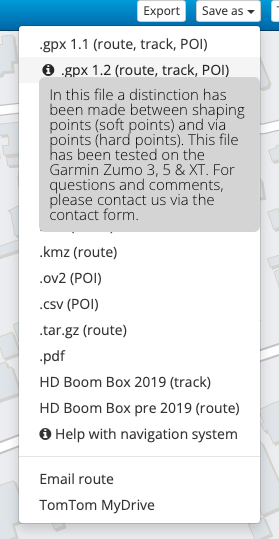
IMO, this format should more accurately be called "gpx 1.1 with via-points" or something like that. -
@pad-0 said in Missed Waypoints:
Thank you for your input. 1.2 seems a bit of an oddity to me, but what the heck!
If it works for some, it works.That's not surprising, as there is no such thing as GPX 1.2 outside MRA. If you look inside the exported GPX "1.2" file, you'll see it says
gpx version="1.1". The latest version of the official standard for GPX is still 1.1.The distinction between shaping and via-points in the "1.2" format, makes use of Garmin-specific extensions to the format, that are not part of the open standard. This is only useful on specific Garmin models that know how to deal with these extensions (they are also shown on the iOS version of MRA Navigation, although I'm not sure if they have other than visual functionality). Some of the Garmin models this has been tested with are listed in the information pop-up for the GPX 1.2 Save as... option in MRA-web (hover over the information icon):
IMO, this format should more accurately be called "gpx 1.1 with via-points" or something like that.
@herko-ter-horst… Indeed! I touched on this yesterday in @Richard-18’s ‘Exporting 1.2 into BaseCamp’ thread.
-
@herko-ter-horst… Indeed! I touched on this yesterday in @Richard-18’s ‘Exporting 1.2 into BaseCamp’ thread.
@PAD-0 I’m resurrecting an old thread here but I having similar issues.
I’m using the App version on my iPhone and if I miss a waypoint, the App keeps directing me back to the missed waypoint & further guidance is seemingly impossible.
I went into a fuel station near a waypoint & that was enough to scramble the route guidance.
Can waypoints be ignored on the iPhone App version ? -
@PAD-0 I’m resurrecting an old thread here but I having similar issues.
I’m using the App version on my iPhone and if I miss a waypoint, the App keeps directing me back to the missed waypoint & further guidance is seemingly impossible.
I went into a fuel station near a waypoint & that was enough to scramble the route guidance.
Can waypoints be ignored on the iPhone App version ?
@Redbarn This thread relates to the old navigation app. Are you still using that or are you using the navigation feature of the new app? The new app is called MyRoute-app and it is available in the AppStore.
Always willing to help if I can.
Triumph Tiger 1200 XRT called Tina.
MRA Navigation Next and SilverFox BJ8 -
@Redbarn This thread relates to the old navigation app. Are you still using that or are you using the navigation feature of the new app? The new app is called MyRoute-app and it is available in the AppStore.
@Nick-Carthew I’m using the MyRoute-app but I haven’t yet used the latest version that was released a few days ago.
I’m having the missed waypoints issue with the MyRoute-app.
I suspect that the App is designed to prepare routes for GPS devices (Garmin, TomTom etc. etc.) rather than be used on an iPhone ?
Hello! It looks like you're interested in this conversation, but you don't have an account yet.
Getting fed up of having to scroll through the same posts each visit? When you register for an account, you'll always come back to exactly where you were before, and choose to be notified of new replies (either via email, or push notification). You'll also be able to save bookmarks and upvote posts to show your appreciation to other community members.
With your input, this post could be even better 💗
Register Login-
06143
-
 05116
05116
-
 057
057
-
 110417
-
06139
-
0369
-
03135
-