Skip to content
  • Categories
  • Recent
  • Popular
  • Support
  • MyRoute-app
Collapse
Brand Logo

MRA Community Forum

  1. Home
  2. MyRoute-app Routeplanner
  3. [Web] Problems, Bugs and other Issues
  4. Way point placement inaccuracies

Way point placement inaccuracies

Scheduled Pinned Locked Moved [Web] Problems, Bugs and other Issues
13 Posts 9 Posters 3.5k Views 3 Watching
  • Oldest to Newest
  • Newest to Oldest
  • Most Votes
Reply
  • Reply as topic
Log in to reply
This topic has been deleted. Only users with topic management privileges can see it.
  • RetiredWingMan
    RetiredWingMan
    RetiredWingMan
    Valued contributor
    wrote on last edited by
    #2

    When they revamp the web site, I hope the add a snap to route feature for waypoints. Having to constantly zoom in to every waypint to make sure it's on the route is a pain.

    2010 GL1800 Goldwing using Samsung Galaxy S20 5G Android 13.

    1 Reply Last reply
    5
    • Michael Doherty 0 Michael Doherty 0

      I'm currently on a 1400 mile road trip. I have many years of route planning experience with MRA going back to the Tyre days. I am using an android phone to follow the route.
      The issue I am experiencing is even with extreme waypoint placement care under navigation mode. On a devided highway, MRA is constantly trying to have me get off on every exit to hit what it seems to be thinking is a missed way point.
      Is there a sensitivity setting or other technique I can use to correct this annoying issue? I'm currently having to use a different navigation program to follow my planned route.

      Thanks in advance,
      MD from the USA

      Rob Verhoeff
      Rob Verhoeff
      Rob Verhoeff
      Alpha tester
      wrote on last edited by
      #3

      @Michael-Doherty-0 Being directed off the highway at every exit sounds to me like a route designed using the OSM map. Is that correct?

      šŸļø BMW K1600GT-P (2013) | Nolan N100-5 with Sena 30K
      šŸ“± iOS on iPhone 13 & 16 (mounted on Quadlock or AliExpress extention on BMW-cradle)
      šŸš™ Apple CarPlay in VW T-Roc
      šŸ’» Routelab on MacBook Air & iMac (Golden Gate & Ventura)

      Michael Doherty 0 1 Reply Last reply
      0
      • Michael Doherty 0 Michael Doherty 0

        I'm currently on a 1400 mile road trip. I have many years of route planning experience with MRA going back to the Tyre days. I am using an android phone to follow the route.
        The issue I am experiencing is even with extreme waypoint placement care under navigation mode. On a devided highway, MRA is constantly trying to have me get off on every exit to hit what it seems to be thinking is a missed way point.
        Is there a sensitivity setting or other technique I can use to correct this annoying issue? I'm currently having to use a different navigation program to follow my planned route.

        Thanks in advance,
        MD from the USA

        nomko
        nomko
        nomko
        Banned
        wrote on last edited by
        #4

        On a devided highway, MRA is constantly trying to have me get off on every exit to hit what it seems to be thinking is a missed way point.

        I recognise this issue. I experienced this myself.
        What i do when this happens is placing a waypoint after each exit forcing MRA to follow the main road/route i planned.

        Is there a sensitivity setting or other technique I can use to correct this annoying issue? I'm currently having to use a different navigation program to follow my planned route.

        Not sure if there is. Like i said, if i notice this, i place an extra waypoint after each exit or intersection where this happens.

        Marinus van Deudekom 1 Reply Last reply
        0
        • nomko nomko

          On a devided highway, MRA is constantly trying to have me get off on every exit to hit what it seems to be thinking is a missed way point.

          I recognise this issue. I experienced this myself.
          What i do when this happens is placing a waypoint after each exit forcing MRA to follow the main road/route i planned.

          Is there a sensitivity setting or other technique I can use to correct this annoying issue? I'm currently having to use a different navigation program to follow my planned route.

          Not sure if there is. Like i said, if i notice this, i place an extra waypoint after each exit or intersection where this happens.

          Marinus van Deudekom
          Marinus van Deudekom
          Marinus van Deudekom
          RouteXpert
          wrote on last edited by
          #5

          @Nomko-Nomden like @Rob-Verhoeff said OSM tends to exit the highway

          Honda Goldwing GL1500,
          Honda Silverwing GL 650
          DMD2 T865X 8 inch Android tablet using MRA next for navigation
          Garmin XT sold
          Samsung S24FE mounted on a Quadlock and using Android Auto in my car

          1 Reply Last reply
          0
          • Michael Doherty 0 Michael Doherty 0

            I'm currently on a 1400 mile road trip. I have many years of route planning experience with MRA going back to the Tyre days. I am using an android phone to follow the route.
            The issue I am experiencing is even with extreme waypoint placement care under navigation mode. On a devided highway, MRA is constantly trying to have me get off on every exit to hit what it seems to be thinking is a missed way point.
            Is there a sensitivity setting or other technique I can use to correct this annoying issue? I'm currently having to use a different navigation program to follow my planned route.

            Thanks in advance,
            MD from the USA

            Nick Carthew
            Nick Carthew
            Nick Carthew
            RouteXpert
            wrote on last edited by
            #6

            @Michael-Doherty-0 As other have said, the issue you see is possibly because you are planning your route using the planning map from OpenStreetMap.
            It is important to use the correct planning map for your device.
            Each planning map comes with its own set of algorithms embedded within the map data to calculate which roads to use.
            The algorithms are unique to each planning map.
            So as you say you are using and Android phone I assume that you will be using MRA Navigation Next to navigate, therefore you should use the HERE planning map.
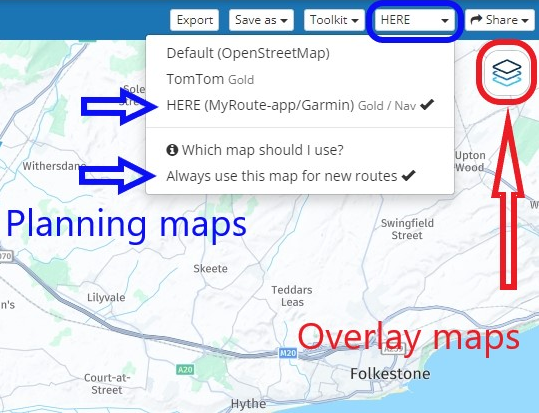
            c6d23b34-ecb2-4785-96af-9ade5aa3d06f-image.png

            After choosing the HERE planning map you can also click Always use this map for new routes to set the HERE map as your default planning map.
            All new routes will be now be created using the HERE map.

            The overlay maps are separate to the planning maps and have no effect on route calculations.
            Think of them as clear sheets with extra information on them that you place over the top of the planning map.
            The planning map underneath does all of the route calculations.
            So choose your planning map and then you can use any of the overlay maps.

            If you do not see the same blue menu bar with the planning maps that is shown in my screenshot, click Page menu and all of the same options will be available to you.

            Always willing to help if I can.
            Triumph Tiger 1200 XRT called Tina.
            MRA Navigation Next and SilverFox BJ8

            1 Reply Last reply
            0
            • Rob Verhoeff Rob Verhoeff

              @Michael-Doherty-0 Being directed off the highway at every exit sounds to me like a route designed using the OSM map. Is that correct?
              Michael Doherty 0
              Michael Doherty 0
              Michael Doherty 0
              wrote on last edited by
              #7

              @Rob-Verhoeff no Google maps

              Bouke Ent Rob Verhoeff 2 Replies Last reply
              0
              • Michael Doherty 0
                Michael Doherty 0
                Michael Doherty 0
                wrote on last edited by
                #8

                I'll try Here maps in the future. My go to maps is usually google due to the better info about attractions and roadside services. I appreciate the feedback I'll give that a try. Hopefully MRA does some tweeking in the future so Google maps works better in planning routs here in the USA.

                1 Reply Last reply
                0
                • Skellum
                  Skellum
                  Skellum
                  wrote on last edited by
                  #9

                  I use the Here map for general planning and then use the Google Map overlay (and sometimes the Michelin Map overlay) for POI's, fuel stations and scenic routes.

                  1 Reply Last reply
                  0
                  • Michael Doherty 0 Michael Doherty 0

                    @Rob-Verhoeff no Google maps

                    Bouke Ent
                    Bouke Ent
                    Bouke Ent
                    wrote on last edited by
                    #10

                    @Michael-Doherty-0 said in Way point placement inaccuracies:

                    @Rob-Verhoeff no Google maps

                    google maps is only as overlay. maps options are osm, tt and here. best is to use here.

                    1 Reply Last reply
                    0
                    • Michael Doherty 0 Michael Doherty 0

                      @Rob-Verhoeff no Google maps

                      Rob Verhoeff
                      Rob Verhoeff
                      Rob Verhoeff
                      Alpha tester
                      wrote on last edited by
                      #11

                      @Michael-Doherty-0 said in Way point placement inaccuracies:

                      no Google maps

                      Read the explanation of @Nick-Carthew Google Maps is just an overlay and not a planningmap!

                      šŸļø BMW K1600GT-P (2013) | Nolan N100-5 with Sena 30K
                      šŸ“± iOS on iPhone 13 & 16 (mounted on Quadlock or AliExpress extention on BMW-cradle)
                      šŸš™ Apple CarPlay in VW T-Roc
                      šŸ’» Routelab on MacBook Air & iMac (Golden Gate & Ventura)

                      1 Reply Last reply
                      0
                      • AWDC LAO
                        AWDC LAO
                        AWDC LAO
                        wrote on last edited by
                        #12

                        To make a very good journey or trip you have to prepare very well using all the maps you can as underlayer.
                        But calculating is "intelligence", I advice you to use the tool comparing OSM, TomTom and Here !

                        R1300GS Adv BlackPanther BMW, Apple MacBook Pro M4, Carpe Iter V4c, ervaring met TTR550, ZumoXT2 & iPhone 12 pro max. (VIRP)

                        Nick Carthew 1 Reply Last reply
                        0
                        • AWDC LAO AWDC LAO

                          To make a very good journey or trip you have to prepare very well using all the maps you can as underlayer.
                          But calculating is "intelligence", I advice you to use the tool comparing OSM, TomTom and Here !

                          Nick Carthew
                          Nick Carthew
                          Nick Carthew
                          RouteXpert
                          wrote on last edited by
                          #13

                          @AWDC-LAO Totally unnecessary if you are only planning the route for yourself. You just need to use the planning map that best suits your navigation device.

                          Always willing to help if I can.
                          Triumph Tiger 1200 XRT called Tina.
                          MRA Navigation Next and SilverFox BJ8

                          1 Reply Last reply
                          0

                          Hello! It looks like you're interested in this conversation, but you don't have an account yet.

                          Getting fed up of having to scroll through the same posts each visit? When you register for an account, you'll always come back to exactly where you were before, and choose to be notified of new replies (either via email, or push notification). You'll also be able to save bookmarks and upvote posts to show your appreciation to other community members.

                          With your input, this post could be even better šŸ’—

                          Register Login
                          Reply
                          • Reply as topic
                          Log in to reply
                          • Oldest to Newest
                          • Newest to Oldest
                          • Most Votes


                          ACTIVE USERS
                          Bouke Ent
                          Bouke Ent
                          Marinus van Deudekom
                          Marinus van Deudekom
                          Nick Carthew
                          Nick Carthew
                          Rob Verhoeff
                          Rob Verhoeff
                          RetiredWingMan
                          RetiredWingMan
                          AWDC LAO
                          AWDC LAO
                          Skellum
                          Skellum
                          nomko
                          nomko
                          Michael Doherty 0
                          Michael Doherty 0
                          POPULAR TOPICS
                          • Beta Navigation V.6
                            Stefan Hummelink
                            Stefan Hummelink
                            0
                            18
                            41

                          • MRA 6.0.0 515 – Removal of the "Navigate routes as tracks" option and problems with outdated road closures in HERE
                            Reinhard Punz
                            Reinhard Punz
                            0
                            10
                            54

                          • Route overlay
                            Corjan Meijerink
                            Corjan Meijerink
                            0
                            4
                            66

                          • Suggestie voor notitie teksten tijdens rijden
                            Albert van den Elsen
                            Albert van den Elsen
                            0
                            3
                            25

                          • Versie 6 van Navigation Next app
                            superg
                            superg
                            0
                            4
                            164

                          • Carplay vehicle location/arrow in wrong place
                            Corjan Meijerink
                            Corjan Meijerink
                            1
                            2
                            48

                          • wat is het verschil tussen het initial scherm en Free Ride in Android Auto
                            a white mouse on the motorbike
                            a white mouse on the motorbike
                            0
                            6
                            176

                          • Machtiging tot Fysieke Activiteiten
                            0
                            1
                            59

                          MY GROUPS
                          • Login

                          • Login or register to search.
                          • First post
                            Last post
                          0
                          • Categories
                          • Recent
                          • Popular
                          • Support
                          • MyRoute-app