
Default map question
-

As of this morning there appears to be a new interface for the web based route planner that requires a separate click to open the top right menu to perform that tasks that were previously available constantly. While I'm not a fan of additional clicks, I can understand why this change was made to make the interface cleaner for smaller screen devices.
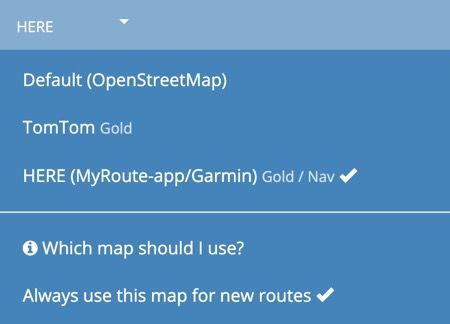
When I look at my map choices OSM is shown as my "Default" map, even though the HERE map is selected as "Always use this map for new routes". Wouldn't any map selected to always be used for new routes be the "Default" map?
Steve Jarrell
Western North Carolina USLifetime Routeplanner Gold & Navigation Next
2025 BMW R1300GS
2025 Can-Am Spyder
DMD T865-X 8" Tablet
Garmin XT3 -
As of this morning there appears to be a new interface for the web based route planner that requires a separate click to open the top right menu to perform that tasks that were previously available constantly. While I'm not a fan of additional clicks, I can understand why this change was made to make the interface cleaner for smaller screen devices.
When I look at my map choices OSM is shown as my "Default" map, even though the HERE map is selected as "Always use this map for new routes". Wouldn't any map selected to always be used for new routes be the "Default" map?

@Steve-Jarrell If you’re referring to having to click on Page menu before selecting your planning map, this is not new. The Page menu button appears if your screen size is too small for the standard bar menu.
You could adjust your browser zoom settings so that the bar menu reappears.The OSM being labelled as default is misleading, it is to indicate that the OSM map is the map available for free basic accounts. I’m sure that it will be changed when the route planner is upgraded.
-
Thanks Nick. You're exactly right. I had my zoom set 1 step in somehow and didn't notice it.
That's a great feature to automatically condense the menu options if the screen size isn't wide enough to support them!
Yes, on the map designations perhaps it should just say something like:
OpenStreetMap (nothing the name would indicate that you don't need to be Gold to use it)
TomTom Gold
HERE (MyRoute-app/Garmin) Gold / NavThe word "Default" could be dropped completely as the checkmark is adequate given the explanation given below the route selection.
I appreciate your help!
-
Nick Carthew locked this topic on
Hello! It looks like you're interested in this conversation, but you don't have an account yet.
Getting fed up of having to scroll through the same posts each visit? When you register for an account, you'll always come back to exactly where you were before, and choose to be notified of new replies (either via email, or push notification). You'll also be able to save bookmarks and upvote posts to show your appreciation to other community members.
With your input, this post could be even better 💗
Register Login-
 0751
0751
-
 07292
07292
-
 1516
1516
-
 0524
0524
-
 011384
-
 06251
06251
-
04155
-
 17233
17233