route-track vs. tracklog
-
If I have a GPX track I want to add to my route lab, I've always chosen to upload it as a "route-track".
As there is another option to upload it as a "tracklog", what is the core difference and when should I use which way?
@Martin-Wilcke
route-track: the track that is the result of calculating a route.
tracklog: the track that is the result of recording a drive (e.g. using the MRA Navigation app).So a tracklog is basically a recorded route. As such, it contains timing information in addition to the route-track (i.e. for each "dot" on the track a timestamp is added to indicate when exactly that location on the track was passed). In MRA, it is possible to add "moments" to a tracklog (a description and photos), which is not possible with a route-track. I don't think you can upload a route-track as a tracklog (because the timing information is missing), but you can upload a tracklog as a route-track (losing the timing information).
Because of the additional timing information, the GPX file for a tracklog with be larger than the GPX file for a route-track for the same route.
-
@Martin-Wilcke
route-track: the track that is the result of calculating a route.
tracklog: the track that is the result of recording a drive (e.g. using the MRA Navigation app).So a tracklog is basically a recorded route. As such, it contains timing information in addition to the route-track (i.e. for each "dot" on the track a timestamp is added to indicate when exactly that location on the track was passed). In MRA, it is possible to add "moments" to a tracklog (a description and photos), which is not possible with a route-track. I don't think you can upload a route-track as a tracklog (because the timing information is missing), but you can upload a tracklog as a route-track (losing the timing information).
Because of the additional timing information, the GPX file for a tracklog with be larger than the GPX file for a route-track for the same route.
@Herko-ter-Horst said in route-track vs. tracklog:
route-track: the track that is the result of calculating a route.
tracklog: the track that is the result of recording a drive (e.g. using the MRA Navigation app).Yes, I agree. That's why a tracklog is sometimes called a "clean track" and a route-track "dirty track".
But I disagree with your other explanations:
- a route-track can also contain time information (some planning apps add this when exporting)
- I can import a track without time information as a tracklog
- A timestamp is just an additional attribute; the size of a gpx file depends mainly on the number of track points.
But that's not the point.
The question remains: when should I import a track as a route-track and when as a tracklog? Adding moments is one aspect. But is that all?
There are a few differences in what I can do with it, e.g. with "export" and "save as" (but why?), and sometimes it is labelled "edit route track" and sometimes "use as route", which leads to the same result.
I'm still confused, and it looks like these are simply two different concepts developed in parallel.
-
@Herko-ter-Horst said in route-track vs. tracklog:
route-track: the track that is the result of calculating a route.
tracklog: the track that is the result of recording a drive (e.g. using the MRA Navigation app).Yes, I agree. That's why a tracklog is sometimes called a "clean track" and a route-track "dirty track".
But I disagree with your other explanations:
- a route-track can also contain time information (some planning apps add this when exporting)
- I can import a track without time information as a tracklog
- A timestamp is just an additional attribute; the size of a gpx file depends mainly on the number of track points.
But that's not the point.
The question remains: when should I import a track as a route-track and when as a tracklog? Adding moments is one aspect. But is that all?
There are a few differences in what I can do with it, e.g. with "export" and "save as" (but why?), and sometimes it is labelled "edit route track" and sometimes "use as route", which leads to the same result.
I'm still confused, and it looks like these are simply two different concepts developed in parallel.

@Martin-Wilcke you can't import a track as a tracklog. You can import a tracklog as a track or as a route
Honda Goldwing GL1500,
Honda Silverwing GL 650
DMD2 T865X 8 inch Android tablet using MRA next for navigation
Garmin XT sold
Samsung S24FE mounted on a Quadlock and using Android Auto in my car -
@Martin-Wilcke you can't import a track as a tracklog. You can import a tracklog as a track or as a route
OK - here you'll find a track
https://hidrive.ionos.com/lnk/eOXELSzaIimported as tracklog:
https://www.myrouteapp.com/en/social/track/694881?mode=shareAre we talking about different things?
-
OK - here you'll find a track
https://hidrive.ionos.com/lnk/eOXELSzaIimported as tracklog:
https://www.myrouteapp.com/en/social/track/694881?mode=shareAre we talking about different things?
@Martin-Wilcke I think so because the imported one is a track
Honda Goldwing GL1500,
Honda Silverwing GL 650
DMD2 T865X 8 inch Android tablet using MRA next for navigation
Garmin XT sold
Samsung S24FE mounted on a Quadlock and using Android Auto in my car -
@Martin-Wilcke I think so because the imported one is a track
Now, I'm even more confused. Maybe I need to explain in more detail what I'm talking about.
From a GPX point of view, there is no difference between a "track" and a "tracklog". It is a .gpx file that contains a <trk> with <trkpt> that may or may not have additional information like <ele> or <time>.
From a MRA / Routelab point of view, such a .gpx file can be imported either as "route-track" or "tracklog"
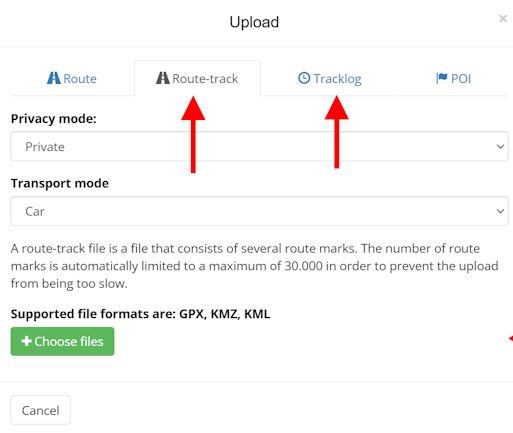
and I would like to understand when I should use which import.So, what do you mean with
@Marinus-van-Deudekom said in route-track vs. tracklog:
you can't import a track as a tracklog.
because that is what I did.
-
Now, I'm even more confused. Maybe I need to explain in more detail what I'm talking about.
From a GPX point of view, there is no difference between a "track" and a "tracklog". It is a .gpx file that contains a <trk> with <trkpt> that may or may not have additional information like <ele> or <time>.
From a MRA / Routelab point of view, such a .gpx file can be imported either as "route-track" or "tracklog"
and I would like to understand when I should use which import.So, what do you mean with
@Marinus-van-Deudekom said in route-track vs. tracklog:
you can't import a track as a tracklog.
because that is what I did.
@Martin-Wilcke I think the main difference is the original intention of the tracklog feature in MRA, which as far as I can tell, was created to support a feature in the app that lets you record a drive/ride (and add photos/"moments" along the way).
Personally, I almost never use tracklogs. I only have a few drives that I've recorded (not using MRA) that I have uploaded as tracklogs. I am mostly interested in using existing routes/tracks for the purpose of creating my own routes, where timing info (and moments) are pretty much irrelevant. So I'll use routes or route-tracks.
-
@Martin-Wilcke I think the main difference is the original intention of the tracklog feature in MRA, which as far as I can tell, was created to support a feature in the app that lets you record a drive/ride (and add photos/"moments" along the way).
Personally, I almost never use tracklogs. I only have a few drives that I've recorded (not using MRA) that I have uploaded as tracklogs. I am mostly interested in using existing routes/tracks for the purpose of creating my own routes, where timing info (and moments) are pretty much irrelevant. So I'll use routes or route-tracks.
Thank you for your assessment - that might also be the right approach for me.
I'm about to migrate my GPX library (consisting of planned and recorded tracks) to MRA and wonder which import to use. It feels natural to import recorded tracks as tracklogs and planned tracks as route-tracks.
I haven't made a final decision yet, but I tend to import all as route-tracks as I can mix routes and route-tracks in the same folder, leading to a more consistent structure.
-
Thank you for your assessment - that might also be the right approach for me.
I'm about to migrate my GPX library (consisting of planned and recorded tracks) to MRA and wonder which import to use. It feels natural to import recorded tracks as tracklogs and planned tracks as route-tracks.
I haven't made a final decision yet, but I tend to import all as route-tracks as I can mix routes and route-tracks in the same folder, leading to a more consistent structure.
@Martin-Wilcke It's likje @Herko-ter-Horst said. I think you were a bit "off route" assuming that a tracklog is the same in all apps. To migrate your collection you have 2 choises, import the collection (track and or tracklogs) ussing the Route-track option. From there on you can chose if you want it to be a track or a route in MRA. If you chose for the route option then make sure that the route is the same as the track you've imported. It shows on the map.
Have funHonda Goldwing GL1500,
Honda Silverwing GL 650
DMD2 T865X 8 inch Android tablet using MRA next for navigation
Garmin XT sold
Samsung S24FE mounted on a Quadlock and using Android Auto in my car -
@Martin-Wilcke It's likje @Herko-ter-Horst said. I think you were a bit "off route" assuming that a tracklog is the same in all apps. To migrate your collection you have 2 choises, import the collection (track and or tracklogs) ussing the Route-track option. From there on you can chose if you want it to be a track or a route in MRA. If you chose for the route option then make sure that the route is the same as the track you've imported. It shows on the map.
Have fun
Thank you for your advice - even if it adds some more confusion

I never thought about how "tracklogs" appear in different apps, and the discussion here is not about converting tracks to routes.
It's all about importing tracks to MRA / Routelab the best way. As mentioned above, I'm going to import everything as route-track.
Hello! It looks like you're interested in this conversation, but you don't have an account yet.
Getting fed up of having to scroll through the same posts each visit? When you register for an account, you'll always come back to exactly where you were before, and choose to be notified of new replies (either via email, or push notification). You'll also be able to save bookmarks and upvote posts to show your appreciation to other community members.
With your input, this post could be even better 💗
Register Login-
 01466
01466
-
 01341
01341
-
013128
-
112103
-
 0922
0922
-
0841
-
 0988
0988
-
 0719
0719