
Why is a re-calculation needed when navigating routes as tracks?
-

The latest release is a big step up, congratulations!
I love navigating routes as tracks, and that's why I sometimes missed my zumo XT, where this worked perfectly with a GPX 1.2 export.
I understand this idea and concept as pre-calculating a route during the planning phase and using it "as is" when it comes to navigation - without a re-calculation!But that seems to be wrong. Here's an example:
The Koman Lake Ferry in Albania is not recognised by HERE, so planning to use this ferry results in a significant deviation. Fortunately, TomTom knows it, and using this routing engine leads to the expected result.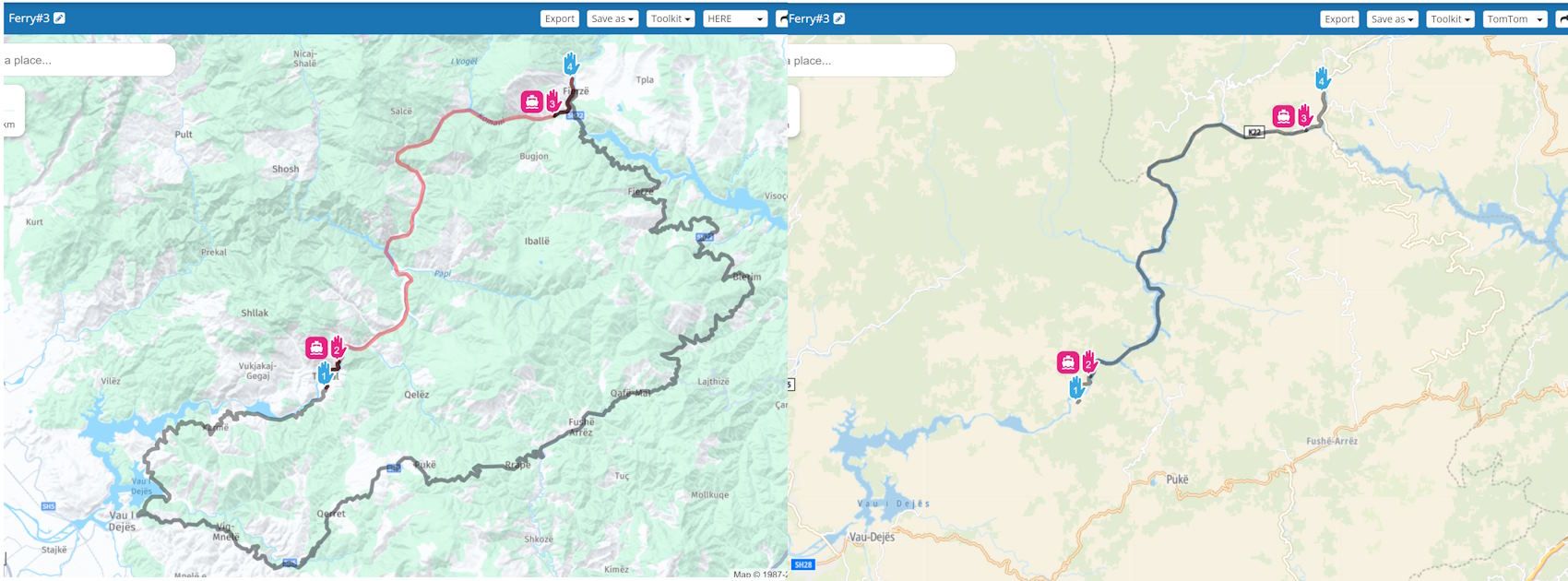
When opening this route in the app, the preview also looks as expected. When starting the navigation, however, a re-calculation starts, throws an error ("route can't be calculated") and ends up with a straight line to link the ferry points while the original route is displayed as a white line.
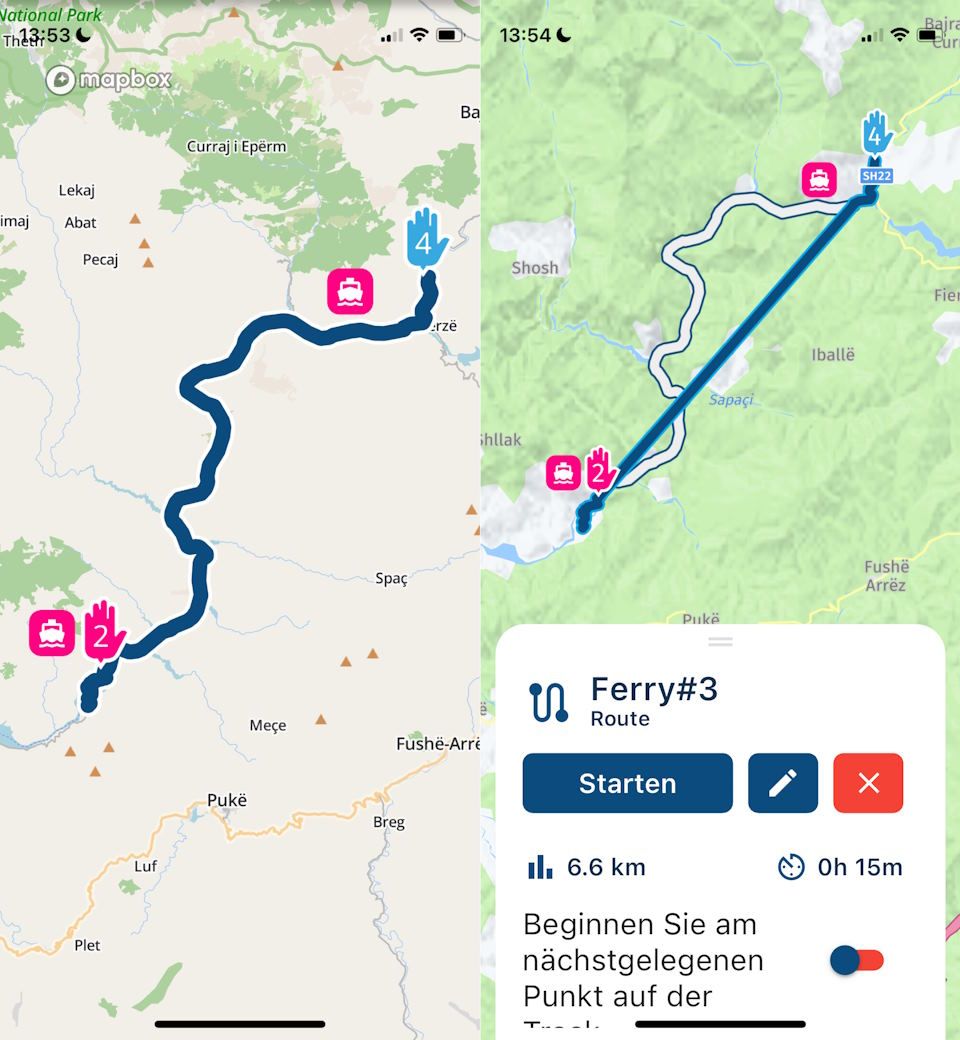
This is not just a "ferry thing"; other examples work similarly.
Two questions here:
-
Is there a setting to avoid re-calculation at the navigation start?
-
If a re-calculation is always needed, what is the core difference between navigating "routes as routes" and "routes as tracks"? Is it all about handling deviations and re-routing during navigation?
Thanks for clarification.
-
-
Here is another example to point out that this issue is not related to ferries only.
This part of SH61 in Albania is recognised by OSM but not by HERE:
https://www.myrouteapp.com/en/social/route/10331015?mode=share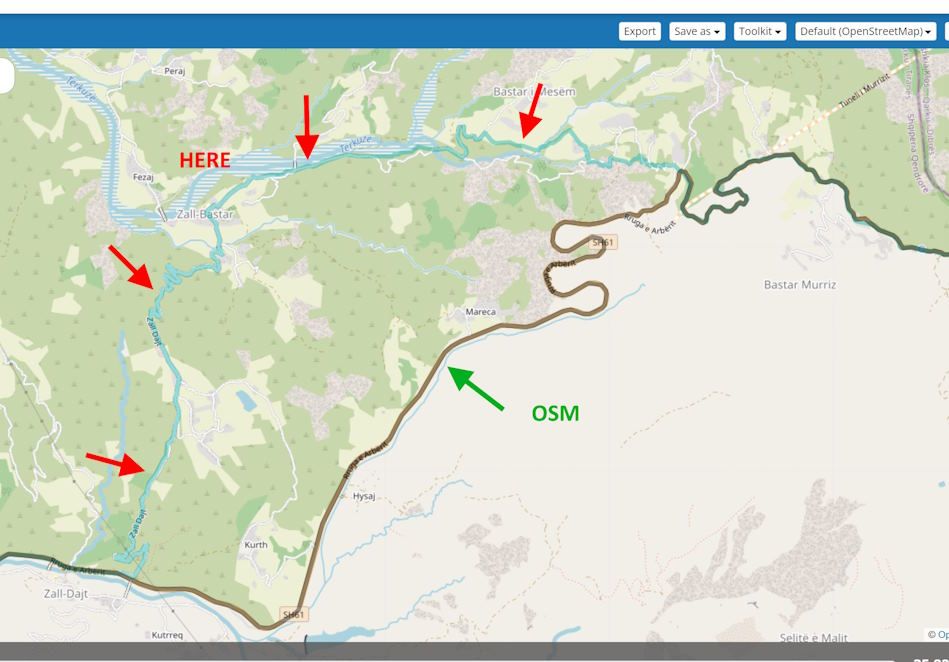
When opening for navigation, the app reported an identified mismatch but poofs to navigate it exactly as planned when selecting "track". But it does not. The navigated route is neither OSM nor HERE.
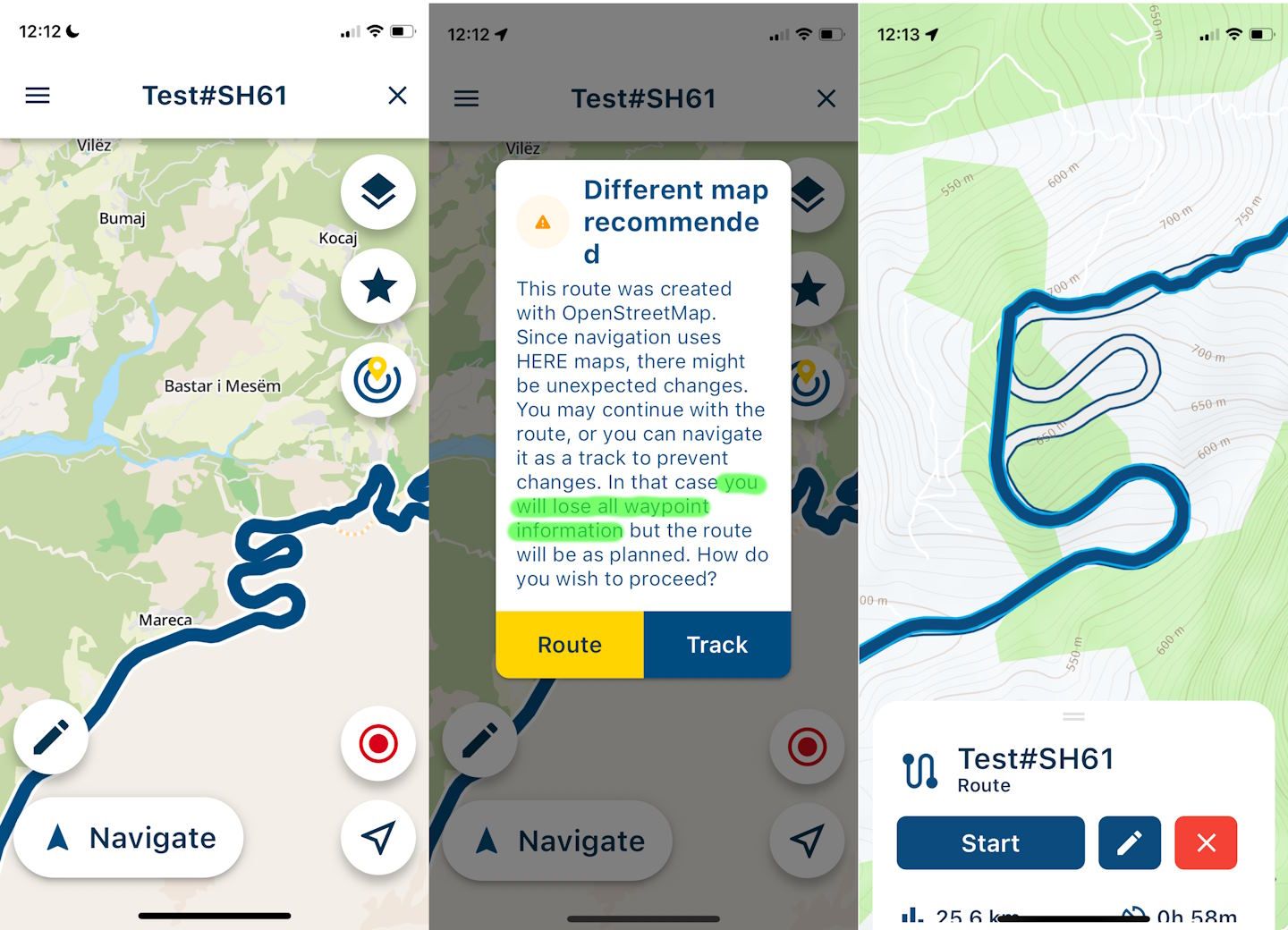
I want to understand the concept of navigating routes as tracks, as it is crucial for my planning and navigation. I prefer planning with OSM as it often fits my needs better than HERE, and I have always searched for a way to navigate routes planned with OSM. Navigating a route as a track could be the perfect solution if it works as expected.
Is there an idea of what's going wrong here?
And, by the way, what does "you will lose all waypoint information" mean? I expected to keep the waypoint information, at least for VIAs.
-

i had that with old version also. with new version if you set in settings use route as track then you do not get option for route or track and osm maps is accepted. only problem stays that app trys to make a blauw line that is based on here map. in my case osm let me over a bridge or ferry and here give me longer way. but it is still better then it was.
-
i had that with old version also. with new version if you set in settings use route as track then you do not get option for route or track and osm maps is accepted. only problem stays that app trys to make a blauw line that is based on here map. in my case osm let me over a bridge or ferry and here give me longer way. but it is still better then it was.
@Bouke-Ent said in Why is a re-calculation needed when navigating routes as tracks?:
if you set in settings use route as track then you do not get option for route or track and osm maps is accepted
I know. I toggled it off to get the warning in the app and used "track" explicitly, which should lead to the same result as I chose "navigate route as tracks" as a general setting.
In my example, the route shown in blue does not result from an HERE routing. It looks like the app tries to route with HERE, can't resolve it and uses "straight lines" instead. But I'm just guessing.
-
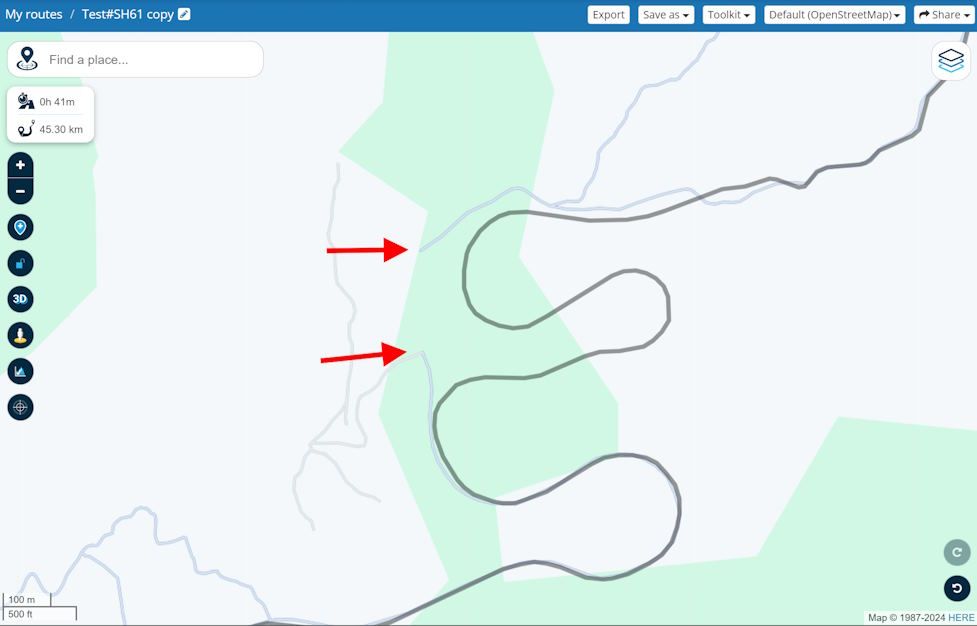
It looks like this gap is "routed" with a direct link.
-
I did some more tests and probably figured out what was going on. Here are my thoughts:
-
When creating a route with the web planner, the calculated result is supplemented with "hidden shaping points" (similar to the GPX 1.2 format) to store and preserve its shape. An imported track (route track) gets its shape from the (typically huge amount of) track points.
Let's call this the "original shape". -
Opening such a route or track with the navigation app shows its original shape as a preview.
-
When starting navigation, the original shape is drawn on the map as a white line. On top of it, a route will be calculated using strictly HERE data that follows the original shape as closely as possible. The result is drawn as a blue line.
-
If white and blue match, we see just a blue line; otherwise, both. If a part of the blue lines deviates too far from the white line, it will be cut and replaced by a straight line.
-
The same happens when deviating during the navigation: the blue line will be recalculated and leads back (or close) to the white line.
-
All turn indications refer to the blue line, not the white line.
So, we are not navigating a pre-calculated route or track; we are actually navigating a route that is calculated on top of it and is always based on HERE data.
I'm curious about any feedback. Am I right? Or, if wrong, what's then going on?
-
Hello! It looks like you're interested in this conversation, but you don't have an account yet.
Getting fed up of having to scroll through the same posts each visit? When you register for an account, you'll always come back to exactly where you were before, and choose to be notified of new replies (either via email, or push notification). You'll also be able to save bookmarks and upvote posts to show your appreciation to other community members.
With your input, this post could be even better 💗
Register Login-
 0751
0751
-
07289
-
 1516
1516
-
 0524
0524
-
 06249
06249
-
04152
-
 17230
17230
-
0376