
Change the starting point on a route
-

I downloaded a nice route but I live halfway the track.
The route has 42 waypoints and I want to change the route to start at point 21 instead of the current nr 1
How do I do that ?
-
I downloaded a nice route but I live halfway the track.
The route has 42 waypoints and I want to change the route to start at point 21 instead of the current nr 1
How do I do that ?

@Peter-Dorr-0 In the route planner, open the context menu of the waypoint where you want to start. Then, click on the three dots and select the flag with 'Go.'
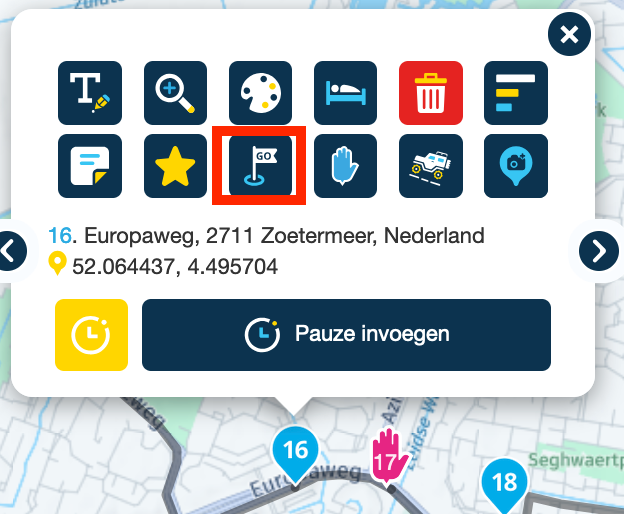
If you find this too complicated and want to start driving immediately, you can press and hold the waypoint where you want to start in the navigation app, starting from your address. That will become the point you are guided to, and from there, the app will pick up the route on its own. However, you'll miss the first part of the route. You will still finish the route at the endpoint.
Hello! It looks like you're interested in this conversation, but you don't have an account yet.
Getting fed up of having to scroll through the same posts each visit? When you register for an account, you'll always come back to exactly where you were before, and choose to be notified of new replies (either via email, or push notification). You'll also be able to save bookmarks and upvote posts to show your appreciation to other community members.
With your input, this post could be even better 💗
Register Login-
0665
-
 0565
0565
-
 057
057
-
 110387
-
06126
-
0363
-
 03117
03117
-
 0874
0874


