Skip to content
  • Categories
  • Recent
  • Popular
  • Support
  • MyRoute-app
Collapse
Brand Logo

MRA Community Forum

  1. Home
  2. The MyRoute-app
  3. [App] Suggestions and Discussion
  4. Should 'current speed' be at the top of the screen?

Should 'current speed' be at the top of the screen?

Scheduled Pinned Locked Moved [App] Suggestions and Discussion
10 Posts 8 Posters 2.7k Views 1 Watching
  • Oldest to Newest
  • Newest to Oldest
  • Most Votes
Reply
  • Reply as topic
Log in to reply
This topic has been deleted. Only users with topic management privileges can see it.
  • Bert 2v Offline
    Bert 2v Offline
    Bert 2v
    wrote on last edited by
    #1

    My situation is that the iPhone is mounted fairly low, on the handlebars, like a lot of (perhaps older) bikes. Its mounted vertical. I know in an ideal world the mount would be higher, snugging behind the windshield above the dials.

    I've noticed that when going towards and from my route, the highway part, I pay far more attention to my actual speed on the app and the traffic cam indicators. Which are both located at the very bottom of the screen.
    Just a thought...

    Corjan Meijerink 1 Reply Last reply
    1
    • Bert 2v Bert 2v

      My situation is that the iPhone is mounted fairly low, on the handlebars, like a lot of (perhaps older) bikes. Its mounted vertical. I know in an ideal world the mount would be higher, snugging behind the windshield above the dials.

      I've noticed that when going towards and from my route, the highway part, I pay far more attention to my actual speed on the app and the traffic cam indicators. Which are both located at the very bottom of the screen.
      Just a thought...

      Corjan Meijerink Offline
      Corjan Meijerink Offline
      Corjan Meijerink
      Developer
      wrote on last edited by
      #2

      @Bert-2v thanks for sharing.
      I am however quite certain this won’t be changed in the near future.

      Neil Bartlett 1 Reply Last reply
      1
      • Corjan Meijerink Corjan Meijerink

        @Bert-2v thanks for sharing.
        I am however quite certain this won’t be changed in the near future.

        Neil Bartlett Offline
        Neil Bartlett Offline
        Neil Bartlett
        wrote on last edited by
        #3

        @Corjan-Meijerink I understand there is a lot to do before this change but I agree that its a problem wherever the phone is mounted. Because the natural scan is from top to bottom we need important info to be at the top. This should be priority information and from a UI point of view, "at the top" is the place it should be. It saves fines to have ability for a quick speed limit and actual speed check.Both together as currently is important. Thanks for doing that.

        R1200RS, Nav VI, Zumo XT2, iPhone. — Plot the Track, Go the Distance

        Con Hennekens Neil Bartlett 2 Replies Last reply
        0
        • richtea999 Offline
          richtea999 Offline
          richtea999
          Valued contributor
          wrote on last edited by richtea999
          #4

          @Neil-Bartlett
          Make it draggable.
          (Corjan won't thank me for that suggestion! 🤐 )

          1 Reply Last reply
          0
          • Corjan Meijerink Offline
            Corjan Meijerink Offline
            Corjan Meijerink
            Developer
            wrote on last edited by
            #5

            It really won’t change in the near future 😉
            Besides, speed indication is displayed somewhere else too! Rather big actually.

            If you are speeding, stuff turns red and you might even get an audio notification. I do not see the need to change this currently.

            RetiredWingMan 1 Reply Last reply
            2
            • Corjan Meijerink Corjan Meijerink

              It really won’t change in the near future 😉
              Besides, speed indication is displayed somewhere else too! Rather big actually.

              If you are speeding, stuff turns red and you might even get an audio notification. I do not see the need to change this currently.

              RetiredWingMan Offline
              RetiredWingMan Offline
              RetiredWingMan
              Valued contributor
              wrote on last edited by
              #6

              @Corjan-Meijerink I prefer it where it is.

              2010 GL1800 Goldwing using Samsung Galaxy S20 5G Android 13.

              1 Reply Last reply
              1
              • Dave J 0 Offline
                Dave J 0 Offline
                Dave J 0
                Valued contributor
                wrote on last edited by Dave J 0
                #7

                Prefer where it is at the bottom. Same as Tomtom and Garmin Zumo. Please keep where it is.

                Kind Regards. Help where I can.
                Ducati Multistrada V4 Rally
                iPhone 15 Pro
                CHIGEE AIO-6 LTE
                Google Pixel 6 Pro - mounted on SP Connect Plus
                Ex Garmin XT2 and XT1 as well as Ex TomTom Rider User

                1 Reply Last reply
                0
                • Neil Bartlett Neil Bartlett

                  @Corjan-Meijerink I understand there is a lot to do before this change but I agree that its a problem wherever the phone is mounted. Because the natural scan is from top to bottom we need important info to be at the top. This should be priority information and from a UI point of view, "at the top" is the place it should be. It saves fines to have ability for a quick speed limit and actual speed check.Both together as currently is important. Thanks for doing that.

                  Con Hennekens Offline
                  Con Hennekens Offline
                  Con Hennekens
                  Alpha tester
                  wrote on last edited by
                  #8

                  @Neil-Bartlett said in Should 'current speed' be at the top of the screen?:

                  Because the natural scan is from top to bottom we need important info to be at the top.

                  I have never seen ANY navigation app showing that info at the top (I have seen many). The route and navigation instructions are important, the speed is not. The speed is already shown in your dashboard somewhere I guess.

                  @richtea999 said in Should 'current speed' be at the top of the screen?:

                  Make it draggable.
                  (Corjan won't thank me for that suggestion! )

                  Haha, I guess not no 😉
                  Can you point to another navigation app that uses floating info tiles? I would hate raindrops messing up my meticulously arranged tiles...

                  I am just an enthusiastic MRA user, and hope you will be one too!

                  Most motorcycle problems are caused by the nut that connects the handlebar to the saddle.

                  Check out RideSleepRepeat.eu, a biker community for sharing stays across Europe

                  1 Reply Last reply
                  1
                  • Neil Hinkins Offline
                    Neil Hinkins Offline
                    Neil Hinkins
                    wrote on last edited by
                    #9

                    I think the team have worked hard to remove information boxes from the top of the screen so we can see more of the route to start putting info boxes back there would feel like a backwards move.

                    1 Reply Last reply
                    2
                    • Neil Bartlett Neil Bartlett

                      @Corjan-Meijerink I understand there is a lot to do before this change but I agree that its a problem wherever the phone is mounted. Because the natural scan is from top to bottom we need important info to be at the top. This should be priority information and from a UI point of view, "at the top" is the place it should be. It saves fines to have ability for a quick speed limit and actual speed check.Both together as currently is important. Thanks for doing that.

                      Neil Bartlett Offline
                      Neil Bartlett Offline
                      Neil Bartlett
                      wrote on last edited by
                      #10

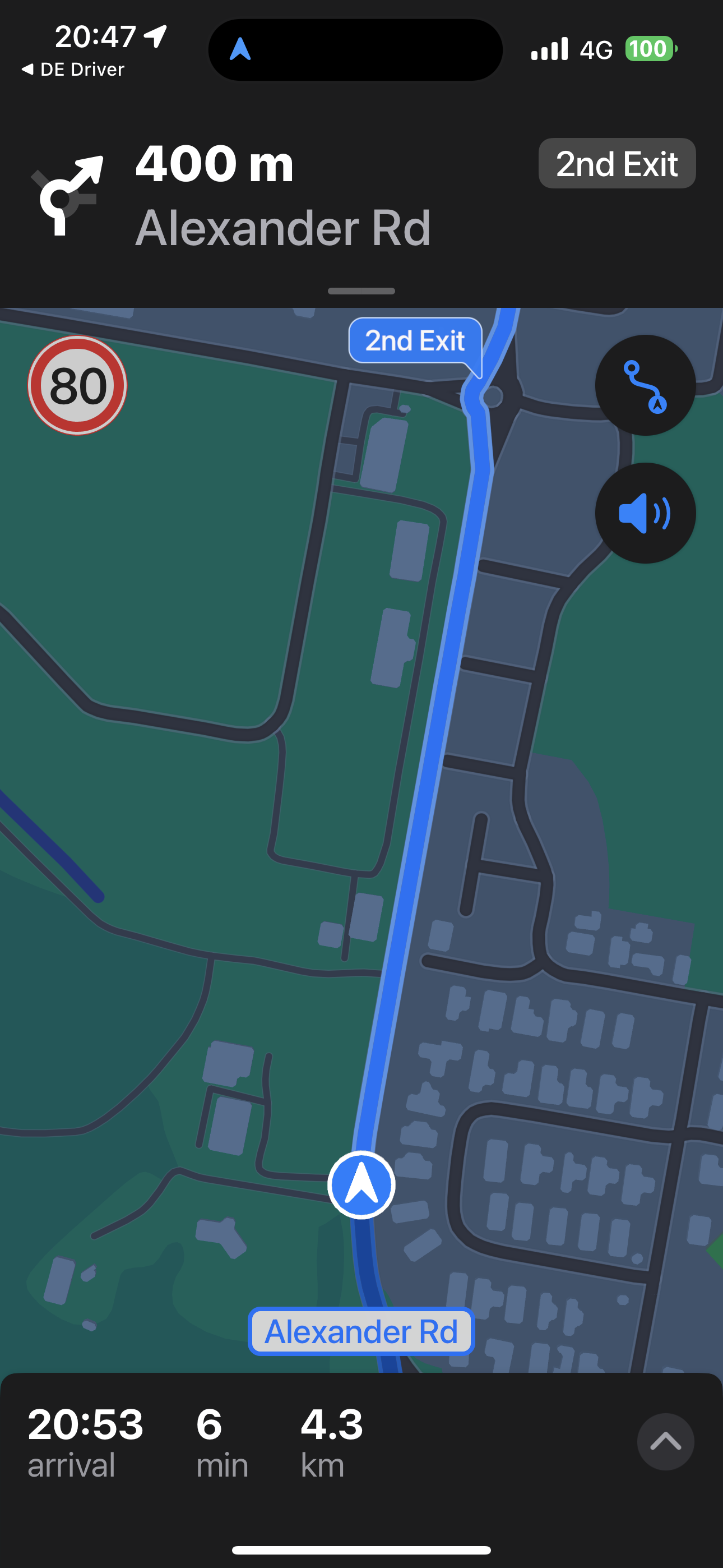
                      @Neil-Bartlett Well you perhaps have not used Apple Maps for a while 🙄 if you have never seen the speed display at the top.

                      See my screen shot from work the other night and note the speed roundel at the top;IMG_0391.PNG

                      R1200RS, Nav VI, Zumo XT2, iPhone. — Plot the Track, Go the Distance

                      1 Reply Last reply
                      0

                      Hello! It looks like you're interested in this conversation, but you don't have an account yet.

                      Getting fed up of having to scroll through the same posts each visit? When you register for an account, you'll always come back to exactly where you were before, and choose to be notified of new replies (either via email, or push notification). You'll also be able to save bookmarks and upvote posts to show your appreciation to other community members.

                      With your input, this post could be even better 💗

                      Register Login
                      Reply
                      • Reply as topic
                      Log in to reply
                      • Oldest to Newest
                      • Newest to Oldest
                      • Most Votes


                      ACTIVE USERS
                      Corjan Meijerink
                      Corjan Meijerink
                      Con Hennekens
                      Con Hennekens
                      Dave J 0
                      Dave J 0
                      RetiredWingMan
                      RetiredWingMan
                      richtea999
                      richtea999
                      Neil Bartlett
                      Neil Bartlett
                      Bert 2v
                      Bert 2v
                      Neil Hinkins
                      Neil Hinkins
                      POPULAR TOPICS
                      • Interesting behaviour on a pre-planned route that uses the same road in both directions
                        paul69
                        paul69
                        0
                        10
                        31

                      • Er gaat hier iets mis melding
                        Travellexxie
                        Travellexxie
                        0
                        22
                        452

                      • Onbegrijpelijke afslagen
                        Travellexxie
                        Travellexxie
                        0
                        5
                        130

                      • Stemgeluid sterker bij afspelen muziek
                        superg
                        superg
                        0
                        4
                        55

                      • GPX1.2 & Garmin Tread
                        MTC-Zeilberg
                        MTC-Zeilberg
                        0
                        4
                        128

                      • Giving folders its own color
                        Travellexxie
                        Travellexxie
                        0
                        13
                        372

                      • POI naming/text display
                        Hubert Thoring
                        Hubert Thoring
                        1
                        2
                        26

                      • Bij route naar bestemming, weg afgesloten die gewoon open is.
                        Marinus van Deudekom
                        Marinus van Deudekom
                        0
                        2
                        46

                      MY GROUPS
                      • Login

                      • Login or register to search.
                      • First post
                        Last post
                      0
                      • Categories
                      • Recent
                      • Popular
                      • Support
                      • MyRoute-app