Skip to content
  • Categories
  • Recent
  • Popular
  • Support
  • MyRoute-app
Collapse
Brand Logo

MRA Community Forum

  1. Home
  2. The MyRoute-app
  3. [App] Problems, Bugs and other Issues
  4. Stop/End recording

Stop/End recording

Scheduled Pinned Locked Moved [App] Problems, Bugs and other Issues
8 Posts 4 Posters 1.9k Views 1 Watching
  • Oldest to Newest
  • Newest to Oldest
  • Most Votes
Reply
  • Reply as topic
Log in to reply
This topic has been deleted. Only users with topic management privileges can see it.
  • Chris mundefined Offline
    Chris mundefined Offline
    Chris m
    wrote on last edited by
    #1

    I tried but I cannot find out how to end recording. I can pause but not stop. The "X" does not stop/ end recording.
    Many thanks.

    Mark Hamilton 0undefined 1 Reply Last reply
    0
    • Chris mundefined Chris m

      I tried but I cannot find out how to end recording. I can pause but not stop. The "X" does not stop/ end recording.
      Many thanks.

      Mark Hamilton 0undefined Offline
      Mark Hamilton 0undefined Offline
      Mark Hamilton 0
      wrote on last edited by
      #2

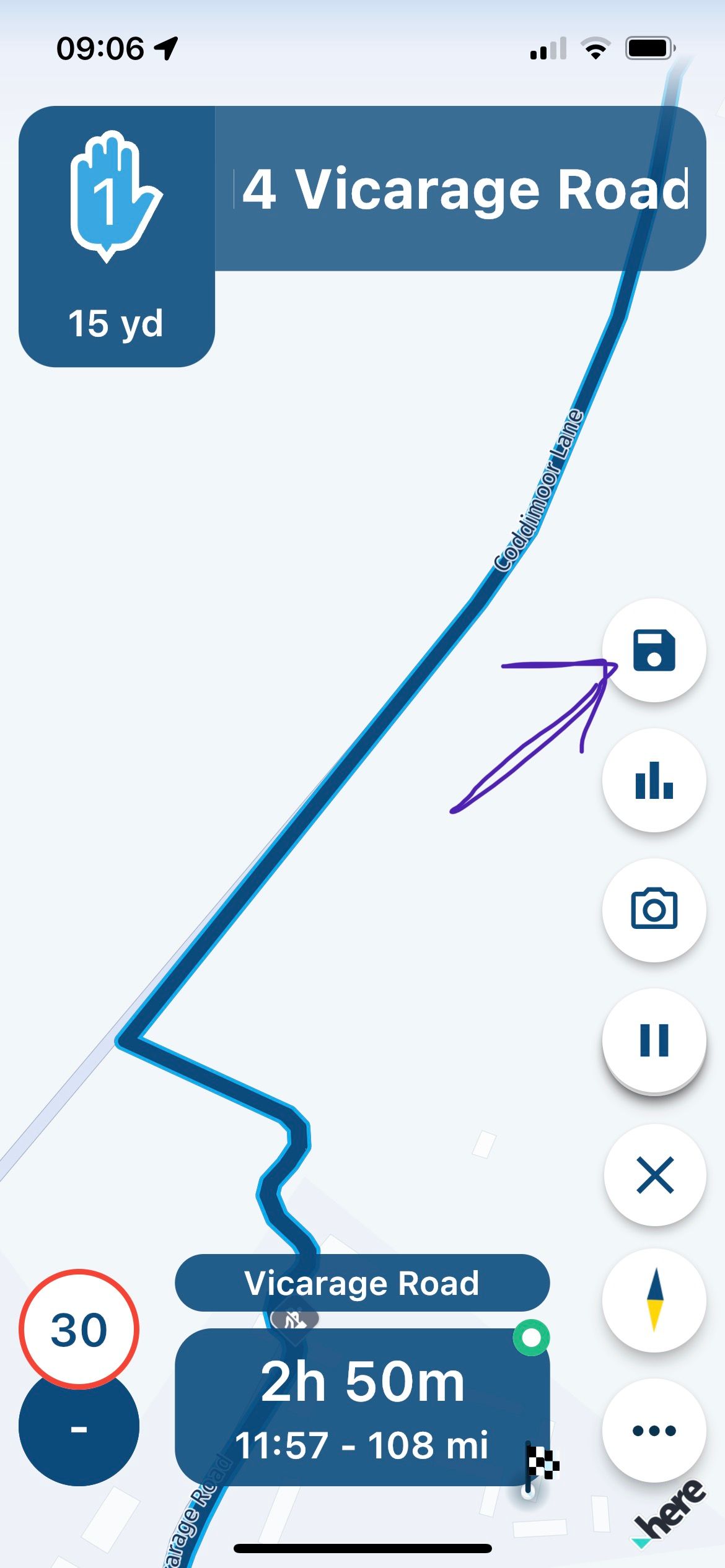
      @Chris-m assuming you are tracking in the Navigation screen and you pause tracking you should have a save button. Click this and either discard or save recording and it will end. Pic attached IMG_8489.jpeg
      Chris mundefined 1 Reply Last reply
      0
      • Mark Hamilton 0undefined Mark Hamilton 0

        @Chris-m assuming you are tracking in the Navigation screen and you pause tracking you should have a save button. Click this and either discard or save recording and it will end. Pic attached IMG_8489.jpeg

        Chris mundefined Offline
        Chris mundefined Offline
        Chris m
        wrote on last edited by
        #3

        @Mark-Hamilton-0 -Thanks, never thought of that. That's a good workaround although I was looking for the standard / common way of ending a recording... that's available on all recording systems.
        I think it was missed by the developers...๐Ÿ˜‰

        Rob Verhoeffundefined 1 Reply Last reply
        0
        • Chris mundefined Chris m

          @Mark-Hamilton-0 -Thanks, never thought of that. That's a good workaround although I was looking for the standard / common way of ending a recording... that's available on all recording systems.
          I think it was missed by the developers...๐Ÿ˜‰

          Rob Verhoeffundefined Offline
          Rob Verhoeffundefined Offline
          Rob Verhoeff
          Alpha tester
          wrote on last edited by Rob Verhoeff
          #4

          @Chris-m That's how you see it! I see it as a brilliant solution. When you want to start recording, press the green button. If you want to stop or pause the recording, then press the red button. And when you do that, you have the option to save or discard your track (or pause your track or insert a photo). It simply saves one button within the already limited space on the screen. So, what did the developer overlook? It's not a workaround, therefore! ๐Ÿ˜‰

          BMW K1600GT-P (2013) | Nolan N100-5 with Sena 30K
          iOS on iPhone 13 & 16 (mounted on Quadlock or AliExpress extention on BMW-cradle)
          Apple CarPlay in VW T-Roc
          Routelab on MacBook Air & iMac (Tahoe & Ventura)

          Chris mundefined Vosjeundefined 2 Replies Last reply
          1
          • Rob Verhoeffundefined Rob Verhoeff

            @Chris-m That's how you see it! I see it as a brilliant solution. When you want to start recording, press the green button. If you want to stop or pause the recording, then press the red button. And when you do that, you have the option to save or discard your track (or pause your track or insert a photo). It simply saves one button within the already limited space on the screen. So, what did the developer overlook? It's not a workaround, therefore! ๐Ÿ˜‰

            Chris mundefined Offline
            Chris mundefined Offline
            Chris m
            wrote on last edited by
            #5

            @Rob-Verhoeff - I didn't mean to offend anybody but I never thought that the "save" button also means "discard".

            Usually the save button's options are to save and rename.

            But to click on save so that you can discard is new to me. Well, leave and learn ๐Ÿ˜€.

            I am quite new using the navigation part as I am mostly using myroute in planning routes and using them with Mapfactor.

            I want to start using myroute especially of the function to delete a way point automatically when bypassed on purpose - a function not found on other apps.

            Rob Verhoeffundefined 1 Reply Last reply
            0
            • Chris mundefined Chris m

              @Rob-Verhoeff - I didn't mean to offend anybody but I never thought that the "save" button also means "discard".

              Usually the save button's options are to save and rename.

              But to click on save so that you can discard is new to me. Well, leave and learn ๐Ÿ˜€.

              I am quite new using the navigation part as I am mostly using myroute in planning routes and using them with Mapfactor.

              I want to start using myroute especially of the function to delete a way point automatically when bypassed on purpose - a function not found on other apps.

              Rob Verhoeffundefined Offline
              Rob Verhoeffundefined Offline
              Rob Verhoeff
              Alpha tester
              wrote on last edited by Rob Verhoeff
              #6

              @Chris-m Where did you offend someone? Certainly not me. Enjoy using the app and have many safe kilometers.
              ๐Ÿ‘ ๐Ÿ˜Š

              BMW K1600GT-P (2013) | Nolan N100-5 with Sena 30K
              iOS on iPhone 13 & 16 (mounted on Quadlock or AliExpress extention on BMW-cradle)
              Apple CarPlay in VW T-Roc
              Routelab on MacBook Air & iMac (Tahoe & Ventura)

              1 Reply Last reply
              0
              • Rob Verhoeffundefined Rob Verhoeff

                @Chris-m That's how you see it! I see it as a brilliant solution. When you want to start recording, press the green button. If you want to stop or pause the recording, then press the red button. And when you do that, you have the option to save or discard your track (or pause your track or insert a photo). It simply saves one button within the already limited space on the screen. So, what did the developer overlook? It's not a workaround, therefore! ๐Ÿ˜‰

                Vosjeundefined Offline
                Vosjeundefined Offline
                Vosje
                wrote on last edited by
                #7

                @Rob-Verhoeff
                You wrote;"When you want to start recording, press the green button. If you want to stop or pause the recording, then press the red button."
                Strange... in my MRA it's red button starts recording, green button stops recording! And when it's in the recording mode, it will show the text "opnemen" in the upper center of the screen

                Rob Verhoeffundefined 1 Reply Last reply
                0
                • Vosjeundefined Vosje

                  @Rob-Verhoeff
                  You wrote;"When you want to start recording, press the green button. If you want to stop or pause the recording, then press the red button."
                  Strange... in my MRA it's red button starts recording, green button stops recording! And when it's in the recording mode, it will show the text "opnemen" in the upper center of the screen

                  Rob Verhoeffundefined Offline
                  Rob Verhoeffundefined Offline
                  Rob Verhoeff
                  Alpha tester
                  wrote on last edited by
                  #8

                  @Vosje You're right... It's just the other way around ๐Ÿ‘
                  Red: start recording
                  Green: opens the menu where you decide to safe or disgard the track.

                  BMW K1600GT-P (2013) | Nolan N100-5 with Sena 30K
                  iOS on iPhone 13 & 16 (mounted on Quadlock or AliExpress extention on BMW-cradle)
                  Apple CarPlay in VW T-Roc
                  Routelab on MacBook Air & iMac (Tahoe & Ventura)

                  1 Reply Last reply
                  0

                  Hello! It looks like you're interested in this conversation, but you don't have an account yet.

                  Getting fed up of having to scroll through the same posts each visit? When you register for an account, you'll always come back to exactly where you were before, and choose to be notified of new replies (either via email, or push notification). You'll also be able to save bookmarks and upvote posts to show your appreciation to other community members.

                  With your input, this post could be even better ๐Ÿ’—

                  Register Login
                  Reply
                  • Reply as topic
                  Log in to reply
                  • Oldest to Newest
                  • Newest to Oldest
                  • Most Votes


                  ACTIVE USERS
                  Rob Verhoeffundefined
                  Rob Verhoeff
                  Chris mundefined
                  Chris m
                  Mark Hamilton 0undefined
                  Mark Hamilton 0
                  Vosjeundefined
                  Vosje
                  POPULAR TOPICS
                  • Feature request - enhanced speed camera alerts
                    Aiello antoninoundefined
                    Aiello antonino
                    3
                    52
                    3.9k

                  • Pondje invoegen
                    Leike Lodiersundefined
                    Leike Lodiers
                    0
                    18
                    291

                  • Gas stations...
                    coupe_vsundefined
                    coupe_vs
                    1
                    12
                    255

                  • Update 5.1 - CarPlay / Android Auto improvements and more!
                    b0hd1undefined
                    b0hd1
                    17
                    47
                    2.6k

                  • How to Navigate Route as a Track?
                    Lenny Oundefined
                    Lenny O
                    1
                    24
                    2.6k

                  • Starting a ride from Waypoint or Exact location
                    ginoginoundefined
                    ginogino
                    1
                    12
                    223

                  • Navigation stopped working during Tour
                    TuonoPantsundefined
                    TuonoPants
                    1
                    29
                    3.0k

                  • MRA 5.1.0 (462) iOS - Sharing via WhatsApp is not possible
                    Rob Verhoeffundefined
                    Rob Verhoeff
                    0
                    4
                    35

                  MY GROUPS
                  • Login

                  • Login or register to search.
                  • First post
                    Last post
                  0
                  • Categories
                  • Recent
                  • Popular
                  • Support
                  • MyRoute-app