Skip to content
  • Categories
  • Recent
  • Popular
  • Support
  • MyRoute-app
Collapse
Brand Logo

MRA Community Forum

  1. Home
  2. General Discussion
  3. WAYPOINT

WAYPOINT

Scheduled Pinned Locked Moved General Discussion
5 Posts 5 Posters 899 Views 1 Watching
  • Oldest to Newest
  • Newest to Oldest
  • Most Votes
Reply
  • Reply as topic
Log in to reply
This topic has been deleted. Only users with topic management privileges can see it.
  • MASSIMO PIACENTINI 0 Offline
    MASSIMO PIACENTINI 0 Offline
    MASSIMO PIACENTINI 0
    wrote on last edited by
    #1

    I DONT' SEE THE WAYPOINT IN THE GPS , IS THERE A WAY TO SEE THEM? THE TRACK IS RIGHT AND I FOLLOW GPS FROM START TO THE END, BUT I'D LIKE TO SEE ON GPS ALL THE WAYPOINT THAT ARE IN THE TRACK, BUT I DON'T SEE THEM ON GPS WHILE RIDING, SOMEONE CAN EXPLANE? THANK YOU.....AND EXCUSE ME FOR MY ENGLISH...

    Hans van de Ven MR.MRA Ray Blighe 0 johnnienicosia 3 Replies Last reply
    0
    • MASSIMO PIACENTINI 0 MASSIMO PIACENTINI 0

      I DONT' SEE THE WAYPOINT IN THE GPS , IS THERE A WAY TO SEE THEM? THE TRACK IS RIGHT AND I FOLLOW GPS FROM START TO THE END, BUT I'D LIKE TO SEE ON GPS ALL THE WAYPOINT THAT ARE IN THE TRACK, BUT I DON'T SEE THEM ON GPS WHILE RIDING, SOMEONE CAN EXPLANE? THANK YOU.....AND EXCUSE ME FOR MY ENGLISH...

      Hans van de Ven MR.MRA Offline
      Hans van de Ven MR.MRA Offline
      Hans van de Ven MR.MRA
      Valued contributor
      wrote on last edited by
      #2

      @MASSIMO-PIACENTINI-0

      Hello Masimo,
      Some questions to clarify your question:

      1. What kind of Navigation System do you use?
      2. Do you use the route or do you use the track?
      3. Would you like to share the url of your route here, make sure it is public.

      Garmin Zumo XT3/XT2/XT/BMW Connected Ride Navigator/Tourstart/ MyRouteapp (The App)/...
      Een dag niet gelachen is een dag niet geleefd / Een route is net zo goed als deze uitgezet is.

      1 Reply Last reply
      1
      • MASSIMO PIACENTINI 0 MASSIMO PIACENTINI 0

        I DONT' SEE THE WAYPOINT IN THE GPS , IS THERE A WAY TO SEE THEM? THE TRACK IS RIGHT AND I FOLLOW GPS FROM START TO THE END, BUT I'D LIKE TO SEE ON GPS ALL THE WAYPOINT THAT ARE IN THE TRACK, BUT I DON'T SEE THEM ON GPS WHILE RIDING, SOMEONE CAN EXPLANE? THANK YOU.....AND EXCUSE ME FOR MY ENGLISH...

        Ray Blighe 0 Offline
        Ray Blighe 0 Offline
        Ray Blighe 0
        wrote on last edited by
        #3

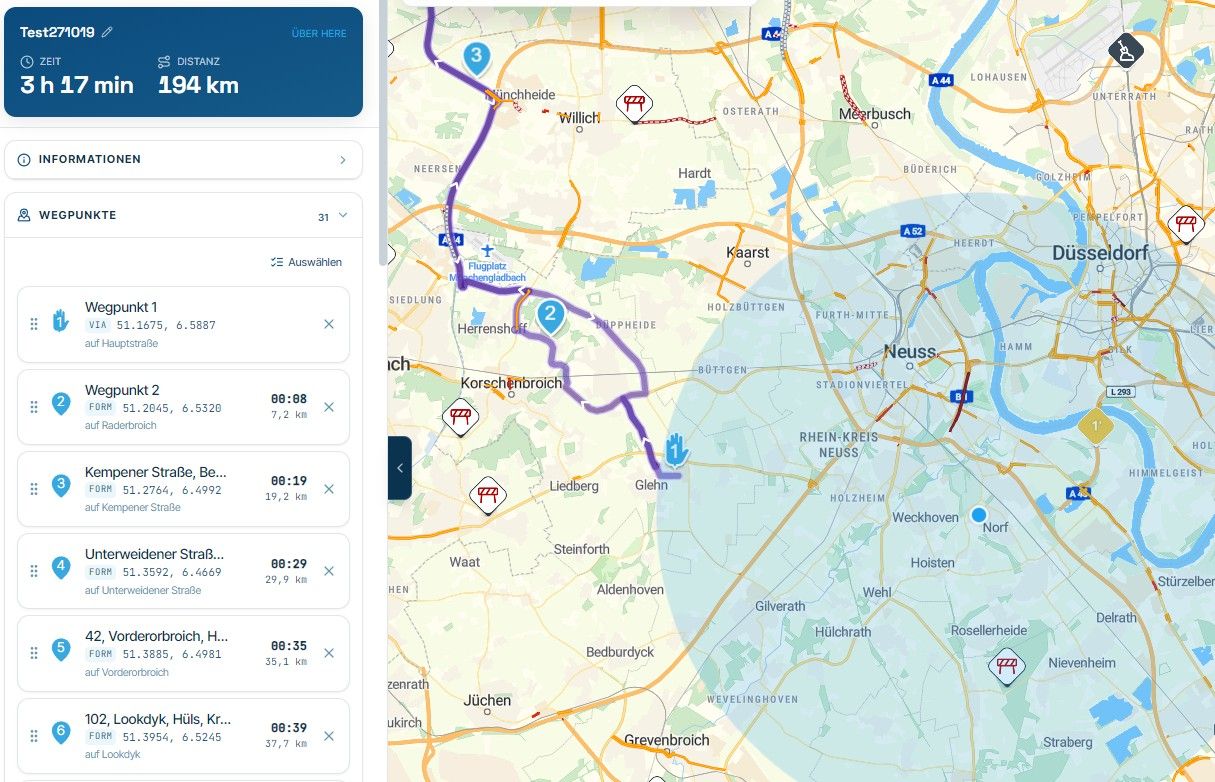
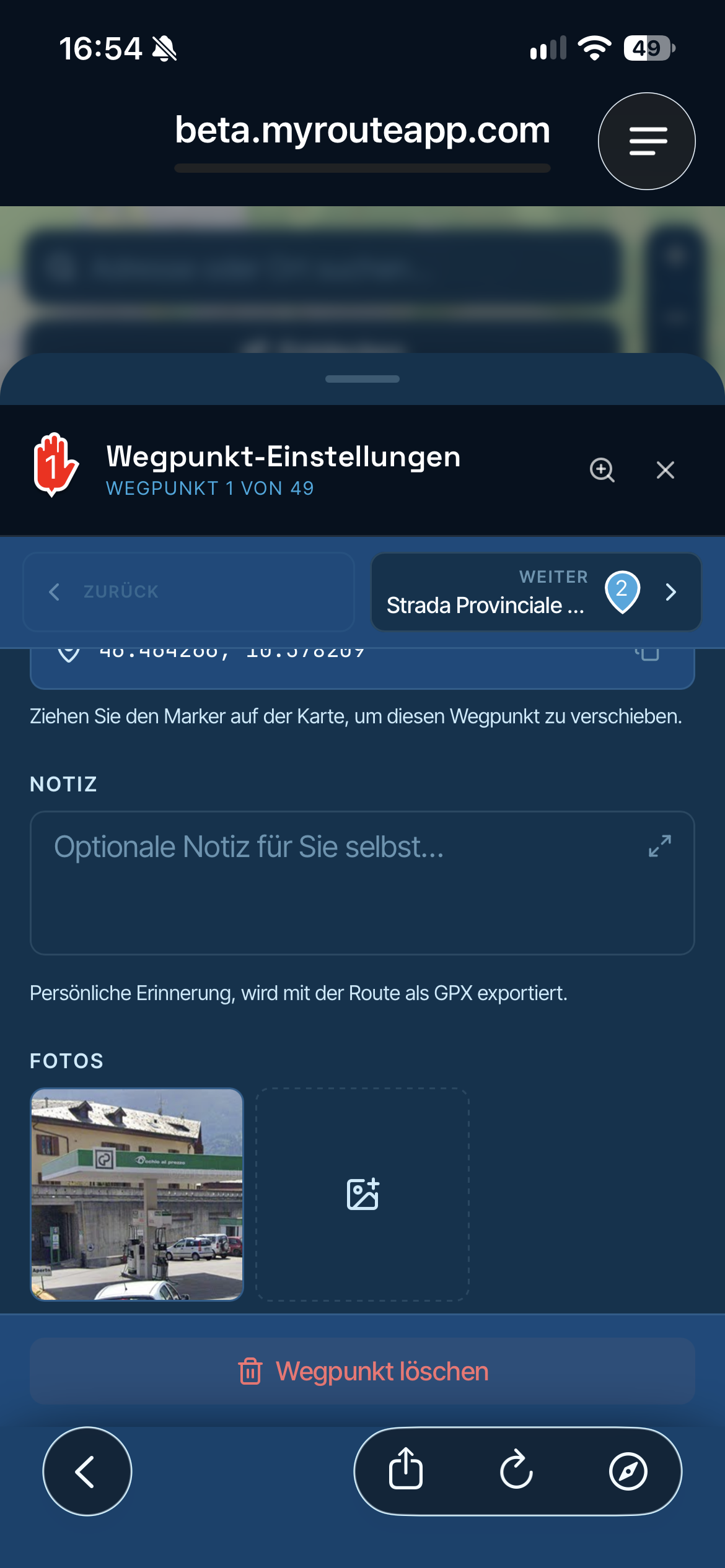
        @MASSIMO-PIACENTINI-0 Hi. I had similar problem, then someone said to change your points in your route from the upside down pear shape to a hand. Click on the route point to open to options box, then the 3 small dots in top right of the box, you will see a hand shape, click that and it will change your route point to a way point.
        That's how I do it and it works for me.
        Hope this helps.

        Scimmy 1 Reply Last reply
        0
        • MASSIMO PIACENTINI 0 MASSIMO PIACENTINI 0

          I DONT' SEE THE WAYPOINT IN THE GPS , IS THERE A WAY TO SEE THEM? THE TRACK IS RIGHT AND I FOLLOW GPS FROM START TO THE END, BUT I'D LIKE TO SEE ON GPS ALL THE WAYPOINT THAT ARE IN THE TRACK, BUT I DON'T SEE THEM ON GPS WHILE RIDING, SOMEONE CAN EXPLANE? THANK YOU.....AND EXCUSE ME FOR MY ENGLISH...

          johnnienicosia Offline
          johnnienicosia Offline
          johnnienicosia
          wrote on last edited by
          #4

          @MASSIMO-PIACENTINI-0 drift boss said in WAYPOINT:

          I DONT' SEE THE WAYPOINT IN THE GPS , IS THERE A WAY TO SEE THEM? THE TRACK IS RIGHT AND I FOLLOW GPS FROM START TO THE END, BUT I'D LIKE TO SEE ON GPS ALL THE WAYPOINT THAT ARE IN THE TRACK, BUT I DON'T SEE THEM ON GPS WHILE RIDING, SOMEONE CAN EXPLANE? THANK YOU.....AND EXCUSE ME FOR MY ENGLISH...

          You can try clicking on the View Destinations button or the Find Destinations button to see waypoints

          1 Reply Last reply
          0
          • Ray Blighe 0 Ray Blighe 0

            @MASSIMO-PIACENTINI-0 Hi. I had similar problem, then someone said to change your points in your route from the upside down pear shape to a hand. Click on the route point to open to options box, then the 3 small dots in top right of the box, you will see a hand shape, click that and it will change your route point to a way point.
            That's how I do it and it works for me.
            Hope this helps.

            Scimmy Offline
            Scimmy Offline
            Scimmy
            wrote on last edited by Scimmy
            #5

            @Ray-Blighe-0 quindi i punti di interesse (waipoint) se li metto tutti con la manina ( ✋ ) funzionano ? e li vedo sul Garmin Zumo 595

            1 Reply Last reply
            0

            Hello! It looks like you're interested in this conversation, but you don't have an account yet.

            Getting fed up of having to scroll through the same posts each visit? When you register for an account, you'll always come back to exactly where you were before, and choose to be notified of new replies (either via email, or push notification). You'll also be able to save bookmarks and upvote posts to show your appreciation to other community members.

            With your input, this post could be even better 💗

            Register Login
            Reply
            • Reply as topic
            Log in to reply
            • Oldest to Newest
            • Newest to Oldest
            • Most Votes


            ACTIVE USERS
            Scimmy
            Scimmy
            Hans van de Ven MR.MRA
            Hans van de Ven MR.MRA
            johnnienicosia
            johnnienicosia
            Ray Blighe 0
            Ray Blighe 0
            MASSIMO PIACENTINI 0
            MASSIMO PIACENTINI 0
            POPULAR TOPICS
            • Statement about device limit
              Peter Zehentreiter
              Peter Zehentreiter
              25
              60
              19.7k

            • Feature Request: Multi-Day Tour Planning Engine with Time, Rest & Routing Constraints
              Michele Skipper
              Michele Skipper
              4
              18
              608

            • Verkeers Informatie Garmin en GPX 1.2
              Marinus van Deudekom
              Marinus van Deudekom
              0
              12
              297

            • Offline Navigation
              Nick Carthew
              Nick Carthew
              0
              2
              47

            • MRA V5.2.1 (488) Kompass fest einstellbar auf „Dynamische Kamera“
              Hubert Thoring
              Hubert Thoring
              1
              5
              75

            • Update 5.2.2 - Quick fix
              ginogino
              ginogino
              6
              35
              1.8k

            • MRA V2.2.2 (489) with Remotek One V2.1.0 – functions have been adapted /// mit Remotek One V2.1.0 - Funktionen sind angepasst
              0
              1
              14

            • status quo: progress regarding map spinning resolvement
              peha
              peha
              1
              8
              435

            MY GROUPS
            • Login

            • Login or register to search.
            • First post
              Last post
            0
            • Categories
            • Recent
            • Popular
            • Support
            • MyRoute-app