GPX 1.1 or 1.2
-

Re: .GPX 1.2 I have Zumo XT and am planning routes for a forthcoming French Trip.
I'm quite new to Garmin having come from TomTom and am trying to learn BaseCamp. I've noticed when I save my routes as GPX 1.2 and then upload to BaseCamp, the routes only show the Alerting Waypoints (Via Points in MRA). The "won't alert" (or Shaping Points in MRA) Waypoints are not shown. If I try the same but save as a GPX 1.1, all points are shown in the route on BaseCamp/
Am I best to create my routes in MRA, save directly as 1.2 and then copy them direct to the Zumo XT thus bypassing BaseCamp altogether? Or is there a better way? And if direct to the Zumo - what location do I copy them to? I'm on a Mac so know I have to use Android File Transfer.
Any guidance on best practice on creating routes and getting them on the Zumo with both Shaping and Via points would be much appreciated. I have no great desire to learn and use BaseCamp if I don't need to.
As an aside - also trying to learn and use Garmin Explore as this seems a good option for wirelessly getting routes onto the Zumo when away from a PC but can't for the life of me work out how to load as usable routes.
-
Re: .GPX 1.2 I have Zumo XT and am planning routes for a forthcoming French Trip.
I'm quite new to Garmin having come from TomTom and am trying to learn BaseCamp. I've noticed when I save my routes as GPX 1.2 and then upload to BaseCamp, the routes only show the Alerting Waypoints (Via Points in MRA). The "won't alert" (or Shaping Points in MRA) Waypoints are not shown. If I try the same but save as a GPX 1.1, all points are shown in the route on BaseCamp/
Am I best to create my routes in MRA, save directly as 1.2 and then copy them direct to the Zumo XT thus bypassing BaseCamp altogether? Or is there a better way? And if direct to the Zumo - what location do I copy them to? I'm on a Mac so know I have to use Android File Transfer.
Any guidance on best practice on creating routes and getting them on the Zumo with both Shaping and Via points would be much appreciated. I have no great desire to learn and use BaseCamp if I don't need to.
As an aside - also trying to learn and use Garmin Explore as this seems a good option for wirelessly getting routes onto the Zumo when away from a PC but can't for the life of me work out how to load as usable routes.

@Rob-Wilkie After a lot of work, I gave up on Basecamp and purchased a lifetime Gold MRA membership. I have the Garmin Drive app on my Android phone already, and it has been linked to my Zumo GPS.
My workflow to load a route into the Garmin Zumo XT is like this:
- Build the route using MRA, usually from my desktop.
- Open the route on my Android phone using the MRA mobile app.
- Select the Download button from the MRA app on the phone, I have been using .gpx 1.1 format.
- A pop up announces 'File has been saved!' and shows a link for 'Export'.
- Touching 'Export' automatically opens the Garmin Drive app, and asks 'Would you like to send it to your Garmin device?'
- The route then downloads to the Zumo XT. On the Zumo, choose 'Apps', then 'Trip Planner.' Your new route will be visible there.
It sounds more complicated than it is, and requires no cable connection.
With the exception of a flawed release of the Drive app last year, this process has been very reliable and dependable.
-KTM-Don
-
Re: .GPX 1.2 I have Zumo XT and am planning routes for a forthcoming French Trip.
I'm quite new to Garmin having come from TomTom and am trying to learn BaseCamp. I've noticed when I save my routes as GPX 1.2 and then upload to BaseCamp, the routes only show the Alerting Waypoints (Via Points in MRA). The "won't alert" (or Shaping Points in MRA) Waypoints are not shown. If I try the same but save as a GPX 1.1, all points are shown in the route on BaseCamp/
Am I best to create my routes in MRA, save directly as 1.2 and then copy them direct to the Zumo XT thus bypassing BaseCamp altogether? Or is there a better way? And if direct to the Zumo - what location do I copy them to? I'm on a Mac so know I have to use Android File Transfer.
Any guidance on best practice on creating routes and getting them on the Zumo with both Shaping and Via points would be much appreciated. I have no great desire to learn and use BaseCamp if I don't need to.
As an aside - also trying to learn and use Garmin Explore as this seems a good option for wirelessly getting routes onto the Zumo when away from a PC but can't for the life of me work out how to load as usable routes.
I use the exact same method as @Don-Stauffer.
It works flawlessly for iOS and Android.Regarding Using GPX1.1 or GPX1.2 the choice is yours to make.
If you only want to visibly see the Via Points on the XT map use GPX1.2 .
If you want to see the Via Points and the Shaping Points on the XT Map then use GPX1.1.Some screenshots below from my iPad Pro.
Open the route directly in the Routes folder not the Routelab.
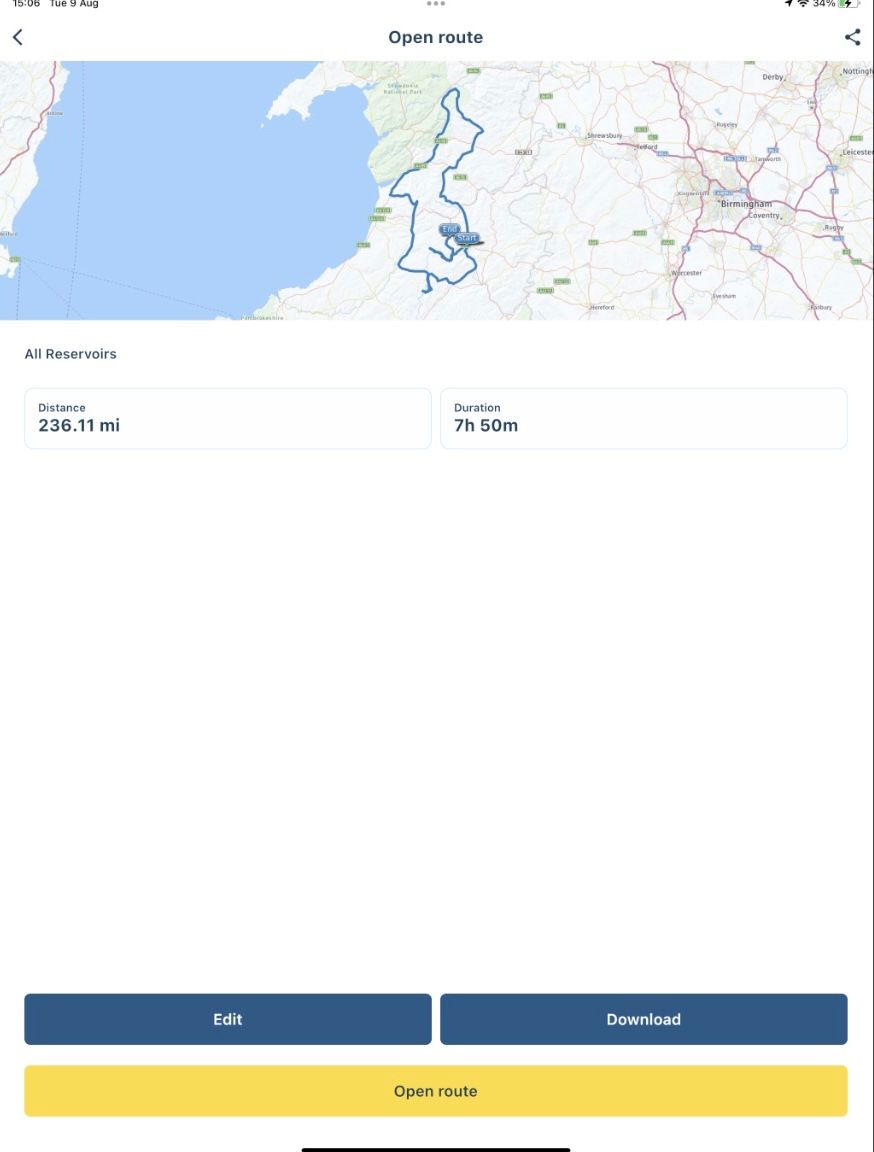
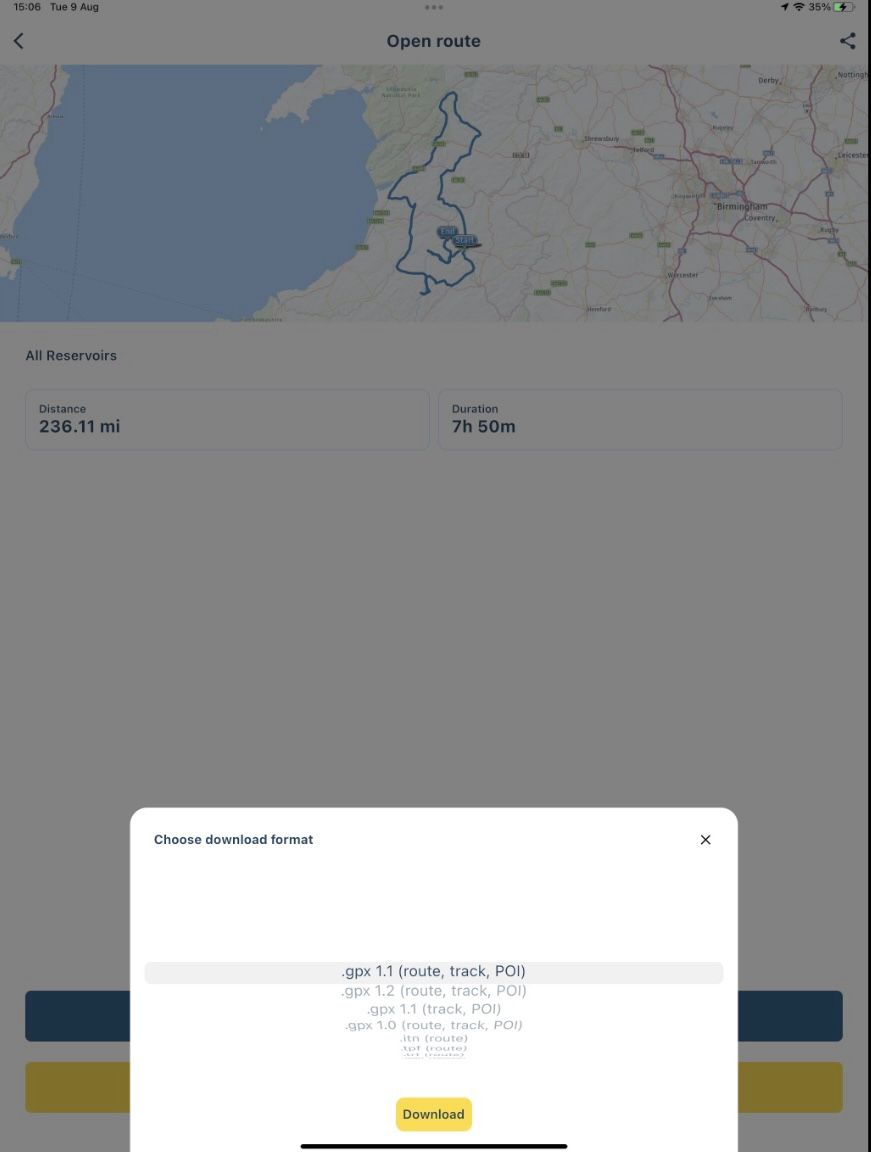
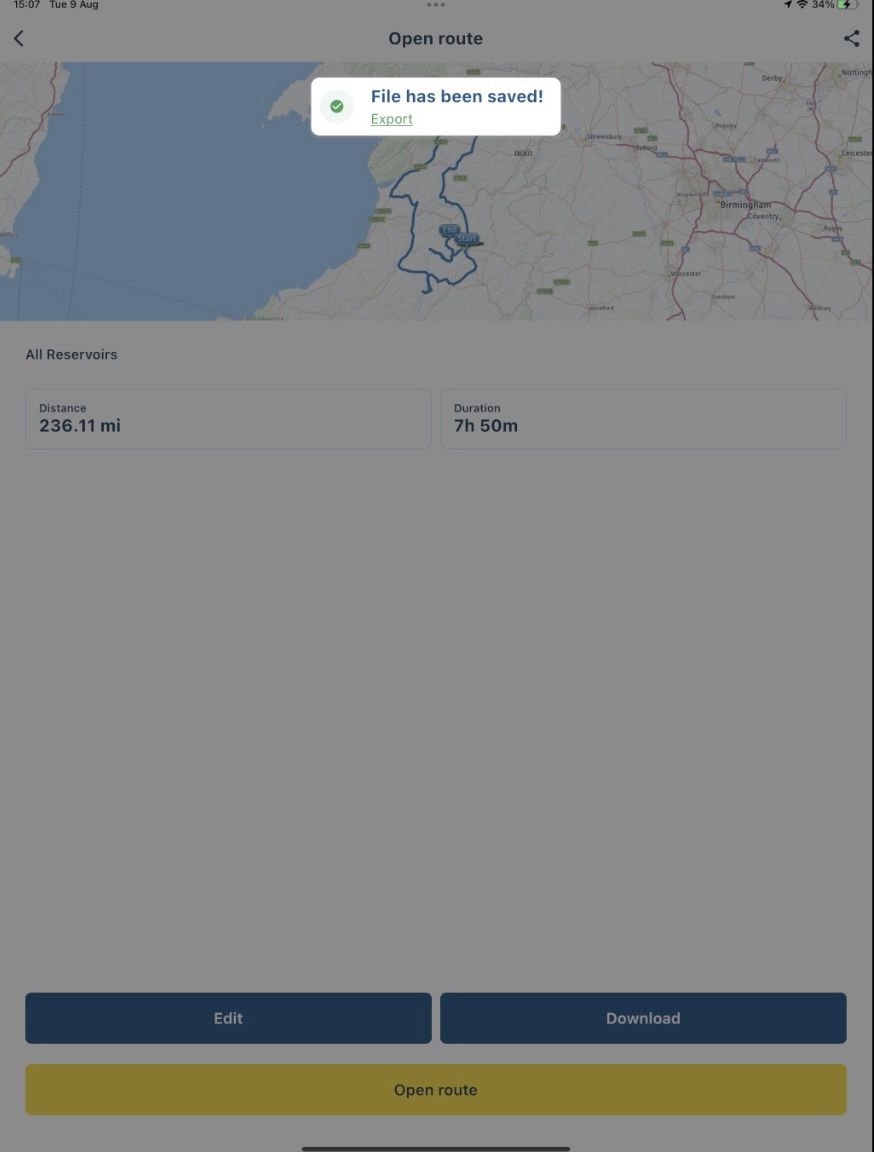
For me it shows the pop up in the top right corner on my iPad Pro where I can select Garmin Drive.
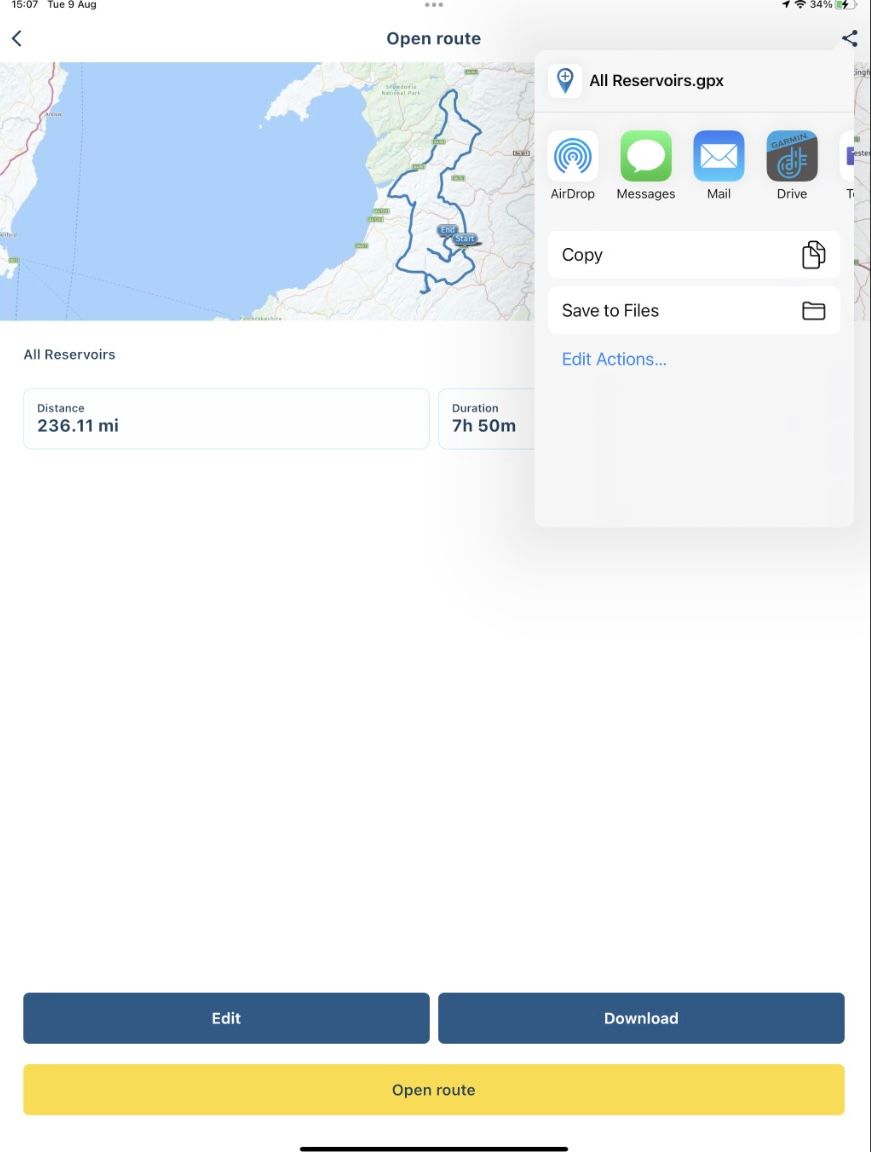
-
Re: .GPX 1.2 I have Zumo XT and am planning routes for a forthcoming French Trip.
I'm quite new to Garmin having come from TomTom and am trying to learn BaseCamp. I've noticed when I save my routes as GPX 1.2 and then upload to BaseCamp, the routes only show the Alerting Waypoints (Via Points in MRA). The "won't alert" (or Shaping Points in MRA) Waypoints are not shown. If I try the same but save as a GPX 1.1, all points are shown in the route on BaseCamp/
Am I best to create my routes in MRA, save directly as 1.2 and then copy them direct to the Zumo XT thus bypassing BaseCamp altogether? Or is there a better way? And if direct to the Zumo - what location do I copy them to? I'm on a Mac so know I have to use Android File Transfer.
Any guidance on best practice on creating routes and getting them on the Zumo with both Shaping and Via points would be much appreciated. I have no great desire to learn and use BaseCamp if I don't need to.
As an aside - also trying to learn and use Garmin Explore as this seems a good option for wirelessly getting routes onto the Zumo when away from a PC but can't for the life of me work out how to load as usable routes.

@Rob-Wilkie said in GPX 1.1 or 1.2:
Am I best to create my routes in MRA, save directly as 1.2 and then copy them direct to the Zumo XT thus bypassing BaseCamp altogether?
yes
Or is there a better way?
Drop basecamp, MRA routeplanner is better and it keeps getting better, but before doing that clan up all the routes you have on basecamp, move these to MRA and store a GPX 1.1 version on your home computer as a backup.
It can be daunting to go back to software you haven't used for a while and try to find something back.

It is not difficult, it is easy, it's a hobby
-
@Rob-Wilkie said in GPX 1.1 or 1.2:
Am I best to create my routes in MRA, save directly as 1.2 and then copy them direct to the Zumo XT thus bypassing BaseCamp altogether?
yes
Or is there a better way?
Drop basecamp, MRA routeplanner is better and it keeps getting better, but before doing that clan up all the routes you have on basecamp, move these to MRA and store a GPX 1.1 version on your home computer as a backup.
It can be daunting to go back to software you haven't used for a while and try to find something back.
Thanks @Drabslab, @Don-Stauffer & @Steve-Lynch
After a bit of mucking about to get Garmin Drive as a target for the exported file, it seems to work great to really good advice. So with lifetime Gold membership of MRA it looks like BaseCamp is history for me.
I’m new to Garmin so thankfully don’t have anything in BaseCamp to save but great advice @Drabslab to others re saving old routes to your PC
I did see if I could attach both my iPhone and iPad to my Zumo but that doesn’t appear possible but not an issue. If I’m tweaking routes it’s easier on the IPad with the bigger screen but as soon as you save them they are on the phone regardless.
I had been looking at Garmin Explore as the method to get routes onto the Zumo when not by a PC but I really don’t like that interface. This method is far better so will be my go to solution for the future.
@Steve-Lynch great looking route in Wales. Ridden those reservoirs a few times and the Elan Valley is ace

-
Thanks @Drabslab, @Don-Stauffer & @Steve-Lynch
After a bit of mucking about to get Garmin Drive as a target for the exported file, it seems to work great to really good advice. So with lifetime Gold membership of MRA it looks like BaseCamp is history for me.
I’m new to Garmin so thankfully don’t have anything in BaseCamp to save but great advice @Drabslab to others re saving old routes to your PC
I did see if I could attach both my iPhone and iPad to my Zumo but that doesn’t appear possible but not an issue. If I’m tweaking routes it’s easier on the IPad with the bigger screen but as soon as you save them they are on the phone regardless.
I had been looking at Garmin Explore as the method to get routes onto the Zumo when not by a PC but I really don’t like that interface. This method is far better so will be my go to solution for the future.
@Steve-Lynch great looking route in Wales. Ridden those reservoirs a few times and the Elan Valley is ace
Just fiddled around a bit more and now have iPad and iPhone connected and seems to work with both. Just don’t think you can have phone and iPad connected simultaneously
-
I find that Basecamp is a nightmare, obviously written by a mad professor. MRA Gold and the ability to send a route from your phone to Zumo via Bluetooth (I have the 346) is a revelation.
Anyway, 1.1 or 1.2? What I have noticed using 1.2 is that the route ridden will be exactly as planned, no matter how few shaping or via points are used. With 1.1, the Zumo still liked to decide its own "better" routing on occasion despite Off-Route Recalculation being switched off. I'm not fussed about seeing the shaping points but they can easily be changed to via points (that are visible) anyway. -

Same problems here.
1.1 gives shaping and via points in Basecamp.
Sometimes very useful.
1.2 only gives the via point, and a lot of straight lines.
On the XT map the route seems to be ok with both 1.1 and 1.2. And there is always the track to help.What I do not get to work is the direct export with the connector to the XT.
Device can not be found. The XT that is.
Any tips on that?
I know I can live without, but I 'd like it to work.And: what is the maximum via points? I used 29 an dthat was too much.
-
Same problems here.
1.1 gives shaping and via points in Basecamp.
Sometimes very useful.
1.2 only gives the via point, and a lot of straight lines.
On the XT map the route seems to be ok with both 1.1 and 1.2. And there is always the track to help.What I do not get to work is the direct export with the connector to the XT.
Device can not be found. The XT that is.
Any tips on that?
I know I can live without, but I 'd like it to work.And: what is the maximum via points? I used 29 an dthat was too much.

@JW-0
Do you work on a windows PC or a Mac?
Max viapoints are 28 -
I find that Basecamp is a nightmare, obviously written by a mad professor. MRA Gold and the ability to send a route from your phone to Zumo via Bluetooth (I have the 346) is a revelation.
Anyway, 1.1 or 1.2? What I have noticed using 1.2 is that the route ridden will be exactly as planned, no matter how few shaping or via points are used. With 1.1, the Zumo still liked to decide its own "better" routing on occasion despite Off-Route Recalculation being switched off. I'm not fussed about seeing the shaping points but they can easily be changed to via points (that are visible) anyway.
@Carl-Lee said in GPX 1.1 or 1.2:
Anyway, 1.1 or 1.2?
Actually, I think that GPX 1.2 does not exist, at least not as an official standard.The current version of the standard appears to be GPX 1.1 released in 2004. (https://www.topografix.com/gpx.asp). The development of that standard seems to have stopped? But the experts of MR can tell a lot more about that probably.
GPX 1.2 seems to be an MRA or Garmin interpretation of GPX 1.1 that is adding functionality not able to achieve with 1.1?
-
@Carl-Lee said in GPX 1.1 or 1.2:
Anyway, 1.1 or 1.2?
Actually, I think that GPX 1.2 does not exist, at least not as an official standard.The current version of the standard appears to be GPX 1.1 released in 2004. (https://www.topografix.com/gpx.asp). The development of that standard seems to have stopped? But the experts of MR can tell a lot more about that probably.
GPX 1.2 seems to be an MRA or Garmin interpretation of GPX 1.1 that is adding functionality not able to achieve with 1.1?
@Drabslab Think I'll be sticking with 1.1. I prefer that the Shaping points are included as well as the Via points - easier to modify a route on the go by skipping a shaping point if necessary.
-
@Drabslab Think I'll be sticking with 1.1. I prefer that the Shaping points are included as well as the Via points - easier to modify a route on the go by skipping a shaping point if necessary.
GPX1.2 was an example of MRA going the extra mile for its end users of the Garmin XT and some other Garmins.
Personally I never use GPX1.2 but some end users prefer to only see see the Via Points on the Garmin map. -
@JW-0
Do you work on a windows PC or a Mac?
Max viapoints are 28
@Hans-van-de-Ven-MRA-Master said in GPX 1.1 or 1.2:
@JW-0
Do you work on a windows PC or a Mac?
Max viapoints are 28I work with Windows 11 Hans
-
@Hans-van-de-Ven-MRA-Master said in GPX 1.1 or 1.2:
@JW-0
Do you work on a windows PC or a Mac?
Max viapoints are 28I work with Windows 11 Hans
Do you have an Micro sd card in your XT?
-
Yes I have.
Take it out, or put some garmin xml on it?ps: how can I get a notification/email that you answere?
I have all notifications at notification and email.
Take the card out and try it again
This is what Garmin says in the manual"
The device does not appear as a portable device or as a removable drive or volume on my computer
Disconnect the USB cable from the computer.
Switch off the device.
Connect the USB cable to your device and to a USB port on your computer.
TIP: The USB cable should be connected to a USB port on your computer and not to a USB hub.
The device will automatically turn on and switch to MTP mode or USB mass storage mode. Then an image of the device connected to a computer appears on the screen of the device.NOTE: If several network drives are connected to the computer, Windows
 may have problems assigning drive letters to your Garmin drives. For more information about assigning drive letters, see the Help file for your operating system.
 -
I use the exact same method as @Don-Stauffer.
It works flawlessly for iOS and Android.Regarding Using GPX1.1 or GPX1.2 the choice is yours to make.
If you only want to visibly see the Via Points on the XT map use GPX1.2 .
If you want to see the Via Points and the Shaping Points on the XT Map then use GPX1.1.Some screenshots below from my iPad Pro.
Open the route directly in the Routes folder not the Routelab.
For me it shows the pop up in the top right corner on my iPad Pro where I can select Garmin Drive.
@Steve-Lynch Hi Steve, I'm back again. I think via points are waypoints but what are shaping points? And why would I need them? I had a hard time getting my XT to hook up with my iPad but after I get that fixed it works great. It took about an hour to get everything hooked up and do one trip but then it took two or three minutes each to do two more. Thanks again for the help.
Artbone
-
@Steve-Lynch Hi Steve, I'm back again. I think via points are waypoints but what are shaping points? And why would I need them? I had a hard time getting my XT to hook up with my iPad but after I get that fixed it works great. It took about an hour to get everything hooked up and do one trip but then it took two or three minutes each to do two more. Thanks again for the help.
Artbone
I am told MRA prefers to call them Routepoints rather than Waypoints.
For the XT this means Via Points which you plan to stop at and Shaping Points which Shape the Route.If you use GPX1.2 and additional via Points then you will visibly see the flag icons on the XT map and Hand Icons in MRA RoutePlanner.
Via points will announce themselves visibly on the XT screen when approaching them.If you use GPX1.2 and you also have Shaping Points in your Route then the Shaping Points are used to shape the route.
Shaping Points will appear in MRA RoutePlanner as Balloon icons but on The XT map you will not see them.
Shaping Points will never announce themselves visibly on the XT screen when approaching them.If you use GPX1.1 and use Via Points then you will visibly see the flag icons on the XT map and Hand Icons in MRA RoutePlanner.
Via points will announce themselves visibly on the XT screen when approaching them.If you use GPX1.1 and you also have Shaping Points in your Route then the Shaping Points are used to shape the route.
Shaping points will appear in MRA RoutePlanner as Balloon icons and on The XT map you will see them as blue dots.
Shaping Points will never announce themselves on the XT Screen. -
@Rob-Wilkie After a lot of work, I gave up on Basecamp and purchased a lifetime Gold MRA membership. I have the Garmin Drive app on my Android phone already, and it has been linked to my Zumo GPS.
My workflow to load a route into the Garmin Zumo XT is like this:
- Build the route using MRA, usually from my desktop.
- Open the route on my Android phone using the MRA mobile app.
- Select the Download button from the MRA app on the phone, I have been using .gpx 1.1 format.
- A pop up announces 'File has been saved!' and shows a link for 'Export'.
- Touching 'Export' automatically opens the Garmin Drive app, and asks 'Would you like to send it to your Garmin device?'
- The route then downloads to the Zumo XT. On the Zumo, choose 'Apps', then 'Trip Planner.' Your new route will be visible there.
It sounds more complicated than it is, and requires no cable connection.
With the exception of a flawed release of the Drive app last year, this process has been very reliable and dependable.
-KTM-Don
@Don-Stauffer,
Hi. I have completed the process axactly as you described and everything works OK until opening up trip planner and the route isn't there. I can use a cable from my PC to XT and it works fine but using garmin drive it fails despite Drive stating file has been transfered. Any ideas? -
@Don-Stauffer,
Hi. I have completed the process axactly as you described and everything works OK until opening up trip planner and the route isn't there. I can use a cable from my PC to XT and it works fine but using garmin drive it fails despite Drive stating file has been transfered. Any ideas?
@Des-Sheil-0
In my experience using the Routelab directly with Garmin Drive causes issues on my iPad Pro.
Using MyRoute-App Mobile works flawlessly on iOS and Android.See the screenshots I posted above that show each stage of transferring a route to the Garmin XT using MyRoute-App Mobile.
Hello! It looks like you're interested in this conversation, but you don't have an account yet.
Getting fed up of having to scroll through the same posts each visit? When you register for an account, you'll always come back to exactly where you were before, and choose to be notified of new replies (either via email, or push notification). You'll also be able to save bookmarks and upvote posts to show your appreciation to other community members.
With your input, this post could be even better 💗
Register Login
-
 51034.4k
-
15120
-
 05127
05127
-
9984.3k
-
 09294
09294
-
 03116
03116
-
 026977
-
 03101
03101