Garmin Satnav vs MRA Navigation Next
-

Hi
Just come back from a 11 day trip from the UK to south of France via the route Napoleon and the Route Des Grande Alps. The primary navigation device was a Garmin DriveSmart 66, with routes created on an iMac using MRA (Gold, HERE maps as used on Garmin). As a back-up, as this was our first time using MRA abroad, I had my iPhone using MRA Navigation Next. Below is a summary of my findings from using the two devices.
Garmin DriveSmart 66
Excellent for 9 of the 11 days and always able to see satellites and provide navigation. On two of the days, on the Route Napoleon and around Gerardmer, the SatNav completely ignored most of the waypoints and tried to take us a completely different route. On the Route Napoleon we had a short stretch (~10 miles) of autoroute planned, but the satnav wanted to route us ~90 miles on autoroute all the way to the south coast of France. I spotted this straight away and switched to MRA Navigation Next on my iPhone which followed the planned route perfectly. Later on in the holiday, when starting the day near Gerardmer, the satnav wanted to take us west rather than east well away from our planned route. On this occasion we could not use MRA Navigation Next on my iPhone as the mobile roaming was not working (this happened for 3 days in mid France and only returned to normal after we entered Belgium). Therefore, we had to use a hardcopy of the route directions that I had taken with us as the ultimate back up, until the satnav eventually corrected to the planned route.Another observation from using the Garmin, when part of the route does a loop mid route, the Garmin ignores the loop even if there is a waypoint in the middle of the loop. MRA Navigation Next does not do this and follows the route correctly.
MRA Navigation Next
This seems to follow the planned route perfectly, but our experience with losing mobile roaming and also poor internet in some places means it could not be relied upon. Also, using a mobile fixed to the car windscreen as the sole means of navigation means the mobile is not readily available for taking photos! Also the incessant danger alerts, which I couldn't work out how to switch off, were rather annoying.Conclusion
Overall my preference for MRA navigation was the satnav due to the guaranteed availability of the satellite signals compared to mobile roaming. However, I would like to understand why the satnav sometimes decides to ignore multiple waypoints (note that the navigation settings in MRA and the Garmin were both set to fastest route) and how to prevent this. -
Hi
Just come back from a 11 day trip from the UK to south of France via the route Napoleon and the Route Des Grande Alps. The primary navigation device was a Garmin DriveSmart 66, with routes created on an iMac using MRA (Gold, HERE maps as used on Garmin). As a back-up, as this was our first time using MRA abroad, I had my iPhone using MRA Navigation Next. Below is a summary of my findings from using the two devices.
Garmin DriveSmart 66
Excellent for 9 of the 11 days and always able to see satellites and provide navigation. On two of the days, on the Route Napoleon and around Gerardmer, the SatNav completely ignored most of the waypoints and tried to take us a completely different route. On the Route Napoleon we had a short stretch (~10 miles) of autoroute planned, but the satnav wanted to route us ~90 miles on autoroute all the way to the south coast of France. I spotted this straight away and switched to MRA Navigation Next on my iPhone which followed the planned route perfectly. Later on in the holiday, when starting the day near Gerardmer, the satnav wanted to take us west rather than east well away from our planned route. On this occasion we could not use MRA Navigation Next on my iPhone as the mobile roaming was not working (this happened for 3 days in mid France and only returned to normal after we entered Belgium). Therefore, we had to use a hardcopy of the route directions that I had taken with us as the ultimate back up, until the satnav eventually corrected to the planned route.Another observation from using the Garmin, when part of the route does a loop mid route, the Garmin ignores the loop even if there is a waypoint in the middle of the loop. MRA Navigation Next does not do this and follows the route correctly.
MRA Navigation Next
This seems to follow the planned route perfectly, but our experience with losing mobile roaming and also poor internet in some places means it could not be relied upon. Also, using a mobile fixed to the car windscreen as the sole means of navigation means the mobile is not readily available for taking photos! Also the incessant danger alerts, which I couldn't work out how to switch off, were rather annoying.Conclusion
Overall my preference for MRA navigation was the satnav due to the guaranteed availability of the satellite signals compared to mobile roaming. However, I would like to understand why the satnav sometimes decides to ignore multiple waypoints (note that the navigation settings in MRA and the Garmin were both set to fastest route) and how to prevent this.
but our experience with losing mobile roaming and also poor internet in some places means it could not be relied upon.
Did you download offline maps for the countries you visited before your trip?
-
You can navigate your routes completely offline (provided, however, that you’ve downloaded your maps offline and enabled offline navigation in the navigation settings).
-
MRA Next automatically detects when you have no cell service and switches between offline and online maps on its own if your Internet connection is temporarily interrupted.
-
-
Hi
Just come back from a 11 day trip from the UK to south of France via the route Napoleon and the Route Des Grande Alps. The primary navigation device was a Garmin DriveSmart 66, with routes created on an iMac using MRA (Gold, HERE maps as used on Garmin). As a back-up, as this was our first time using MRA abroad, I had my iPhone using MRA Navigation Next. Below is a summary of my findings from using the two devices.
Garmin DriveSmart 66
Excellent for 9 of the 11 days and always able to see satellites and provide navigation. On two of the days, on the Route Napoleon and around Gerardmer, the SatNav completely ignored most of the waypoints and tried to take us a completely different route. On the Route Napoleon we had a short stretch (~10 miles) of autoroute planned, but the satnav wanted to route us ~90 miles on autoroute all the way to the south coast of France. I spotted this straight away and switched to MRA Navigation Next on my iPhone which followed the planned route perfectly. Later on in the holiday, when starting the day near Gerardmer, the satnav wanted to take us west rather than east well away from our planned route. On this occasion we could not use MRA Navigation Next on my iPhone as the mobile roaming was not working (this happened for 3 days in mid France and only returned to normal after we entered Belgium). Therefore, we had to use a hardcopy of the route directions that I had taken with us as the ultimate back up, until the satnav eventually corrected to the planned route.Another observation from using the Garmin, when part of the route does a loop mid route, the Garmin ignores the loop even if there is a waypoint in the middle of the loop. MRA Navigation Next does not do this and follows the route correctly.
MRA Navigation Next
This seems to follow the planned route perfectly, but our experience with losing mobile roaming and also poor internet in some places means it could not be relied upon. Also, using a mobile fixed to the car windscreen as the sole means of navigation means the mobile is not readily available for taking photos! Also the incessant danger alerts, which I couldn't work out how to switch off, were rather annoying.Conclusion
Overall my preference for MRA navigation was the satnav due to the guaranteed availability of the satellite signals compared to mobile roaming. However, I would like to understand why the satnav sometimes decides to ignore multiple waypoints (note that the navigation settings in MRA and the Garmin were both set to fastest route) and how to prevent this.
Also the incessant danger alerts, which I couldn't work out how to switch off, were rather annoying.
What exactly were the messages you received?
Could you be a little more specific....
-
but our experience with losing mobile roaming and also poor internet in some places means it could not be relied upon.
Did you download offline maps for the countries you visited before your trip?
-
You can navigate your routes completely offline (provided, however, that you’ve downloaded your maps offline and enabled offline navigation in the navigation settings).
-
MRA Next automatically detects when you have no cell service and switches between offline and online maps on its own if your Internet connection is temporarily interrupted.
- I did download the route for a couple of days the day before, is that the same as downloading the map? However, when I tried to access the route the next day MRA would not open as I had no internet access, even though I had opened it earlier using the hotel wifi.
-
-
- I did download the route for a couple of days the day before, is that the same as downloading the map? However, when I tried to access the route the next day MRA would not open as I had no internet access, even though I had opened it earlier using the hotel wifi.
@Alan-Purcell-4 No, those are two different processes.
Actually, it’s not even necessary to download the route... unless you want to transfer the GPX file to another app or to your Garmin.
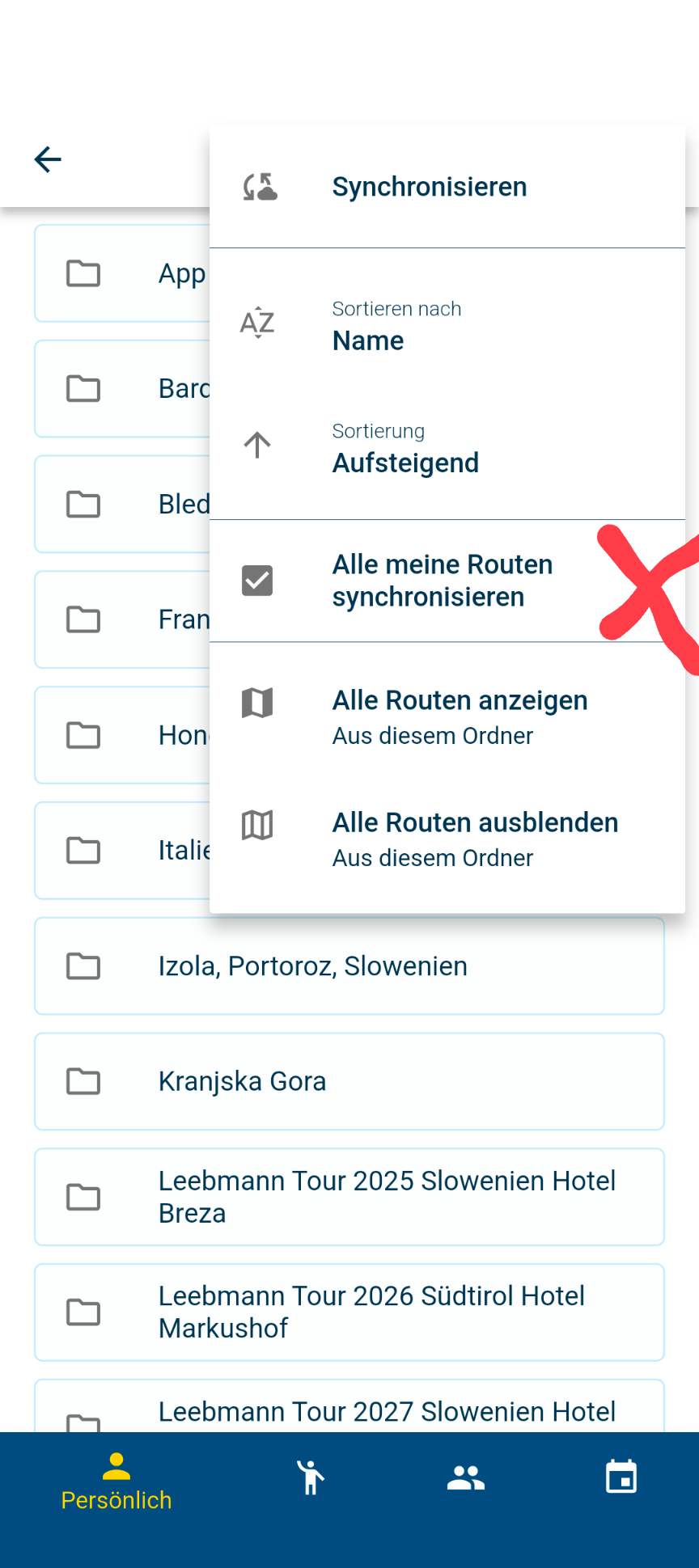 It’s enough to just sync all your routes.
Downloading offline maps is a completely different process.
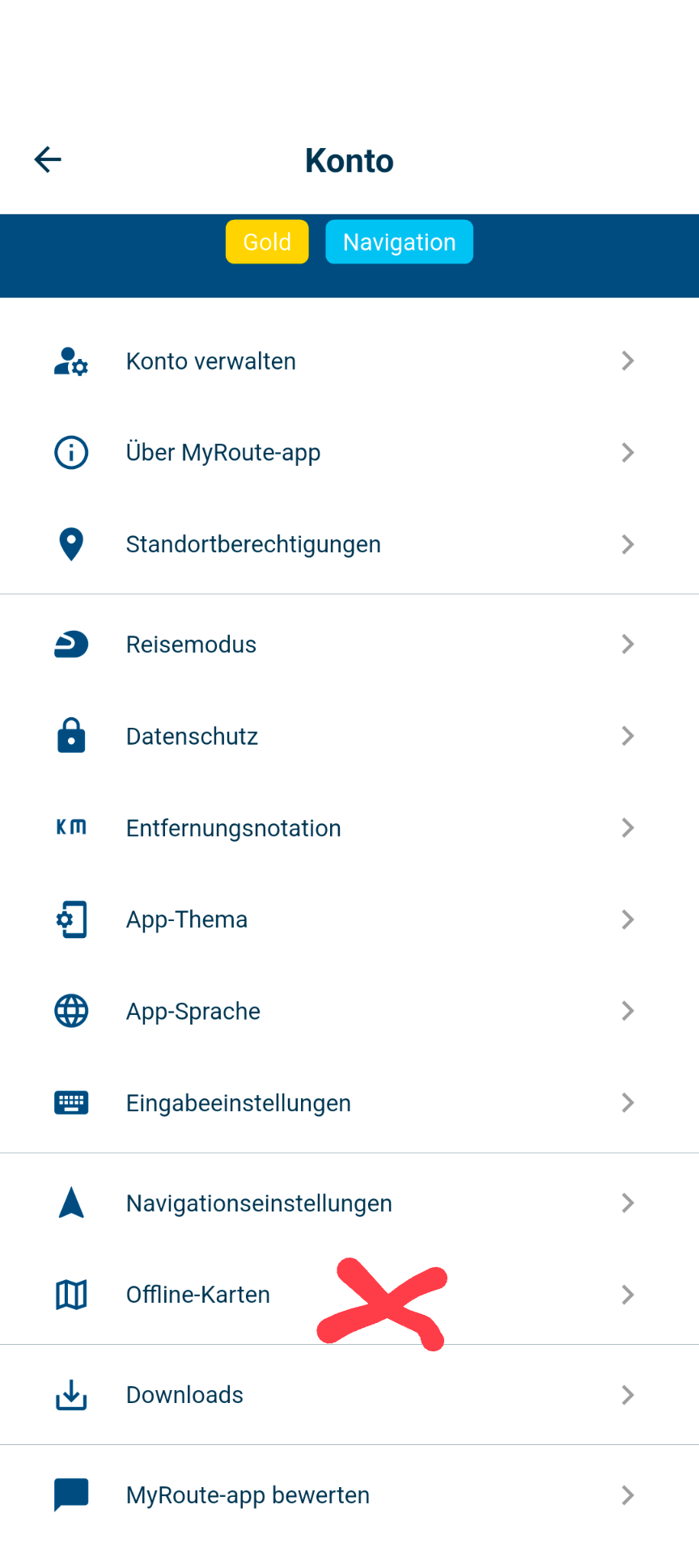
Go to your avatar and select “Offline Maps”; there, you can choose which countries you want to download for offline navigation.
-
Also the incessant danger alerts, which I couldn't work out how to switch off, were rather annoying.
What exactly were the messages you received?
Could you be a little more specific....
I think it was a danger warning, e.g. something like dangerous road segment and accompanied by a red banner on the lower part of screen plus a loud bell like noise
-
I think it was a danger warning, e.g. something like dangerous road segment and accompanied by a red banner on the lower part of screen plus a loud bell like noise
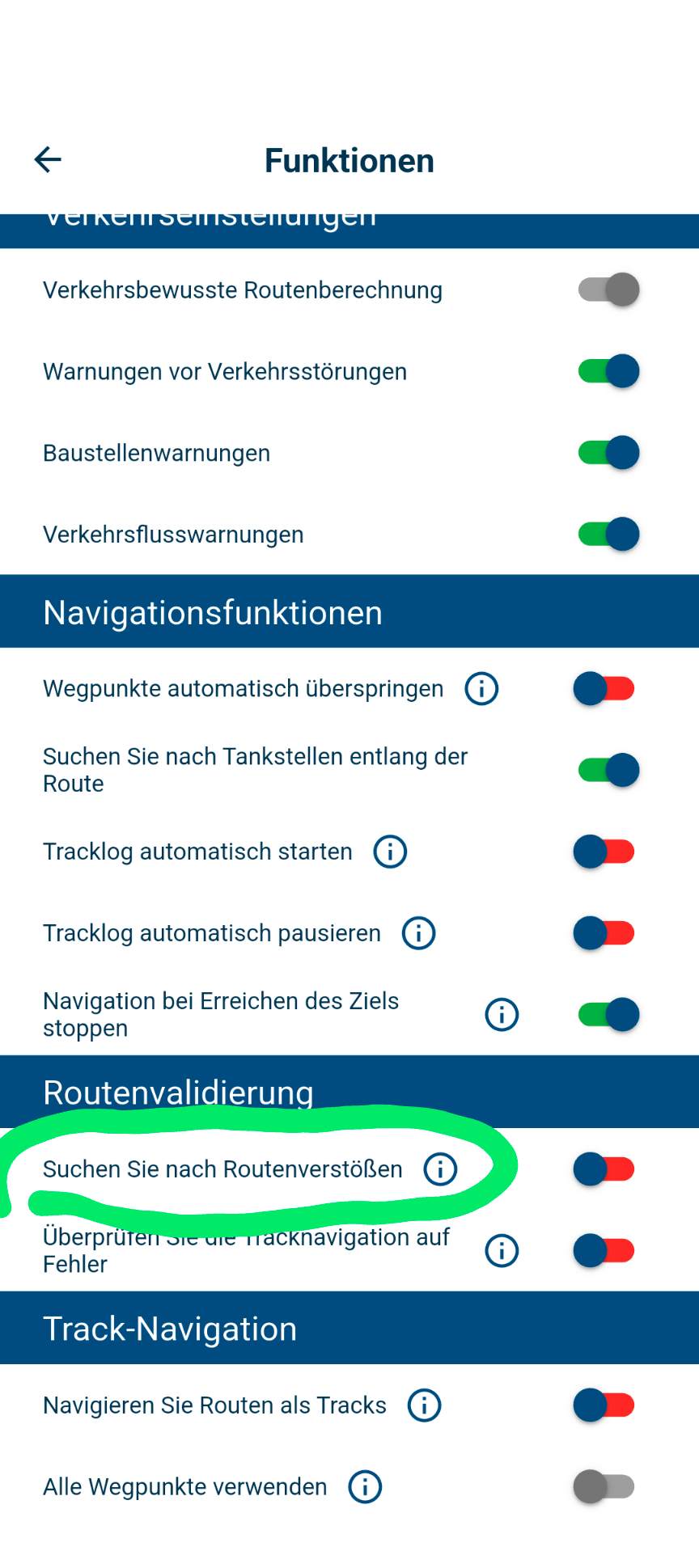
@Alan-Purcell-4 The app probably warned you that you were on a road that’s closed for the season.
You can disable route violation alerts in the navigation settings.
There’s a great support page with lots of useful tips and instructions
https://www.myrouteapp.com/support
Hello! It looks like you're interested in this conversation, but you don't have an account yet.
Getting fed up of having to scroll through the same posts each visit? When you register for an account, you'll always come back to exactly where you were before, and choose to be notified of new replies (either via email, or push notification). You'll also be able to save bookmarks and upvote posts to show your appreciation to other community members.
With your input, this post could be even better 💗
Register Login-
 0620
0620
-
 1833
1833
-
 0578
0578
-
01086
-
 0211
0211
-
0236
-
81555.3k
-
1213