A simplified navigation-only tutorial
-

For a car club looking to try MRA on a scenic drive, I have built a tutorial video for MyRoute-App Navigation Next.
It is focused on the very minimum which new users need to know in order to follow a route designed by others; and it includes how to handle the most common user errors. We couldn't find an existing tutorial which fitted this purpose -- the others include route planning, or go through every option in the app etc -- so I made this myself.
I hope this will be useful for others.
https://www.youtube.com/watch?v=Hrb0c8-_gIY -
Anonymouse referenced this topic on
-
Looks good, all achieved using AI and your script?
@Mzokk Yes. AI mimics my voice patterns (speed, intonation etc). But the hard work is designing what to say!
-

Nice job!
Here is the MRA Route Experts guide to the colors: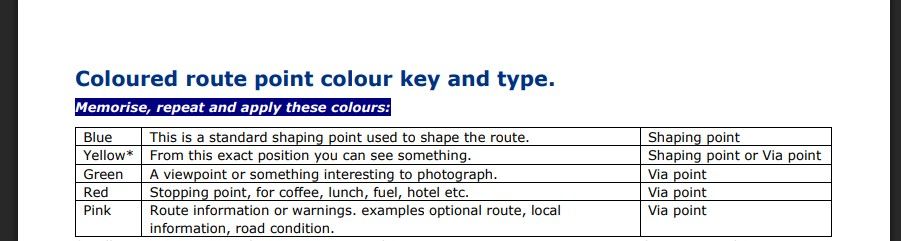
-

Wow, very good and perfect for beginners.
Can I use it for my German Facebook group? The subtitle translates it to German perfectly. -
Sure. It's on "free" YouTube hosting (ie they make money by stuffing ads on the start of my video
 ) so no problems sharing with others.
I subtitled the English manually so I'm glad to hear the German auto translation works well.
-
Nice job!
Here is the MRA Route Experts guide to the colors:
@Lenny-O Yes - Nick showed me the official colour guidance. I simplified the wording a bit in my video as part of making everything easier to understand. I think the colour coding is very useful, although I've noticed that some route authors interpret it in slightly different ways (hence the rules).
And in the colour guide it is a bit strange to allow yellow shaping points -- either they are via points (which might have descriptions) or shaping points (which are irrelevant to the driver as long as he/she follow the route).
One complexity is that different terminology seems to turn up in documentation and in the apps, for "way", "via" and "shaping" point. I tried to choose the best options while keeping it very simple.
-
@Lenny-O Yes - Nick showed me the official colour guidance. I simplified the wording a bit in my video as part of making everything easier to understand. I think the colour coding is very useful, although I've noticed that some route authors interpret it in slightly different ways (hence the rules).
And in the colour guide it is a bit strange to allow yellow shaping points -- either they are via points (which might have descriptions) or shaping points (which are irrelevant to the driver as long as he/she follow the route).
One complexity is that different terminology seems to turn up in documentation and in the apps, for "way", "via" and "shaping" point. I tried to choose the best options while keeping it very simple.
@Anonymouse All good, was just sharing
-
@Mzokk Yes. AI mimics my voice patterns (speed, intonation etc). But the hard work is designing what to say!

@Anonymouse Cracking job.

-

@anonymouse
Hey, that's great
-
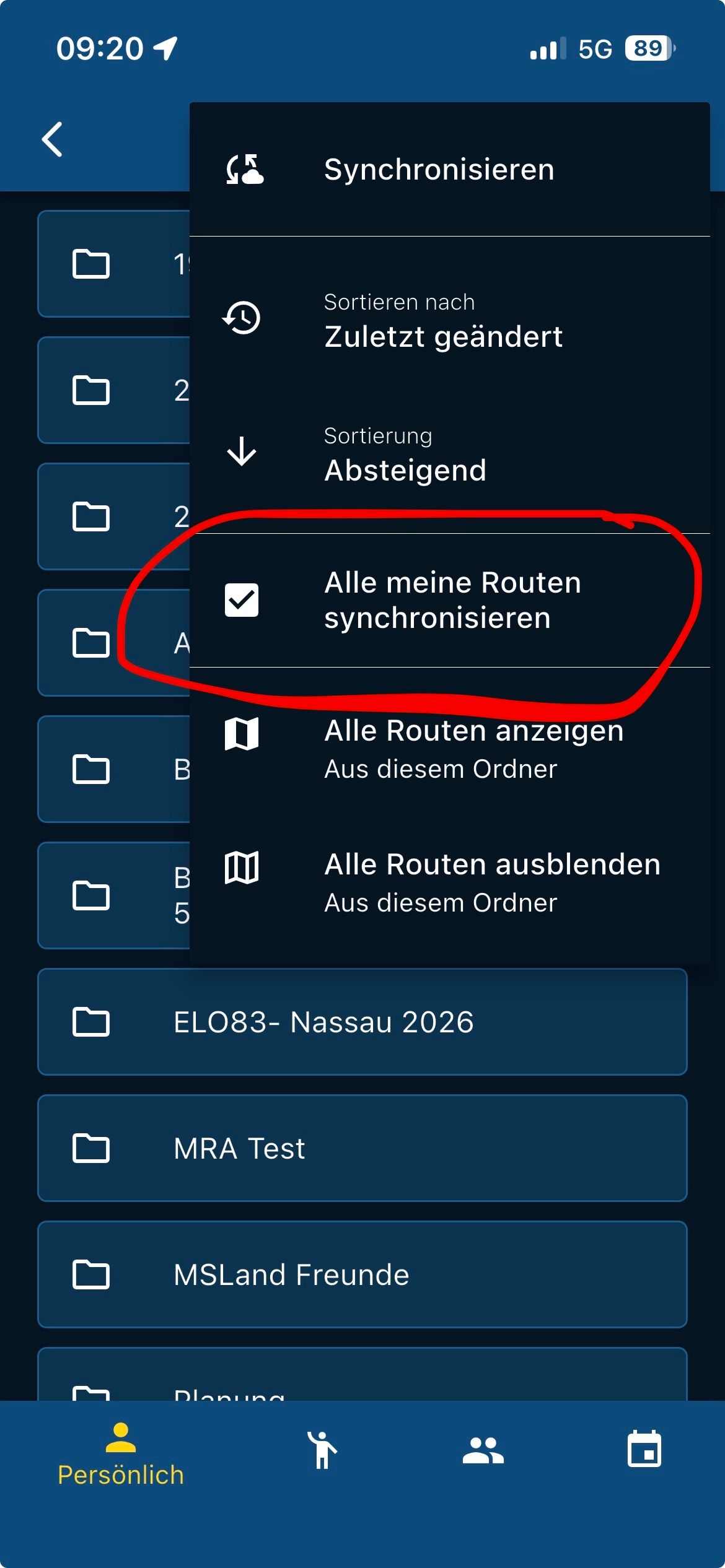
A hint, you don't really need that with the download if you always simply synchronize all routes...

VG Hubert
Beta Test "Next App" dazu die Hardware .
iPad 9. Gen iOS 27.2.0/ iPhone 16e iOS 27.2.0/ Navi iPhone Xr iOS 18.7.11 / PC mit MS Win11 /❗️MyRoute-App im Cradel und Remotek-One❗️ Info zu MRA & Remotek One -
A hint, you don't really need that with the download if you always simply synchronize all routes...

@Hubert-Thoring Routes sent to you in an email or via social media can be navigated offline without syncing or downloading. If you navigate the route it automatically goes into the download folder. You can only sync routes that are in your route library.
-
A hint, you don't really need that with the download if you always simply synchronize all routes...
@Hubert-Thoring yes but does that work if they only have a subscription to Navigation Next?
-
@Hubert-Thoring yes but does that work if they only have a subscription to Navigation Next?
@Hubert-Thoring yes but does that work if they only have a subscription to Navigation Next?
Then probably not then you should use the download option
!!️ -

That looks great! Thanks.
-
@Mzokk Yes. AI mimics my voice patterns (speed, intonation etc). But the hard work is designing what to say!

@Anonymouse Very impressive! If I may ask: What tool exactly did you use to archieve the video (the visuals)? How did the AI produce a correct looking MRA user interface - are these parts screen grab from the phone?
BMW F 450 GS: AA with Carpuride W702BS Pro (via Samsung S22 Ultra)
VOGE DS 900 X: AA with Carpuride W702 (via Samsung S22 Ultra)
Skoda Citigo: AA with Carpuride W903 (via Samsung S22 Ultra) -
@Anonymouse Very impressive! If I may ask: What tool exactly did you use to archieve the video (the visuals)? How did the AI produce a correct looking MRA user interface - are these parts screen grab from the phone?
What tool exactly did you use
Still image of presenter generated in ChatGPT. Animated with Heygen using prompts built by ChatGPT and my voice for intonation and speed. Assembled by hand in Adobe Premiere Pro as I just couldn't get enough control in any of the (many) demo-building tools I looked at. The screen grabs are recorded on a phone or desktop and imported into Premiere Pro. I used an iPhone template from videowizard.io to surround it. Background music from Adobe Premiere Pro because I didn't have the time to generate my own.
-
What tool exactly did you use
Still image of presenter generated in ChatGPT. Animated with Heygen using prompts built by ChatGPT and my voice for intonation and speed. Assembled by hand in Adobe Premiere Pro as I just couldn't get enough control in any of the (many) demo-building tools I looked at. The screen grabs are recorded on a phone or desktop and imported into Premiere Pro. I used an iPhone template from videowizard.io to surround it. Background music from Adobe Premiere Pro because I didn't have the time to generate my own.
@Anonymouse Thanks for your detailed response. Sounds like you know what you are doing, and the results certainly demonstrate it. Well done!
Hello! It looks like you're interested in this conversation, but you don't have an account yet.
Getting fed up of having to scroll through the same posts each visit? When you register for an account, you'll always come back to exactly where you were before, and choose to be notified of new replies (either via email, or push notification). You'll also be able to save bookmarks and upvote posts to show your appreciation to other community members.
With your input, this post could be even better 💗
Register Login-
010182
-
 2872
2872
-
 0663
0663
-
 012266
-
 015421
-
0444
-
0633
-
018990