How to switch to 3D mode on CarPlay?
-

I am using a CarpodGo Mini as my main CarPlay device in my car. I would like to test MRA with CarPlay in my car. Unfortunately, the map is display "top-down" in 2D. I would like to switch into 3D mode.
Currently, CarpodGo Mini does not support multi touch (software issue, not hardware), so I am not able to change the view angle for 3D mode with two fingers like on my iPhone directly.
Is there any other way to do this for CarPlay?
-

Hello @conikost .
Press the Compass arrow on your phone to switch between the available views.
CP will folow the setting.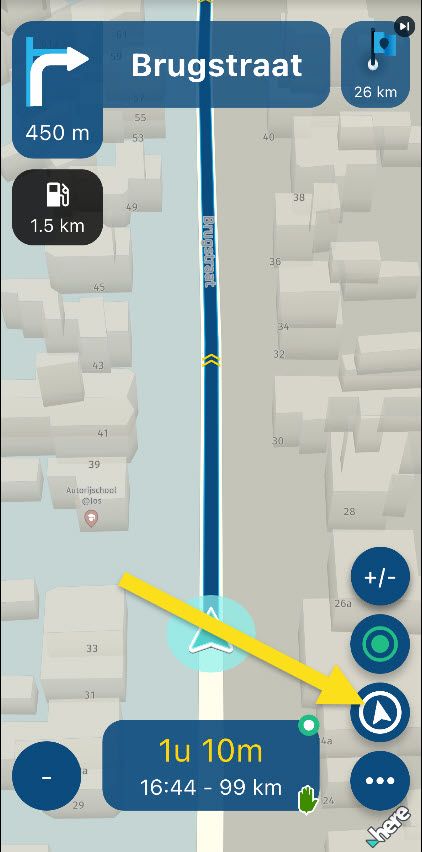
-
can you just tap the screen and than open the "settings"?
can you just tap the screen and than open the "settings"?
Yes. Setting via Car Play MyRoute-app > Settings > Cameramode > Automatic seems to mace this as 3D.
But: When I do press minus or plus for zoom, it always falls back to 2D and does not go back to 3D. I need to go again into settings and choose automatic. This can't be the only way? This differes from iPhone, since there, MRA does stay on 3D when using zoom.

Hello! It looks like you're interested in this conversation, but you don't have an account yet.
Getting fed up of having to scroll through the same posts each visit? When you register for an account, you'll always come back to exactly where you were before, and choose to be notified of new replies (either via email, or push notification). You'll also be able to save bookmarks and upvote posts to show your appreciation to other community members.
With your input, this post could be even better 💗
Register Login-
 024682
-
 012215
-
 346
346
-
 0475
0475
-
013207
-
19209
-
0253
-
 0122.4k