Skip to content
  • Categories
  • Recent
  • Popular
  • Support
  • MyRoute-app
Collapse
Brand Logo

MRA Community Forum

  1. Home
  2. The MyRoute-app
  3. [App] Android Auto & CarPlay
  4. How to switch to 3D mode on CarPlay?

How to switch to 3D mode on CarPlay?

Scheduled Pinned Locked Moved [App] Android Auto & CarPlay
5 Posts 3 Posters 231 Views 1 Watching
  • Oldest to Newest
  • Newest to Oldest
  • Most Votes
Reply
  • Reply as topic
Log in to reply
This topic has been deleted. Only users with topic management privileges can see it.
  • ConiKostundefined Offline
    ConiKostundefined Offline
    ConiKost
    wrote last edited by ConiKost
    #1

    I am using a CarpodGo Mini as my main CarPlay device in my car. I would like to test MRA with CarPlay in my car. Unfortunately, the map is display "top-down" in 2D. I would like to switch into 3D mode.

    Currently, CarpodGo Mini does not support multi touch (software issue, not hardware), so I am not able to change the view angle for 3D mode with two fingers like on my iPhone directly.

    Is there any other way to do this for CarPlay?

    Shiny!

    1 Reply Last reply
    0
    • Albert van den Elsenundefined Offline
      Albert van den Elsenundefined Offline
      Albert van den Elsen
      RouteXpert
      wrote last edited by
      #2

      Hello @conikost .
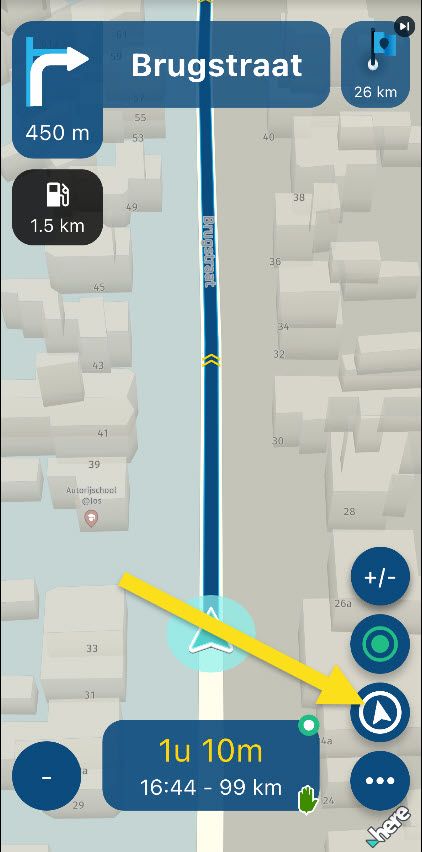
      Press the Compass arrow on your phone to switch between the available views.
      CP will folow the setting.
      2026-06-28_15-35-25.jpg

      iPhone 15,
      Carpuride W702 Pro
      Sena 20S EVO headset
      Harley Davidson Road King M8

      1 Reply Last reply
      0
      • ConiKostundefined Offline
        ConiKostundefined Offline
        ConiKost
        wrote last edited by
        #3

        This doesn't work for me. Pressing the compass arrow on iPhone does change the view on iPhone but not on the CarPlay display.

        Shiny!

        1 Reply Last reply
        0
        • Ewout Dundefined Offline
          Ewout Dundefined Offline
          Ewout D
          wrote last edited by
          #4

          can you just tap the screen and than open the "settings"?

          ConiKostundefined 1 Reply Last reply
          0
          • Ewout Dundefined Ewout D

            can you just tap the screen and than open the "settings"?

            ConiKostundefined Offline
            ConiKostundefined Offline
            ConiKost
            wrote last edited by
            #5

            can you just tap the screen and than open the "settings"?

            Yes. Setting via Car Play MyRoute-app > Settings > Cameramode > Automatic seems to mace this as 3D.

            But: When I do press minus or plus for zoom, it always falls back to 2D and does not go back to 3D. I need to go again into settings and choose automatic. This can't be the only way? This differes from iPhone, since there, MRA does stay on 3D when using zoom.

            Shiny!

            1 Reply Last reply
            0

            Hello! It looks like you're interested in this conversation, but you don't have an account yet.

            Getting fed up of having to scroll through the same posts each visit? When you register for an account, you'll always come back to exactly where you were before, and choose to be notified of new replies (either via email, or push notification). You'll also be able to save bookmarks and upvote posts to show your appreciation to other community members.

            With your input, this post could be even better 💗

            Register Login
            Reply
            • Reply as topic
            Log in to reply
            • Oldest to Newest
            • Newest to Oldest
            • Most Votes


            ACTIVE USERS
            Albert van den Elsenundefined
            Albert van den Elsen
            Ewout Dundefined
            Ewout D
            ConiKostundefined
            ConiKost
            POPULAR TOPICS
            • Reading out the name of the waypoint and associated notes
              Peter Zehentreiterundefined
              Peter Zehentreiter
              0
              34
              794

            • Restart route: option to navigatie to nearest point on route
              Gerard Wullinkundefined
              Gerard Wullink
              0
              15
              235

            • MRA 5.2.1 - 486 CarPlay Display Issue When route started on iPhone
              GT JWRundefined
              GT JWR
              0
              5
              47

            • Updated beta! 5.2.1 (486)
              white.mouseundefined
              white.mouse
              7
              23
              224

            • Unknown symbol
              Leike Lodiersundefined
              Leike Lodiers
              0
              4
              110

            • Hoogte meters in Navigatie
              Corjan Meijerinkundefined
              Corjan Meijerink
              0
              2
              48

            • MRA en Garmin GPSmap 60CSx
              Con Hennekensundefined
              Con Hennekens
              0
              2
              80

            • Navigation Next versus Routeplanner
              Ron 33undefined
              Ron 33
              0
              4
              155

            MY GROUPS
            • Login

            • Login or register to search.
            • First post
              Last post
            0
            • Categories
            • Recent
            • Popular
            • Support
            • MyRoute-app