Starting navigation in the middle o the programmed Route.
-
Just returned from a 5 days trip using only MRA Navigation app. And I am already a fan.
One question: is it already possibile to start navigating in the middle of the route instead from the beginning?
I haven't found the way.I had two real problem to solve:
-
I accidentally interrupted the navigation in the middle of the route. So when I started the navigation again I did not find the way to skip the waypoints already visited .
-
Due to the closure of a street I had to skip several waypoint in the middle of the running navigation.
So, in the both of the cases, i had to park the motorbike, enter in the edit mode and modify the route.
There is a diffent and quicker way to do that?
Thanks
Paolo -
-
Just returned from a 5 days trip using only MRA Navigation app. And I am already a fan.
One question: is it already possibile to start navigating in the middle of the route instead from the beginning?
I haven't found the way.I had two real problem to solve:
-
I accidentally interrupted the navigation in the middle of the route. So when I started the navigation again I did not find the way to skip the waypoints already visited .
-
Due to the closure of a street I had to skip several waypoint in the middle of the running navigation.
So, in the both of the cases, i had to park the motorbike, enter in the edit mode and modify the route.
There is a diffent and quicker way to do that?
Thanks
Paolo@Montorsi-Paolo-0 Great to read that you are a fan. If you long press on any waypoint, all previous waypoints will be skipped so that navigation continues from the chosen waypoint. You can also use this method if you accidentally skip too many. Example, if you long pressed waypoint 7 but you are at waypoint 5, long press waypoint 5 to restore to your chosen waypoint.
-
-
@montorsi-paolo-0 You also have the option to configure the navigation app so that, after a pause, it starts at the nearest waypoint relative to your starting point.
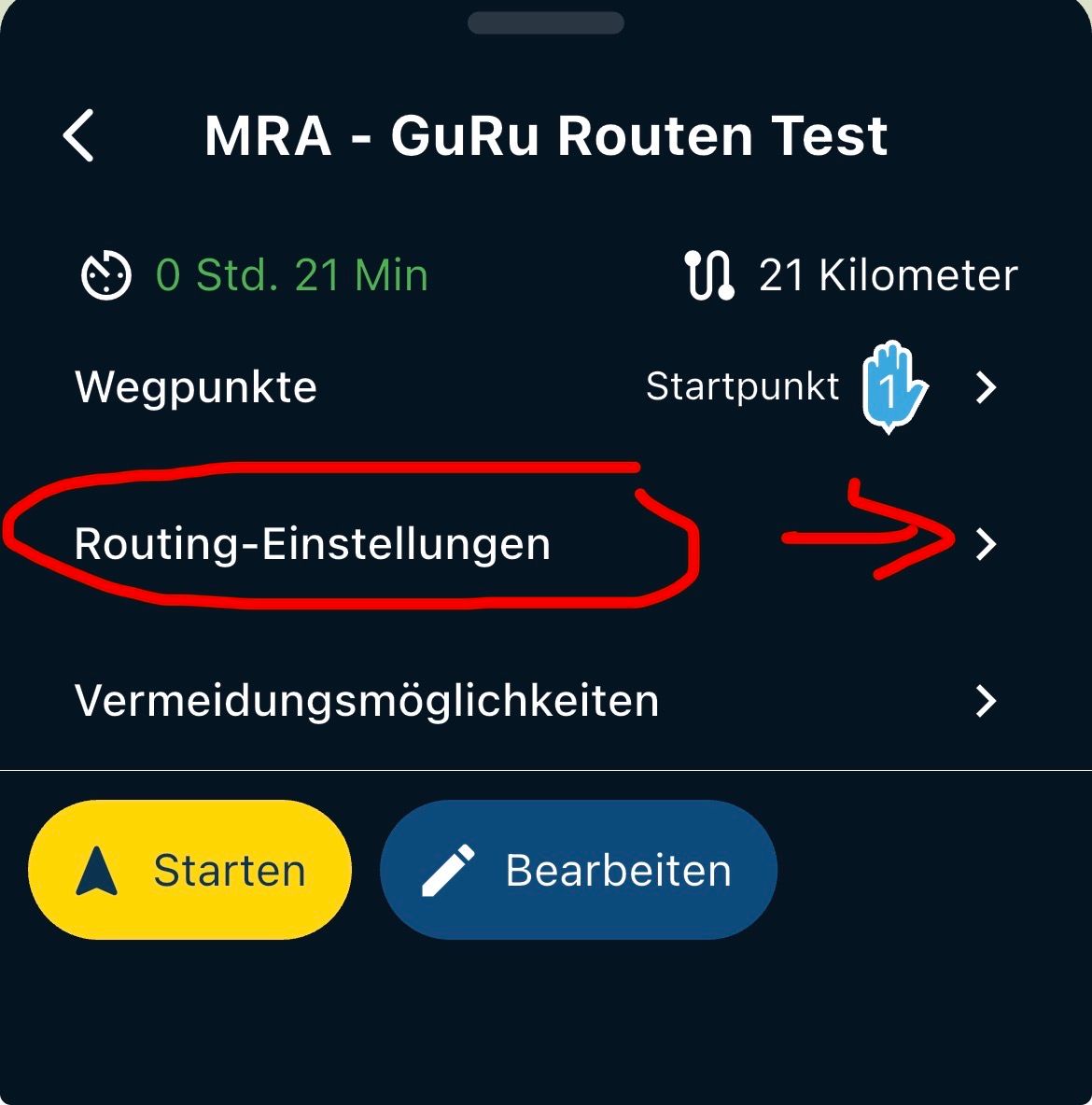
Select the route and tap "Navigate," then choose "Routing Settings" from the menu and enable the "Start at nearest waypoint" option.
Good luck with that!
What Nick wrote works too, of course—and it’s always visible on the map display at any time. ...
VG Hubert
Beta Test "Next App" dazu die Hardware .
iPad 9. Gen iOS 26.5 / iPhone 16e iOS 26.5/ Navi iPhone Xr iOS 18.7.9 / PC mit MS Win11 /❗️MyRoute-App im Cradel und Remotek-One❗️ Info zu MRA & Remotek One -
@montorsi-paolo-0 You also have the option to configure the navigation app so that, after a pause, it starts at the nearest waypoint relative to your starting point.
Select the route and tap "Navigate," then choose "Routing Settings" from the menu and enable the "Start at nearest waypoint" option.
Good luck with that!
What Nick wrote works too, of course—and it’s always visible on the map display at any time. ...
So what happens if the nearest waypoint is already behind you ??
-
you are probably navigating the route as track. the current behaviour in that scenario is indeed such that the navigation always starts at the first point.
but you can click on a waypoint on the map or in the waypoint list and make that point the first target.
if you navigate a route as route you can select the target waypoint before you start. by default the nearest is selected. -
Personally I never navigate a route as a track, always a route as a route.
So in my case will the app try sending me back to where I've already been??
-
Personally I never navigate a route as a track, always a route as a route.
So in my case will the app try sending me back to where I've already been??
@richard-3v yes that can happen
-
@herman-veldhuizen
OK, thanks for the reply



Hello! It looks like you're interested in this conversation, but you don't have an account yet.
Getting fed up of having to scroll through the same posts each visit? When you register for an account, you'll always come back to exactly where you were before, and choose to be notified of new replies (either via email, or push notification). You'll also be able to save bookmarks and upvote posts to show your appreciation to other community members.
With your input, this post could be even better 💗
Register Login-
0881
-
21290
-
08170
-
1663.1k
-
0473
-
028751
-
011110
-
0216