Best way to set my Garmin Zumo XT to play well with the MRA?
-

Hello all, I'm looking for advice for setting up my Garmin Zumo XT. I plan my routes with the desktop app and then I transfer the gpx file to my garmin. For those that do the same, can you advise me on the settings for my garmin so it will not change my route that was sent from the MRA app. The last big trip I took my garmin would try to change the route and not match what was on my phone with the MRA. Has anyone else had this problem. I like to run them both as it seems easier to search things on my zumo.
Thanks for any help you can give me.
MikeMike W
2013 Honda Goldwing
Bushtec Trailer
Garmin Zumo XT
Nebraska
youTube channel https://www.youtube.com/@mrjawmaster5854 -

Try this Link. It has most of the information you're after.
I used my Garmin Zumo XT on my Honda Africa Twin for navigation until spring of 2025 when MyRoute app became reliable enough for me to use it for navigation via the Honda's Android Auto Screen. I use old Zumo 340 and 390 for navigation on my 24 year old R1150GS and I much prefer these for navigation as with Basecamp they are WYSIWYG as long as the settings on the unit and basecamp match. I'm a 22 year user of Garmin motorcycle navigators but between the Zumo 340 and 390 that I have and the XT they changed the routing algorithm so that "Faster Time" between waypoints now means faster roads.....so the unit will always try to take you via motorways and dual carriageways between waypoints if possible.
I only use my Zumo XT for tracks and proximity alerted POI's which MRA does not do yet.
-
Just another point. Garmin tracks on older zumo's displayed as a thin line on top of the magenta navigation line. On the XT the track is displayed BELOW the magenta line and is the same width so you can only see it if the route line deviates from the track. To fix this you can do as I've done and make a custom theme that makes the track line thicker so that you can see it below the route line. And for the sake of your sanity do not connect your XT to "Garmin Explore" and if you have follow the instructions on the Garmin Zumo Forums to disconnect it!
-

The Garmin on "fastest connection" between the WP and SP.
Export the MRA Route as format 1.1 GPX and load it in the Garmin ...
When planning as much as possible SP put so that the path is clearly described,...
Then that should fit, the Garmin is limited with fixed WP as far as I know.
VG

-

The best way, I found out is to make the route in MRA and export it as GPX 1.1 (route, track, poi).
Then use the "good" old Basecamp and import this file. you will see now in Basecamp the track and a route existing of straight lines.
Now open the route and let Basecamp recalculate. You'll find out that the route now follows more or less the track which is also visible in Basecamp .
Manualy put in extra waypoint to make the route follow the track exact.
There is no standard setting to avoid this problem.
After that you can connect the GPS to your computer and in Basecamp, with a left click on the map existing the track and route you get an option to send it direct to the GPS.
This is the most solit way. -
Nope you don't need to put the additional unnecessary step of exporting to Basecamp. Just create the route with plenty of shaping (teardrop) points between Via(hand) points and download the file as gpx1.1 and send it via your phone using Garmin Drive. You can also use GPX 1.2 but if you do switch off auto recalculate......or the Garmin will take you straight to the end.
-

That is the issue with every Route planner, sending the route to another navigation app/device. Each has it's own algorithm. So it's nearly impossible, to setup on each end the same settings. The only way is, to enter "enough" route points during planning, to force navigation apps/devices to use exactly that roads you have planned.
But as @hubert-thoring said: Garmin devices has limited capacity for work with via points (route points). But you can work in MRA with shaping points, which are also route points (with some differences in the effect). -
Garmin has also an APP : TREAD for the XT2/3, or do you have XT1 ?
-
The best way, I found out is to make the route in MRA and export it as GPX 1.1 (route, track, poi).
Then use the "good" old Basecamp and import this file. you will see now in Basecamp the track and a route existing of straight lines.
Now open the route and let Basecamp recalculate. You'll find out that the route now follows more or less the track which is also visible in Basecamp .
Manualy put in extra waypoint to make the route follow the track exact.
There is no standard setting to avoid this problem.
After that you can connect the GPS to your computer and in Basecamp, with a left click on the map existing the track and route you get an option to send it direct to the GPS.
This is the most solit way.
@white.mouse
This is exactly the process I follow on my Garmin Zumo 595. It's a little tedious but does guarantee that the route I meticulously planned in MRA route planner is followed on the 595.
-
Hello all, I'm looking for advice for setting up my Garmin Zumo XT. I plan my routes with the desktop app and then I transfer the gpx file to my garmin. For those that do the same, can you advise me on the settings for my garmin so it will not change my route that was sent from the MRA app. The last big trip I took my garmin would try to change the route and not match what was on my phone with the MRA. Has anyone else had this problem. I like to run them both as it seems easier to search things on my zumo.
Thanks for any help you can give me.
Mike
@Mike-wiruth as @guzzist suggests use lots of points to constrain the route to the path that you want to take
on the web planner you definitely want to be using "Compare" tool to ensure that OpenStreetMap & TomTom also follow the same path that Here is calculating in the MRA web planner
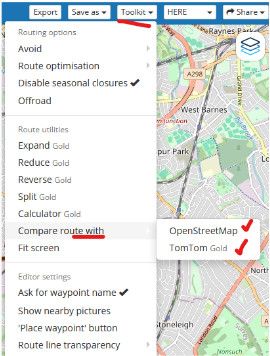
if TomTom or OpenStreetMap can find an alternative path you can bet that your XT will also find a different path to what you had plannedthe XT is using a different path calculator profile to MRA even though they are both using Here maps
so any calculation done by the XT is possibly going to be different unless you force (constrain) it to the same path with as many points as it takes
& again as @guzzist says you have to make sure the settings you have on the MRA planner match the settings on your XT as closely as you cana rough guide that paths are closely matching is to make sure the mileage for the path in MRA is similar to the path on the XT
it is not a perfect check but if the variation is small, chances are more likely the paths are more similarit is a lot of work trying to coral an XT to stick on a path you want to go & ultimately the XT will defeat you
you will be taken off your chosen path, I know from bitter experienceyes the search & poi capabilities on a Garmin are far better than MRA, especially when it comes to things like finding petrol
but I would rather my navigation device actually navigates exactly the path I want to go (MRA navigation does this) & sacrifice the nice feature of being able to find restaurants or hotels etc
after all we do have google for that sort of thing& as @mzokk you dont need to pass the mra file through basecamp, that fixes nothing
-
Garmin has also an APP : TREAD for the XT2/3, or do you have XT1 ?
Garmin has also an APP : TREAD for the XT2/3, or do you have XT1 ?
Folks, the issue is not the transmission method to the Garmin XT, nor the gpx file format! O.k. the file format has other issues in the Garmin device, but this is not the point in this discussion.
After transmit a route via gpx file to the Navi Device, it is starting the calculation, how to come from WP1 to the next WP. Yes, you can deny recalculation - but the first interpretation/calculation is necessary.By the way: in many forum discussion (also in Garmin forum) users suggests not to use the bloody TREAD app...
And @mike-wiruth asked only why the planned route differs after transmission into the navi.
-
That is simply the only reason I still use Basecamp.
In all the time until now the route I check there (and if neccesary modify) has never been different in my XT1 -

Ok, let's hear another opinion

- Plan your route with enough waypoints
- Export the route in 1.2 format
- Transfer the route by cable/connector/wireless with drive/whatever to your XT and place the route in the GPX map
- Import the route
- Make the track visible on the map and make it wider
- Set recalculation off
- Start the route and enjoy


Hello! It looks like you're interested in this conversation, but you don't have an account yet.
Getting fed up of having to scroll through the same posts each visit? When you register for an account, you'll always come back to exactly where you were before, and choose to be notified of new replies (either via email, or push notification). You'll also be able to save bookmarks and upvote posts to show your appreciation to other community members.
With your input, this post could be even better 💗
Register Login-
 17117
17117
-
 06116
06116
-
0485
-
 0413
0413
-
 06295
06295
-
0316
-
 0210
0210
-
0210