Skip to content
  • Categories
  • Recent
  • Popular
  • Support
  • MyRoute-app
Collapse
Brand Logo

MRA Community Forum

  1. Home
  2. General Discussion
  3. Best way to set my Garmin Zumo XT to play well with the MRA?

Best way to set my Garmin Zumo XT to play well with the MRA?

Scheduled Pinned Locked Moved General Discussion
16 Posts 9 Posters 977 Views 6 Watching
  • Oldest to Newest
  • Newest to Oldest
  • Most Votes
Reply
  • Reply as topic
Log in to reply
This topic has been deleted. Only users with topic management privileges can see it.
  • Hubert Thoringundefined Offline
    Hubert Thoringundefined Offline
    Hubert Thoring
    Valued contributor
    wrote last edited by
    #4

    The Garmin on "fastest connection" between the WP and SP.

    Export the MRA Route as format 1.1 GPX and load it in the Garmin ...

    When planning as much as possible SP put so that the path is clearly described,...

    Then that should fit, the Garmin is limited with fixed WP as far as I know.

    VG 👋

    VG Hubert
    Beta Test "Next App" dazu die Hardware .
    iPad 9. Gen iOS 26.5 / iPhone 16e iOS 26.5/ Navi iPhone Xr iOS 18.7.9 / PC mit MS Win11 /❗️MyRoute-App im Cradel und Remotek-One❗️ Info zu MRA & Remotek One

    1 Reply Last reply
    0
    • AWDC LAOundefined Offline
      AWDC LAOundefined Offline
      AWDC LAO
      wrote last edited by
      #5

      There are two versions of GPS v1.1; v1.0 is older but more reliable.
      MARA has become so good that for on-road use, your smartphone is all you need.
      I use the XT2 or XT3 for off-road use and for following a track.

      R1300GS Adv BlackPanther BMW, Apple MacBook Pro M4, Carpe Iter V4c, ervaring met TTR550, ZumoXT2 & iPhone 12 pro max.

      1 Reply Last reply
      1
      • white.mouseundefined Offline
        white.mouseundefined Offline
        white.mouse
        Valued contributor
        wrote last edited by
        #6

        The best way, I found out is to make the route in MRA and export it as GPX 1.1 (route, track, poi).
        Then use the "good" old Basecamp and import this file. you will see now in Basecamp the track and a route existing of straight lines.
        Now open the route and let Basecamp recalculate. You'll find out that the route now follows more or less the track which is also visible in Basecamp .
        Manualy put in extra waypoint to make the route follow the track exact.
        There is no standard setting to avoid this problem.
        After that you can connect the GPS to your computer and in Basecamp, with a left click on the map existing the track and route you get an option to send it direct to the GPS.
        This is the most solit way.

        met een R1250RT met TFT en BMW Connected Ride App (die dus nog steeds niet voldoet!) ;
        de Garmin Zumo XT en M.R.A. in combinatie met de Carpuride W702 (voor Android op de Motor!)

        Stevedo 6 0undefined 1 Reply Last reply
        0
        • Mzokkundefined Offline
          Mzokkundefined Offline
          Mzokk
          wrote last edited by
          #7

          Nope you don't need to put the additional unnecessary step of exporting to Basecamp. Just create the route with plenty of shaping (teardrop) points between Via(hand) points and download the file as gpx1.1 and send it via your phone using Garmin Drive. You can also use GPX 1.2 but if you do switch off auto recalculate......or the Garmin will take you straight to the end.

          1 Reply Last reply
          0
          • Guzzistundefined Offline
            Guzzistundefined Offline
            Guzzist
            Valued contributor
            wrote last edited by
            #8

            That is the issue with every Route planner, sending the route to another navigation app/device. Each has it's own algorithm. So it's nearly impossible, to setup on each end the same settings. The only way is, to enter "enough" route points during planning, to force navigation apps/devices to use exactly that roads you have planned.
            But as @hubert-thoring said: Garmin devices has limited capacity for work with via points (route points). But you can work in MRA with shaping points, which are also route points (with some differences in the effect).

            Nothing is impossible ;-)
            In past: GARMIN Zumo 210->GARMIN Zumo 395->GARMIN XT=> now: DMD T865-X + MyRoute-App, LocusMaps, OsmAnd.
            In past: GARMIN MapSource ->GARMIN BaseCamp->Tyre->Kurviger->Calimoto=> now: MRA-Routplanner.

            1 Reply Last reply
            1
            • Mzokkundefined Offline
              Mzokkundefined Offline
              Mzokk
              wrote last edited by
              #9

              The Zumo XT can handle 30 via (stop points) and 125 shaping points between each via point. So plenty for most purposes. Tracks cancelled have 10,000 points.

              1 Reply Last reply
              1
              • AWDC LAOundefined Offline
                AWDC LAOundefined Offline
                AWDC LAO
                wrote last edited by AWDC LAO
                #10

                Garmin has also an APP : TREAD for the XT2/3, or do you have XT1 ?

                R1300GS Adv BlackPanther BMW, Apple MacBook Pro M4, Carpe Iter V4c, ervaring met TTR550, ZumoXT2 & iPhone 12 pro max.

                white.mouseundefined Guzzistundefined 2 Replies Last reply
                0
                • AWDC LAOundefined AWDC LAO

                  Garmin has also an APP : TREAD for the XT2/3, or do you have XT1 ?

                  white.mouseundefined Offline
                  white.mouseundefined Offline
                  white.mouse
                  Valued contributor
                  wrote last edited by
                  #11

                  @AWDC-LAO said:

                  Garmin has also an APP : TREAD for the XT2/3, or do you have XT1 ?

                  I haven't heard much good about it. Especially when it comes to importing routes

                  met een R1250RT met TFT en BMW Connected Ride App (die dus nog steeds niet voldoet!) ;
                  de Garmin Zumo XT en M.R.A. in combinatie met de Carpuride W702 (voor Android op de Motor!)

                  1 Reply Last reply
                  0
                  • white.mouseundefined white.mouse

                    The best way, I found out is to make the route in MRA and export it as GPX 1.1 (route, track, poi).
                    Then use the "good" old Basecamp and import this file. you will see now in Basecamp the track and a route existing of straight lines.
                    Now open the route and let Basecamp recalculate. You'll find out that the route now follows more or less the track which is also visible in Basecamp .
                    Manualy put in extra waypoint to make the route follow the track exact.
                    There is no standard setting to avoid this problem.
                    After that you can connect the GPS to your computer and in Basecamp, with a left click on the map existing the track and route you get an option to send it direct to the GPS.
                    This is the most solit way.

                    Stevedo 6 0undefined Offline
                    Stevedo 6 0undefined Offline
                    Stevedo 6 0
                    wrote last edited by
                    #12

                    @white.mouse

                    This is exactly the process I follow on my Garmin Zumo 595. It's a little tedious but does guarantee that the route I meticulously planned in MRA route planner is followed on the 595.

                    1 Reply Last reply
                    0
                    • Mike wiruthundefined Mike wiruth

                      Hello all, I'm looking for advice for setting up my Garmin Zumo XT. I plan my routes with the desktop app and then I transfer the gpx file to my garmin. For those that do the same, can you advise me on the settings for my garmin so it will not change my route that was sent from the MRA app. The last big trip I took my garmin would try to change the route and not match what was on my phone with the MRA. Has anyone else had this problem. I like to run them both as it seems easier to search things on my zumo.
                      Thanks for any help you can give me.
                      Mike

                      Brian McGundefined Offline
                      Brian McGundefined Offline
                      Brian McG
                      wrote last edited by Brian McG
                      #13

                      @Mike-wiruth as @guzzist suggests use lots of points to constrain the route to the path that you want to take

                      on the web planner you definitely want to be using "Compare" tool to ensure that OpenStreetMap & TomTom also follow the same path that Here is calculating in the MRA web planner
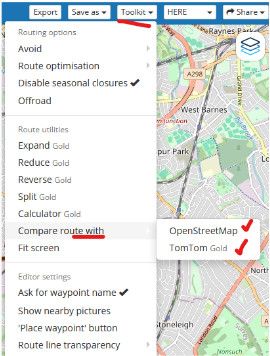
                      2ae9b09c-6f29-4026-9673-e81f0d7b7f67-image.jpeg
                      if TomTom or OpenStreetMap can find an alternative path you can bet that your XT will also find a different path to what you had planned

                      the XT is using a different path calculator profile to MRA even though they are both using Here maps 
                      so any calculation done by the XT is possibly going to be different unless you force (constrain) it to the same path with as many points as it takes
                      & again as @guzzist says you have to make sure the settings you have on the MRA planner match the settings on your XT as closely as you can

                      a rough guide that paths are closely matching is to make sure the mileage for the path in MRA is similar to the path on the XT
                      it is not a perfect check but if the variation is small, chances are more likely the paths are more similar

                      it is a lot of work trying to coral an XT to stick on a path you want to go & ultimately the XT will defeat you
                      you will be taken off your chosen path, I know from bitter experience

                      yes the search & poi capabilities on a Garmin are far better than MRA, especially when it comes to things like finding petrol
                      but I would rather my navigation device actually navigates exactly the path I want to go (MRA navigation does this) & sacrifice the nice feature of being able to find restaurants or hotels etc
                      after all we do have google for that sort of thing

                      & as @mzokk you dont need to pass the mra file through basecamp, that fixes nothing

                      BlackView BV7100, Android 12
                      Navigate "Routes as Tracks" in Offline mode with Offline Maps
                      No Wifi, no internet, no interruptions, works well

                      1 Reply Last reply
                      1
                      • AWDC LAOundefined AWDC LAO

                        Garmin has also an APP : TREAD for the XT2/3, or do you have XT1 ?

                        Guzzistundefined Offline
                        Guzzistundefined Offline
                        Guzzist
                        Valued contributor
                        wrote last edited by
                        #14

                        @AWDC-LAO said:

                        Garmin has also an APP : TREAD for the XT2/3, or do you have XT1 ?

                        Folks, the issue is not the transmission method to the Garmin XT, nor the gpx file format! O.k. the file format has other issues in the Garmin device, but this is not the point in this discussion.
                        After transmit a route via gpx file to the Navi Device, it is starting the calculation, how to come from WP1 to the next WP. Yes, you can deny recalculation - but the first interpretation/calculation is necessary.

                        By the way: in many forum discussion (also in Garmin forum) users suggests not to use the bloody TREAD app...

                        And @mike-wiruth asked only why the planned route differs after transmission into the navi.

                        Nothing is impossible ;-)
                        In past: GARMIN Zumo 210->GARMIN Zumo 395->GARMIN XT=> now: DMD T865-X + MyRoute-App, LocusMaps, OsmAnd.
                        In past: GARMIN MapSource ->GARMIN BaseCamp->Tyre->Kurviger->Calimoto=> now: MRA-Routplanner.

                        1 Reply Last reply
                        0
                        • white.mouseundefined Offline
                          white.mouseundefined Offline
                          white.mouse
                          Valued contributor
                          wrote last edited by
                          #15

                          That is simply the only reason I still use Basecamp.
                          In all the time until now the route I check there (and if neccesary modify) has never been different in my XT1

                          met een R1250RT met TFT en BMW Connected Ride App (die dus nog steeds niet voldoet!) ;
                          de Garmin Zumo XT en M.R.A. in combinatie met de Carpuride W702 (voor Android op de Motor!)

                          1 Reply Last reply
                          0
                          • Travellexxieundefined Offline
                            Travellexxieundefined Offline
                            Travellexxie
                            Valued contributor
                            wrote last edited by
                            #16

                            Ok, let's hear another opinion 😆

                            1. Plan your route with enough waypoints
                            2. Export the route in 1.2 format
                            3. Transfer the route by cable/connector/wireless with drive/whatever to your XT and place the route in the GPX map
                            4. Import the route
                            5. Make the track visible on the map and make it wider
                            6. Set recalculation off
                            7. Start the route and enjoy😁

                            Met andere apps maak je een route, met MRA componeer je een route!

                            Ducati Monster 1200 met Garmin Zümo XT
                            Fiat 124 Spider/Camper Dethleffs met Navigation-App op Samsung Tab Active4 Pro
                            MRA Lifetime Gold

                            1 Reply Last reply
                            0

                            Hello! It looks like you're interested in this conversation, but you don't have an account yet.

                            Getting fed up of having to scroll through the same posts each visit? When you register for an account, you'll always come back to exactly where you were before, and choose to be notified of new replies (either via email, or push notification). You'll also be able to save bookmarks and upvote posts to show your appreciation to other community members.

                            With your input, this post could be even better 💗

                            Register Login
                            Reply
                            • Reply as topic
                            Log in to reply
                            • Oldest to Newest
                            • Newest to Oldest
                            • Most Votes


                            ACTIVE USERS
                            Hubert Thoringundefined
                            Hubert Thoring
                            Brian McGundefined
                            Brian McG
                            Mike wiruthundefined
                            Mike wiruth
                            white.mouseundefined
                            white.mouse
                            Stevedo 6 0undefined
                            Stevedo 6 0
                            Mzokkundefined
                            Mzokk
                            Travellexxieundefined
                            Travellexxie
                            Guzzistundefined
                            Guzzist
                            AWDC LAOundefined
                            AWDC LAO
                            POPULAR TOPICS
                            • Account blocking issue
                              Bouke Entundefined
                              Bouke Ent
                              1
                              19
                              232

                            • Why does route change when connecting to Android Auto?
                              Herman Veldhuizenundefined
                              Herman Veldhuizen
                              0
                              28
                              837

                            • Tracklog fails
                              Edwin_Mundefined
                              Edwin_M
                              0
                              6
                              58

                            • Suggestion for mobile app (battery saver)
                              Brian McGundefined
                              Brian McG
                              3
                              6
                              131

                            • Silverfox C1
                              Con Hennekensundefined
                              Con Hennekens
                              0
                              4
                              70

                            • Displaying POI
                              Con Hennekensundefined
                              Con Hennekens
                              0
                              4
                              90

                            • MRA V5.2, Navigation alters the route
                              RideToPortugal.comundefined
                              RideToPortugal.com
                              1
                              4
                              41

                            • Eerste woord ontbreekt
                              Ed Lauwerens 0undefined
                              Ed Lauwerens 0
                              0
                              3
                              89

                            MY GROUPS
                            • Login

                            • Login or register to search.
                            • First post
                              Last post
                            0
                            • Categories
                            • Recent
                            • Popular
                            • Support
                            • MyRoute-app