
Proposal for an algorithm to guide around unexpected road closures
-

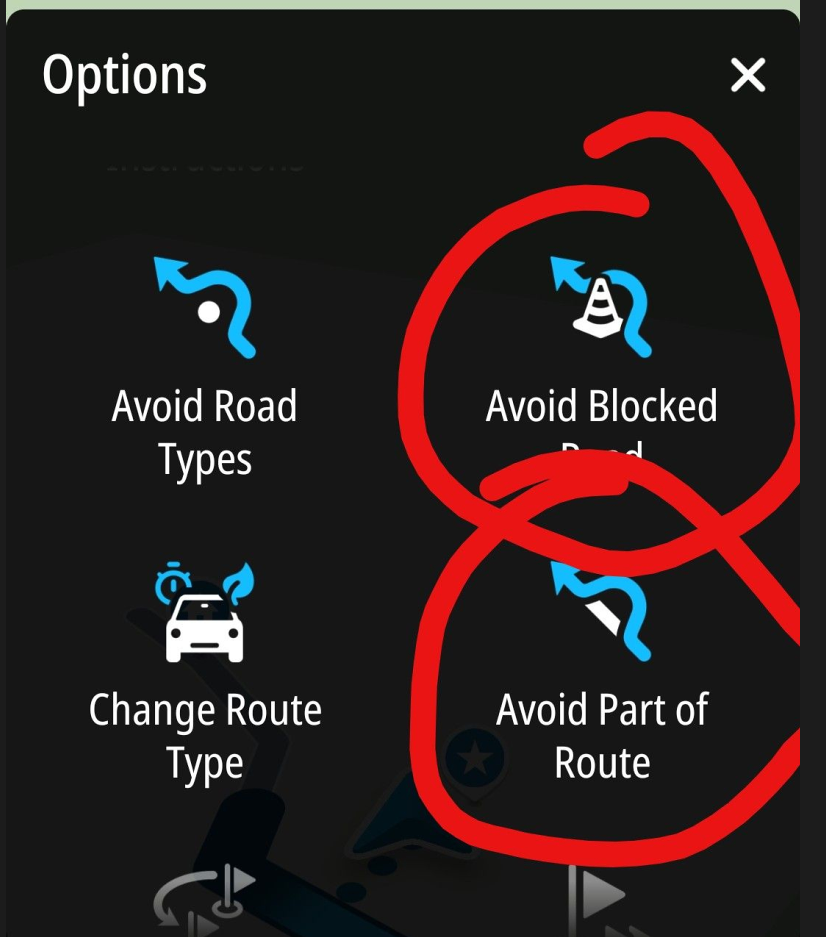
As this is a subject close to my heart, I’d like to highlight once again a scenario that has become all too common, where the ability to block an exit on the planned route would be extremely helpful.
You reach a motorway exit that has only just been closed. So you can only continue straight ahead. After a few kilometres, you are diverted at the next opportunity. At that moment, you don’t know whether the app is (incorrectly) rerouting you back or whether it has found a new way back onto the planned route beyond the closure.
That is why it would be so important to be able to mark the closure with a button so that it is excluded from the routing. (Please bear in mind that you are driving on the motorway and cannot stop to fiddle about on the small screen).
This scenario, as well as sudden closures on country roads due to fallen trees, landslides, etc., is unfortunately becoming increasingly common and is no longer the absolute exception.
There are people with a very good sense of direction who don’t need this – for me, it would be a huge help. -
As this is a subject close to my heart, I’d like to highlight once again a scenario that has become all too common, where the ability to block an exit on the planned route would be extremely helpful.
You reach a motorway exit that has only just been closed. So you can only continue straight ahead. After a few kilometres, you are diverted at the next opportunity. At that moment, you don’t know whether the app is (incorrectly) rerouting you back or whether it has found a new way back onto the planned route beyond the closure.
That is why it would be so important to be able to mark the closure with a button so that it is excluded from the routing. (Please bear in mind that you are driving on the motorway and cannot stop to fiddle about on the small screen).
This scenario, as well as sudden closures on country roads due to fallen trees, landslides, etc., is unfortunately becoming increasingly common and is no longer the absolute exception.
There are people with a very good sense of direction who don’t need this – for me, it would be a huge help.
Perfect. I totally agree.
In my proposal the usage of shaping point A and B would be as follows.
If you press the button "here is beginning of a closure" shaping point A is automatically set.
If you leave the highway and press "here is end of a closure" shaping point B is automatically set.
The algorithm then excludes the road between A and B from the calculation and continues as I described.
Best, Axel
BMW R 1200 RT
Tourenorientiert
MRA lifetime member -
Perfect. I totally agree.
In my proposal the usage of shaping point A and B would be as follows.
If you press the button "here is beginning of a closure" shaping point A is automatically set.
If you leave the highway and press "here is end of a closure" shaping point B is automatically set.
The algorithm then excludes the road between A and B from the calculation and continues as I described.
Best, Axel
@Axel-Härtl Would this prevent the app from trying to reroute via the closed exit?
If I understand your suggestion correctly, only the section from the closed exit (first press of the button) straight ahead until the second press of the button would be blocked.
However, the exit itself (and certainly a few kilometres beyond it) – the road or motorway you actually wanted to take – would need to be blocked. -

Now we are discussing 2 different scenarios? If I understand correctly, we have:
- the road you are driving (following the planned route) is suddenly blocked. So, you need to leave this road - and you need guidance to get back on the planned route
- You are supposed to leave the road you’re driving on – following the planned route. But the exit is suddenly blocked. So you can’t leave this road – and you need guidance to get back on the planned route
-
Yes, there are two scenarios under discussion now.
1: if a planned route is blocked -> the algorithm is decribed in my post #1
.
.
2: by selecting "here is the end of the closure" at the exit of a motorway, shaping point B would not be set on the originally planned route but somewhere else (i.e. at the exit).So in this case the algorithm should navigate to the nearest point of the originally planned route.
Here the rule for skipping a via point between A and the location, where the original route is met again must be implemented as I proposed in post #1
-

@Axel-Härtl
Don't you have those diversion signs in Germany, like we have in the Netherlands, that direct you around the location of the roadworks when there are roadworks somewhere?Or do you mean, for example, roadworks that suddenly appear without clear prior notice?
I get the point about having a button or function in MRA that allows you to bypass roadworks. Last year in Belgium, I experienced 3 or 4 times that roadworks suddenly appeared that hadn't been there a week before my tour. It is annoying, but stopping for a moment and checking how to get from A to B is, in my opinion, perfectly doable.
-
@Axel-Härtl
Don't you have those diversion signs in Germany, like we have in the Netherlands, that direct you around the location of the roadworks when there are roadworks somewhere?Or do you mean, for example, roadworks that suddenly appear without clear prior notice?
I get the point about having a button or function in MRA that allows you to bypass roadworks. Last year in Belgium, I experienced 3 or 4 times that roadworks suddenly appeared that hadn't been there a week before my tour. It is annoying, but stopping for a moment and checking how to get from A to B is, in my opinion, perfectly doable.
@Nomko-Nomden Yes, of course there are diversion signs when it’s a PLANNED construction project at a motorway exit. You can, after all, take these into account during the planning stage.
However, I’m talking about the increasingly frequent SUDDEN closures of motorway exits.
Or fallen trees or landslides on country roads.
In such cases, I would like to see a button that prevents the navigationdevice from repeatedly attempting to navigate through the closure.
I would like to point out that you simply cannot stop to look at anything or make a change because you are not allowed to stop on motorways.It would be possible on country roads, but it would be fiddly to set up a diversion manually on the small screen. -
@Axel-Härtl
Don't you have those diversion signs in Germany, like we have in the Netherlands, that direct you around the location of the roadworks when there are roadworks somewhere?Or do you mean, for example, roadworks that suddenly appear without clear prior notice?
I get the point about having a button or function in MRA that allows you to bypass roadworks. Last year in Belgium, I experienced 3 or 4 times that roadworks suddenly appeared that hadn't been there a week before my tour. It is annoying, but stopping for a moment and checking how to get from A to B is, in my opinion, perfectly doable.
@Nomko-Nomden
Hello Nomko
This entire discussion pertains to the scenario where there is an unplanned, last-minute road closure. In such cases, there are often (based on experience) no detour signs. (Unfortunately, Germany is also on the decline right now, which is making the situation increasingly worse—but that’s a different discussion.)
In this case, you have to stop and re-plan your route. This is certainly possible with a little effort. However, adding a shaping point by pressing and holding a road segment on my phone during navigation unfortunately doesn’t work. So I have to stop the navigation, go back to planning mode, and replan.
However, if you encounter a closed exit on a highway, this isn’t an option, since you’re not allowed to stop on highways. By the time you reach the next possible exit, you’re no longer on the planned route and may be redirected back.
Various approaches to this issue (unfortunately scattered throughout the thread) have been compiled here.
In addition to the arguments for including a simple detour feature in MRA, we also see that other navigation systems offer this capability.
@Corjan-Meijerink has taken up the basic idea but has also written that implementation is not currently planned.
I hope this clarifies our request somewhat.
-

I do hope that we’re not going to over complicate the app by adding more buttons and settings. In my 50 years of using our road systems, I have encountered both blocked motorway exits caused by accidents and unexpected road closures (fallen tree) and I have always dealt with them without an additional magic button. Some of the posts in this thread paint an almost apocalyptic picture where these unexpected closures are happening on a daily basis. Just my thoughts.
-
I do hope that we’re not going to over complicate the app by adding more buttons and settings. In my 50 years of using our road systems, I have encountered both blocked motorway exits caused by accidents and unexpected road closures (fallen tree) and I have always dealt with them without an additional magic button. Some of the posts in this thread paint an almost apocalyptic picture where these unexpected closures are happening on a daily basis. Just my thoughts.
Hi Nick. Do you regard TomTom as being overcomplicated, since there is such a button?
By the way: I encounter an unexpected closure nearly on every tour. This might be because I prefer small, windy roads.
On those roads you hardly find detour signs. They are simply closed and that‘s it. -

Offcouse i have my opnion about this issue.
Many times there signs which to follow to get around the roadworks but the question i always have. Does this re-route get me back on the route or sends it me far off-route? So i rarely use these signs. I always look on the map where to go.I have many years of experience of riding with TomTom and routes (track based).
If routeworks were not present or aware on the map during planning, but they are on the map when the route was started on the navigation. TomTom reroutes me automatic around these roadworks. No questions or remarks. 9 of 10 times it works like a charm. Especially in cities/villages. But there are limits (that's the 1 time it doesn't work).Instead of a special roadworks button/option. Isn't is possible to long press on a waypoint or point on the route and then select the option roadworks. Then the navigation knows what to do.
A few years ago i was in Scotland and suddenly the road was closed due to an accident. We were pretty quick after the accident happened because we did see some policecars going to the accident with sirens on. I didn't took long this closure was mentioned to TomTom and TomTom found me a re-route by itself without input from me. Suddenly it told me to turn around and get an exit a mile back. It brought me as close as possible after the roadclosure back on the original route.
All and all.
I suspect a function like the roadworks button will be more and more unneseccary in the future. More and more roadworks and closures are going to be registered which are available for navigation software. Then it is up-to the software how deal with this. -
To all valued participants in this discussion.
I think everything essential has been said.
I posted this suggestion specifically in the “Suggestions and Discussion” section because I wanted to propose what I believe is an improvement to MRA.
The topic has been assigned to @Corjan-Meijerink, and he has already responded to it.
I don’t know how the decision-making processes work at MRA, but for me, the discussion here has reached a point where I don’t want to invest any more effort into it.
Should it come to implementation, I would be more than happy to offer my assistance in designing the process. Process development is my profession.
Best, Axel
BMW R 1200 RT
Tourenorientiert
MRA lifetime member -
To all valued participants in this discussion.
I think everything essential has been said.
I posted this suggestion specifically in the “Suggestions and Discussion” section because I wanted to propose what I believe is an improvement to MRA.
The topic has been assigned to @Corjan-Meijerink, and he has already responded to it.
I don’t know how the decision-making processes work at MRA, but for me, the discussion here has reached a point where I don’t want to invest any more effort into it.
Should it come to implementation, I would be more than happy to offer my assistance in designing the process. Process development is my profession.
Best, Axel

@Axel-Härtl I think it's a fantastic idea. I don't understand the "fear" some users have of improvements. If there were no improvements, we'd still be using paper maps.
Again, thank you very much, Axel, for your suggestion.Creator and administrator of the largest MRA groups.
- https://t.me/MRa_by_b0hd1
- https://www.myrouteapp.com/group/messages/7007
- YouTube: @demco17
- Ex-routexpert, current beta tester and MRA expert. Creator of tutorials, manuals, and MRA user trainer.
-
@Axel-Härtl I think it's a fantastic idea. I don't understand the "fear" some users have of improvements. If there were no improvements, we'd still be using paper maps.
Again, thank you very much, Axel, for your suggestion.
@b0hd1

-

Hi all!
From my point of view, if app users didn't provide suggestions for improvements or changes, we wouldn't need the wide range of apps we have: we'd all just use Google Maps, period. Or paper maps... or rely on our memory.
It's true that not everything goes, but just as improvements are managed within the app itself, having a "quick" way to cancel a section of a route seems great to me. And here, everyone can use it or not, based on their personal preferences.
@Nick-Carthew , it's an option that will be (I suppose) in the menu. I don't think that part is so bothersome that you wouldn't want it implemented. If it's developed and you don't want to use it, that's perfectly fine.
I think it's a great idea!!!
-
I do hope that we’re not going to over complicate the app by adding more buttons and settings. In my 50 years of using our road systems, I have encountered both blocked motorway exits caused by accidents and unexpected road closures (fallen tree) and I have always dealt with them without an additional magic button. Some of the posts in this thread paint an almost apocalyptic picture where these unexpected closures are happening on a daily basis. Just my thoughts.
@Nick-Carthew I don’t want to let that go unchallenged.
Complication:
First of all, I can’t see what would be so complicated about using a ‘block button’.Apocalyptic Szenario:
The problems on German motorways and roads have become significantly worse in recent years (I’ve been riding a motorbike for exactly 50 years myself). In any case, these sudden road closures are no longer the absolute exception.General benefit:
The app contains some features that aren’t relevant to ME, but I recognise that other users value them. If you don’t need help with diversions, be grateful for your sense of direction.
As I’m unfortunately not blessed with one, I use a Navdevice and would be grateful for any further technical support to get me back on track to my destination.Or as we say say in Germany: "Haben ist besser als brauchen!" ("to have is better than to need")

-
Let me state now that I am not opposed to developing the app, I have every faith in the development team at MRA to come up with a good solution to this request if it is achievable. Maybe the reality of the real world is different to mine, I try to avoid motorway riding as much as possible, preferring roads with grass in the middle if possible. So perhaps the need for a magic button is greater than what I perceive. If I ever come across a situation where I need the magic button I would certainly not hesitate to tap it.
-
In my opinion, this function would be very useful also in such cases:
- The HERE map is not up to date and the selected road is not accessible for motorbikes in reality (often in cities, mountains, etc.), so I have to find a quick detour.
- The road is not blocked, but the surface condition is not acceptable to me (there is some sand or mud, for example), so I decide to turn back.
-

All very valid, but the common denominator is that you usually do not know in advance for how long you need to block the road. Maybe a more sensible idea is to be able to tap on the map where you want to try to rejoin the route, avoiding the route until that point is reached. Much like already exist while navigating tracks. You can already choose your own point to skip to by long-pressing any point on the track. You just cannot avoid the track being part of the detour.
I am just an enthusiastic MRA user, and hope you will be one too!
Most motorcycle problems are caused by the nut that connects the handlebar to the saddle.
Check out RideSleepRepeat.eu, a biker community for sharing stays across Europe
-
All very valid, but the common denominator is that you usually do not know in advance for how long you need to block the road. Maybe a more sensible idea is to be able to tap on the map where you want to try to rejoin the route, avoiding the route until that point is reached. Much like already exist while navigating tracks. You can already choose your own point to skip to by long-pressing any point on the track. You just cannot avoid the track being part of the detour.
@Con-Hennekens
Hi Con,
Thanks for your post.
Actually, I didn’t want to write anything more on this topic. But now, just a quick note.
Of course, you don’t know how long the road closure ahead of you will be in advance. Now there are two scenarios.
1: The estimated length of the closure (e.g., 10 km) is sufficient. Then the biker reaches the originally planned route and can continue toward the destination.
2: The estimated length of the closure is too short and insufficient. In that case, the biker ends up facing the closed route again and must repeat the detour process. This may continue until he reaches the open originally planned route.
Therefore the uncertainty of the estimation of the length of a closure is no problem in practice.
In any case, skipping via-points on the detoured planned route must be taken into account. Shaping-points can be skipped automatically.
By the way: adding new shaping points by klicking and holding a point on the map during navigation doesn't work on my mobile phone. I tried this several times. Probably I'm doing something wrong.
BMW R 1200 RT
Tourenorientiert
MRA lifetime member
Hello! It looks like you're interested in this conversation, but you don't have an account yet.
Getting fed up of having to scroll through the same posts each visit? When you register for an account, you'll always come back to exactly where you were before, and choose to be notified of new replies (either via email, or push notification). You'll also be able to save bookmarks and upvote posts to show your appreciation to other community members.
With your input, this post could be even better 💗
Register Login

-
 0748
0748
-
 1514
1514
-
0524
-
06279
-
 06242
06242
-
04146
-
 17224
17224
-
0367