Skip to content
  • Categories
  • Recent
  • Popular
  • Support
  • MyRoute-app
Collapse
Brand Logo

MRA Community Forum

  1. Home
  2. MyRoute-app Routeplanner
  3. [Web] Problems, Bugs and other Issues
  4. Routes List Menu, Select Multiple Routes and ‘Save as’

Routes List Menu, Select Multiple Routes and ‘Save as’

Scheduled Pinned Locked Moved [Web] Problems, Bugs and other Issues
12 Posts 6 Posters 1.8k Views 3 Watching
  • Oldest to Newest
  • Newest to Oldest
  • Most Votes
Reply
  • Reply as topic
Log in to reply
This topic has been deleted. Only users with topic management privileges can see it.
  • Big Al 1 Offline
    Big Al 1 Offline
    Big Al 1
    wrote on last edited by
    #1

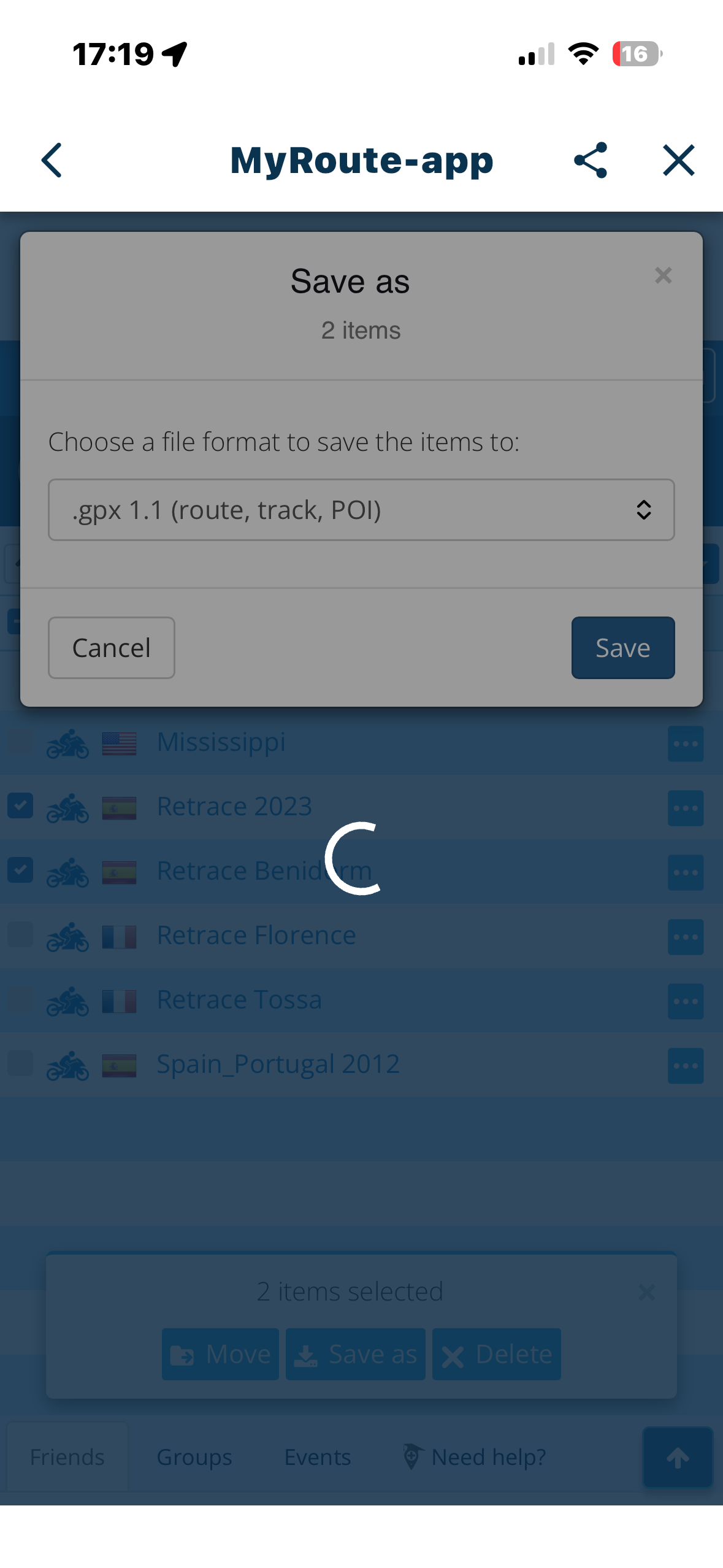
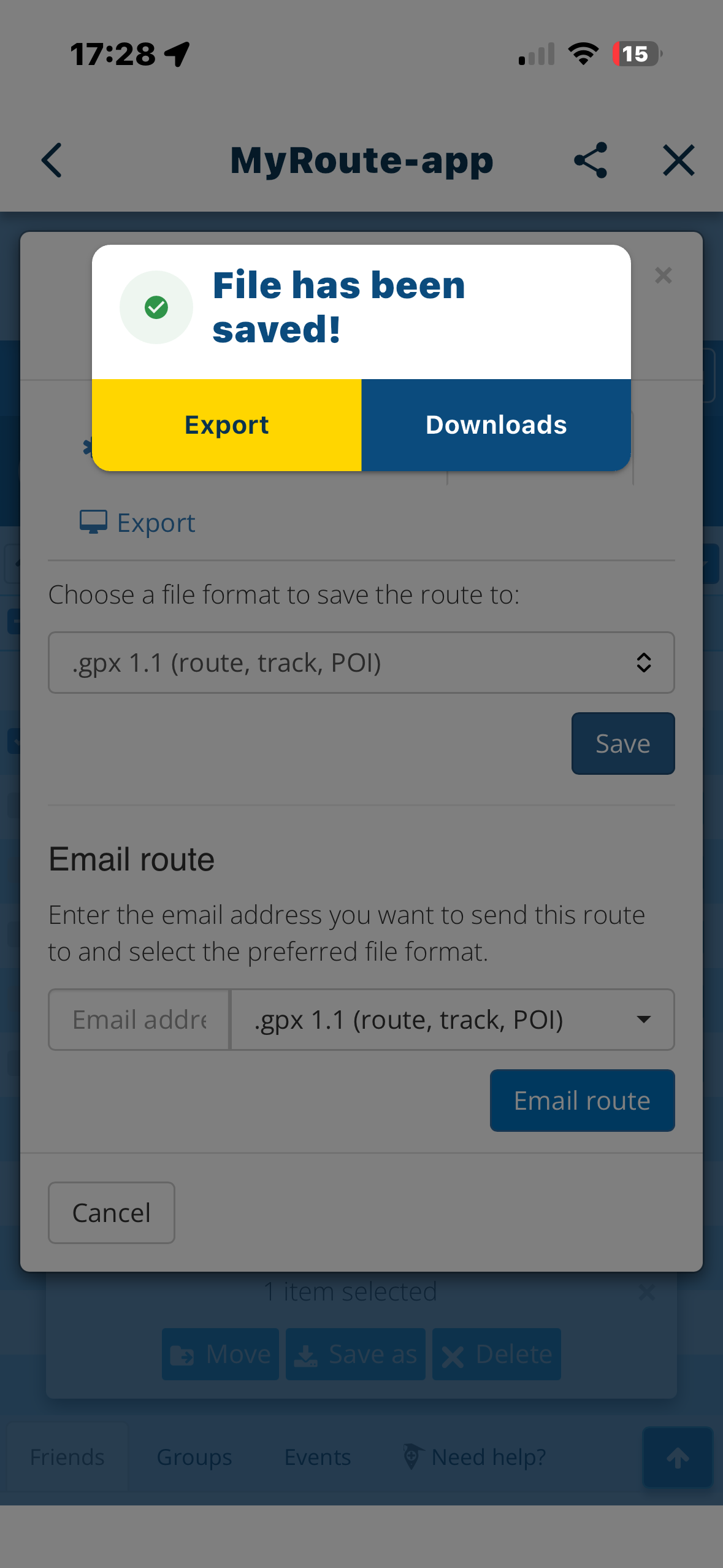
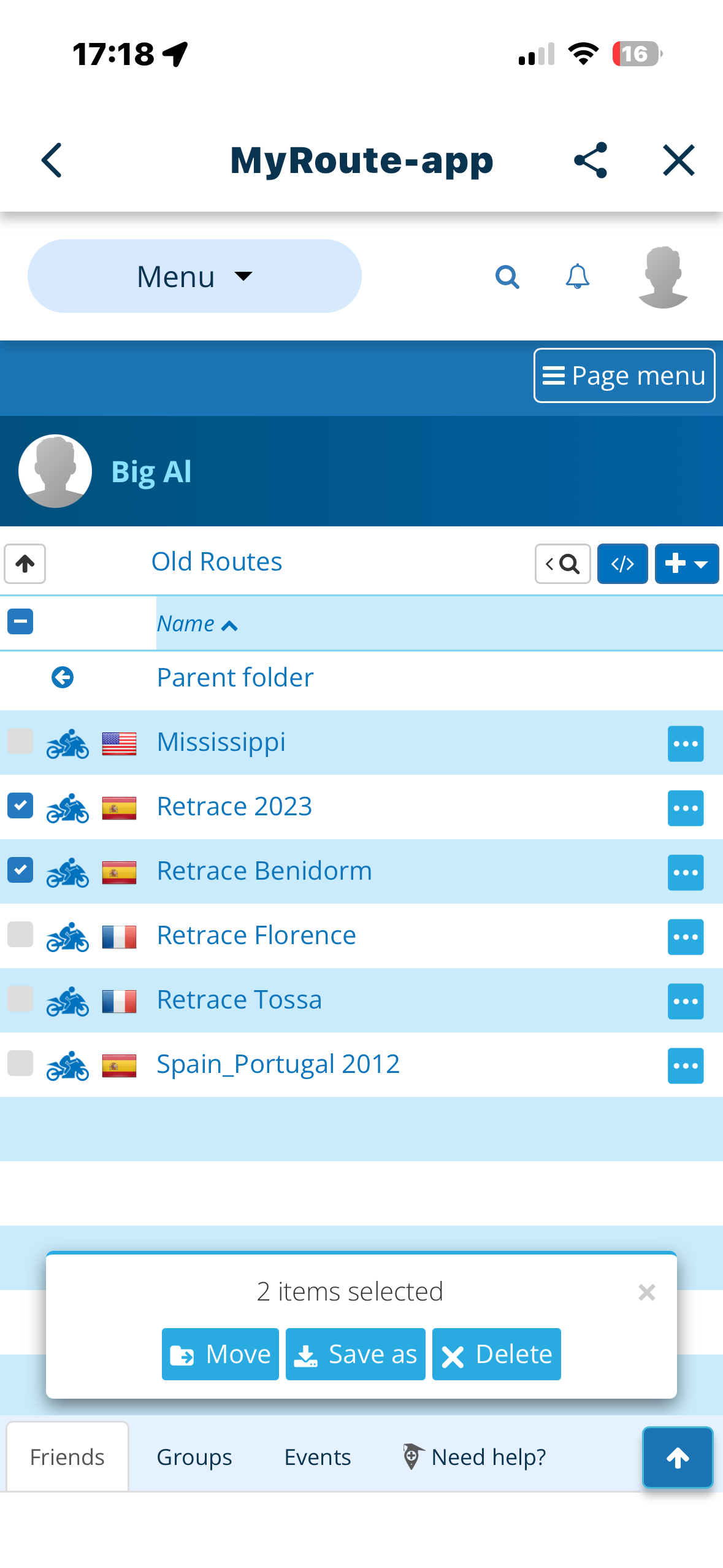
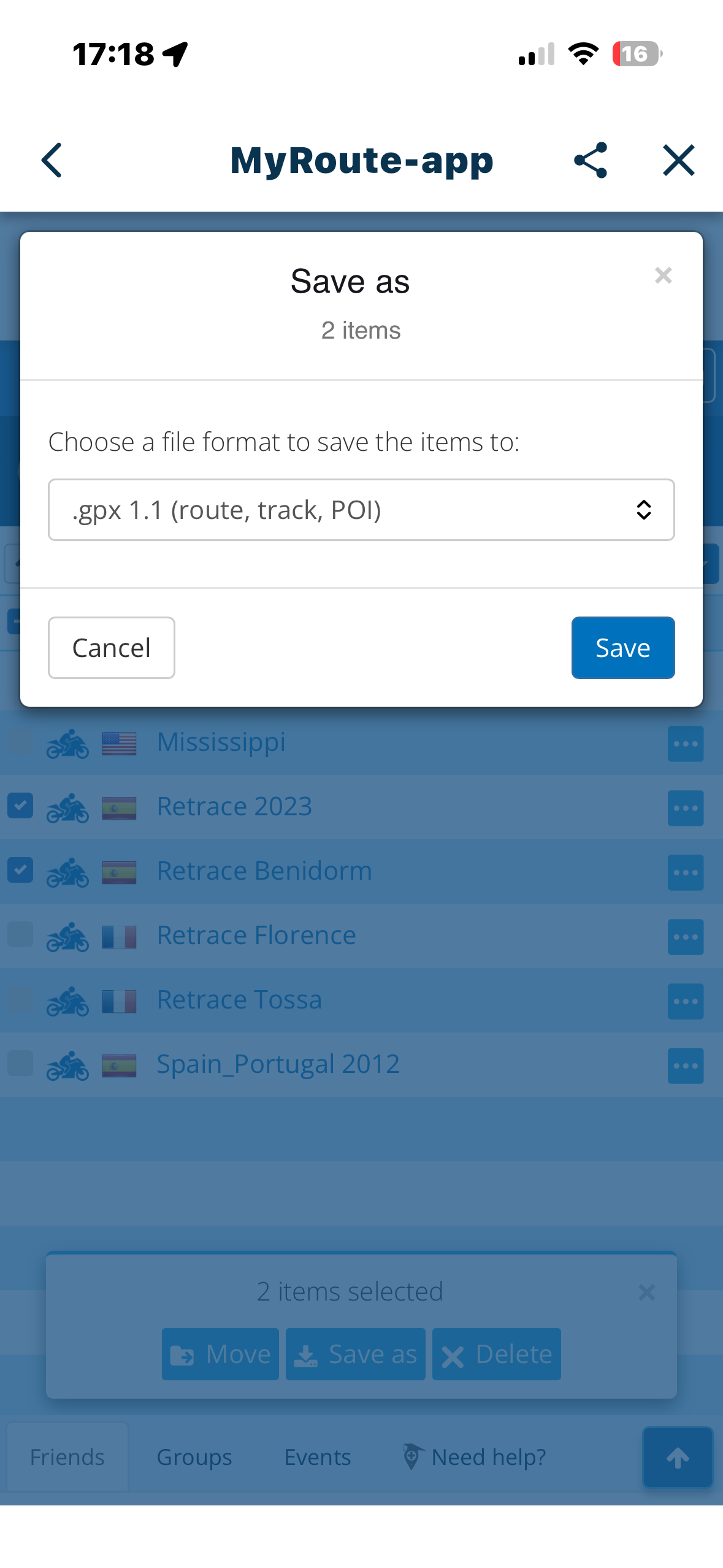
    From the “Routes” list, ‘select’ more than one route by ticking in the leftmost box. Click ‘Save as’ at the bottom of the screen and select the type (.GPX 1.1 etc). This results in a ‘Please Wait’ meassge followed closely by the rotating circle (busy)…..and that’s it. Seems like the program is in a loop.
    I suspect there is a hidden “File has been saved……..Export/Download” (see photo) dialogue in the background going unanswered on multiple selects . Works OK when only one file is selected.
    e621fb2d-7298-44e2-8030-6ca8b6000858-image.png 797f0dda-2ff0-4b07-a3b2-d57a1fb3033a-image.png 15e14bec-0df7-41ac-868b-903a87a0c98f-image.png 07e867e1-2913-4c42-a74e-2a7bccf982cc-image.png

    Nick Carthew 1 Reply Last reply
    0
    • Big Al 1 Big Al 1

      From the “Routes” list, ‘select’ more than one route by ticking in the leftmost box. Click ‘Save as’ at the bottom of the screen and select the type (.GPX 1.1 etc). This results in a ‘Please Wait’ meassge followed closely by the rotating circle (busy)…..and that’s it. Seems like the program is in a loop.
      I suspect there is a hidden “File has been saved……..Export/Download” (see photo) dialogue in the background going unanswered on multiple selects . Works OK when only one file is selected.
      e621fb2d-7298-44e2-8030-6ca8b6000858-image.png 797f0dda-2ff0-4b07-a3b2-d57a1fb3033a-image.png 15e14bec-0df7-41ac-868b-903a87a0c98f-image.png 07e867e1-2913-4c42-a74e-2a7bccf982cc-image.png

      Nick Carthew Offline
      Nick Carthew Offline
      Nick Carthew
      RouteXpert
      wrote on last edited by
      #2

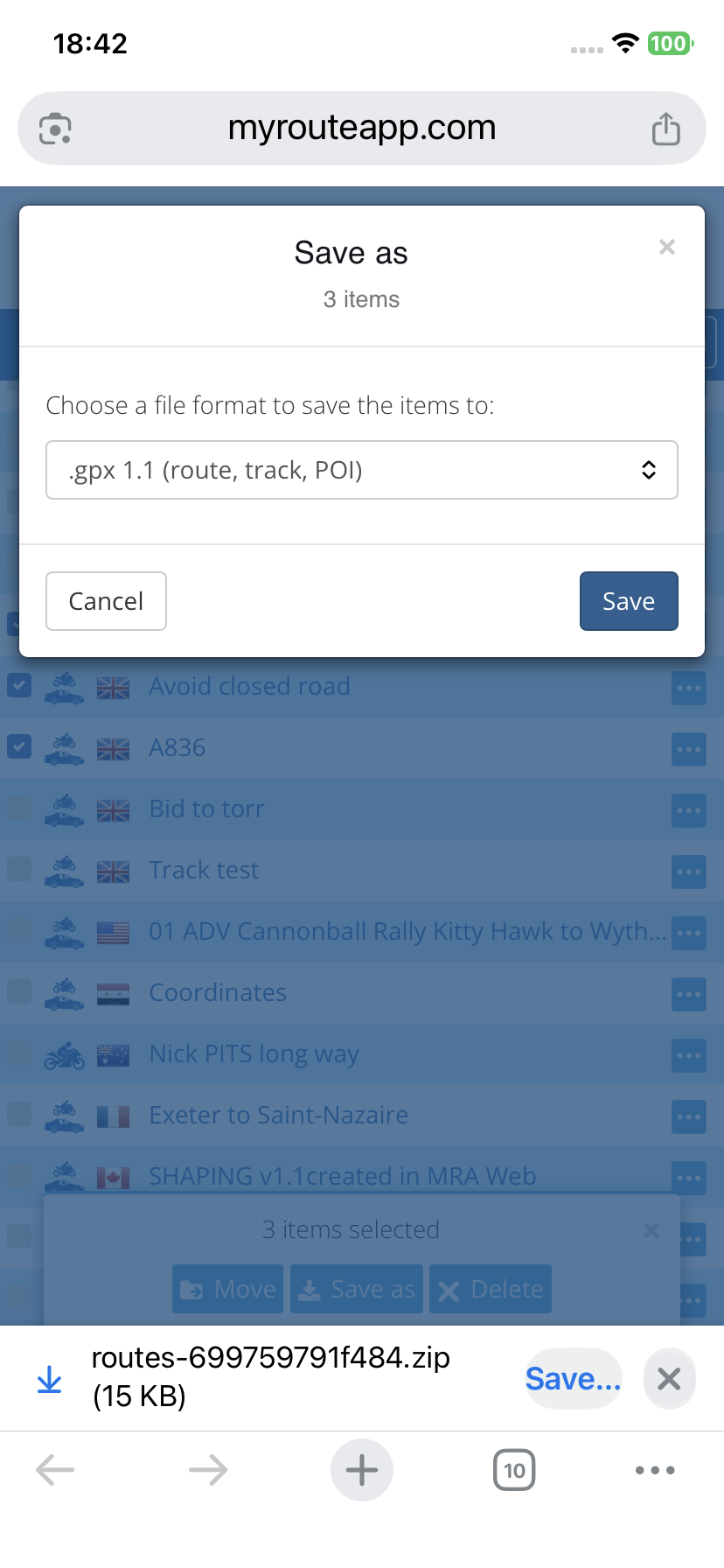
      @Big-Al-1 I have never saved multiple files from my phone so I replicated your test. I get the option to save the 3 chosen files in a Zip folder to my Files folder.
      IMG_5537.png

      Always willing to help if I can.
      Triumph Tiger 1200 XRT called Tina.
      MRA Navigation Next and SilverFox BJ8

      1 Reply Last reply
      0
      • Guzzist Offline
        Guzzist Offline
        Guzzist
        Valued contributor
        wrote on last edited by
        #3

        ...the behavior demands on used browser. If "system browser" in MyRoute-App is used - this indeed will not save multiple selected routes. Other browsers will act more or less similar an will in such cases simply create a zip file.

        Nothing is impossible ;-)
        In past: GARMIN Zumo 210->GARMIN Zumo 395->GARMIN XT=> now: DMD T865-X + MyRoute-App, LocusMaps, OsmAnd.
        In past: GARMIN MapSource ->GARMIN BaseCamp->Tyre->Kurviger->Calimoto=> now: MRA-Routplanner.

        1 Reply Last reply
        0
        • Guzzist Offline
          Guzzist Offline
          Guzzist
          Valued contributor
          wrote on last edited by
          #4

          ...the behavior demands on used browser. If "system browser" in MyRoute-App is used - this indeed will not save multiple selected routes. Other browsers will act more or less similar an will in such cases simply create a zip file.

          Nothing is impossible ;-)
          In past: GARMIN Zumo 210->GARMIN Zumo 395->GARMIN XT=> now: DMD T865-X + MyRoute-App, LocusMaps, OsmAnd.
          In past: GARMIN MapSource ->GARMIN BaseCamp->Tyre->Kurviger->Calimoto=> now: MRA-Routplanner.

          1 Reply Last reply
          0
          • b0hd1 Offline
            b0hd1 Offline
            b0hd1
            wrote on last edited by
            #5

            It would be great to be able to back up all the paths. Whether one by one, several at once, by folder, or even the entire directory. In my case, we have over 2500 paths, and it's impossible to back them up 10 at a time, which is the current limit.

            Creator and administrator of the largest MRA groups.

            • https://t.me/MRa_by_b0hd1
            • https://www.myrouteapp.com/group/messages/7007
            • YouTube: @demco17
            • Ex-routexpert, current beta tester and MRA expert. Creator of tutorials, manuals, and MRA user trainer.
            1 Reply Last reply
            0
            • Big Al 1 Offline
              Big Al 1 Offline
              Big Al 1
              wrote on last edited by
              #6

              Guzzist -I don’t understand ‘system browser’. I used Apple products, IPhone 14 and IPad. The multiple save doesn’t work. Tried my bike phone, a Google Pixel 8a and same again, doesn’t work. I don’t get any dialogues to choose where I save the files. I invoke MyRoute Web from the app and I only use the web route planner.
              So to sum it all up…..the multiple route save doesn’t work on my mobile hardware.
              Obviously, I can individually save the routes, but I typically split my rides into days, resulting in a lot of individual files. And the app obviously thinks it can be done or else there wouldn’t be a ‘save as’ option at the foot of the screen.

              Con Hennekens 1 Reply Last reply
              0
              • Big Al 1 Big Al 1

                Guzzist -I don’t understand ‘system browser’. I used Apple products, IPhone 14 and IPad. The multiple save doesn’t work. Tried my bike phone, a Google Pixel 8a and same again, doesn’t work. I don’t get any dialogues to choose where I save the files. I invoke MyRoute Web from the app and I only use the web route planner.
                So to sum it all up…..the multiple route save doesn’t work on my mobile hardware.
                Obviously, I can individually save the routes, but I typically split my rides into days, resulting in a lot of individual files. And the app obviously thinks it can be done or else there wouldn’t be a ‘save as’ option at the foot of the screen.

                Con Hennekens Offline
                Con Hennekens Offline
                Con Hennekens
                Alpha tester
                wrote on last edited by
                #7

                @Big-Al-1 said in Routes List Menu, Select Multiple Routes and ‘Save as’:

                I invoke MyRoute Web from the app and I only use the web route planner.

                Try invoking the planner from your internet browser instead of from your app.
                Chrome, Firefox, Safari, whatever.

                I am just an enthusiastic MRA user, and hope you will be one too!

                Most motorcycle problems are caused by the nut that connects the handlebar to the saddle.

                Check out RideSleepRepeat.eu, a biker community for sharing stays across Europe

                Nick Carthew 1 Reply Last reply
                1
                • Con Hennekens Con Hennekens

                  @Big-Al-1 said in Routes List Menu, Select Multiple Routes and ‘Save as’:

                  I invoke MyRoute Web from the app and I only use the web route planner.

                  Try invoking the planner from your internet browser instead of from your app.
                  Chrome, Firefox, Safari, whatever.

                  Nick Carthew Offline
                  Nick Carthew Offline
                  Nick Carthew
                  RouteXpert
                  wrote on last edited by
                  #8

                  @Con-Hennekens said in Routes List Menu, Select Multiple Routes and ‘Save as’:

                  @Big-Al-1 said in Routes List Menu, Select Multiple Routes and ‘Save as’:

                  I invoke MyRoute Web from the app and I only use the web route planner.

                  Try invoking the planner from your internet browser instead of from your app.
                  Chrome, Firefox, Safari, whatever.

                  You’ve nailed it @Con-Hennekens, I get the same results as @Big-Al-1 when I use Route lab from the mobile app. In my original test I accessed my route library via the Safari browser on my iPhone.

                  Always willing to help if I can.
                  Triumph Tiger 1200 XRT called Tina.
                  MRA Navigation Next and SilverFox BJ8

                  1 Reply Last reply
                  0
                  • Aiello antonino Offline
                    Aiello antonino Offline
                    Aiello antonino
                    wrote on last edited by
                    #9

                    With iPad Air 4 and Safari browser, I tried selecting 3 paths and everything works perfectly

                    1 Reply Last reply
                    0
                    • Big Al 1 Offline
                      Big Al 1 Offline
                      Big Al 1
                      wrote on last edited by
                      #10

                      OK - using just Safari and selecting multiple files, the web version creates a zip file in the Downloads folder, which when unzipped, creates a folder with the GPX files in there.
                      Using the app directly on an Apple device, and doing the ‘save as’ from the route itself, the system saves the file on the iPad in the MyRoute-App folder. So it seems we have 2 different types of operation here…and one doesn’t work. Is this Ok with you guys that at My-Route?
                      No great sweat for me and I’m sure there are bigger fish to fry on the development front. Nice if it were fixed in the rewrite version.

                      Guzzist 1 Reply Last reply
                      0
                      • Aiello antonino Offline
                        Aiello antonino Offline
                        Aiello antonino
                        wrote on last edited by Aiello antonino
                        #11

                        Ok! Exporting multiple files from the app's browser doesn't work, but it does work with individual files.

                        1 Reply Last reply
                        1
                        • Big Al 1 Big Al 1

                          OK - using just Safari and selecting multiple files, the web version creates a zip file in the Downloads folder, which when unzipped, creates a folder with the GPX files in there.
                          Using the app directly on an Apple device, and doing the ‘save as’ from the route itself, the system saves the file on the iPad in the MyRoute-App folder. So it seems we have 2 different types of operation here…and one doesn’t work. Is this Ok with you guys that at My-Route?
                          No great sweat for me and I’m sure there are bigger fish to fry on the development front. Nice if it were fixed in the rewrite version.

                          Guzzist Offline
                          Guzzist Offline
                          Guzzist
                          Valued contributor
                          wrote on last edited by
                          #12

                          @Big-Al-1 said in Routes List Menu, Select Multiple Routes and ‘Save as’:

                          OK - using just Safari and selecting multiple files, the web version creates a zip file in the Downloads folder, which when unzipped, creates a folder with the GPX files in there.
                          Using the app directly on an Apple device, and doing the ‘save as’ from the route itself, the system saves the file on the iPad in the MyRoute-App folder. So it seems we have 2 different types of operation here…and one doesn’t work...

                          ...as I mentioned 😉

                          Nothing is impossible ;-)
                          In past: GARMIN Zumo 210->GARMIN Zumo 395->GARMIN XT=> now: DMD T865-X + MyRoute-App, LocusMaps, OsmAnd.
                          In past: GARMIN MapSource ->GARMIN BaseCamp->Tyre->Kurviger->Calimoto=> now: MRA-Routplanner.

                          1 Reply Last reply
                          0

                          Hello! It looks like you're interested in this conversation, but you don't have an account yet.

                          Getting fed up of having to scroll through the same posts each visit? When you register for an account, you'll always come back to exactly where you were before, and choose to be notified of new replies (either via email, or push notification). You'll also be able to save bookmarks and upvote posts to show your appreciation to other community members.

                          With your input, this post could be even better 💗

                          Register Login
                          Reply
                          • Reply as topic
                          Log in to reply
                          • Oldest to Newest
                          • Newest to Oldest
                          • Most Votes


                          ACTIVE USERS
                          Con Hennekens
                          Con Hennekens
                          Guzzist
                          Guzzist
                          Nick Carthew
                          Nick Carthew
                          b0hd1
                          b0hd1
                          Aiello antonino
                          Aiello antonino
                          Big Al 1
                          Big Al 1
                          POPULAR TOPICS
                          • The compas direction on the elevation circle is wrong
                            Guzzist
                            Guzzist
                            0
                            30
                            1.1k

                          • Carpuride scherm vast
                            Corjan Meijerink
                            Corjan Meijerink
                            3
                            26
                            1.2k

                          • GPX Versions 1.1 vs 1.2 for Garmin Visually Explained
                            Mzokk
                            Mzokk
                            7
                            174
                            13.9k

                          • How can I change the verbal navigation directions from male to female?
                            Marinus van Deudekom
                            Marinus van Deudekom
                            0
                            3
                            6

                          • Camperroutes
                            De Ploey Georges
                            De Ploey Georges
                            0
                            4
                            154

                          • Latest version of the App?
                            white.mouse
                            white.mouse
                            0
                            3
                            96

                          • App probleem scenic route niet mogelijk
                            Philip Verbeek
                            Philip Verbeek
                            0
                            3
                            78

                          • HERE maps updates
                            Travellexxie
                            Travellexxie
                            0
                            10
                            300

                          MY GROUPS
                          • Login

                          • Login or register to search.
                          • First post
                            Last post
                          0
                          • Categories
                          • Recent
                          • Popular
                          • Support
                          • MyRoute-app