
Updated beta! 5.0.3 (449)
-

Hi everyone!

This beta version (build 449) is the one that will be released to the public next week.
Looking forward to any feedback over the coming days.Critical fix Android
Some Android devices were completely broken since the last beta as the device name contained a special character. This update fixes that (new) issue.Show devices from account
Within the app, you can now always view your active devices (if you are a Navigation Next subscriber).
From here you can see what your device limit is and how many you are using. Exactly as the list you are shown when exceeding the limit.Minor improvements
- Stability of device limit constraints
- Ensure more devices are names correctly when saving the name for the device list
- Fixed scenario where sometimes Android would not play any audio
Cheers,
Corjan -

Thanks again for your effort! The update is available via TestFlight for iOS.
-

I hope it will be available for Android bij early tomorrow morning, for I'm starting at 08.30 for a ride! But I doubt
-

@Corjan-Meijerink : That was very good. Thank you for the little subtleties in the new update.
Thank you very much

-
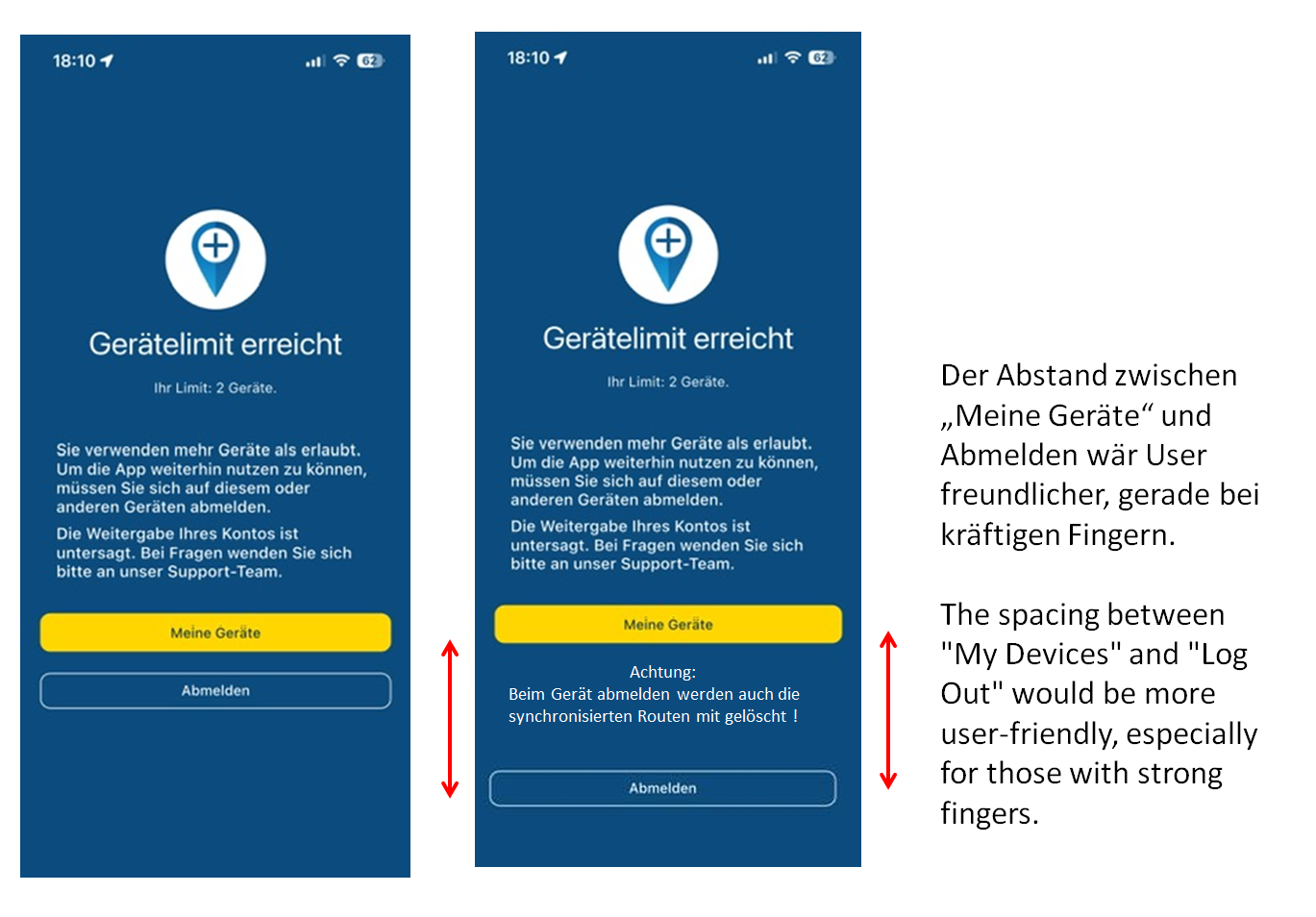
Perhaps one more request: With wider fingers, gloves, or in bright sunlight, it's sometimes too easy to accidentally hit the logout button.
Perhaps this could be adjusted as shown in the image; that would certainly be very helpful for all users.
VG Hubert
Beta Test "Next App" dazu die Hardware .
iPad 9. Gen iOS 27.0.1/ iPhone 16e iOS 27.0.1/ Navi iPhone Xr iOS 18.7.10 / PC mit MS Win11 /❗️MyRoute-App im Cradel und Remotek-One❗️ Info zu MRA & Remotek One -
Perhaps one more request: With wider fingers, gloves, or in bright sunlight, it's sometimes too easy to accidentally hit the logout button.
Perhaps this could be adjusted as shown in the image; that would certainly be very helpful for all users.
@Hubert-Thoring you’ve shared the feedback before. Have not changed it in this version and won’t in the next

-

@Corjan-Meijerink I would like to point a few things about the device management
- My iPhone 17 Pro Max is shown as Unknown Device
- Will be there any option to delete devices? For example, if some device has been sold?
- On german translation, when opening the device management from settings, the button is called 'Abbrechen' which makes less sense here. 'Zurück' would be a better translation here.
Shiny!
-
@Corjan-Meijerink I would like to point a few things about the device management
- My iPhone 17 Pro Max is shown as Unknown Device
- Will be there any option to delete devices? For example, if some device has been sold?
- On german translation, when opening the device management from settings, the button is called 'Abbrechen' which makes less sense here. 'Zurück' would be a better translation here.

@ConiKost said in Updated beta! 5.0.3 (449):
Will be there any option to delete devices? For example, if some device has been sold?
Yes, use the red icon on the right behind each device.
On german translation, when opening the device management from settings, the button is called 'Abbrechen' which makes less sense here. 'Zurück' would be a better translation here.
That button backs off from deleting devices from the list, so O think "abbrechen" is not very wrong
 . This window is the same one as the one you are forced into when you really need to delete one from the list. "Zurück" in that case is not an option.
 -
@Hubert-Thoring you’ve shared the feedback before. Have not changed it in this version and won’t in the next
@Corjan-Meijerink said in Updated beta! 5.0.3 (449):
@Hubert-Thoring you’ve shared the feedback before. Have not changed it in this version and won’t in the next
Sorry, it was just supposed to be a well-intentioned suggestion for honest users, and I thought maybe it was just overlooked...

I understand it now, if someone happens to come to "unsubscribe" it should just happen like that, that's how it will certainly go for some times.
-
unfortunate for those who have acquired their license correctly and honestly and like to use it (... then effort is generated)
-
right for those who have not purchased a license properly, for that it is really good
 (unsubscribe and OFF and over)
VG Hubert
Beta Test "Next App" dazu die Hardware .
iPad 9. Gen iOS 27.0.1/ iPhone 16e iOS 27.0.1/ Navi iPhone Xr iOS 18.7.10 / PC mit MS Win11 /❗️MyRoute-App im Cradel und Remotek-One❗️ Info zu MRA & Remotek One -
-
@Corjan-Meijerink said in Updated beta! 5.0.3 (449):
@Hubert-Thoring you’ve shared the feedback before. Have not changed it in this version and won’t in the next
Sorry, it was just supposed to be a well-intentioned suggestion for honest users, and I thought maybe it was just overlooked...
I understand it now, if someone happens to come to "unsubscribe" it should just happen like that, that's how it will certainly go for some times.
-
unfortunate for those who have acquired their license correctly and honestly and like to use it (... then effort is generated)
-
right for those who have not purchased a license properly, for that it is really good
(unsubscribe and OFF and over)
@Hubert-Thoring but it’s not an unsubscribe?
It’s just logging out off the app. -
-
@Hubert-Thoring but it’s not an unsubscribe?
It’s just logging out off the app.
@Corjan-Meijerink Gisteren gebeurde er iets bijzonders na het installeren van deze beta op mijn iPad en iPhone:
iPhone: via de nieuwe instellingen pagina logde ik mijn iPad uit. (rode knop)
iPad: app bleef werkend terwijl online op wifi, daarop geforceerd afgesloten en opnieuw gestart. Zonder ook maar ergens op te hoeven drukken was ik weer ingelogd.
iPhone: Bij mijn apparaten bleef alleen mijn iPhone zichtbaar. Hierop geforceerd afgesloten en app opnieuw gestart. iPhone was vervolgens uitgelogd. Moest daarbij ook de app herstarten omdat er iets was aangepast aan mijn abonnement gaaf die aan. (die melding kwam laatst ook ergens op het forum voorbij.)
iPad: Gaf vervolgens de melding dat ik teveel apparaten actief had.
iPhone: Gaf een melding dat rond de 50 routes (mijn bibliotheek is veel groter) werden gesynchroniseerd.
iPhone: Zag de iPad daarna ook weer gewoon ingelogd... en alles werkte weer...Hierop gestopt met rommelen en ben ik gaan mopperen tegen Rob
Van Rob begreep ik dat die rode knop geen uitlog knop is. Wat het dan wel is snap ik ook niet helemaal, maar nu geef jij aan dat dit wel een knop is om uit te loggen. Snap het niet meer 
Hopelijk heb je iets aan bovenstaande.
@Corjan-Meijerink Yesterday something unusual happened after installing this beta on my iPad and iPhone:
iPhone: via the new settings page, I logged out of my iPad (red button)
iPad: the app kept working while online on Wi-Fi, then I force-closed it and restarted. Without having to press anything, I was logged in again.
iPhone: Under my devices, only my iPhone remained visible. I force-closed it and restarted the app. The iPhone was then logged out. I also had to restart the app because something had been changed with my subscription (that notification recently came up somewhere on the forum as well).
iPad: Then it displayed a message that I had too many active devices.
iPhone: Showed a message that around 50 routes (my library is much larger) were being synchronized.
iPhone: Afterwards, I saw the iPad logged in again… and everything worked again.At that point, I stopped messing around and started complaining to Rob
From Rob, I understood that the red button is not a logout button. What it actually is, I don’t quite understand either, but now you’re saying it is a logout button. I don’t get it anymore Hopefully the above is helpful.
-
Guys, the red button takes a device out of the device list, zo you can continue. It does not unsubscribe, it does not long off, it just makes room for your device in a list that may contain 2 devices. You do not need to login on the other devices, nothing bad happens...
@Hubert-Thoring, those who have acquired their license correctly are unlikely to run into this.
-
@Corjan-Meijerink Gisteren gebeurde er iets bijzonders na het installeren van deze beta op mijn iPad en iPhone:
iPhone: via de nieuwe instellingen pagina logde ik mijn iPad uit. (rode knop)
iPad: app bleef werkend terwijl online op wifi, daarop geforceerd afgesloten en opnieuw gestart. Zonder ook maar ergens op te hoeven drukken was ik weer ingelogd.
iPhone: Bij mijn apparaten bleef alleen mijn iPhone zichtbaar. Hierop geforceerd afgesloten en app opnieuw gestart. iPhone was vervolgens uitgelogd. Moest daarbij ook de app herstarten omdat er iets was aangepast aan mijn abonnement gaaf die aan. (die melding kwam laatst ook ergens op het forum voorbij.)
iPad: Gaf vervolgens de melding dat ik teveel apparaten actief had.
iPhone: Gaf een melding dat rond de 50 routes (mijn bibliotheek is veel groter) werden gesynchroniseerd.
iPhone: Zag de iPad daarna ook weer gewoon ingelogd... en alles werkte weer...Hierop gestopt met rommelen en ben ik gaan mopperen tegen Rob
Van Rob begreep ik dat die rode knop geen uitlog knop is. Wat het dan wel is snap ik ook niet helemaal, maar nu geef jij aan dat dit wel een knop is om uit te loggen. Snap het niet meer Hopelijk heb je iets aan bovenstaande.
@Corjan-Meijerink Yesterday something unusual happened after installing this beta on my iPad and iPhone:
iPhone: via the new settings page, I logged out of my iPad (red button)
iPad: the app kept working while online on Wi-Fi, then I force-closed it and restarted. Without having to press anything, I was logged in again.
iPhone: Under my devices, only my iPhone remained visible. I force-closed it and restarted the app. The iPhone was then logged out. I also had to restart the app because something had been changed with my subscription (that notification recently came up somewhere on the forum as well).
iPad: Then it displayed a message that I had too many active devices.
iPhone: Showed a message that around 50 routes (my library is much larger) were being synchronized.
iPhone: Afterwards, I saw the iPad logged in again… and everything worked again.At that point, I stopped messing around and started complaining to Rob
From Rob, I understood that the red button is not a logout button. What it actually is, I don’t quite understand either, but now you’re saying it is a logout button. I don’t get it anymore Hopefully the above is helpful.
@CD130 sounds like it works exactly as expected.
It does not log out your account but it unlists the device as active. When using the other device it is automatically activated again -
In Dutch I would say “afmelden” rather than “uitloggen” but I don’t know if English has this specific contextual distinguish

@nick-carthew help?

-
In Dutch I would say “afmelden” rather than “uitloggen” but I don’t know if English has this specific contextual distinguish
@nick-carthew help?

@Corjan-Meijerink Delist or Exclude would both work as would Deregister and Unlist.
Always willing to help if I can.
Triumph Tiger 1200 XRT called Tina.
MRA Navigation Next and SilverFox BJ8 -
@Corjan-Meijerink Delist or Exclude would both work as would Deregister and Unlist.
@Nick-Carthew amen. Then that’s the better term
-
I don’t like the chosen red button because for me it means something like exporting or sharing data. Why not chosen for the delete (trash bin) button?
@Arno-0 said in Updated beta! 5.0.3 (449):
I don’t like the chosen red button because for me it means something like exporting or sharing data. Why not chosen for the delete (trash bin) button?
I am not certain putting something in the bin really gives me a better feeling...
-
In Dutch I would say “afmelden” rather than “uitloggen” but I don’t know if English has this specific contextual distinguish
@nick-carthew help?

@Corjan-Meijerink said in Updated beta! 5.0.3 (449):
In Dutch I would say “afmelden” rather than “uitloggen” but I don’t know if English has this specific contextual distinguish
@nick-carthew help?
In German, I would say "Gerät abmelden" to make it more clear. So it is not related to the account and with loggin/ loggout etc. Could work also in other languages.
-
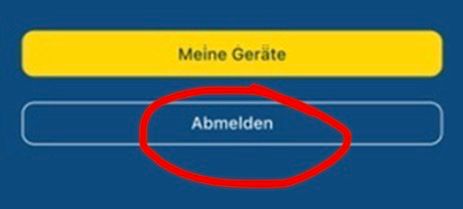
Sorry, I have to ask again because I don't understand the reason
Why are the device - "Log out" also deleted all synchronized routes in this affected device .
VG

VG Hubert
Beta Test "Next App" dazu die Hardware .
iPad 9. Gen iOS 27.0.1/ iPhone 16e iOS 27.0.1/ Navi iPhone Xr iOS 18.7.10 / PC mit MS Win11 /❗️MyRoute-App im Cradel und Remotek-One❗️ Info zu MRA & Remotek One
Hello! It looks like you're interested in this conversation, but you don't have an account yet.
Getting fed up of having to scroll through the same posts each visit? When you register for an account, you'll always come back to exactly where you were before, and choose to be notified of new replies (either via email, or push notification). You'll also be able to save bookmarks and upvote posts to show your appreciation to other community members.
With your input, this post could be even better 💗
Register Login
-
 0748
0748
-
1514
-
0524
-
 06279
06279
-
 06242
06242
-
04146
-
 17224
17224
-
0367