Imported GPX file Waypoint Names
-

Hi All,
I have a GPX file that I created that right now includes a track and 9 waypoints. When I import, the track looks just fine, but the names and descriptions of the waypoints are missing. When I import the file into Osmand or OnX it looks fine. Any thoughts?
A screenshot and the GPX file are located here.
-
Hi All,
I have a GPX file that I created that right now includes a track and 9 waypoints. When I import, the track looks just fine, but the names and descriptions of the waypoints are missing. When I import the file into Osmand or OnX it looks fine. Any thoughts?
A screenshot and the GPX file are located here.

@Kerry-Lebel said in Imported GPX file Waypoint Names:
I have a GPX file that I created that right now
What routing software did you use to create the GPX?
I think your issue may be an unusual formatted GPX file, each track & waypoint element content in your file contains the term "ns0", ns=name space
Unless the software you are uploading the GPX to can interpret the "ns0" term then things look like they go a bit pear shaped. Appears Osmand can cope with the term but not MRAAs the "ns0" term is not one I am used to seeing in a GPX file I stripped it out using this xml converter & the resulting track & points loaded correctly into MRA web planner
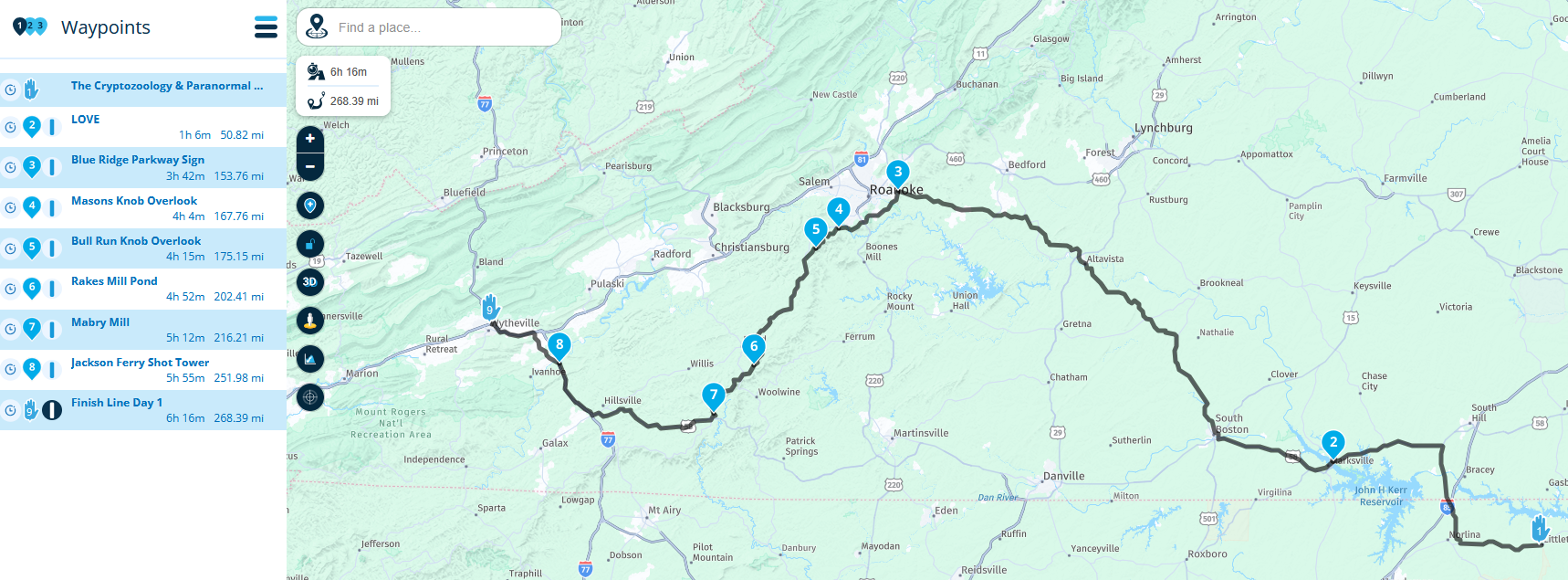
-
@Kerry-Lebel said in Imported GPX file Waypoint Names:
I have a GPX file that I created that right now
What routing software did you use to create the GPX?
I think your issue may be an unusual formatted GPX file, each track & waypoint element content in your file contains the term "ns0", ns=name space
Unless the software you are uploading the GPX to can interpret the "ns0" term then things look like they go a bit pear shaped. Appears Osmand can cope with the term but not MRAAs the "ns0" term is not one I am used to seeing in a GPX file I stripped it out using this xml converter & the resulting track & points loaded correctly into MRA web planner
@Brian McG Those tracks are from a ride I personally rode and recorded, so they ended up living in Garmin Explore and OsmAnd. The waypoints were provided by the event organizer.
My goal was to upload one GPX that includes both the recorded track and the waypoints, then use that as the starting point to build a shareable route for others in MyRouteApp. After more testing, it looks like the import can handle either a GPX with only a track, or a GPX with only a route plus waypoints, but not a GPX that contains both a track and waypoints. When both are present, it brings in the coordinates but strips the waypoint names and details.
This was a 10 day ride with over 100 waypoints, so retyping all the waypoint names and descriptions manually is not a realistic option.
-
@Kerry-Lebel said in Imported GPX file Waypoint Names:
I have a GPX file that I created that right now
What routing software did you use to create the GPX?
I think your issue may be an unusual formatted GPX file, each track & waypoint element content in your file contains the term "ns0", ns=name space
Unless the software you are uploading the GPX to can interpret the "ns0" term then things look like they go a bit pear shaped. Appears Osmand can cope with the term but not MRAAs the "ns0" term is not one I am used to seeing in a GPX file I stripped it out using this xml converter & the resulting track & points loaded correctly into MRA web planner
@Brian-McG wow Brian that's awesome! It have 10 separate files for that. I will clean them all up and try again. Thank you!
-
@Brian McG Those tracks are from a ride I personally rode and recorded, so they ended up living in Garmin Explore and OsmAnd. The waypoints were provided by the event organizer.
My goal was to upload one GPX that includes both the recorded track and the waypoints, then use that as the starting point to build a shareable route for others in MyRouteApp. After more testing, it looks like the import can handle either a GPX with only a track, or a GPX with only a route plus waypoints, but not a GPX that contains both a track and waypoints. When both are present, it brings in the coordinates but strips the waypoint names and details.
This was a 10 day ride with over 100 waypoints, so retyping all the waypoint names and descriptions manually is not a realistic option.
@Kerry-Lebel in your original post the GPX track you shared had 9 waypoints, these are clearly shown in the picture I posted with the waypoint names, it looks exactly like it does in Osmand & I was surprised to see that MRA also imported all the descriptions for the points
Somewhere along the way your original recorded GPX file seems to have had the "ns0" attribute added to it, just use a text editor like notepad to view the GPX file & you will see "ns0" all over it.
This could have been introduced by Garmin Explore or it may have been in some other part of the storage/transfer chain & this is why you were having issues importing it to MRA & losing the waypoint names & descriptionsI agree recreating a route with 100 points & all the descriptions is a bit of a task & a little unrealistic
I am not sure what you now asking for, cleaning up the GPX file seems to work well, this is a link to a cleaned up copy of your original GPX imported into MRA
https://www.myrouteapp.com/en/social/route/12495544?mode=share -
@Brian-McG wow Brian that's awesome! It have 10 separate files for that. I will clean them all up and try again. Thank you!
@Kerry-Lebel looks like we both posted at the same time

hope it all works for you -
@Kerry-Lebel in your original post the GPX track you shared had 9 waypoints, these are clearly shown in the picture I posted with the waypoint names, it looks exactly like it does in Osmand & I was surprised to see that MRA also imported all the descriptions for the points
Somewhere along the way your original recorded GPX file seems to have had the "ns0" attribute added to it, just use a text editor like notepad to view the GPX file & you will see "ns0" all over it.
This could have been introduced by Garmin Explore or it may have been in some other part of the storage/transfer chain & this is why you were having issues importing it to MRA & losing the waypoint names & descriptionsI agree recreating a route with 100 points & all the descriptions is a bit of a task & a little unrealistic
I am not sure what you now asking for, cleaning up the GPX file seems to work well, this is a link to a cleaned up copy of your original GPX imported into MRA
https://www.myrouteapp.com/en/social/route/12495544?mode=share
@Brian-McG this is great thanks Brian. I removed all the NSO attributes from the tags (editor tool issue) and that cleared up the waypoints naming and description issues for me as well (thanks to you), but when I click to see tracklogs (I assume this is where it would be?) the track did not get imported.
Based on what I understand of MRA workflow, what I am trying to achieve now is uploading the file with the track and waypoints into one route. Convert the track into a route. That gives me the shapoing points I need plus the primary waypoints for stops and photo opportunities. I would be fine uploading them as two separate files but I can't upload the waypoints into an existing route correct?
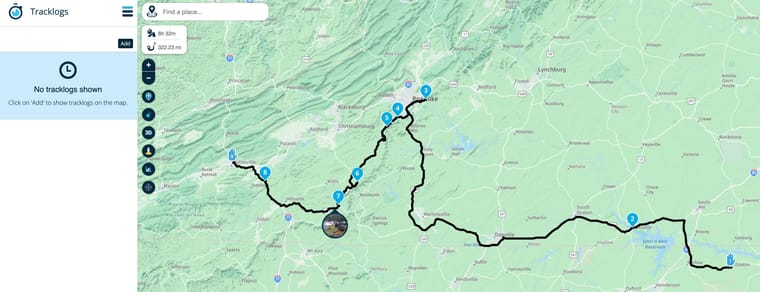
If I try to import the file as a Route-Track, then the waypoints don't appear importing that way. I'm not sure why there are two different import methods. I do have some gpx files that have waypoints, routes and tracks all in the same file.
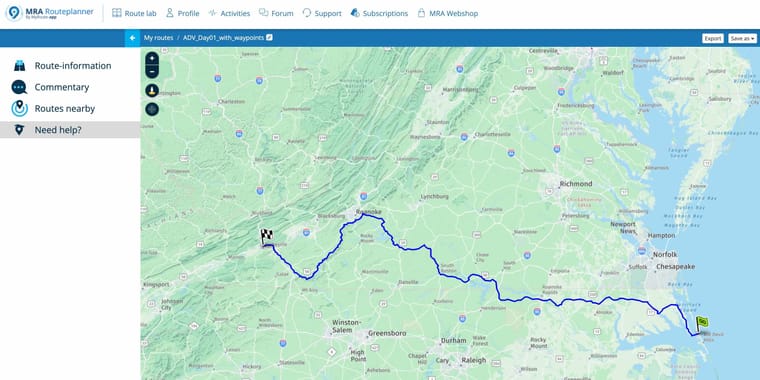
Next I tried to just import the tracks by itself, convert it to a route and see if I could find a way to import those Primary 9 waypoints into this new route created from the track. No deal. It looks like you can only do an import into a new route and you can't select the location where the imported file will go to (subfolder).
-
@Brian-McG this is great thanks Brian. I removed all the NSO attributes from the tags (editor tool issue) and that cleared up the waypoints naming and description issues for me as well (thanks to you), but when I click to see tracklogs (I assume this is where it would be?) the track did not get imported.
Based on what I understand of MRA workflow, what I am trying to achieve now is uploading the file with the track and waypoints into one route. Convert the track into a route. That gives me the shapoing points I need plus the primary waypoints for stops and photo opportunities. I would be fine uploading them as two separate files but I can't upload the waypoints into an existing route correct?
If I try to import the file as a Route-Track, then the waypoints don't appear importing that way. I'm not sure why there are two different import methods. I do have some gpx files that have waypoints, routes and tracks all in the same file.
Next I tried to just import the tracks by itself, convert it to a route and see if I could find a way to import those Primary 9 waypoints into this new route created from the track. No deal. It looks like you can only do an import into a new route and you can't select the location where the imported file will go to (subfolder).
Hi @Kerry-Lebel I think maybe you are over thinking things or are trying to apply possibly Garmin know-how to MRA & getting a little confused
This thread has a little discussion about routes, route-tracks & tracks as they apply to MRA which hopefully makes things a little clearerIf your aim is to generate a gpx file that contains both route, waypoint & track information all you need to to is via the MRA web planner select "Save As" in the top right corner of the page & choose the format you prefer
If you save the file in each of the multiple different gpx formats you can inspect them with a text editor & observe the differencesIn general gpx 1.1 is the most versatile & readable by most navigation systems as it contains both the waypoints & track info
Gpx 1.2 was developed really for Garmin devices, it contains route & track points but not the Waypoint infoAt the end of the day you select the format which works/suits your navigation device which is obviously the aim of doing all this planning
-

...a gpx file can contain:
- a track with dedicated trackpoints
- list itema route with min 2 dedicated routepoints
- list itemseveral Points of Interest (waypoints)
But the general structure in MRA is, to load (by a gpx file)
- a route into the folder structure for route
- a track into the folder structure for tracks
You can't mix them up! If the gpx file contains both (route and track), you need to upload it twice - one time the route into route folder structure, second time the track into track folder structure.
The internal upload logic of MRA picks the needed information automatically out of the gpx file. But for tracks, only 2 of the trackpoints (start- and endpoint) will be made visibly on the map. For routes, all the existing routepoints will be made visible on the map (max 200).In MRA you can open the route and add to display additionally one or more tracks. But this isn't possible in the App (for navigation).
-
Thanks guys. Yes I am applying Garmin Explore structure to this and MRA doesnt quite have that level of flexibility. They treat things like a true relational database where you can mix and match everything into various collections. Where Waypoints, track, and even routes can all belong to multiple collections. Its just a different approach I am trying to get used to.
Hello! It looks like you're interested in this conversation, but you don't have an account yet.
Getting fed up of having to scroll through the same posts each visit? When you register for an account, you'll always come back to exactly where you were before, and choose to be notified of new replies (either via email, or push notification). You'll also be able to save bookmarks and upvote posts to show your appreciation to other community members.
With your input, this post could be even better 💗
Register Login-
 18251.7k
-
811137
-
 510106
-
1224198
-
 07114
07114
-
 57476
57476
-
0636
-
 0629
0629