Skip to content
  • Categories
  • Recent
  • Popular
  • Support
  • MyRoute-app
Collapse
Brand Logo

MRA Community Forum

  1. Home
  2. The MyRoute-app
  3. [App] Suggestions and Discussion
  4. upcoming viapoint option

upcoming viapoint option

Scheduled Pinned Locked Moved [App] Suggestions and Discussion
9 Posts 3 Posters 2.2k Views 1 Watching
  • Oldest to Newest
  • Newest to Oldest
  • Most Votes
Reply
  • Reply as topic
Log in to reply
This topic has been deleted. Only users with topic management privileges can see it.
  • Nick Elsom 0 Offline
    Nick Elsom 0 Offline
    Nick Elsom 0
    wrote on last edited by
    #1

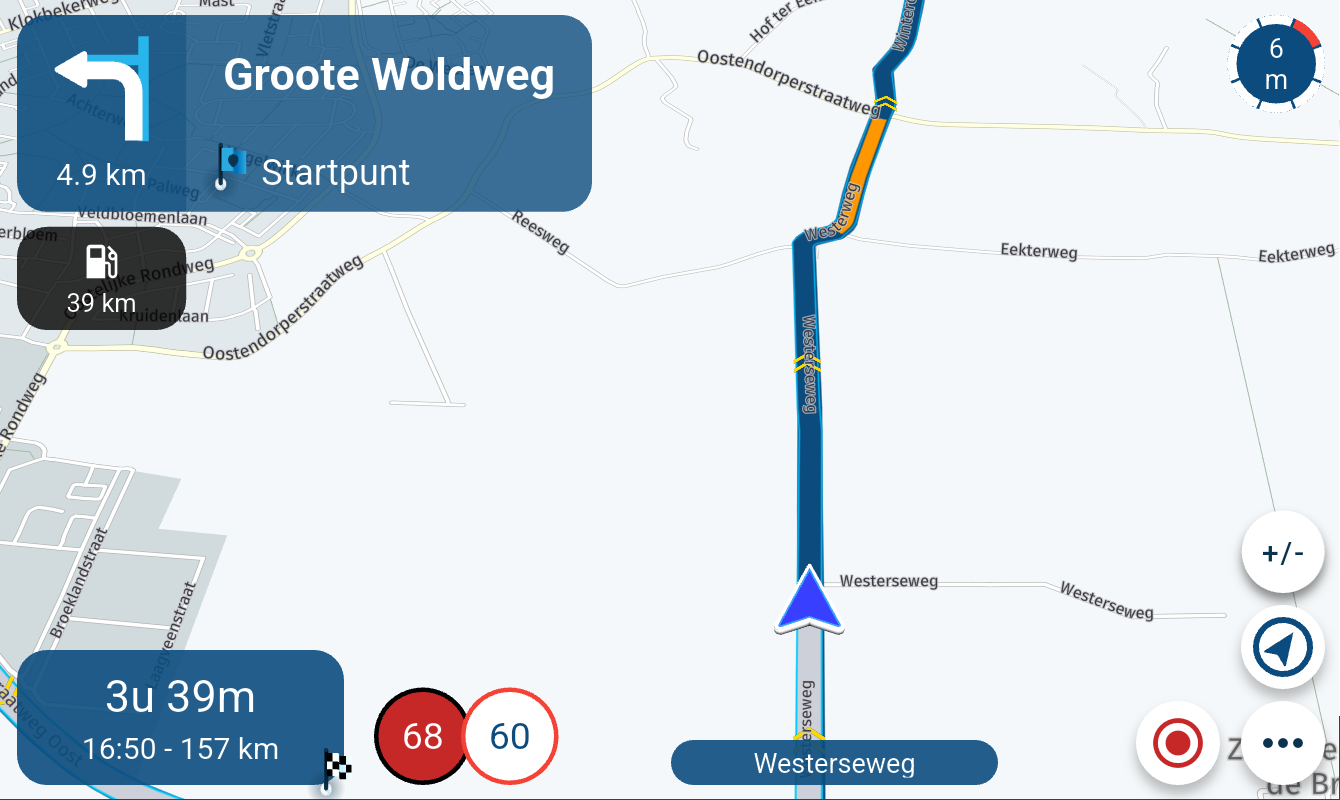
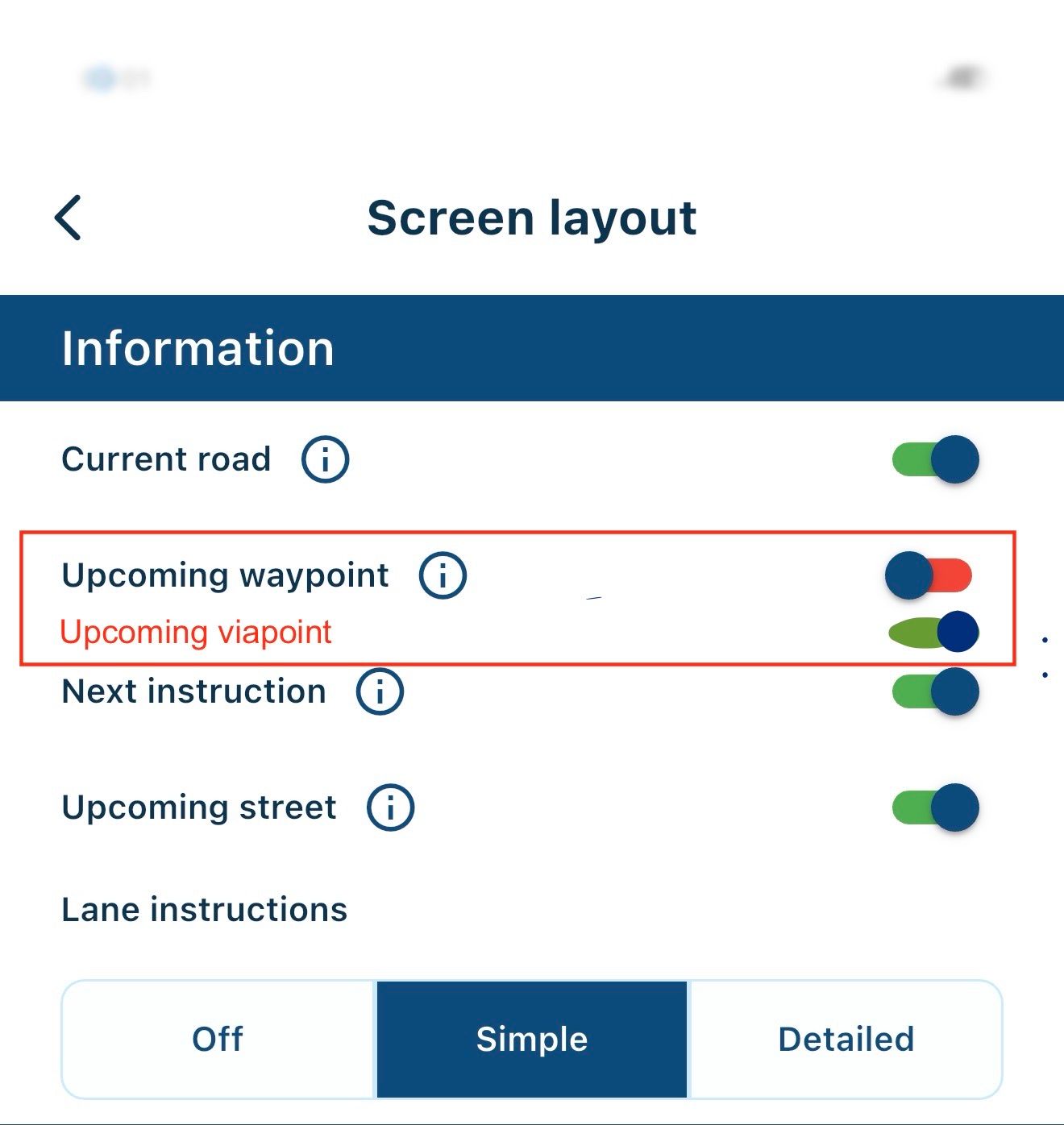
    Hi, would be great to see an option in screen layout to toggle upcoming via points. I would like the ability to toggle OFF upcoming waypoints, which I know is currently possible but also toggle ON via points at the same time. I don't particularly want to see shaping/waypoints.. only via points. IMG_0256.jpeg
    Nick Carthew 1 Reply Last reply
    0
    • Nick Elsom 0 Nick Elsom 0

      Hi, would be great to see an option in screen layout to toggle upcoming via points. I would like the ability to toggle OFF upcoming waypoints, which I know is currently possible but also toggle ON via points at the same time. I don't particularly want to see shaping/waypoints.. only via points. IMG_0256.jpeg

      Nick Carthew Online
      Nick Carthew Online
      Nick Carthew
      RouteXpert
      wrote on last edited by
      #2

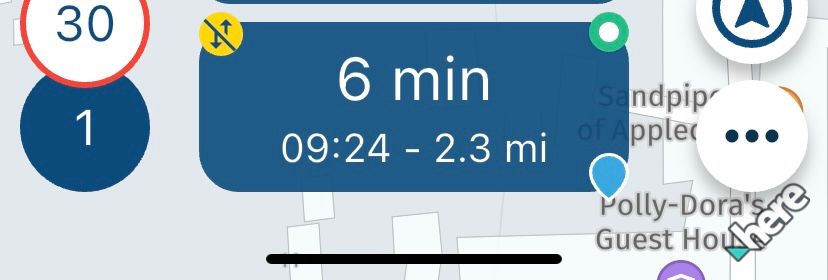
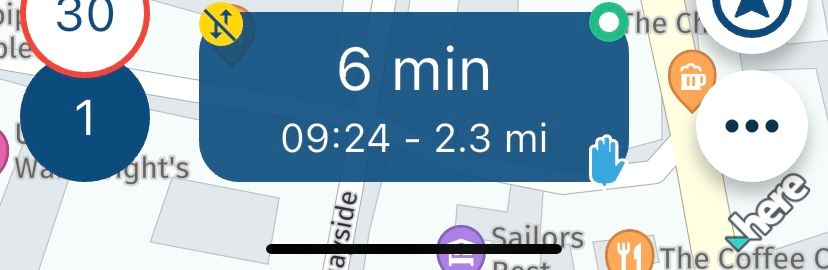
      @Nick-Elsom-0 You can select to see time and distance to the next via point by tapping the ETA box. You have 3 options - ETA to next waypoint, ETA to next via point or ETA to end destination. Each tap toggles to the next option.

      Always willing to help if I can.
      Triumph Tiger 1200 XRT called Tina.
      MRA Navigation Next and SilverFox BJ8

      1 Reply Last reply
      0
      • paul69 Offline
        paul69 Offline
        paul69
        wrote on last edited by
        #3

        hi @Nick-Elsom-0
        i am unsure if this is the answer you require. in Navigation settings>screen layout, you may choose, OFF or Via or ALL

        to achieve, we must first attempt ✌️
        K1600 GTL
        Oukitel RT3
        iPhone 13 Pro, carpuride 702b

        Nick Carthew 1 Reply Last reply
        0
        • paul69 paul69

          hi @Nick-Elsom-0
          i am unsure if this is the answer you require. in Navigation settings>screen layout, you may choose, OFF or Via or ALL

          Nick Carthew Online
          Nick Carthew Online
          Nick Carthew
          RouteXpert
          wrote on last edited by
          #4

          @paul69 said in upcoming viapoint option:

          hi @Nick-Elsom-0
          i am unsure if this is the answer you require. in Navigation settings>screen layout, you may choose, OFF or Via or ALL

          Not related @paul69 The setting you refer to is for seeing the information that is written in the notes displayed on screen.

          Always willing to help if I can.
          Triumph Tiger 1200 XRT called Tina.
          MRA Navigation Next and SilverFox BJ8

          1 Reply Last reply
          0
          • paul69 Offline
            paul69 Offline
            paul69
            wrote on last edited by
            #5

            Ah, perhaps I should triple read posts, I'll get my coat 🤣

            to achieve, we must first attempt ✌️
            K1600 GTL
            Oukitel RT3
            iPhone 13 Pro, carpuride 702b

            1 Reply Last reply
            0
            • Nick Carthew Online
              Nick Carthew Online
              Nick Carthew
              RouteXpert
              wrote on last edited by Nick Carthew
              #6

              This image of the ETA box shows time and distance to next waypoint selected.
              IMG_5195.jpeg

              This image shows the next via point selected. The time and distance are the same as the first image because it is the first waypoint. Note that the icon has changed from standard waypoint (shaping point) to via point.
              IMG_5196.jpeg

              This image shows time and distance to the end destination in the ETA box.
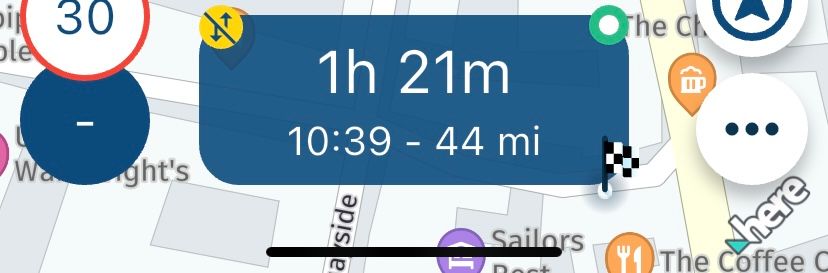
              IMG_5197.jpeg

              Always willing to help if I can.
              Triumph Tiger 1200 XRT called Tina.
              MRA Navigation Next and SilverFox BJ8

              1 Reply Last reply
              1
              • Nick Elsom 0 Offline
                Nick Elsom 0 Offline
                Nick Elsom 0
                wrote on last edited by
                #7

                Hi
                I didn’t realise I could cycle through these 3 options. This solves my problem of not knowing how far to my next viapoint.
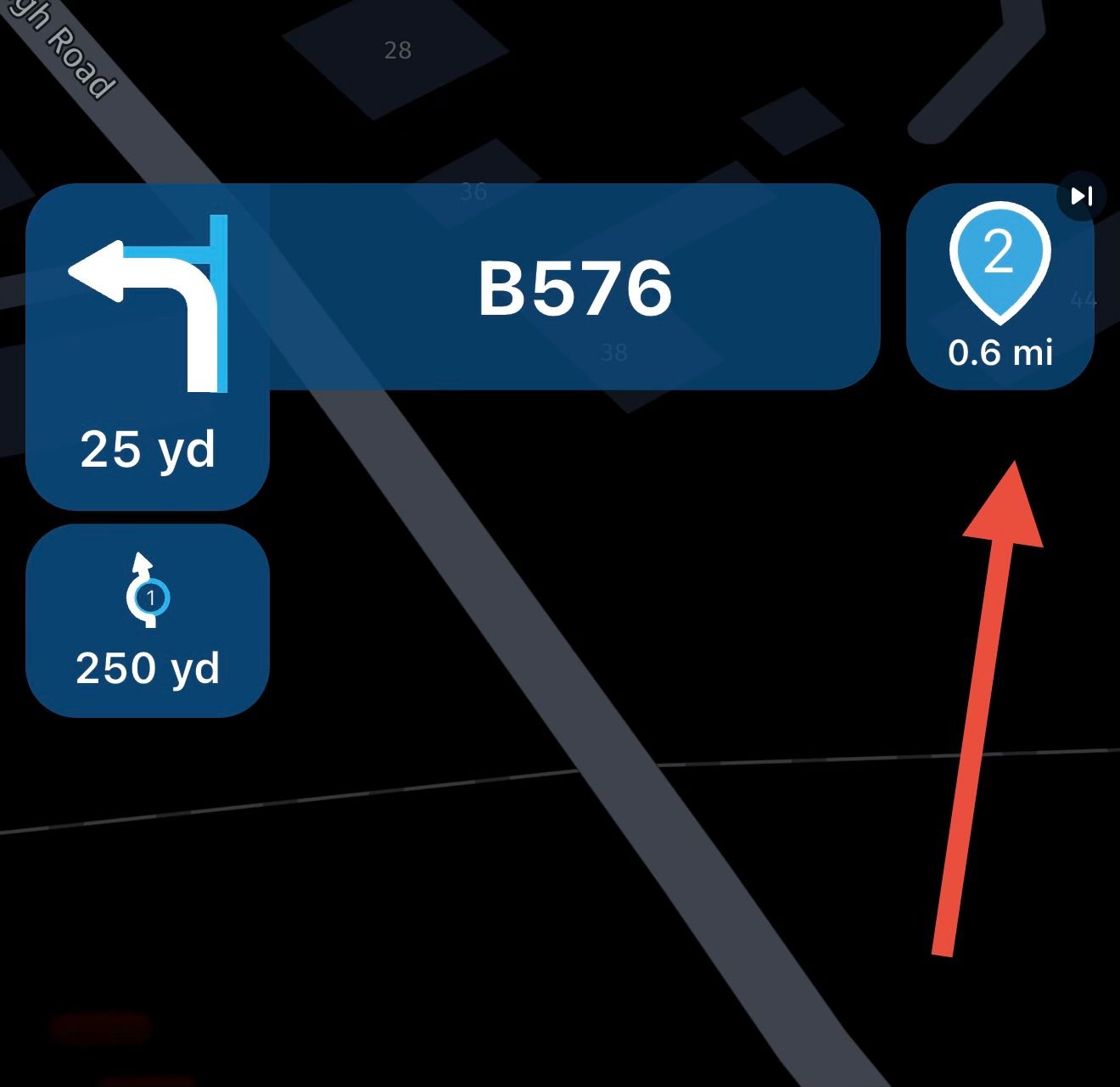
                Sorry I wasn’t clear but was referring to the symbol at the top right of the screen, I would still love to see the option to exclude waypoints or via points specifically but the function of cycling through at the bottom is really handy and I will use that. Thank you very much.
                IMG_0267.jpeg

                Nick Carthew 1 Reply Last reply
                0
                • Nick Elsom 0 Nick Elsom 0

                  Hi
                  I didn’t realise I could cycle through these 3 options. This solves my problem of not knowing how far to my next viapoint.
                  Sorry I wasn’t clear but was referring to the symbol at the top right of the screen, I would still love to see the option to exclude waypoints or via points specifically but the function of cycling through at the bottom is really handy and I will use that. Thank you very much.
                  IMG_0267.jpeg

                  Nick Carthew Online
                  Nick Carthew Online
                  Nick Carthew
                  RouteXpert
                  wrote on last edited by
                  #8

                  @Nick-Elsom-0 The upcoming waypoint icon that you have arrowed is not just a visual reference of the upcoming waypoint but by tapping it you can skip the waypoint. The skip function would not work as intended if it only showed via points.

                  Always willing to help if I can.
                  Triumph Tiger 1200 XRT called Tina.
                  MRA Navigation Next and SilverFox BJ8

                  1 Reply Last reply
                  0
                  • Nick Elsom 0 Offline
                    Nick Elsom 0 Offline
                    Nick Elsom 0
                    wrote on last edited by
                    #9

                    Oh yes, thats a good point. Thanks for your time, great help

                    1 Reply Last reply
                    1

                    Hello! It looks like you're interested in this conversation, but you don't have an account yet.

                    Getting fed up of having to scroll through the same posts each visit? When you register for an account, you'll always come back to exactly where you were before, and choose to be notified of new replies (either via email, or push notification). You'll also be able to save bookmarks and upvote posts to show your appreciation to other community members.

                    With your input, this post could be even better 💗

                    Register Login
                    Reply
                    • Reply as topic
                    Log in to reply
                    • Oldest to Newest
                    • Newest to Oldest
                    • Most Votes


                    ACTIVE USERS
                    Nick Carthew
                    Nick Carthew
                    paul69
                    paul69
                    Nick Elsom 0
                    Nick Elsom 0
                    POPULAR TOPICS
                    • The compas direction on the elevation circle is wrong
                      LennyO
                      LennyO
                      0
                      56
                      1.9k

                    • Er gaat hier iets mis melding
                      Martijn 8d 0
                      Martijn 8d 0
                      0
                      5
                      51

                    • MRA V5.2.1 (488) Kompass fest einstellbar auf „Dynamische Kamera“
                      white.mouse
                      white.mouse
                      1
                      3
                      37

                    • New update 5.2 - Avoid roadblocks, persistent map items, POI management and share
                      Nick Carthew
                      Nick Carthew
                      28
                      50
                      6.5k

                    • New update 5.2.1
                      white.mouse
                      white.mouse
                      16
                      24
                      1.1k

                    • route niet zichtbaar op audi scherm
                      Marinus van Deudekom
                      Marinus van Deudekom
                      0
                      7
                      272

                    • Blauwe routelijn lijft in Carplay wit
                      0
                      1
                      1

                    • Plannen van een rit met de elektrische auto
                      0
                      1
                      4

                    MY GROUPS
                    • Login

                    • Login or register to search.
                    • First post
                      Last post
                    0
                    • Categories
                    • Recent
                    • Popular
                    • Support
                    • MyRoute-app