New beta! 6.0.0 (514)
-

Hi everyone!

It has been a long summer without any beta update!
But to be honest, the has been performing very well
We are really proud of the app in it's current form.Is there room for improvement? Definitely!
This update will tackle a lot of issues and blow you away with a new UI.Improved navigation UI
So since update v5, we greatly improved the visual appearance of the app.
One thing was left out: navigation.
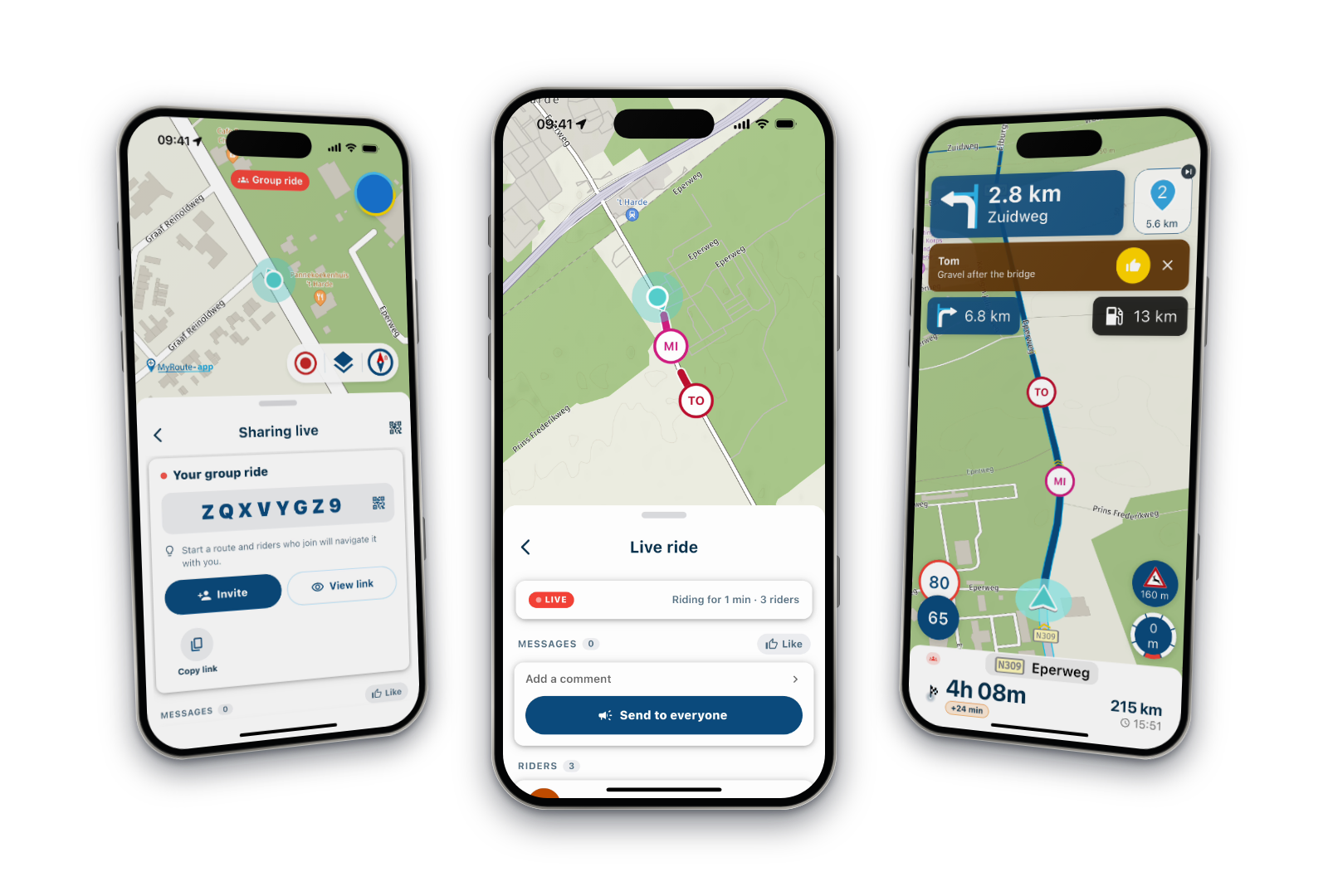
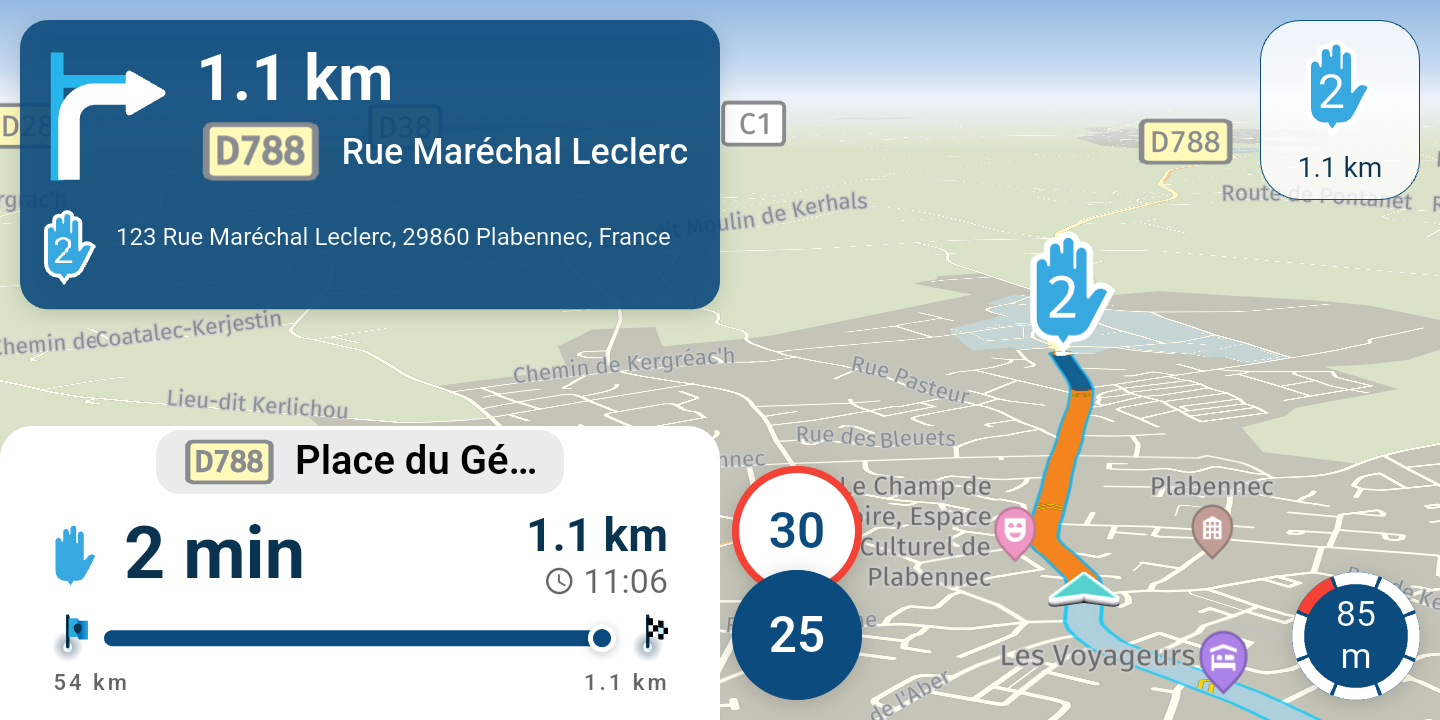
In this update, we completely redesigned the navigation experience and it looks absolutely amazing
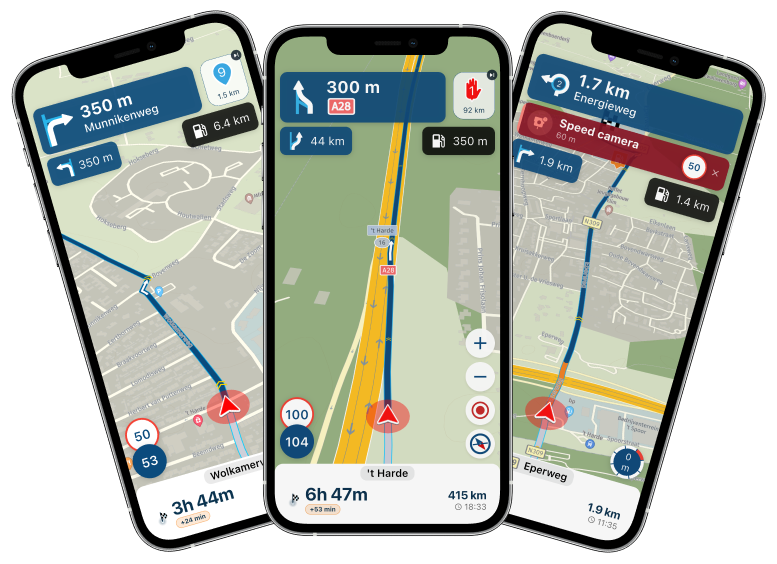
It's too much to mention here. Just go try it!

Things you will enjoy are:- Better font size / readability of what's important
- Redesigned warnings
- Use of official road shields (See the "A28" icon in the center image) to better indicate where to go
- Road sign warnings (stop signs, yield signs, dangerous crossing etc)
What has been really improved are all zoom animations. It's all much smoother.
We have also been able to configure a more natural tilt so it just looks better and you can look further ahead.Together with that, the zoom adjustments have been decoupled from the camera mode. Meaning you can now zoom in / out while staying in the selected mode.
I am probably even now forgetting something but you will be blown away!
Especially tablet users are going to love this because the app looks gorgeous while navigating with that.Improved tracklog details
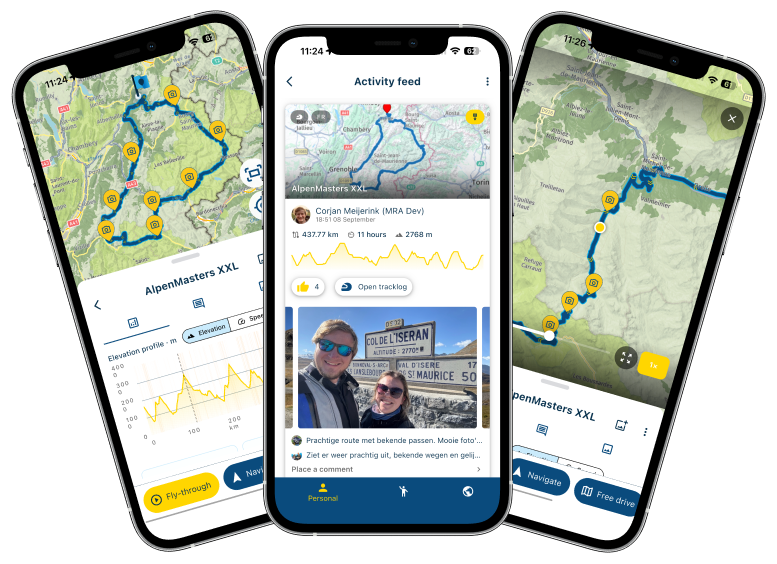
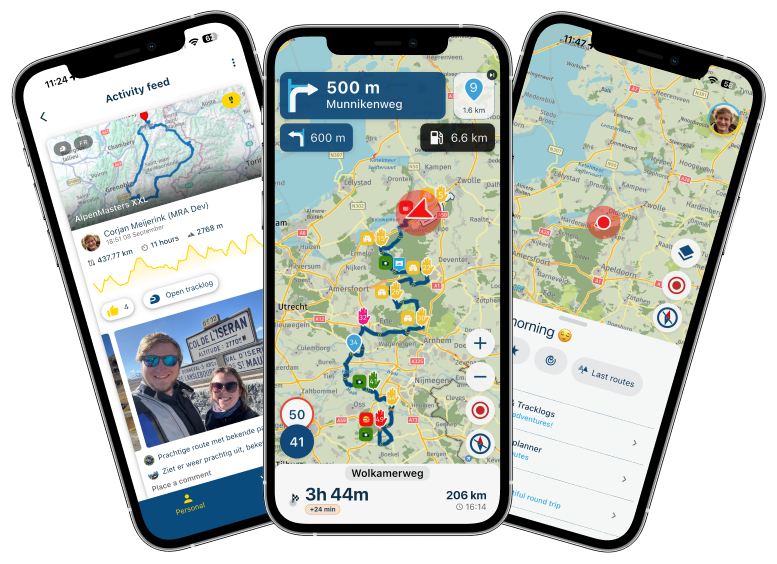
We now show the speed / height graphs! More statistics is always fun.
Added to that is the "Fly-through" allowing you to quickly relive the tracklog.
How amazing is that?While we were at it, the entire comment interface has been improved so that responding to activities becomes a better experience.
Another nice detail is that swiping through the pictures will show correctly on map where the current displayed on is. Also, the fullscreen gallery has been improved drastically

Add and reorder stops
Yes, you could create a route to a destination.
Yes, you could use the in-app routeplanner.
Yes, you could add stops while navigating.But....you could not immediately create a route with some quick stops.
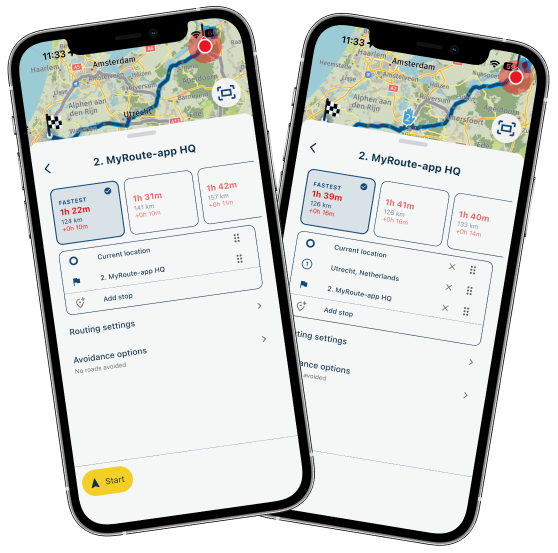
Now you can!
Just add an intermediate stop and there you go! How easy should it be?
And because we were making changes here, we also improved the visual appearance of the rest.
Track navigation improvements
Or well....improvements?
It's gone. Completely gone.
Reason for panic? Absolutely not!
We now create a highly accurate route matching the track.
Nicely warning you where it does match. But honestly, we haven't seen it mismatching yet.Why did we do this? Because it will just work better!
Experience it yourself
Other amazing reasons to do this:
- Full offline support
- All features will work such as adding stops along route while navigating and adding a roadblock / creating a deviation
- Saves us quite some


I've tested this extensively over 3000km of driving. Worked absolutely flawless once I was done
Route warnings
Because of the above change we redesign our route warning system. Beneficial for our track approximation but also when passing seasonal closures or other road violations.
Waypoint skip redesign
From the ground up completely rebuilt.
The waypoint skip algorithm behaves like it should.
Forget how you thought about it and give your new opinion.
Our logs contain all information we need to improve it based on your feedback.So turn it back on and start driving!
This was especially important as waypoint skip should work flawlessly now that track navigation is gone.Fuel station suggestions
And then this algorithm has also been improved!
All aiming to suggest the fuel station that is nearest and makes most sense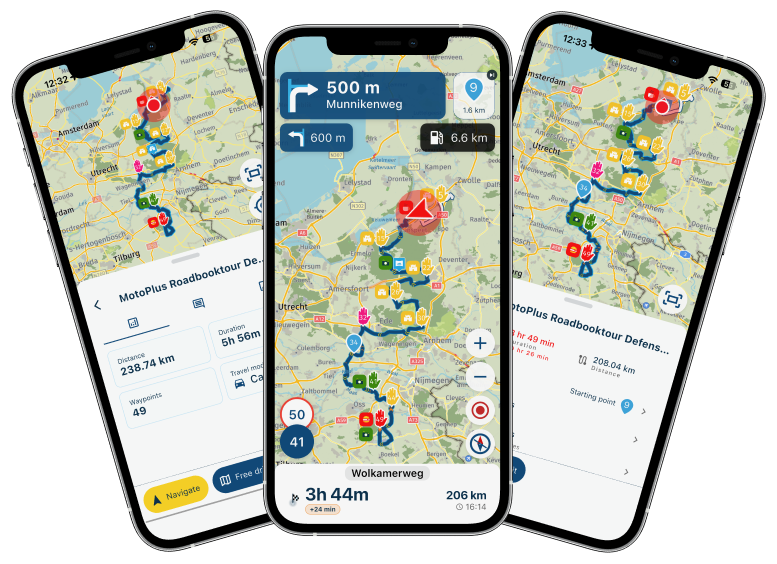
Recent routes
The recent route. What is it?
Last navigated? Last edited? Last shared?
That confusion has now been resolved! We present them all and you pick.
Away you go
Rebuilt camera
Did you hate taking photo's with our in-app camera?
Hopefully not anymore now!Add photo's to tracklog
Ever forgot to add pictures to your tracklog after saving?
No problem anymore! You can add them after saving.
Photo's are automatically placed correctly on the tracklog if the GPS data is there.Map rotating while standing still
Finally resolved!
Stability
This has also been a critical part of the update!
A lot of stability issues have been tackled.
Hopefully for the better!
From CarPlay to Android Auto.
From low budget tablets to high end phones.
MyRoute-app should perform better on all.Minor things
- Redesigned roundtrip screen
- Improved app wide text scaling
- Haptic feedback where useful
- Bluetooth controller improvements
- Orientation lock / quirks fixed
- ETA keeps updating while standing still
- Improvements to day / nigh behavior when driving in tunnels
If you think this is the biggest announcement of the week, you will be blown away by our announcement on Thursday
Looking forward to all your feedback as always!
We are in no rush to release this beta to the public so feel free to share your thoughts.Cheers,
Corjan -
Hi everyone!
It has been a long summer without any beta update!
But to be honest, the has been performing very well
We are really proud of the app in it's current form.Is there room for improvement? Definitely!
This update will tackle a lot of issues and blow you away with a new UI.Improved navigation UI
So since update v5, we greatly improved the visual appearance of the app.
One thing was left out: navigation.
In this update, we completely redesigned the navigation experience and it looks absolutely amazingIt's too much to mention here. Just go try it!
Things you will enjoy are:- Better font size / readability of what's important
- Redesigned warnings
- Use of official road shields (See the "A28" icon in the center image) to better indicate where to go
- Road sign warnings (stop signs, yield signs, dangerous crossing etc)
What has been really improved are all zoom animations. It's all much smoother.
We have also been able to configure a more natural tilt so it just looks better and you can look further ahead.Together with that, the zoom adjustments have been decoupled from the camera mode. Meaning you can now zoom in / out while staying in the selected mode.
I am probably even now forgetting something but you will be blown away!
Especially tablet users are going to love this because the app looks gorgeous while navigating with that.Improved tracklog details
We now show the speed / height graphs! More statistics is always fun.
Added to that is the "Fly-through" allowing you to quickly relive the tracklog.
How amazing is that?While we were at it, the entire comment interface has been improved so that responding to activities becomes a better experience.
Another nice detail is that swiping through the pictures will show correctly on map where the current displayed on is. Also, the fullscreen gallery has been improved drastically
Add and reorder stops
Yes, you could create a route to a destination.
Yes, you could use the in-app routeplanner.
Yes, you could add stops while navigating.But....you could not immediately create a route with some quick stops.
Now you can!
Just add an intermediate stop and there you go! How easy should it be?And because we were making changes here, we also improved the visual appearance of the rest.
Track navigation improvements
Or well....improvements?
It's gone. Completely gone.
Reason for panic? Absolutely not!We now create a highly accurate route matching the track.
Nicely warning you where it does match. But honestly, we haven't seen it mismatching yet.Why did we do this? Because it will just work better!
Experience it yourselfOther amazing reasons to do this:
- Full offline support
- All features will work such as adding stops along route while navigating and adding a roadblock / creating a deviation
- Saves us quite some
I've tested this extensively over 3000km of driving. Worked absolutely flawless once I was done
Route warnings
Because of the above change we redesign our route warning system. Beneficial for our track approximation but also when passing seasonal closures or other road violations.
Waypoint skip redesign
From the ground up completely rebuilt.
The waypoint skip algorithm behaves like it should.
Forget how you thought about it and give your new opinion.
Our logs contain all information we need to improve it based on your feedback.So turn it back on and start driving!
This was especially important as waypoint skip should work flawlessly now that track navigation is gone.Fuel station suggestions
And then this algorithm has also been improved!
All aiming to suggest the fuel station that is nearest and makes most senseRecent routes
The recent route. What is it?
Last navigated? Last edited? Last shared?
That confusion has now been resolved! We present them all and you pick.
Away you goRebuilt camera
Did you hate taking photo's with our in-app camera?
Hopefully not anymore now!Add photo's to tracklog
Ever forgot to add pictures to your tracklog after saving?
No problem anymore! You can add them after saving.
Photo's are automatically placed correctly on the tracklog if the GPS data is there.Map rotating while standing still
Finally resolved!
Stability
This has also been a critical part of the update!
A lot of stability issues have been tackled.
Hopefully for the better!
From CarPlay to Android Auto.
From low budget tablets to high end phones.
MyRoute-app should perform better on all.Minor things
- Redesigned roundtrip screen
- Improved app wide text scaling
- Haptic feedback where useful
- Bluetooth controller improvements
- Orientation lock / quirks fixed
- ETA keeps updating while standing still
- Improvements to day / nigh behavior when driving in tunnels
If you think this is the biggest announcement of the week, you will be blown away by our announcement on Thursday
Looking forward to all your feedback as always!
We are in no rush to release this beta to the public so feel free to share your thoughts.Cheers,
Corjan
@Corjan-Meijerink Top job. I have been looking forward to this new version.

-

Whoa, slow down, let me catch my breath ……. Wow, just when you think the navigation app couldn’t get any better, you kick it out of the park with a huge update. Well done and thanks @corjan-meijerink and #TeamMRA


-
Hi everyone!
It has been a long summer without any beta update!
But to be honest, the has been performing very well
We are really proud of the app in it's current form.Is there room for improvement? Definitely!
This update will tackle a lot of issues and blow you away with a new UI.Improved navigation UI
So since update v5, we greatly improved the visual appearance of the app.
One thing was left out: navigation.
In this update, we completely redesigned the navigation experience and it looks absolutely amazingIt's too much to mention here. Just go try it!
Things you will enjoy are:- Better font size / readability of what's important
- Redesigned warnings
- Use of official road shields (See the "A28" icon in the center image) to better indicate where to go
- Road sign warnings (stop signs, yield signs, dangerous crossing etc)
What has been really improved are all zoom animations. It's all much smoother.
We have also been able to configure a more natural tilt so it just looks better and you can look further ahead.Together with that, the zoom adjustments have been decoupled from the camera mode. Meaning you can now zoom in / out while staying in the selected mode.
I am probably even now forgetting something but you will be blown away!
Especially tablet users are going to love this because the app looks gorgeous while navigating with that.Improved tracklog details
We now show the speed / height graphs! More statistics is always fun.
Added to that is the "Fly-through" allowing you to quickly relive the tracklog.
How amazing is that?While we were at it, the entire comment interface has been improved so that responding to activities becomes a better experience.
Another nice detail is that swiping through the pictures will show correctly on map where the current displayed on is. Also, the fullscreen gallery has been improved drastically
Add and reorder stops
Yes, you could create a route to a destination.
Yes, you could use the in-app routeplanner.
Yes, you could add stops while navigating.But....you could not immediately create a route with some quick stops.
Now you can!
Just add an intermediate stop and there you go! How easy should it be?And because we were making changes here, we also improved the visual appearance of the rest.
Track navigation improvements
Or well....improvements?
It's gone. Completely gone.
Reason for panic? Absolutely not!We now create a highly accurate route matching the track.
Nicely warning you where it does match. But honestly, we haven't seen it mismatching yet.Why did we do this? Because it will just work better!
Experience it yourselfOther amazing reasons to do this:
- Full offline support
- All features will work such as adding stops along route while navigating and adding a roadblock / creating a deviation
- Saves us quite some
I've tested this extensively over 3000km of driving. Worked absolutely flawless once I was done
Route warnings
Because of the above change we redesign our route warning system. Beneficial for our track approximation but also when passing seasonal closures or other road violations.
Waypoint skip redesign
From the ground up completely rebuilt.
The waypoint skip algorithm behaves like it should.
Forget how you thought about it and give your new opinion.
Our logs contain all information we need to improve it based on your feedback.So turn it back on and start driving!
This was especially important as waypoint skip should work flawlessly now that track navigation is gone.Fuel station suggestions
And then this algorithm has also been improved!
All aiming to suggest the fuel station that is nearest and makes most senseRecent routes
The recent route. What is it?
Last navigated? Last edited? Last shared?
That confusion has now been resolved! We present them all and you pick.
Away you goRebuilt camera
Did you hate taking photo's with our in-app camera?
Hopefully not anymore now!Add photo's to tracklog
Ever forgot to add pictures to your tracklog after saving?
No problem anymore! You can add them after saving.
Photo's are automatically placed correctly on the tracklog if the GPS data is there.Map rotating while standing still
Finally resolved!
Stability
This has also been a critical part of the update!
A lot of stability issues have been tackled.
Hopefully for the better!
From CarPlay to Android Auto.
From low budget tablets to high end phones.
MyRoute-app should perform better on all.Minor things
- Redesigned roundtrip screen
- Improved app wide text scaling
- Haptic feedback where useful
- Bluetooth controller improvements
- Orientation lock / quirks fixed
- ETA keeps updating while standing still
- Improvements to day / nigh behavior when driving in tunnels
If you think this is the biggest announcement of the week, you will be blown away by our announcement on Thursday
Looking forward to all your feedback as always!
We are in no rush to release this beta to the public so feel free to share your thoughts.Cheers,
Corjan
@Corjan-Meijerink great update #MRAteam. Had a great summer thanks to you, and enyoing it still as we speak!!
-
Wooow!! Great job!!!!
-

thanks a lot
-

Wow, there minimum 5-6 points I would like to see.
You are so quick with updates; I can't follow.
Great work. -
Hi everyone!
It has been a long summer without any beta update!
But to be honest, the has been performing very well
We are really proud of the app in it's current form.Is there room for improvement? Definitely!
This update will tackle a lot of issues and blow you away with a new UI.Improved navigation UI
So since update v5, we greatly improved the visual appearance of the app.
One thing was left out: navigation.
In this update, we completely redesigned the navigation experience and it looks absolutely amazingIt's too much to mention here. Just go try it!
Things you will enjoy are:- Better font size / readability of what's important
- Redesigned warnings
- Use of official road shields (See the "A28" icon in the center image) to better indicate where to go
- Road sign warnings (stop signs, yield signs, dangerous crossing etc)
What has been really improved are all zoom animations. It's all much smoother.
We have also been able to configure a more natural tilt so it just looks better and you can look further ahead.Together with that, the zoom adjustments have been decoupled from the camera mode. Meaning you can now zoom in / out while staying in the selected mode.
I am probably even now forgetting something but you will be blown away!
Especially tablet users are going to love this because the app looks gorgeous while navigating with that.Improved tracklog details
We now show the speed / height graphs! More statistics is always fun.
Added to that is the "Fly-through" allowing you to quickly relive the tracklog.
How amazing is that?While we were at it, the entire comment interface has been improved so that responding to activities becomes a better experience.
Another nice detail is that swiping through the pictures will show correctly on map where the current displayed on is. Also, the fullscreen gallery has been improved drastically
Add and reorder stops
Yes, you could create a route to a destination.
Yes, you could use the in-app routeplanner.
Yes, you could add stops while navigating.But....you could not immediately create a route with some quick stops.
Now you can!
Just add an intermediate stop and there you go! How easy should it be?And because we were making changes here, we also improved the visual appearance of the rest.
Track navigation improvements
Or well....improvements?
It's gone. Completely gone.
Reason for panic? Absolutely not!We now create a highly accurate route matching the track.
Nicely warning you where it does match. But honestly, we haven't seen it mismatching yet.Why did we do this? Because it will just work better!
Experience it yourselfOther amazing reasons to do this:
- Full offline support
- All features will work such as adding stops along route while navigating and adding a roadblock / creating a deviation
- Saves us quite some
I've tested this extensively over 3000km of driving. Worked absolutely flawless once I was done
Route warnings
Because of the above change we redesign our route warning system. Beneficial for our track approximation but also when passing seasonal closures or other road violations.
Waypoint skip redesign
From the ground up completely rebuilt.
The waypoint skip algorithm behaves like it should.
Forget how you thought about it and give your new opinion.
Our logs contain all information we need to improve it based on your feedback.So turn it back on and start driving!
This was especially important as waypoint skip should work flawlessly now that track navigation is gone.Fuel station suggestions
And then this algorithm has also been improved!
All aiming to suggest the fuel station that is nearest and makes most senseRecent routes
The recent route. What is it?
Last navigated? Last edited? Last shared?
That confusion has now been resolved! We present them all and you pick.
Away you goRebuilt camera
Did you hate taking photo's with our in-app camera?
Hopefully not anymore now!Add photo's to tracklog
Ever forgot to add pictures to your tracklog after saving?
No problem anymore! You can add them after saving.
Photo's are automatically placed correctly on the tracklog if the GPS data is there.Map rotating while standing still
Finally resolved!
Stability
This has also been a critical part of the update!
A lot of stability issues have been tackled.
Hopefully for the better!
From CarPlay to Android Auto.
From low budget tablets to high end phones.
MyRoute-app should perform better on all.Minor things
- Redesigned roundtrip screen
- Improved app wide text scaling
- Haptic feedback where useful
- Bluetooth controller improvements
- Orientation lock / quirks fixed
- ETA keeps updating while standing still
- Improvements to day / nigh behavior when driving in tunnels
If you think this is the biggest announcement of the week, you will be blown away by our announcement on Thursday
Looking forward to all your feedback as always!
We are in no rush to release this beta to the public so feel free to share your thoughts.Cheers,
Corjan
@Corjan-Meijerink said:
If you think this is the biggest announcement of the week, you will be blown away by our announcement on Thursday
-

Great job!!! I can’t wait to download on Android…
Please Google, do not delay PlayStore publication


-

Sounds good, especially the spinning job.
-

@corjan-meijerink This sounds amazing and I'm eager to try it out!! Unfortunately, some patience will likely be necessary since I'm an Android user (thanks for nothing, Google Play Store!)... I am especially grateful that map spinning is finally resolved, and looking forward to a lot of the mentioned features. Thanks for your hard work!
-

Thanks a lot. Everything has been said yet!
Hopefully it will be available somewhere in Oktober for Android! -

Great job team. Can't wait to try it since I'm going on a trip to Germany starting first week October I'm afraid Google will not deliver it before my departure.
There's always the rest of October
-

It is becoming a pattern: a long silence leads to BIG BIG updates...
You did an excellent job... again! -

Thank you for listening on the font size front!

A lot of old fidgets with dodgy eyesight will be very happy.

-
Hi everyone!
It has been a long summer without any beta update!
But to be honest, the has been performing very well
We are really proud of the app in it's current form.Is there room for improvement? Definitely!
This update will tackle a lot of issues and blow you away with a new UI.Improved navigation UI
So since update v5, we greatly improved the visual appearance of the app.
One thing was left out: navigation.
In this update, we completely redesigned the navigation experience and it looks absolutely amazingIt's too much to mention here. Just go try it!
Things you will enjoy are:- Better font size / readability of what's important
- Redesigned warnings
- Use of official road shields (See the "A28" icon in the center image) to better indicate where to go
- Road sign warnings (stop signs, yield signs, dangerous crossing etc)
What has been really improved are all zoom animations. It's all much smoother.
We have also been able to configure a more natural tilt so it just looks better and you can look further ahead.Together with that, the zoom adjustments have been decoupled from the camera mode. Meaning you can now zoom in / out while staying in the selected mode.
I am probably even now forgetting something but you will be blown away!
Especially tablet users are going to love this because the app looks gorgeous while navigating with that.Improved tracklog details
We now show the speed / height graphs! More statistics is always fun.
Added to that is the "Fly-through" allowing you to quickly relive the tracklog.
How amazing is that?While we were at it, the entire comment interface has been improved so that responding to activities becomes a better experience.
Another nice detail is that swiping through the pictures will show correctly on map where the current displayed on is. Also, the fullscreen gallery has been improved drastically
Add and reorder stops
Yes, you could create a route to a destination.
Yes, you could use the in-app routeplanner.
Yes, you could add stops while navigating.But....you could not immediately create a route with some quick stops.
Now you can!
Just add an intermediate stop and there you go! How easy should it be?And because we were making changes here, we also improved the visual appearance of the rest.
Track navigation improvements
Or well....improvements?
It's gone. Completely gone.
Reason for panic? Absolutely not!We now create a highly accurate route matching the track.
Nicely warning you where it does match. But honestly, we haven't seen it mismatching yet.Why did we do this? Because it will just work better!
Experience it yourselfOther amazing reasons to do this:
- Full offline support
- All features will work such as adding stops along route while navigating and adding a roadblock / creating a deviation
- Saves us quite some
I've tested this extensively over 3000km of driving. Worked absolutely flawless once I was done
Route warnings
Because of the above change we redesign our route warning system. Beneficial for our track approximation but also when passing seasonal closures or other road violations.
Waypoint skip redesign
From the ground up completely rebuilt.
The waypoint skip algorithm behaves like it should.
Forget how you thought about it and give your new opinion.
Our logs contain all information we need to improve it based on your feedback.So turn it back on and start driving!
This was especially important as waypoint skip should work flawlessly now that track navigation is gone.Fuel station suggestions
And then this algorithm has also been improved!
All aiming to suggest the fuel station that is nearest and makes most senseRecent routes
The recent route. What is it?
Last navigated? Last edited? Last shared?
That confusion has now been resolved! We present them all and you pick.
Away you goRebuilt camera
Did you hate taking photo's with our in-app camera?
Hopefully not anymore now!Add photo's to tracklog
Ever forgot to add pictures to your tracklog after saving?
No problem anymore! You can add them after saving.
Photo's are automatically placed correctly on the tracklog if the GPS data is there.Map rotating while standing still
Finally resolved!
Stability
This has also been a critical part of the update!
A lot of stability issues have been tackled.
Hopefully for the better!
From CarPlay to Android Auto.
From low budget tablets to high end phones.
MyRoute-app should perform better on all.Minor things
- Redesigned roundtrip screen
- Improved app wide text scaling
- Haptic feedback where useful
- Bluetooth controller improvements
- Orientation lock / quirks fixed
- ETA keeps updating while standing still
- Improvements to day / nigh behavior when driving in tunnels
If you think this is the biggest announcement of the week, you will be blown away by our announcement on Thursday
Looking forward to all your feedback as always!
We are in no rush to release this beta to the public so feel free to share your thoughts.Cheers,
Corjan
If you think this is the biggest announcement of the week, you will be blown away by our announcement on Thursday
Why wait to Thursday?
met een R1250RT met TFT
en BMW Connected Ride App(die dus nog steeds niet voldoet!) ; M.R.A. in combinatie met de Carpuride W702 (voor Android op de Motor!), de Garmin Zumo XT als backup en een Samsung Galaxy S24 -
If you think this is the biggest announcement of the week, you will be blown away by our announcement on Thursday
Why wait to Thursday?
@a-white-mouse-on-the-motorbike Corjan is responsible for quite a few sleepless nights because of this

-

Thanks for the next step to V6.0, and the topic of layout navigation.
How do I use the mobile phone on the motorcycle now best, vertically or horizontally on the motorcycle.
What does the developer say, what is the better choice right now after the update. Gladly an honest answer.
Alignment of the display from V 6.0 ?
-
Display vertical ?
-
Display horizontal ?
—-###—-
Danke für den nächsten Schritt zur V6.0, und dem Thema Layout Navigation.
Wie nutze ich das Handy am Motorrad denn jetzt am besten, senkrecht oder waagerecht am Motorrad.
Was sagt der Entwickler, was ist die bessere Wahl gerade jetzt nach dem Update. Gerne dazu eine ehrliche Antwort.
Ausrichtung des Display ab V 6.0 ?
- Display senkrecht ?
- Display waagerecht ?
-
-
Let's go just loaded for iOS


Hello! It looks like you're interested in this conversation, but you don't have an account yet.
Getting fed up of having to scroll through the same posts each visit? When you register for an account, you'll always come back to exactly where you were before, and choose to be notified of new replies (either via email, or push notification). You'll also be able to save bookmarks and upvote posts to show your appreciation to other community members.
With your input, this post could be even better 💗
Register Login


-
 02042
02042
-
8724
-
013200
-
0732
-
1673
-
0627
-
 011733
-
 15139
15139