Web App isn’t stable
-

I’ve been using mra online for years but this morning when I logged on and tried to use it, I couldn’t get the map to expand and contract as it should. When I tried to pinch the screen the frame around the map and the map both reacted. I played with it for a while and, suddenly the frame filled the whole screen and I couldn’t get no longer see the address bar and the app worked perfectly. Then I touched something and it went back to the same behavior. It’s driving me nuts. Any ideas?
-
Never mind. I changed from the default Google map to the Default Here map and everything works as it should.

Never mind. I changed from the default Google map to the Default Here map and everything works as it should.
Hi, MRA does not have a Google map.
It uses 3 main maps:- HERE map
- TomTom map
- Open Street Map (short: OSM)
I think you main the overlay map?
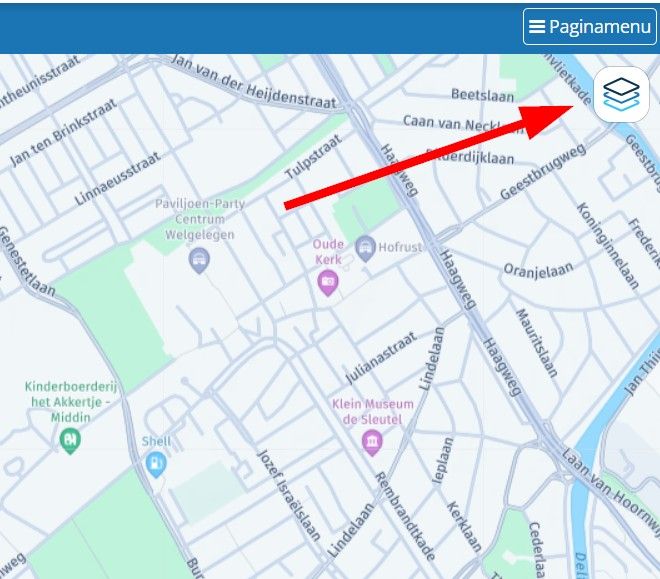
Maybe you clicked this button by accident and clicked on Google Maps? Or you did it consciously but you forgot about it?
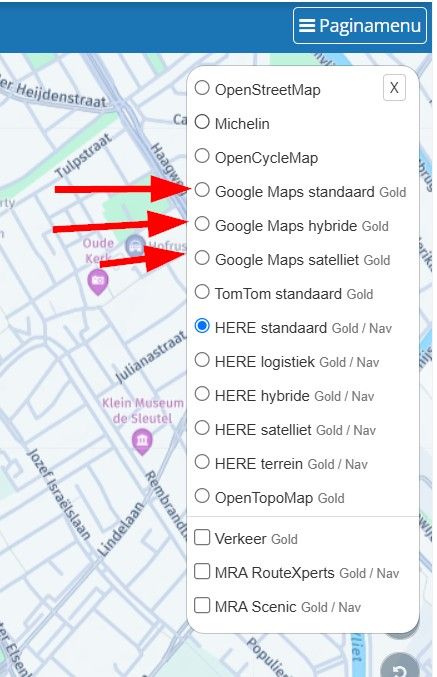
-

The same thing happened to me but on mobile devices, both iPhone and iPad, but it seems to me that if I put Google on top, this is what I think the problem is, the map doesn't respond correctly, as if the software needed more resources for a stretch and the processor couldn't handle it, then if I change the map and put MICHELIN for example, everything goes back to normal... it's been happening for a few weeks now, I even wrote about it somewhere, but it seems to me that it wasn't given too much importance... I thought it was just my problem... but apparently that's not the case...
Hello! It looks like you're interested in this conversation, but you don't have an account yet.
Getting fed up of having to scroll through the same posts each visit? When you register for an account, you'll always come back to exactly where you were before, and choose to be notified of new replies (either via email, or push notification). You'll also be able to save bookmarks and upvote posts to show your appreciation to other community members.
With your input, this post could be even better 💗
Register Login-
 417172
-
 012628
-
 0828
0828
-
 1201.1k
-
06171
-
 05130
05130
-
 0454
0454
-
0339