Managing POIs and Favorites - Do POIs show up in other routes?
-

I've done a lot of searching on this forum and in the support area. and I think I may have a misunderstanding of how POIs and Favorites work. I can add POIs, but, they disappear for the next route. Favorites seem to stay but I don't know how to show them on the map without making them a waypoint.
I thought POIs I added would show up in new routes like favorites do, however, when I make some they do not appear in other routes. This seemed strange as the "search POI's" library does, I haven't tested if an uploaded "Library" of POIs transfer between routes.
Problem/goal: to show POIs and/or favorites on a new route without making them a waypoint. Favorites do show in all routes but I can not see how to keep them showing on the map without making them a waypoint. POIs can be put on the map without being a waypoint, but, need to be reentered for each route. I'd like to have the points I've entered remain with new routes and can show on the map. For example, someone mentioned all the covered bridges in New Hampshire. Do these have to be reuploaded each time or do they stick?
-
I've done a lot of searching on this forum and in the support area. and I think I may have a misunderstanding of how POIs and Favorites work. I can add POIs, but, they disappear for the next route. Favorites seem to stay but I don't know how to show them on the map without making them a waypoint.
I thought POIs I added would show up in new routes like favorites do, however, when I make some they do not appear in other routes. This seemed strange as the "search POI's" library does, I haven't tested if an uploaded "Library" of POIs transfer between routes.
Problem/goal: to show POIs and/or favorites on a new route without making them a waypoint. Favorites do show in all routes but I can not see how to keep them showing on the map without making them a waypoint. POIs can be put on the map without being a waypoint, but, need to be reentered for each route. I'd like to have the points I've entered remain with new routes and can show on the map. For example, someone mentioned all the covered bridges in New Hampshire. Do these have to be reuploaded each time or do they stick?

@Lary Favourites are like bookmarks and are used to find favourite locations quickly, use the big + icon to add a favourite as a waypoint.
POIs. If you have a list of POIs that you have uploaded to your personal POIs library, selecting the account icon for a list will show that list in all routes and they will be visible on the MRA Navigation Next app while navigating.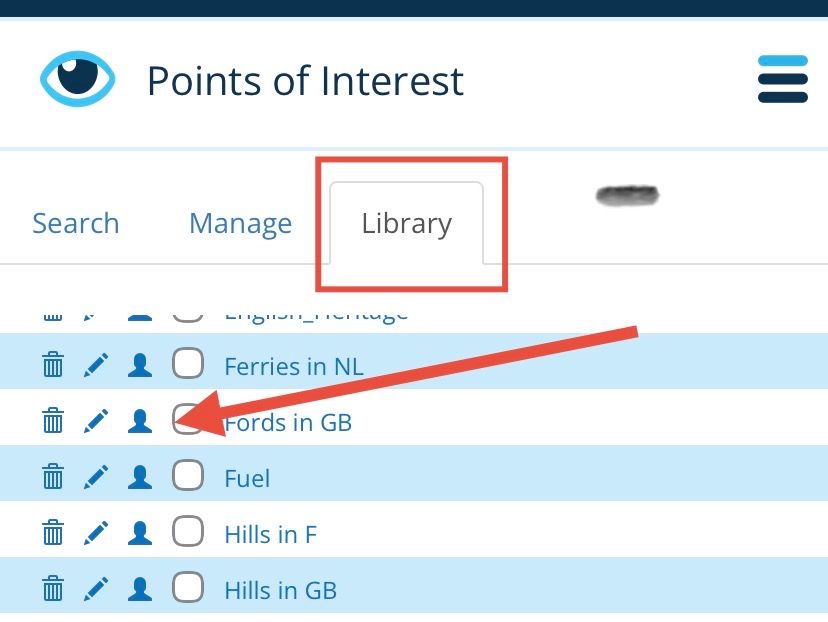
-
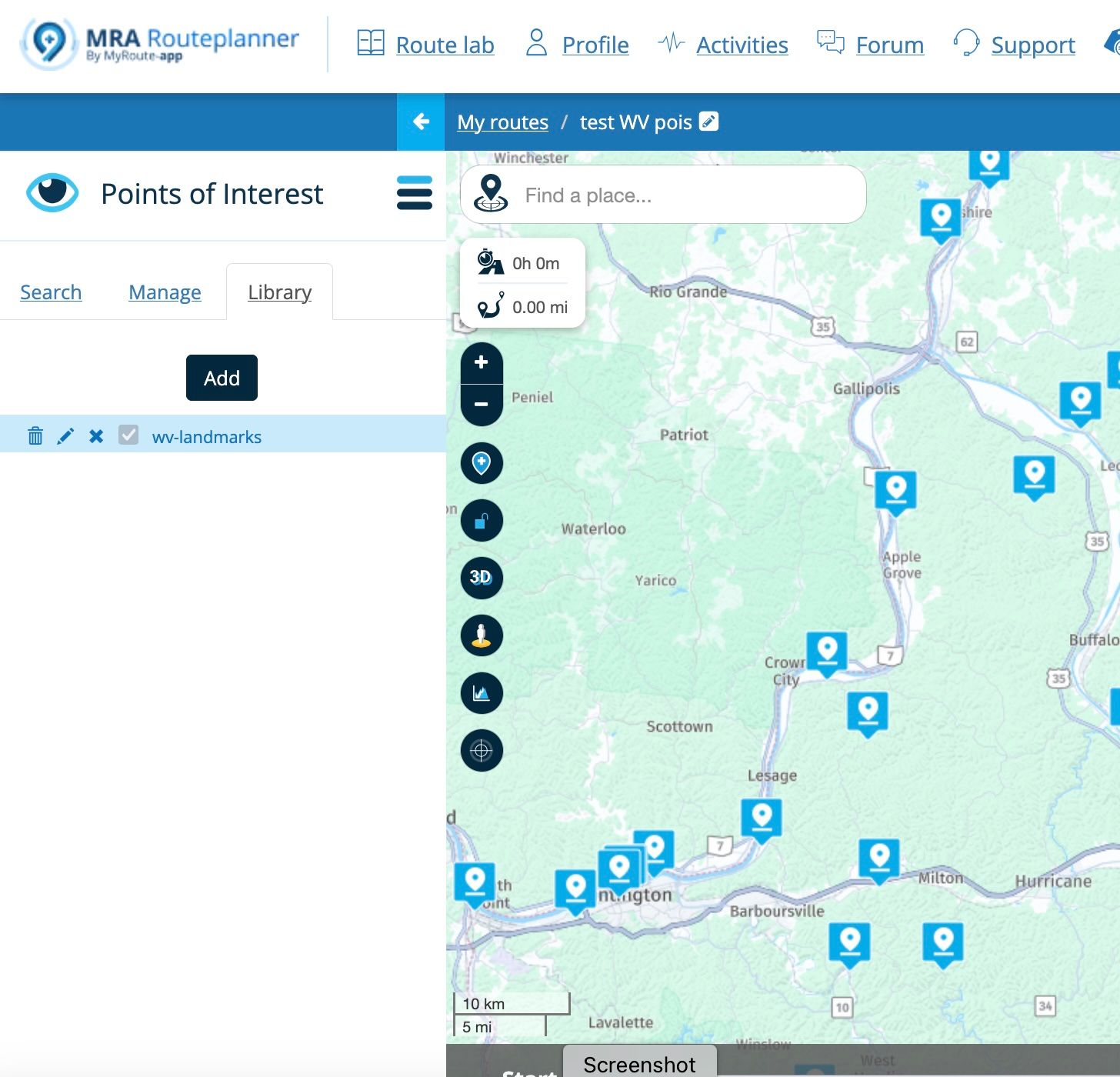
Hi Nick, thanks I've made some progress. I was able to upload a file of POIs (West Virginia) to the library and they do appear in new routes as you said. I have a lot to learn on this process as the whole file appears under one POI. I assume because it has no organization. Is there a link where I can learn more about managing POIs than in the support manual topic? (I don't see the little person you point to).
Is there a way to get the POIs we've adding to a route into the library or to download them into a file and re-upload them so they are available in all new routes? Thanks Lary
-
Hi Nick, thanks I've made some progress. I was able to upload a file of POIs (West Virginia) to the library and they do appear in new routes as you said. I have a lot to learn on this process as the whole file appears under one POI. I assume because it has no organization. Is there a link where I can learn more about managing POIs than in the support manual topic? (I don't see the little person you point to).
Is there a way to get the POIs we've adding to a route into the library or to download them into a file and re-upload them so they are available in all new routes? Thanks Lary
@Lary The ‘little man’ or account icon is under the X in your screenshot, you have already clicked on it. After clicking, it turns into a X, click the X to turn them off.
You can save POIs from a route by clicking Save as and choose the .csv option, then upload it to your POI library.
Hello! It looks like you're interested in this conversation, but you don't have an account yet.
Getting fed up of having to scroll through the same posts each visit? When you register for an account, you'll always come back to exactly where you were before, and choose to be notified of new replies (either via email, or push notification). You'll also be able to save bookmarks and upvote posts to show your appreciation to other community members.
With your input, this post could be even better 💗
Register Login-
018322
-
 3181.6k
-
 0312
0312
-
 05167
05167
-
 51078.2k
-
 029
029
-
 1334456
-
110689