POI import anomalies
-

I am trying to import POI groups into the Route Planner. In this particular case a list of all the covered bridges in my state (New Hampshire). This is a subset of a CSV of all covered bridges in the US. To do this, I used the following methodology:
- found the lat/long for the corners of a bounding box that covered the state. This covers a bit of surrounding states but I figured that I could edit outliers after seeing them plotted.
- sorted the master file by lat and long, and removed any entries outside the bounding box
- imported the resulting file to the Route Planner.
This seemed to work as expected but upon closer inspection, I found a couple of strange things:
- there are 5 POIs shown that are outside the bounding box that I can not find if I search in the CSV. None of these are actually bridges (four of them are waterfalls).
- When I look in the CSV, I see at least one bridge that is outside NH (I recognize the name) but I think is inside the bounding box however it does not show as a POI in the Route Planner.
Can anyone give me a clue as to why this may be happening?
Thanks. -

Oddly to import a CSV POI list into MRA you need to organise the list by Long,Lat,and Name. This is a CSV of Irish photorally waypoints I have imported to my library.
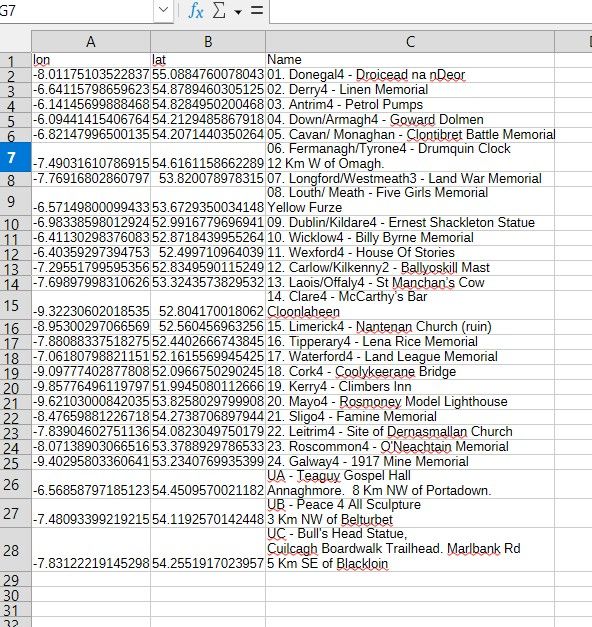
To get to this point I had to merge several columns of data into the "Name" column so that when you clicked on the waypoint on the map you got some meaningful indication of what the point was. When I imported the same info as a GPX all I got was the Long and Lat which wasn't very helpful. Its an aspect of the MyRoute app route planner that is ripe for improvement.
-
First, thanks @mzokk. Despite that the fact that I said "lat/long" in the post, the columns were as you pointed out, "long/lat, in the file.
Second, seems I managed to be "that guy" who manages to, on his first post to the list, waste space and time with a bogus question. I posted after the 3rd time looking things over and not seeing it, only to find, 10 minutes later on my fourth look, that I had uploaded a different file than I intended and was searching for the points in the wrong place.
I removed that import and imported the right file and, lo and behold, everything was as it should be.
My apologies to the group and anyone whose time I wasted. I will try to do better the next time I post.
Thanks.
-David-

Hello! It looks like you're interested in this conversation, but you don't have an account yet.
Getting fed up of having to scroll through the same posts each visit? When you register for an account, you'll always come back to exactly where you were before, and choose to be notified of new replies (either via email, or push notification). You'll also be able to save bookmarks and upvote posts to show your appreciation to other community members.
With your input, this post could be even better 💗
Register Login-
 5922.5k
-
9942.6k
-
 0591
0591
-
 022786
-
 05124
05124
-
0463
-
 05126
05126
-
03110