The magic tree Points an skip Waypoints during navigation

-

Glad to read you enjoyed it!
What if you remove those other apps on the DC right? Will it then send the skip command to MRA as it should?
-

Hello Corjan,
I tested it. And YES I am now able to skip the waypoints.
So there has no app to be in the main profile of remotek app. The Media Profile is not affected. I am able zu switch and controlling spotify app.
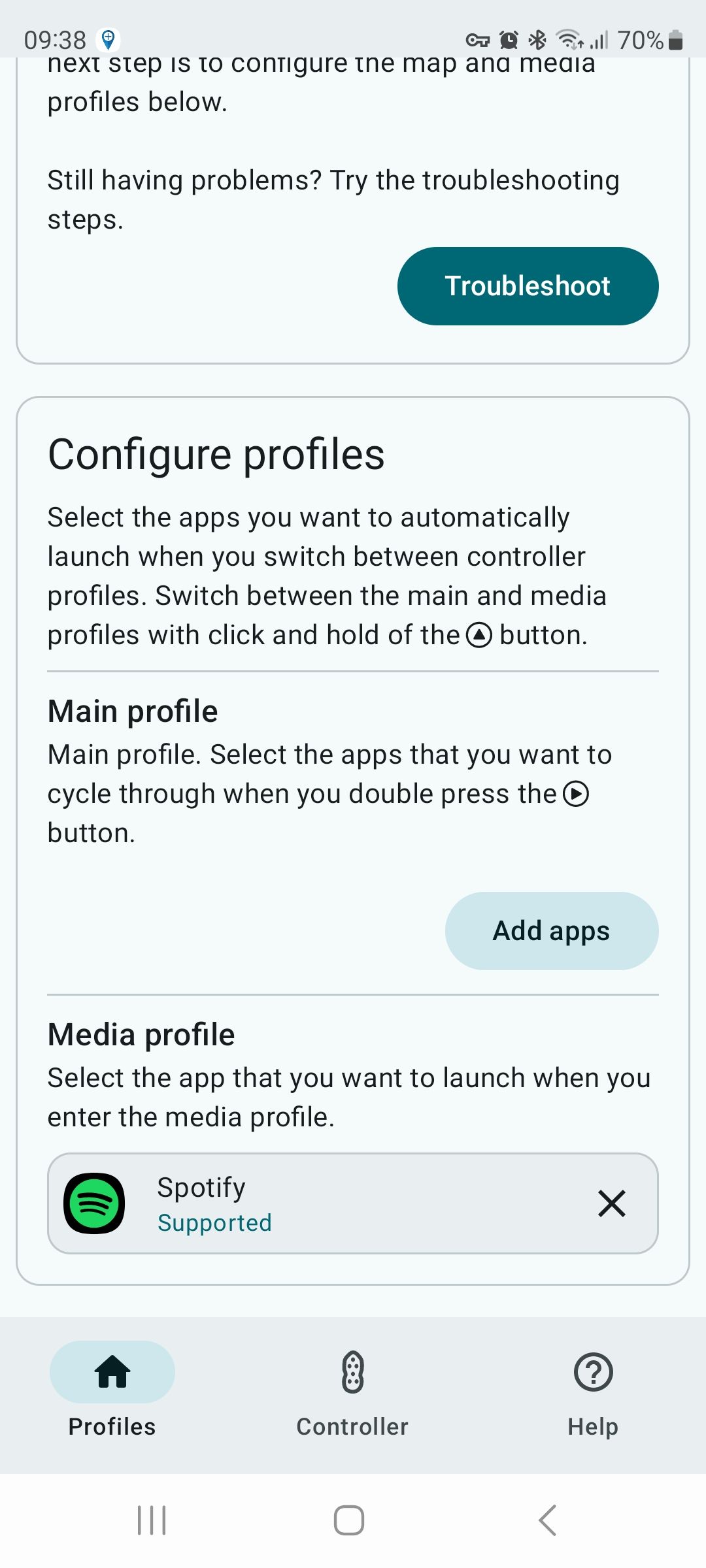
If you selected MRA app it would not be able to skip waypoint
Thanks for your help.
best regards
Oliver
-
-

Hey @Westerwald_Rider ,
Maybe that will help you too or Dag will send you an update with the old version.I am very happy with it on iOS.
https://forum.myrouteapp.com/post/70445 -
Great!


@Corjan-Meijerink apologies Conjan I think not so great
IMO one of the great benefits of the Remotek is its ability to use the double click right button to switch between different apps
the double click right is the only key combination that the Remotek reserves I think via its firmware,
I believe all other key combinations are available but for some reason MRA decided to add the skip function to the key combination double click right & thus disable this great feature of the Remotek
I do not understand why this choice was madeMaybe I am partly to blame as I was active in thread last year requesting requesting the addition of the skip function for the Remotek
I did however ask for the skip key combination to be possibly longpress down (4)This key combination long press down (4) was not a spurious request,
I thought long press down would possible be the least error prone/disruptive combination as all the down key (4) does is scroll the map down for a single click & for a double click "Change displayed arrival time (end, via or shaping)" so nothing disastrous would occur if the key press was fumbledI really like that MRA did add the skip function for the Remotek just not the way it was implemented, I use the skip quite often
I do not know about other Remotek users but I would really like to see MRA change the key combination for the skip function from double click right (3) to some other key combination so I can have BOTH the great app switching feature of the Remotek & also the very necessary MRA Skip function
BlackView BV7100, Android 12
Navigate "Routes as Tracks" in Offline mode with Offline Maps
No Wifi, no internet, no interruptions, works well -
@Corjan-Meijerink apologies Conjan I think not so great
IMO one of the great benefits of the Remotek is its ability to use the double click right button to switch between different apps
the double click right is the only key combination that the Remotek reserves I think via its firmware,
I believe all other key combinations are available but for some reason MRA decided to add the skip function to the key combination double click right & thus disable this great feature of the Remotek
I do not understand why this choice was madeMaybe I am partly to blame as I was active in thread last year requesting requesting the addition of the skip function for the Remotek
I did however ask for the skip key combination to be possibly longpress down (4)This key combination long press down (4) was not a spurious request,
I thought long press down would possible be the least error prone/disruptive combination as all the down key (4) does is scroll the map down for a single click & for a double click "Change displayed arrival time (end, via or shaping)" so nothing disastrous would occur if the key press was fumbledI really like that MRA did add the skip function for the Remotek just not the way it was implemented, I use the skip quite often
I do not know about other Remotek users but I would really like to see MRA change the key combination for the skip function from double click right (3) to some other key combination so I can have BOTH the great app switching feature of the Remotek & also the very necessary MRA Skip function
@Brian-McG Our "skip waypoint" function was implemented before they had the firmware to support the "app switching" feature
 (I believe).
I can extremely easily move it to another function which will simply mean another function disappears. It was mapped to DC right because that is intuitive for a "skip waypoint" as right kinda implies "next".
DC down = Toggle ETA
DC left = Compass (this one you definitely need)
DC up = Open menu (but broken since another firmware 2.x update)I guess we can switch "toggle ETA" and "skip waypoint".
But bluetooth controllers do kinda frustrate me sometimes. SilverFox and Carpe Iter communicate their changes but others absolutely not

Functions work and then they are broken because their firmware changes and other keycodes are sent. Demonstrated by the fact that open menu does not work anymore (or it might again) with the Remotek One.
So yeah, if actual remotek users tell me what DC they want to sacrifice (I guess toggle ETA is the only option), I can definitely make that change.
-
@Brian-McG Our "skip waypoint" function was implemented before they had the firmware to support the "app switching" feature
(I believe).I can extremely easily move it to another function which will simply mean another function disappears. It was mapped to DC right because that is intuitive for a "skip waypoint" as right kinda implies "next".
DC down = Toggle ETA
DC left = Compass (this one you definitely need)
DC up = Open menu (but broken since another firmware 2.x update)I guess we can switch "toggle ETA" and "skip waypoint".
But bluetooth controllers do kinda frustrate me sometimes. SilverFox and Carpe Iter communicate their changes but others absolutely not
Functions work and then they are broken because their firmware changes and other keycodes are sent. Demonstrated by the fact that open menu does not work anymore (or it might again) with the Remotek One.
So yeah, if actual remotek users tell me what DC they want to sacrifice (I guess toggle ETA is the only option), I can definitely make that change.

@Corjan-Meijerink I like it just the way the key mapping is at the moment for the Remotek One. I have no need for the app switching as I am on iOS.
-
@Brian-McG Our "skip waypoint" function was implemented before they had the firmware to support the "app switching" feature
(I believe).I can extremely easily move it to another function which will simply mean another function disappears. It was mapped to DC right because that is intuitive for a "skip waypoint" as right kinda implies "next".
DC down = Toggle ETA
DC left = Compass (this one you definitely need)
DC up = Open menu (but broken since another firmware 2.x update)I guess we can switch "toggle ETA" and "skip waypoint".
But bluetooth controllers do kinda frustrate me sometimes. SilverFox and Carpe Iter communicate their changes but others absolutely not
Functions work and then they are broken because their firmware changes and other keycodes are sent. Demonstrated by the fact that open menu does not work anymore (or it might again) with the Remotek One.
So yeah, if actual remotek users tell me what DC they want to sacrifice (I guess toggle ETA is the only option), I can definitely make that change.
@Brian-McG Our "skip waypoint" function was implemented before they had the firmware to support the "app switching" feature
(I believe). > I believe the reserved key DC right to switch app function has been in the Remotek firmware from day one, I know the MRA implementation of the DC right broke the Remotek switch function 
will simply mean another function disappears.....what DC they want to sacrifice>
Why, does the skip function have to be a DC, is it not possible to map a key to a longpress?
BlackView BV7100, Android 12
Navigate "Routes as Tracks" in Offline mode with Offline Maps
No Wifi, no internet, no interruptions, works well -
@Brian-McG Our "skip waypoint" function was implemented before they had the firmware to support the "app switching" feature
(I believe). > I believe the reserved key DC right to switch app function has been in the Remotek firmware from day one, I know the MRA implementation of the DC right broke the Remotek switch function will simply mean another function disappears.....what DC they want to sacrifice>
Why, does the skip function have to be a DC, is it not possible to map a key to a longpress?
@Brian-McG then I might have simply never used their custom app and just looked at the documentation. But still, not the real point here.
There are no long presses for the remotek.
If so, they need to update their manuals / communicate with people implementing their controllers.With the hardness of the buttons on a remotek I’m always impressed that people can execute a DC while driving with gloves

-
I use the following old version V1.1.2 which can still be loaded for MyRouteApp users...
I am an iOS user - with the Remotek One forapprox. 2 years https://forum.myrouteapp.com/post/70445
With the old V1.1.2 of the Remotek One, therare two important levels:
Navigate:
- Zooming +/-
- Skip WP
Profile change:
- APP switching with DCH1 between the profiles with button ( 1 )
- 1.) App MRA (Map Profile)
- 2.) App Spotify or another app (as media profile)
Switching is possible via iOS shortcut...
VG Hubert
Beta Test "Next App" dazu die Hardware .
iPad 9. Gen iOS 27.0.1/ iPhone 16e iOS 27.0.1/ Navi iPhone Xr iOS 18.7.10 / PC mit MS Win11 /❗️MyRoute-App im Cradel und Remotek-One❗️ Info zu MRA & Remotek One -
I use the following old version V1.1.2 which can still be loaded for MyRouteApp users...
I am an iOS user - with the Remotek One forapprox. 2 years https://forum.myrouteapp.com/post/70445
With the old V1.1.2 of the Remotek One, therare two important levels:
Navigate:
- Zooming +/-
- Skip WP
Profile change:
- APP switching with DCH1 between the profiles with button ( 1 )
- 1.) App MRA (Map Profile)
- 2.) App Spotify or another app (as media profile)
Switching is possible via iOS shortcut...
@Hubert-Thoring I use the latest firmware (V2.1.0) for the Remotek and the profile functionality is still there. It all works well for me with iOS and I am a happy user. I have an Android phone as well and there are more options for configurability with Android than iOS so I can understand the loss of options. That said, I do not want to lose the current set up of buttons of DC left, right and down.
@Corjan-Meijerink There is a new version of the firmware coming ‘soon’ although that was muted at least a couple of months ago. Users should be able to ‘program’ buttons to their need with this forthcoming version of the firmware although there was not a lot of information given. I will probably have to contact Remotek again once the firmware is released if the MRA configuration is not workable. As far as usability and DC, the angle of the device is key and I had a wide angle left bracket template from the Remotek website 3D printed - really helps.
-
@Brian-McG Our "skip waypoint" function was implemented before they had the firmware to support the "app switching" feature
(I believe).I can extremely easily move it to another function which will simply mean another function disappears. It was mapped to DC right because that is intuitive for a "skip waypoint" as right kinda implies "next".
DC down = Toggle ETA
DC left = Compass (this one you definitely need)
DC up = Open menu (but broken since another firmware 2.x update)I guess we can switch "toggle ETA" and "skip waypoint".
But bluetooth controllers do kinda frustrate me sometimes. SilverFox and Carpe Iter communicate their changes but others absolutely not
Functions work and then they are broken because their firmware changes and other keycodes are sent. Demonstrated by the fact that open menu does not work anymore (or it might again) with the Remotek One.
So yeah, if actual remotek users tell me what DC they want to sacrifice (I guess toggle ETA is the only option), I can definitely make that change.
@Corjan-Meijerink said in The magic tree Points an skip Waypoints during navigation:
So yeah, if actual remotek users tell me what DC they want to sacrifice (I guess toggle ETA is the only option), I can definitely make that change.
Please don't, toggle ETA is a super useful feature
-
@Corjan-Meijerink said in The magic tree Points an skip Waypoints during navigation:
So yeah, if actual remotek users tell me what DC they want to sacrifice (I guess toggle ETA is the only option), I can definitely make that change.
Please don't, toggle ETA is a super useful feature
-
@Graziano-0 agree
I also agree that there should be no sacrifice of existing functionality
(I just want to have my cake & eat it, to have the Remotek app toggling functionality back & have the skip point function as well))"DC down = Toggle ETA" is extremely useful, I am regularly toggling this to see time to next Via point & time to final destination
"DC left = Compass (this one you definitely need)" is 200% needed to re-centre the map after any panning of the map
"DC up = Open menu (but broken since another firmware 2.x update)" I do not understand why this is marked as does not work with 2.x, I have Remotek version 2.1.0 installed & "DC up" in navigation mode does exactly as specified, it opens the menu & always has done so, maybe only a 2.0 issue
Now "DC Right" is a bit more complex
For me on Android 12 I have the option/ability via the Remotek app to enable the Android "Accessibility Service"
When the "Accessibility Service" is enabled I believe this gives the Remotek the permission/ability to perform the app switching function so I can use the great Remotek feature "DC right" to toggle & click through a list of preselected apps
When the "Accessibility Service" is disabled I can use only use "DC Right" to perform the MRA designated skip functionSo because MRA chose the "DC right" key combination for the skip function it effectively replaces the one key combination that Remotek had reserved
I cannot therefore have both the MRA skip function & Remotek app toggling function at the same timeAs for the hardness of the buttons, yes it does require a positive pressure but this just takes practice & familiarity, we all know that with practice things get easier / better
As for "no longpress" for the Remotek I think this may be an incorrect statement
If I take the android app "Key Mapper"

I can set it up so that it recognises a "longpress down" as a trigger to send the command M so that within MRA a skip action is performed,
So I do believe it should be possible for MRA to edit the Remotek profile in the MRA Navigation App to recognise a longpressAs for documentation it looks like the Remotek is capable of a bewildering number of key combinations
"SC – SingleClick
DC – Double Click
H – Push down and hold button (this is equivalent to longpress )
SCH1 – Single Click Hold – One click and let go, then immediately push down the same button and hold it for duration(Dur), example; SCH1 is Single Click Hold for 1 second.
DCH2 – Double Click Hold – Two clicks followed by hold for a duration, here 2 seconds"
The above info from this MRA threadI admit some of these combinations would take a lot of practice using motorbike gloves but there are certainly plenty of key combinations available for the skip function without it having to overwrite the Remotek Toggle feature
-
But then please with an additional good solution with an input settings selection for further Remotek One solutions or how is that supposed to work?!
-
Remotek One
 V1.x / V2.x
 -
Remotek One
 V2.1.1 Brain McGAndroid
-
Hello! It looks like you're interested in this conversation, but you don't have an account yet.
Getting fed up of having to scroll through the same posts each visit? When you register for an account, you'll always come back to exactly where you were before, and choose to be notified of new replies (either via email, or push notification). You'll also be able to save bookmarks and upvote posts to show your appreciation to other community members.
With your input, this post could be even better 💗
Register Login-
0730
-
0869
-
81655.5k
-
0349
-
0275
-
16277
-
 0268
0268
-
1215