Skip to content
  • Categories
  • Recent
  • Popular
  • Support
  • MyRoute-app
Collapse
Brand Logo

MRA Community Forum

  1. Home
  2. The MyRoute-app
  3. [App] Problems, Bugs and other Issues
  4. Free ride not possible with new update

Free ride not possible with new update
Scheduled Pinned Locked Moved [App] Problems, Bugs and other Issues
9 Posts 5 Posters 2.3k Views 4 Watching
  • Oldest to Newest
  • Newest to Oldest
  • Most Votes
Reply
  • Reply as topic
Log in to reply
This topic has been deleted. Only users with topic management privileges can see it.
  • stuart marritt Offline
    stuart marritt Offline
    stuart marritt
    wrote on last edited by
    #1

    When in landscape mode with the new update you can't see the full map using free ride all you see is the menu and no way to hide it.
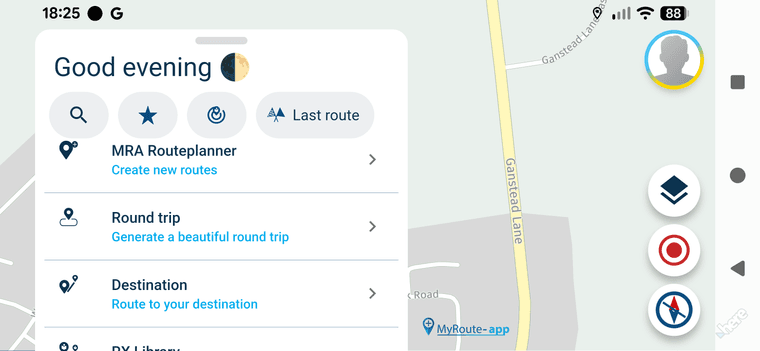
    1000022601.png

    1 Reply Last reply
    0
    • Corjan Meijerink Offline
      Corjan Meijerink Offline
      Corjan Meijerink
      Developer
      wrote on last edited by
      #2

      Correct, a dedicated free drive mode will be added later.

      For now you could long press the navigate button on a route to enable a sort of free drive 🙂
      This is default for walking / cycling.

      Note (hint): a route could just contain a random single waypoint

      Guzzist 1 Reply Last reply
      0
      • stuart marritt Offline
        stuart marritt Offline
        stuart marritt
        wrote on last edited by
        #3

        Thanks for that 👍

        1 Reply Last reply
        0
        • Corjan Meijerink Corjan Meijerink

          Correct, a dedicated free drive mode will be added later.

          For now you could long press the navigate button on a route to enable a sort of free drive 🙂
          This is default for walking / cycling.

          Note (hint): a route could just contain a random single waypoint

          Guzzist Online
          Guzzist Online
          Guzzist
          Valued contributor
          wrote on last edited by
          #4

          @Corjan-Meijerink please what do you mean with "Navigation Button" at home screen?
          I tried with an extra created route with only one route point in. By starting the navigation, I got the message "no route could be calculated".
          If I switch before this to use offline maps - than it worked.

          Nothing is impossible ;-)
          In past: GARMIN Zumo 210->GARMIN Zumo 395->GARMIN XT=> now: DMD T865-X + MyRoute-App, LocusMaps, OsmAnd.
          In past: GARMIN MapSource ->GARMIN BaseCamp->Tyre->Kurviger->Calimoto=> now: MRA-Routplanner.

          Con Hennekens 1 Reply Last reply
          0
          • Jörgen Offline
            Jörgen Offline
            Jörgen
            Valued contributor
            wrote on last edited by
            #5

            @Guzzist see this video from me: https://www.facebook.com/groups/myrouteapp.de/posts/2277583002713813/?__cft__[0]=AZVWNuTt1vlpY9FbXU6jWR9YxxYRZPdEdWx2fjhp_oq0tQVSgHJbOzThTKOrb-Ejq_WwoEIOhLTZojR4NXupttyNJerPpDdk8hHuZDF5SPqR746WTYhTzK4OdNn0d_zZiedGfBqOdgIP4tZTOv7OS0hSTSZ5RA9cVcxqN4dGrdC1vAGK5MTXqyCTjLbqvA144x3Dt-UHC9kfSTg0MT_bVGlX&__tn__=%2CO%2CP-R

            Hardware
            iPhone 12 pro (iOS 26.2.1)
            iPad (7.Gen.) 18.7.3
            Oukitel RT3 Pro (Andr. 14)
            Wireless CarPlay mit (Elebest C650)
            Wired CarPlay (SEAT Arona - 2021)
            MRA Workshops in Deutsch sind hier zu finden

            Guzzist 1 Reply Last reply
            0
            • Guzzist Guzzist

              @Corjan-Meijerink please what do you mean with "Navigation Button" at home screen?
              I tried with an extra created route with only one route point in. By starting the navigation, I got the message "no route could be calculated".
              If I switch before this to use offline maps - than it worked.

              Con Hennekens Offline
              Con Hennekens Offline
              Con Hennekens
              Alpha tester
              wrote on last edited by
              #6

              @Guzzist, if you long-press the Navigate button when you start a route, it starts in "follow-the-line" mode. When you make a route with only one waypoint (eg your home address or whatever), you can start that route without a line in follow the line mode, and see the full map. It's a work-around until a real free-drive mode is available.

              @Jörgen, that's a private group. If you want to share a video, please use a public option.

              I am just an enthusiastic MRA user, and hope you will be one too!

              Most motorcycle problems are caused by the nut that connects the handlebar to the saddle.

              Check out RideSleepRepeat.eu, a biker community for sharing stays across Europe

              1 Reply Last reply
              0
              • Jörgen Jörgen

                @Guzzist see this video from me: https://www.facebook.com/groups/myrouteapp.de/posts/2277583002713813/?__cft__[0]=AZVWNuTt1vlpY9FbXU6jWR9YxxYRZPdEdWx2fjhp_oq0tQVSgHJbOzThTKOrb-Ejq_WwoEIOhLTZojR4NXupttyNJerPpDdk8hHuZDF5SPqR746WTYhTzK4OdNn0d_zZiedGfBqOdgIP4tZTOv7OS0hSTSZ5RA9cVcxqN4dGrdC1vAGK5MTXqyCTjLbqvA144x3Dt-UHC9kfSTg0MT_bVGlX&__tn__=%2CO%2CP-R

                Guzzist Online
                Guzzist Online
                Guzzist
                Valued contributor
                wrote on last edited by
                #7

                @Jörgen thank you verry much for the linked video. But I'm sorry, I don't have Facebook.

                @Con-Hennekens thank you verry much for the hint. I now understand, it's not beginning on the home screen, but by opening a route.

                In meantime I figured out:

                • if I create an extra created route with only one route point in (may my home base), and starting the navigation, I will get the message "no route could be calculated". So it doesn't work.
                • if I select this extra created route, and open it for edit, and switch to use offline maps just before start navigation - then it works
                • if I select this extra created route, and longpress button "Navigate" - then it workes too (in both modes: offline and online maps)
                • if I'm at map on home screen and longpress icon "position indicator" on map - then I get the submenue with buttons "Navigate" and others. And if I press this button, I get a sub-submenue with button "Start". If I press this - it worked too - just responds: "reached your destination". But it worked then also as freeride mode.

                As mentioned before, it's a workaround. For a real freeride mode, min. current speed limitations must be populated.
                But Corjan has promised for later... 😊

                Nothing is impossible ;-)
                In past: GARMIN Zumo 210->GARMIN Zumo 395->GARMIN XT=> now: DMD T865-X + MyRoute-App, LocusMaps, OsmAnd.
                In past: GARMIN MapSource ->GARMIN BaseCamp->Tyre->Kurviger->Calimoto=> now: MRA-Routplanner.

                Jörgen Con Hennekens 2 Replies Last reply
                0
                • Guzzist Guzzist

                  @Jörgen thank you verry much for the linked video. But I'm sorry, I don't have Facebook.

                  @Con-Hennekens thank you verry much for the hint. I now understand, it's not beginning on the home screen, but by opening a route.

                  In meantime I figured out:

                  • if I create an extra created route with only one route point in (may my home base), and starting the navigation, I will get the message "no route could be calculated". So it doesn't work.
                  • if I select this extra created route, and open it for edit, and switch to use offline maps just before start navigation - then it works
                  • if I select this extra created route, and longpress button "Navigate" - then it workes too (in both modes: offline and online maps)
                  • if I'm at map on home screen and longpress icon "position indicator" on map - then I get the submenue with buttons "Navigate" and others. And if I press this button, I get a sub-submenue with button "Start". If I press this - it worked too - just responds: "reached your destination". But it worked then also as freeride mode.

                  As mentioned before, it's a workaround. For a real freeride mode, min. current speed limitations must be populated.
                  But Corjan has promised for later... 😊

                  Jörgen Offline
                  Jörgen Offline
                  Jörgen
                  Valued contributor
                  wrote on last edited by Jörgen
                  #8

                  @Guzzist said in Free ride not possible with new update:

                  if I select this extra created route, and longpress button "Navigate" - then it workes too (in both modes: offline and online maps)

                  Exactly, and that's what it's designed for.

                  Here the video: https://youtu.be/1RL0z0LxDew

                  Hardware
                  iPhone 12 pro (iOS 26.2.1)
                  iPad (7.Gen.) 18.7.3
                  Oukitel RT3 Pro (Andr. 14)
                  Wireless CarPlay mit (Elebest C650)
                  Wired CarPlay (SEAT Arona - 2021)
                  MRA Workshops in Deutsch sind hier zu finden

                  1 Reply Last reply
                  1
                  • Guzzist Guzzist

                    @Jörgen thank you verry much for the linked video. But I'm sorry, I don't have Facebook.

                    @Con-Hennekens thank you verry much for the hint. I now understand, it's not beginning on the home screen, but by opening a route.

                    In meantime I figured out:

                    • if I create an extra created route with only one route point in (may my home base), and starting the navigation, I will get the message "no route could be calculated". So it doesn't work.
                    • if I select this extra created route, and open it for edit, and switch to use offline maps just before start navigation - then it works
                    • if I select this extra created route, and longpress button "Navigate" - then it workes too (in both modes: offline and online maps)
                    • if I'm at map on home screen and longpress icon "position indicator" on map - then I get the submenue with buttons "Navigate" and others. And if I press this button, I get a sub-submenue with button "Start". If I press this - it worked too - just responds: "reached your destination". But it worked then also as freeride mode.

                    As mentioned before, it's a workaround. For a real freeride mode, min. current speed limitations must be populated.
                    But Corjan has promised for later... 😊

                    Con Hennekens Offline
                    Con Hennekens Offline
                    Con Hennekens
                    Alpha tester
                    wrote on last edited by
                    #9

                    @Guzzist said in Free ride not possible with new update:

                    if I select this extra created route, and longpress button "Navigate" - then it workes too (in both modes: offline and online maps)

                    Is indeed, a route with a single waypoint makes no route, so it cannot be calculated, but following the map can be don by the long-press instead. It is what it is for now 😉

                    I am just an enthusiastic MRA user, and hope you will be one too!

                    Most motorcycle problems are caused by the nut that connects the handlebar to the saddle.

                    Check out RideSleepRepeat.eu, a biker community for sharing stays across Europe

                    1 Reply Last reply
                    1

                    Hello! It looks like you're interested in this conversation, but you don't have an account yet.

                    Getting fed up of having to scroll through the same posts each visit? When you register for an account, you'll always come back to exactly where you were before, and choose to be notified of new replies (either via email, or push notification). You'll also be able to save bookmarks and upvote posts to show your appreciation to other community members.

                    With your input, this post could be even better 💗

                    Register Login
                    Reply
                    • Reply as topic
                    Log in to reply
                    • Oldest to Newest
                    • Newest to Oldest
                    • Most Votes


                    ACTIVE USERS
                    Guzzist
                    Guzzist
                    Con Hennekens
                    Con Hennekens
                    Corjan Meijerink
                    Corjan Meijerink
                    stuart marritt
                    stuart marritt
                    Jörgen
                    Jörgen
                    POPULAR TOPICS
                    • Carpuride scherm vast
                      De Ploey Georges
                      De Ploey Georges
                      3
                      28
                      1.2k

                    • How can I change the verbal navigation directions from male to female?
                      Brian McG
                      Brian McG
                      0
                      5
                      32

                    • Apple Carplay - navigatie instructies zichtbaar, maar kaart niet??
                      Nick Carthew
                      Nick Carthew
                      0
                      3
                      22

                    • Camperroutes
                      De Ploey Georges
                      De Ploey Georges
                      0
                      4
                      168

                    • GPX Versions 1.1 vs 1.2 for Garmin Visually Explained
                      Mzokk
                      Mzokk
                      7
                      174
                      14.0k

                    • Linker in MRA kleurt blauw (alles geselecteerd)
                      Rob Verhoeff
                      Rob Verhoeff
                      0
                      12
                      336

                    • Not a great route choice
                      Marinus van Deudekom
                      Marinus van Deudekom
                      0
                      2
                      37

                    • (Android Auto) Zoom/Steuerung blendet aus und lässt sich nicht per Lenkerschalter reaktivieren.
                      0
                      1
                      9

                    MY GROUPS
                    • Login

                    • Login or register to search.
                    • First post
                      Last post
                    0
                    • Categories
                    • Recent
                    • Popular
                    • Support
                    • MyRoute-app