Skip to content
  • Categories
  • Recent
  • Popular
  • Support
  • MyRoute-app
Collapse
Brand Logo

MRA Community Forum

  1. Home
  2. The MyRoute-app
  3. [App] Problems, Bugs and other Issues
  4. Android Auto - Tiny Text

Android Auto - Tiny Text

Scheduled Pinned Locked Moved [App] Problems, Bugs and other Issues
3 Posts 2 Posters 705 Views 2 Watching
  • Oldest to Newest
  • Newest to Oldest
  • Most Votes
Reply
  • Reply as topic
Log in to reply
This topic has been deleted. Only users with topic management privileges can see it.
  • dungbeetleundefined Offline
    dungbeetleundefined Offline
    dungbeetle
    wrote on last edited by
    #1

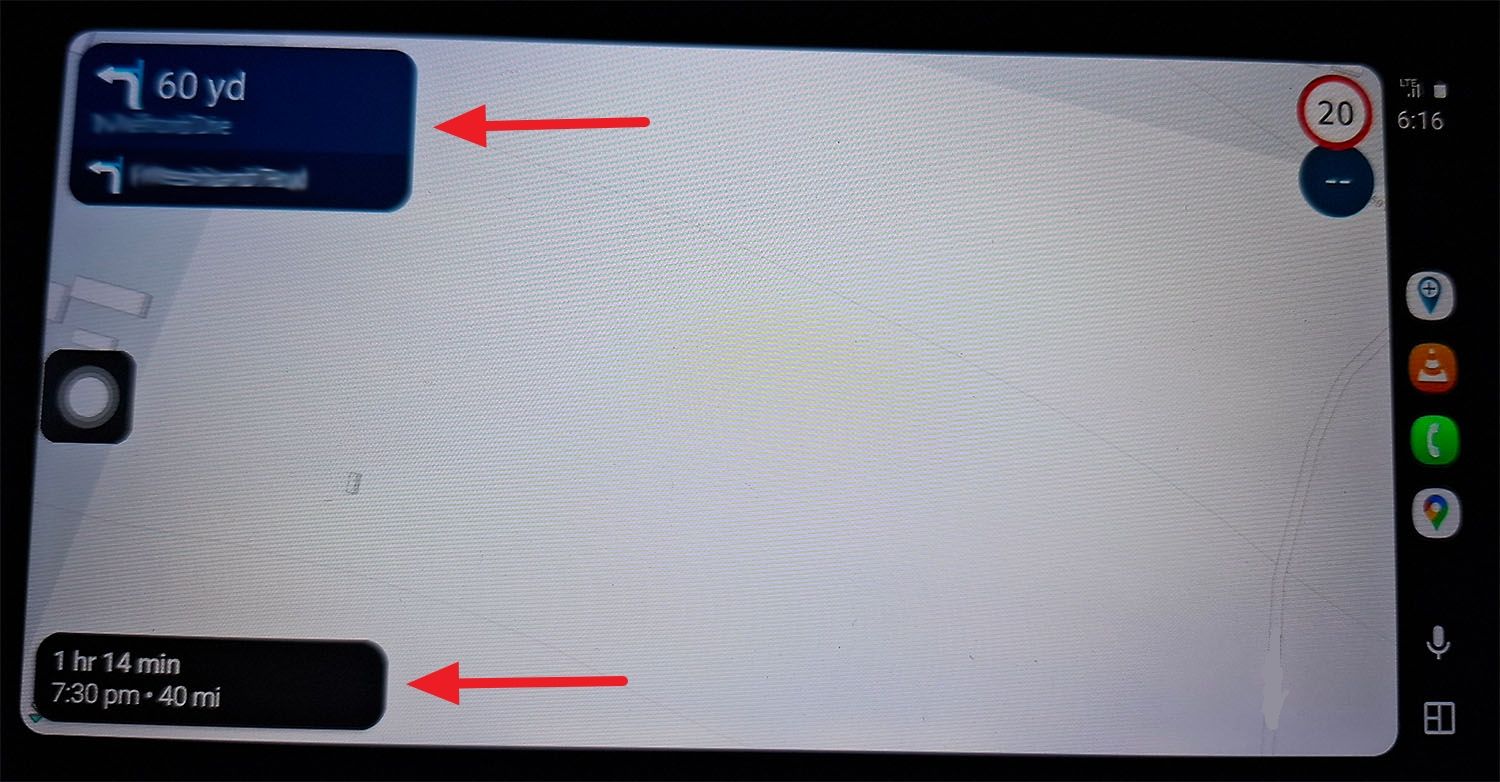
    Android Auto.jpg

    Hi,

    I’m running MyRoute App on a Samsung phone and using Android Auto to send the app to this CPMC (same as Aoocci, just a different name) B6 Motorcycle screen. It’s the one that plugs directly into the BMW navigation cradle.

    Is there any way to make either of these boxes (see photo), and hence the text inside, any bigger? It’s really difficult to read the text when riding when it’s this small.

    I’ve tried using the Samsung’s developer options to change the Android Auto resolution to a lower setting in the hopes of increasing the text size, but this doesn’t seem to work.

    Are there any other settings available, either within Android or within MyRoute App itself, to increase the text size somehow?

    Thanks. 🙂

    1 Reply Last reply
    0
    • M. Schrijverundefined Offline
      M. Schrijverundefined Offline
      M. Schrijver
      Valued contributor
      wrote on last edited by
      #2

      No, that's part of the new Android Auto design. Starting from version 15 of Android Auto, the info boxes are made smaller.

      You can go back to an older version version of Android Auto (14.6 is good) by sideloading this version on your phone. This version still has the bigger info boxes

      (I use MRA Next only on Android Auto. Every comment, suggestion, etc will be based on my usage with Android Auto)

      dungbeetleundefined 1 Reply Last reply
      1
      • M. Schrijverundefined M. Schrijver

        No, that's part of the new Android Auto design. Starting from version 15 of Android Auto, the info boxes are made smaller.

        You can go back to an older version version of Android Auto (14.6 is good) by sideloading this version on your phone. This version still has the bigger info boxes

        dungbeetleundefined Offline
        dungbeetleundefined Offline
        dungbeetle
        wrote on last edited by
        #3

        @M.-Schrijver said in Android Auto - Tiny Text:

        No, that's part of the new Android Auto design. Starting from version 15 of Android Auto, the info boxes are made smaller.

        You can go back to an older version version of Android Auto (14.6 is good) by sideloading this version on your phone. This version still has the bigger info boxes

        Ah, that's a shame, but thanks for the reply and the previous version tip. 👍

        1 Reply Last reply
        0

        Hello! It looks like you're interested in this conversation, but you don't have an account yet.

        Getting fed up of having to scroll through the same posts each visit? When you register for an account, you'll always come back to exactly where you were before, and choose to be notified of new replies (either via email, or push notification). You'll also be able to save bookmarks and upvote posts to show your appreciation to other community members.

        With your input, this post could be even better 💗

        Register Login
        Reply
        • Reply as topic
        Log in to reply
        • Oldest to Newest
        • Newest to Oldest
        • Most Votes


        ACTIVE USERS
        M. Schrijverundefined
        M. Schrijver
        dungbeetleundefined
        dungbeetle
        POPULAR TOPICS
        • After coffee, MRA does not continue from where we left off.
          white.mouseundefined
          white.mouse
          0
          9
          145

        • Route ging prima; nog wel twee wensen!
          white.mouseundefined
          white.mouse
          0
          5
          108

        • MRA tijdens een trip door de Eifel
          Travellexxieundefined
          Travellexxie
          0
          4
          25

        • Mileage to destination versus waypoint to waypoint
          phedgesgmail.comundefined
          phedgesgmail.com
          0
          6
          136

        • Navigation stopped working during Tour
          Thomas Neumeyerundefined
          Thomas Neumeyer
          1
          69
          4.8k

        • volume loopt terug
          supergundefined
          superg
          0
          11
          202

        • Herschikken routepunten
          RobdHundefined
          RobdH
          0
          3
          78

        • No display of current speed and linit speed after update
          Corjan Meijerinkundefined
          Corjan Meijerink
          0
          3
          83

        MY GROUPS
        • Login

        • Login or register to search.
        • First post
          Last post
        0
        • Categories
        • Recent
        • Popular
        • Support
        • MyRoute-app