Other travellers using MRA not following the defined route
-

Hi,
I am a Lifetime Gold Routeplanner. I therefore understand that the routes that i plan will be in HERE format.
Some friends that are standard MRA Navigation users have noted that when we are out on the road, their 'version' will sometimes take them off the route that I am following. Is this because they will be using OpenStreetMap format?I have made sure that their settings are the same - (i.e. avoid tolls roads, no dirt roads)
Are there any other tips and tricks to ensure folks all follow the same planned route?
Thanks -
Hi,
I am a Lifetime Gold Routeplanner. I therefore understand that the routes that i plan will be in HERE format.
Some friends that are standard MRA Navigation users have noted that when we are out on the road, their 'version' will sometimes take them off the route that I am following. Is this because they will be using OpenStreetMap format?I have made sure that their settings are the same - (i.e. avoid tolls roads, no dirt roads)
Are there any other tips and tricks to ensure folks all follow the same planned route?
Thanks
@Roger-Needham-0 Everyone with an MRA Navigation Next subscription will have access to the planning map from HERE.
-
Hi,
I am a Lifetime Gold Routeplanner. I therefore understand that the routes that i plan will be in HERE format.
Some friends that are standard MRA Navigation users have noted that when we are out on the road, their 'version' will sometimes take them off the route that I am following. Is this because they will be using OpenStreetMap format?I have made sure that their settings are the same - (i.e. avoid tolls roads, no dirt roads)
Are there any other tips and tricks to ensure folks all follow the same planned route?
Thanks
Why everybody is recommending a subscription is not clear to me.
@Roger-Needham-0 said in Other travellers using MRA not following the defined route:
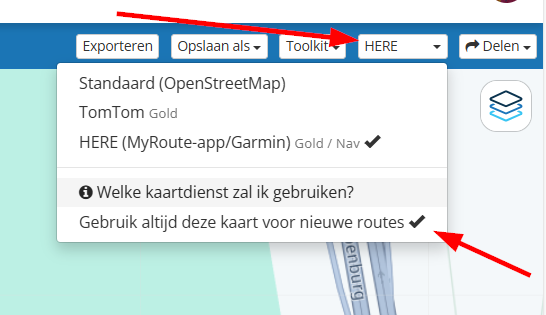
I am a Lifetime Gold Routeplanner. I therefore understand that the routes that i plan will be in HERE format.No, you can still use TomTOm and OSM as standard layer. This can be set in the pulldown menu were you choose your standard layer. Only with Gold you have TomTom and HERE. The default layer is OSM.
@Roger-Needham-0 said in Other travellers using MRA not following the defined route:
Some friends that are standard MRA Navigation users have noted that when we are out on the road, their 'version' will sometimes take them off the route that I am following. Is this because they will be using OpenStreetMap format?No has basically not much to do with the layer (map). In some cases there arfe small differences between OSM, TomTom and HERE but this has more to do with how accurate and up-to-date the mapmakers maintain and update their maps. Nothing to do with MRA.
Also, the choice of layer (map) to use will have not much influence in the route and how you drive it. My best guess is, is that your friends have reroute calculation switched on. And then you could run into the possibility that were you rturn right, your friends (or some of them) must turn left according to their navigation to get to the next waypoint (shorter route/shorter distance). You should check this.
@Roger-Needham-0 said in Other travellers using MRA not following the defined route:
I have made sure that their settings are the same - (i.e. avoid tolls roads, no dirt roads)
Are there any other tips and tricks to ensure folks all follow the same planned route?As said above, did you checked that they have reroute calculation turned off?
Make sure if you share a route, you use the 1.1 format and not the 1.2 format for the GPX files. I noticed some small issues with the 1.2 format.
Also, share it as a track, not as a route. There's a big difference between routes and tracks.
Were routes use preplotted waypoints, tracks are made of hundreds point following your route which makes a tracj more accurate. -
Thanks Nomko, I will certainly get fellow travellers to check their ‘reroute calculation’ settings.
I don’t tend to ‘share’ the routes I have created. I create a link to the folder in which I have stored the routes and then let my friends download the routes as they please. So some will just ‘use’ the routes if they are also MRA Navigation users, others will download to suit their device, eg TomTom, Garmin etc. I’ll pass on your tip to download any route as a ‘track’ as well

-
Thanks Nomko, I will certainly get fellow travellers to check their ‘reroute calculation’ settings.
I don’t tend to ‘share’ the routes I have created. I create a link to the folder in which I have stored the routes and then let my friends download the routes as they please. So some will just ‘use’ the routes if they are also MRA Navigation users, others will download to suit their device, eg TomTom, Garmin etc. I’ll pass on your tip to download any route as a ‘track’ as well
@Roger-Needham-0 The users of a TomTom-device use another map and they can't switch off automatic recalculation. If a road that is used in the route does not exist in the map of the TomTom, the TomTom will automatically take another road on its map (part of the software design). If you want to avoid this you should compare the routes in Toolkit and erase the differences by changing waypoints..
-
Hi,
I am a Lifetime Gold Routeplanner. I therefore understand that the routes that i plan will be in HERE format.
Some friends that are standard MRA Navigation users have noted that when we are out on the road, their 'version' will sometimes take them off the route that I am following. Is this because they will be using OpenStreetMap format?I have made sure that their settings are the same - (i.e. avoid tolls roads, no dirt roads)
Are there any other tips and tricks to ensure folks all follow the same planned route?
Thanks
@Roger-Needham-0 said in Other travellers using MRA not following the defined route:
Some friends that are standard MRA Navigation users
What do you mean by standard users?
If they are using Navigation Next, they will follow the same map as you, and that is HERE map. -
Thanks Nomko, I will certainly get fellow travellers to check their ‘reroute calculation’ settings.
I don’t tend to ‘share’ the routes I have created. I create a link to the folder in which I have stored the routes and then let my friends download the routes as they please. So some will just ‘use’ the routes if they are also MRA Navigation users, others will download to suit their device, eg TomTom, Garmin etc. I’ll pass on your tip to download any route as a ‘track’ as well

@Roger-Needham-0 said in Other travellers using MRA not following the defined route:
I create a link to the folder in which I have stored the routes and then let my friends download the routes as they please. So some will just ‘use’ the routes if they are also MRA Navigation users
Other MRA Navigation Next users do not need to download the route. If they are friends in the app/RouteLab, and you made the route available for friends, they can navigate directly to the relevant folder and start the route immediately.


Hello! It looks like you're interested in this conversation, but you don't have an account yet.
Getting fed up of having to scroll through the same posts each visit? When you register for an account, you'll always come back to exactly where you were before, and choose to be notified of new replies (either via email, or push notification). You'll also be able to save bookmarks and upvote posts to show your appreciation to other community members.
With your input, this post could be even better 💗
Register Login-
 0728
0728
-
0867
-
 81655.4k
-
0345
-
01089
-
0579
-
1833
-
0258