App wil vormingspunt niet verbergen
-

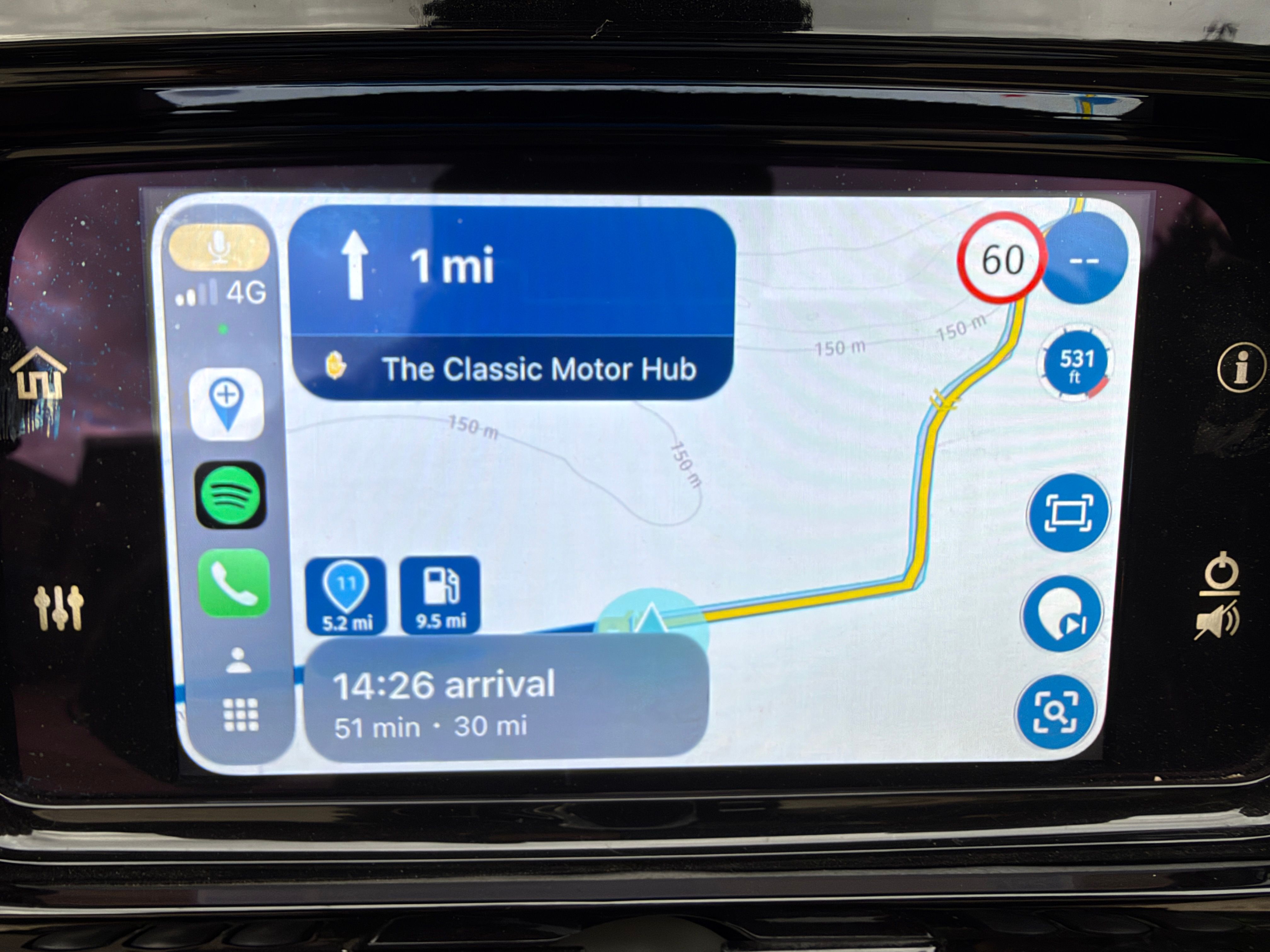
Ik wil tijdens het navigeren rechtsbovenin alleen maar de viapunten zien en niet de vormingspunten. Ik heb in de instellingen onder scherm-layout wel degelijk de schakelaar op "via" staan, maar de app toont toch echt alle tussenpunten. Iemand een idee? Ik heb al geschakeld tussen de 3 mogelijkheden, maar helaas peanutbutter.
Iemandeen idee?Met andere apps maak je een route, met MRA componeer je een route!
Ducati Monster 1200 met Garmin Zümo XT
Fiat 124 Spider/Camper Dethleffs met Navigation-App op Samsung Tab Active4 Pro
MRA Lifetime Gold -
Ik wil tijdens het navigeren rechtsbovenin alleen maar de viapunten zien en niet de vormingspunten. Ik heb in de instellingen onder scherm-layout wel degelijk de schakelaar op "via" staan, maar de app toont toch echt alle tussenpunten. Iemand een idee? Ik heb al geschakeld tussen de 3 mogelijkheden, maar helaas peanutbutter.
Iemandeen idee?
Hi @Lex.Kloet.RX
The icon in the top right shows the upcoming waypoint, it doesn’t matter if it’s a shaping point or via point, it shows the next waypoint.The choice in the settings to show waypoint information is for the title and notes. You can choose to see all waypoints information or just via points or none. This is the information that is seen as scrolling text at the top of the screen.
-
Ben er al achter, ik heb rechtsboven en linksonder doorelkaar gehaald. Bedankt @Nick-Carthew
Met andere apps maak je een route, met MRA componeer je een route!
Ducati Monster 1200 met Garmin Zümo XT
Fiat 124 Spider/Camper Dethleffs met Navigation-App op Samsung Tab Active4 Pro
MRA Lifetime Gold -
Ben er al achter, ik heb rechtsboven en linksonder doorelkaar gehaald. Bedankt @Nick-Carthew
@Lex.Kloet.RX

Hello! It looks like you're interested in this conversation, but you don't have an account yet.
Getting fed up of having to scroll through the same posts each visit? When you register for an account, you'll always come back to exactly where you were before, and choose to be notified of new replies (either via email, or push notification). You'll also be able to save bookmarks and upvote posts to show your appreciation to other community members.
With your input, this post could be even better 💗
Register Login-
 01844
01844
-
 16116
16116
-
 05150
05150
-
 0419
0419
-
 0416
0416
-
 07274
07274
-
0334
-
0211