Skip to content
  • Categories
  • Recent
  • Popular
  • Support
  • MyRoute-app
Collapse
Brand Logo

MRA Community Forum

  1. Home
  2. The MyRoute-app
  3. [App] Suggestions and Discussion
  4. Text size too small

Text size too small

Scheduled Pinned Locked Moved [App] Suggestions and Discussion
12 Posts 7 Posters 2.7k Views 4 Watching
  • Oldest to Newest
  • Newest to Oldest
  • Most Votes
Reply
  • Reply as topic
Log in to reply
This topic has been deleted. Only users with topic management privileges can see it.
  • Rob Kelley Rob Kelley

    Hi
    I'm using a Samsung S21 and find it really hard to see the small text when navigating, distances, roundabout exit number etc.
    There's plenty of room on the screen for the text and objects to be bigger as the left side isn't used for navigating as it's manily the right hand side that shows the map and direction of travel.
    Will this be fixed in the new version?
    When wil the new version be GA?
    I've increased the Andriod text size but this isn't affect the MRA app.
    Thanks

    Marinus van Deudekom Do not disturb
    Marinus van Deudekom Do not disturb
    Marinus van Deudekom
    RouteXpert
    wrote on last edited by
    #2

    @Rob-Kelley Hi Rob
    can you take a screenshot of your phone showing these text boxes
    On mine, the distances are visible quite good

    Honda Goldwing GL1500,
    Honda Silverwing GL 650
    DMD2 T865X 8 inch Android tablet using MRA next for navigation
    Garmin XT sold
    Samsung S24FE mounted on a Quadlock and using Android Auto in my car

    Rob Kelley 1 Reply Last reply
    0
    • Marinus van Deudekom Marinus van Deudekom

      @Rob-Kelley Hi Rob
      can you take a screenshot of your phone showing these text boxes
      On mine, the distances are visible quite good

      Rob Kelley Offline
      Rob Kelley Offline
      Rob Kelley
      wrote on last edited by
      #3

      @Marinus-van-Deudekom
      It looks ok in a scrn shot but when it's mounted to the bike the smaller txt (in red boxes) is hard to see and when there's a roundabout (top left) with a small number inside this is almost impossible to see.
      There's lots of unused (margin) space in the blue boxes, can the text be made bigger to fit the entire box, or maybe a setting to make it bigger or smaller?
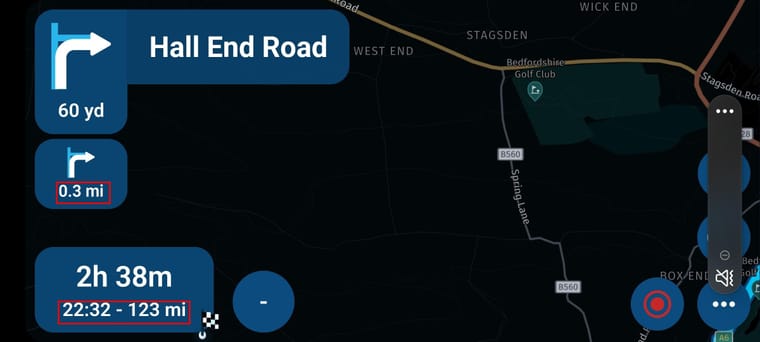
      MRA scrn shot.jpg

      GSA1250
      HD Street Glide
      HD Sport Glide
      XT500 x 2

      Herman Veldhuizen 1 Reply Last reply
      2
      • Rob Kelley Rob Kelley

        @Marinus-van-Deudekom
        It looks ok in a scrn shot but when it's mounted to the bike the smaller txt (in red boxes) is hard to see and when there's a roundabout (top left) with a small number inside this is almost impossible to see.
        There's lots of unused (margin) space in the blue boxes, can the text be made bigger to fit the entire box, or maybe a setting to make it bigger or smaller?

        MRA scrn shot.jpg

        Herman Veldhuizen Offline
        Herman Veldhuizen Offline
        Herman Veldhuizen
        wrote on last edited by Herman Veldhuizen
        #4

        @Rob-Kelley I have the same wish. The ETA box is an important feature for me and it would be nice if some space for navigation could be sacrified to make it easier to read the text in the ETA box. A size setting like e.g. small/medium/large would be good enough.

        Guzzist 1 Reply Last reply
        1
        • Herman Veldhuizen Herman Veldhuizen

          @Rob-Kelley I have the same wish. The ETA box is an important feature for me and it would be nice if some space for navigation could be sacrified to make it easier to read the text in the ETA box. A size setting like e.g. small/medium/large would be good enough.

          Guzzist Offline
          Guzzist Offline
          Guzzist
          Valued contributor
          wrote on last edited by
          #5

          I have the same issue by using T865-X from DMD. Instructions Icons are big enough, but ETA or Number in Icon for Roundabout are small.
          But most important: Text of City names on map are much to small! And no setting in device system will increase this on map! At other Apps, it works fine for map texts to change it by font size or screen adjustment in system settings!
          Please develop enhancement.

          Nothing is impossible ;-)
          In past: GARMIN Zumo 210->GARMIN Zumo 395->GARMIN XT=> now: DMD T865-X + MyRoute-App, LocusMaps, OsmAnd.
          In past: GARMIN MapSource ->GARMIN BaseCamp->Tyre->Kurviger->Calimoto=> now: MRA-Routplanner.

          Marinus van Deudekom 1 Reply Last reply
          0
          • Guzzist Guzzist

            I have the same issue by using T865-X from DMD. Instructions Icons are big enough, but ETA or Number in Icon for Roundabout are small.
            But most important: Text of City names on map are much to small! And no setting in device system will increase this on map! At other Apps, it works fine for map texts to change it by font size or screen adjustment in system settings!
            Please develop enhancement.

            Marinus van Deudekom Do not disturb
            Marinus van Deudekom Do not disturb
            Marinus van Deudekom
            RouteXpert
            wrote on last edited by
            #6

            @Guzzist I also have a T865X. I agrée that the text size in the ETA box could be biggen. Maybe @Corjan-Meijerink could tell if it is possible to make that text bigger
            The names of citys I think that’s a questions of taste.

            Honda Goldwing GL1500,
            Honda Silverwing GL 650
            DMD2 T865X 8 inch Android tablet using MRA next for navigation
            Garmin XT sold
            Samsung S24FE mounted on a Quadlock and using Android Auto in my car

            Kenny Thierens 1 Reply Last reply
            0
            • Leike Lodiers Offline
              Leike Lodiers Offline
              Leike Lodiers
              wrote on last edited by
              #7

              In the settings on you're phone or tablet you can set the fontsize bigger this wil make you're text bigger on you're screen.

              R1250GS. Started with a Zumo 550, BMW nav IV, Carpe-iter and now Chigee met MRA app.

              Rob Kelley 1 Reply Last reply
              0
              • Leike Lodiers Leike Lodiers

                In the settings on you're phone or tablet you can set the fontsize bigger this wil make you're text bigger on you're screen.

                Rob Kelley Offline
                Rob Kelley Offline
                Rob Kelley
                wrote on last edited by
                #8

                @Leike-Lodiers as per my inital post, making the Andriod text bigger has no affect on MRA

                GSA1250
                HD Street Glide
                HD Sport Glide
                XT500 x 2

                Leike Lodiers 1 Reply Last reply
                0
                • Rob Kelley Rob Kelley

                  @Leike-Lodiers as per my inital post, making the Andriod text bigger has no affect on MRA

                  Leike Lodiers Offline
                  Leike Lodiers Offline
                  Leike Lodiers
                  wrote on last edited by Leike Lodiers
                  #9

                  @Rob-Kelley on my carpe iter that worked fine. On the phone it doesn't ??????

                  R1250GS. Started with a Zumo 550, BMW nav IV, Carpe-iter and now Chigee met MRA app.

                  Rob Kelley 1 Reply Last reply
                  0
                  • Leike Lodiers Leike Lodiers

                    @Rob-Kelley on my carpe iter that worked fine. On the phone it doesn't ??????

                    Rob Kelley Offline
                    Rob Kelley Offline
                    Rob Kelley
                    wrote on last edited by
                    #10

                    @Leike-Lodiers I've just tried again, Android settings, 'Font size and style', set the font to max but MRA stays the same.

                    GSA1250
                    HD Street Glide
                    HD Sport Glide
                    XT500 x 2

                    1 Reply Last reply
                    1
                    • Rob Kelley Rob Kelley

                      Hi
                      I'm using a Samsung S21 and find it really hard to see the small text when navigating, distances, roundabout exit number etc.
                      There's plenty of room on the screen for the text and objects to be bigger as the left side isn't used for navigating as it's manily the right hand side that shows the map and direction of travel.
                      Will this be fixed in the new version?
                      When wil the new version be GA?
                      I've increased the Andriod text size but this isn't affect the MRA app.
                      Thanks
                      GT JWR Offline
                      GT JWR Offline
                      GT JWR
                      Valued contributor
                      wrote on last edited by
                      #11

                      @Rob-Kelley 100% agree. IMO, long outstanding issue that does not appear to even be a blip on the developer list. 😞

                      1 Reply Last reply
                      1
                      • Marinus van Deudekom Marinus van Deudekom

                        @Guzzist I also have a T865X. I agrée that the text size in the ETA box could be biggen. Maybe @Corjan-Meijerink could tell if it is possible to make that text bigger
                        The names of citys I think that’s a questions of taste.
                        Kenny Thierens Offline
                        Kenny Thierens Offline
                        Kenny Thierens
                        wrote on last edited by
                        #12

                        @Marinus-van-Deudekom In de instellingen van de T865x kun je weergavegrootte (≠lettergrootte) aanpassen. Dit helpt al een stuk. Nadeel, geen splitscreen meer mogelijk. Dus hopelijk komt in de toekomst MRA nog met een iets groter lettertype.

                        '07 BMW R1200RT
                        DMD² T865x tablet
                        Silverfox C1 controller
                        Samsung S24+
                        Cardo Spirit HD headset

                        1 Reply Last reply
                        0

                        Hello! It looks like you're interested in this conversation, but you don't have an account yet.

                        Getting fed up of having to scroll through the same posts each visit? When you register for an account, you'll always come back to exactly where you were before, and choose to be notified of new replies (either via email, or push notification). You'll also be able to save bookmarks and upvote posts to show your appreciation to other community members.

                        With your input, this post could be even better 💗

                        Register Login
                        Reply
                        • Reply as topic
                        Log in to reply
                        • Oldest to Newest
                        • Newest to Oldest
                        • Most Votes


                        ACTIVE USERS
                        Marinus van Deudekom
                        Marinus van Deudekom
                        Herman Veldhuizen
                        Herman Veldhuizen
                        Guzzist
                        Guzzist
                        Rob Kelley
                        Rob Kelley
                        Leike Lodiers
                        Leike Lodiers
                        GT JWR
                        GT JWR
                        Kenny Thierens
                        Kenny Thierens
                        POPULAR TOPICS
                        • How to share route with another member.
                          Guzzist
                          Guzzist
                          0
                          10
                          159

                        • Skipping waypoints for no reason
                          Brian McG
                          Brian McG
                          0
                          10
                          537

                        • Route doesn’t recalculate to my destination
                          Peter Zehentreiter
                          Peter Zehentreiter
                          0
                          5
                          96

                        • Offline navigeren
                          Marinus van Deudekom
                          Marinus van Deudekom
                          0
                          3
                          44

                        • No navigation instructions
                          Brian McG
                          Brian McG
                          0
                          3
                          80

                        • Routes en verblijf Zwitserland
                          Con Hennekens
                          Con Hennekens
                          0
                          23
                          763

                        • Beeld loopt achter
                          Marinus van Deudekom
                          Marinus van Deudekom
                          0
                          2
                          16

                        • One time glitch after lost gps signal
                          Herman Veldhuizen
                          Herman Veldhuizen
                          0
                          10
                          246

                        MY GROUPS
                        • Login

                        • Login or register to search.
                        • First post
                          Last post
                        0
                        • Categories
                        • Recent
                        • Popular
                        • Support
                        • MyRoute-app