Skip to content
  • Categories
  • Recent
  • Popular
  • Support
  • MyRoute-app
Collapse
Brand Logo

MRA Community Forum

  1. Home
  2. The MyRoute-app
  3. [App] Suggestions and Discussion
  4. Points of interest near the route

Points of interest near the route

Scheduled Pinned Locked Moved [App] Suggestions and Discussion
15 Posts 9 Posters 3.7k Views 3 Watching
  • Oldest to Newest
  • Newest to Oldest
  • Most Votes
Reply
  • Reply as topic
Log in to reply
This topic has been deleted. Only users with topic management privileges can see it.
  • UltraStar UltraStar

    I was just creating a new route, and I wanted to find something interesting along the way.
    In ex.: I would like to find state parks, national monuments, etc. within, let's say, 5 miles from the route. The same thing with the favorite restaurants, it would be nice to know if there are any close to the route.
    I do not know how difficult would that be to implement, if it would be possible at all.

    BertM Offline
    BertM Offline
    BertM
    wrote on last edited by
    #4

    @UltraStar

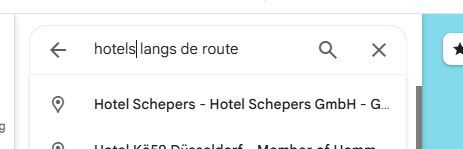
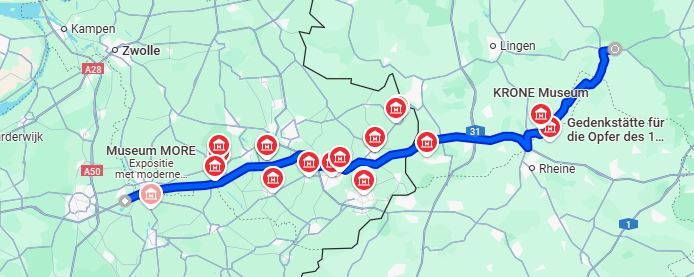
    it can be done in Google maps:

    draw a route
    On the left search "with Route"
    route2.JPG

    route1.JPG

    if you live in the USA you can use roadtrippers.com

    1 Reply Last reply
    0
    • UltraStar Offline
      UltraStar Offline
      UltraStar
      wrote on last edited by UltraStar
      #5

      That is all nice guys, but I am talking about this functionality in MyRoute-app, not jumping back and forth through the plethora of other junk.
      Maybe I have given a wrong example. I am not looking for the POI, I was thinking about a specific type of interest point, restaurant chain, specific type of food, specific type of gas station or hotel. Can it be done here or not, that is only my question. I would imagine that the search engine might be too difficult for this kind of application.

      BertM 1 Reply Last reply
      0
      • UltraStar UltraStar

        That is all nice guys, but I am talking about this functionality in MyRoute-app, not jumping back and forth through the plethora of other junk.
        Maybe I have given a wrong example. I am not looking for the POI, I was thinking about a specific type of interest point, restaurant chain, specific type of food, specific type of gas station or hotel. Can it be done here or not, that is only my question. I would imagine that the search engine might be too difficult for this kind of application.

        BertM Offline
        BertM Offline
        BertM
        wrote on last edited by
        #6

        @UltraStar said in Points of interest near the route:

        That is all nice guys, but I am talking about this functionality in MyRoute-app, not jumping back and forth through the plethora of other junk.
        Maybe I have given a wrong example. I am not looking for the POI, I was thinking about a specific type of interest point, restaurant chain, specific type of food, specific type of gas station or hotel. Can it be done here or not, that is only my question. I would imagine that the search engine might be too difficult for this kind of application.

        No, it can not be done without a big database with items, you need some additional junk from Google or openstreetmap

        UltraStar 1 Reply Last reply
        0
        • BertM BertM

          @UltraStar said in Points of interest near the route:

          That is all nice guys, but I am talking about this functionality in MyRoute-app, not jumping back and forth through the plethora of other junk.
          Maybe I have given a wrong example. I am not looking for the POI, I was thinking about a specific type of interest point, restaurant chain, specific type of food, specific type of gas station or hotel. Can it be done here or not, that is only my question. I would imagine that the search engine might be too difficult for this kind of application.

          No, it can not be done without a big database with items, you need some additional junk from Google or openstreetmap

          UltraStar Offline
          UltraStar Offline
          UltraStar
          wrote on last edited by
          #7

          @BertM Thank you. That's what I thought, it would be way too much work.
          Appreciate the response.

          1 Reply Last reply
          0
          • Jörgen Offline
            Jörgen Offline
            Jörgen
            Valued contributor
            wrote on last edited by Jörgen
            #8

            Hi, you can switch on POIs in MRA (like you want, here e.g. Restaurants, Cafe, History) and zoom in into your route to see what is next.
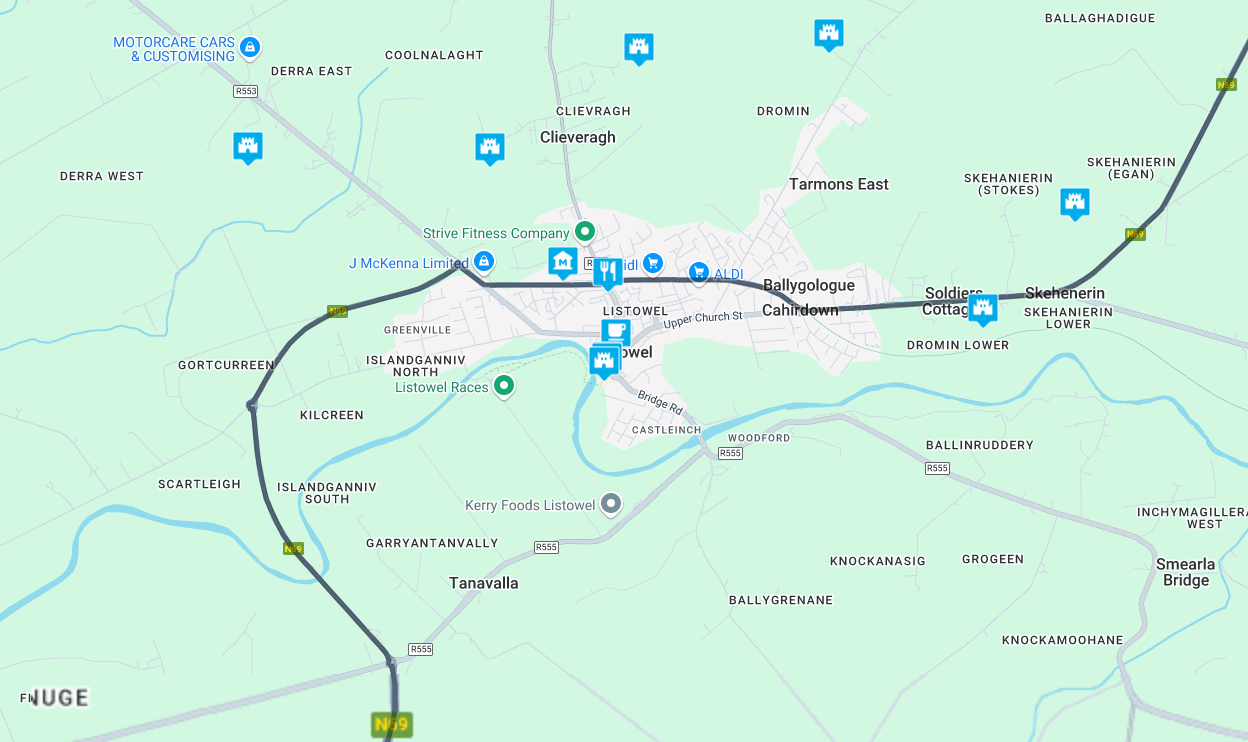
            2831062c-4951-4ecf-b757-57043d222c06-image.png

            Hardware
            iPhone 12 pro (iOS 26.2.1)
            iPad (7.Gen.) 18.7.3
            Oukitel RT3 Pro (Andr. 14)
            Wireless CarPlay mit (Elebest C650)
            Wired CarPlay (SEAT Arona - 2021)
            MRA Workshops in Deutsch sind hier zu finden

            UltraStar Flavio Silva 2 Replies Last reply
            0
            • Jörgen Jörgen

              Hi, you can switch on POIs in MRA (like you want, here e.g. Restaurants, Cafe, History) and zoom in into your route to see what is next.

              2831062c-4951-4ecf-b757-57043d222c06-image.png

              UltraStar Offline
              UltraStar Offline
              UltraStar
              wrote on last edited by
              #9

              @Jörgen Thank you. Actually, that might help. I just read about the new, and improved POI. With a little time and some "elbow grease," we can come up with some POI that will help with the routes. Thanks again all.

              1 Reply Last reply
              0
              • Jörgen Jörgen

                Hi, you can switch on POIs in MRA (like you want, here e.g. Restaurants, Cafe, History) and zoom in into your route to see what is next.

                2831062c-4951-4ecf-b757-57043d222c06-image.png

                Flavio Silva Offline
                Flavio Silva Offline
                Flavio Silva
                wrote on last edited by
                #10

                @Jörgen Hi, please, how do I do that? Thank you.

                Jörgen 1 Reply Last reply
                0
                • Flavio Silva Flavio Silva

                  @Jörgen Hi, please, how do I do that? Thank you.

                  Jörgen Offline
                  Jörgen Offline
                  Jörgen
                  Valued contributor
                  wrote on last edited by
                  #11

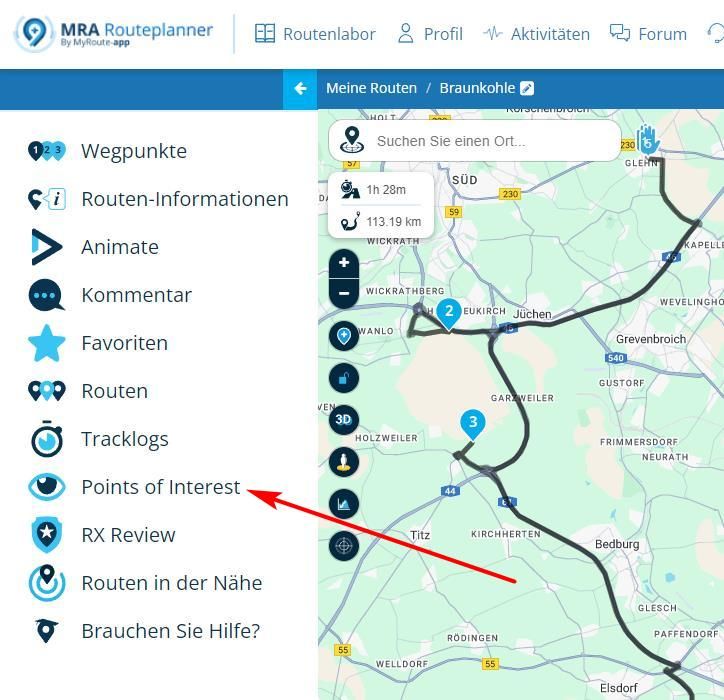
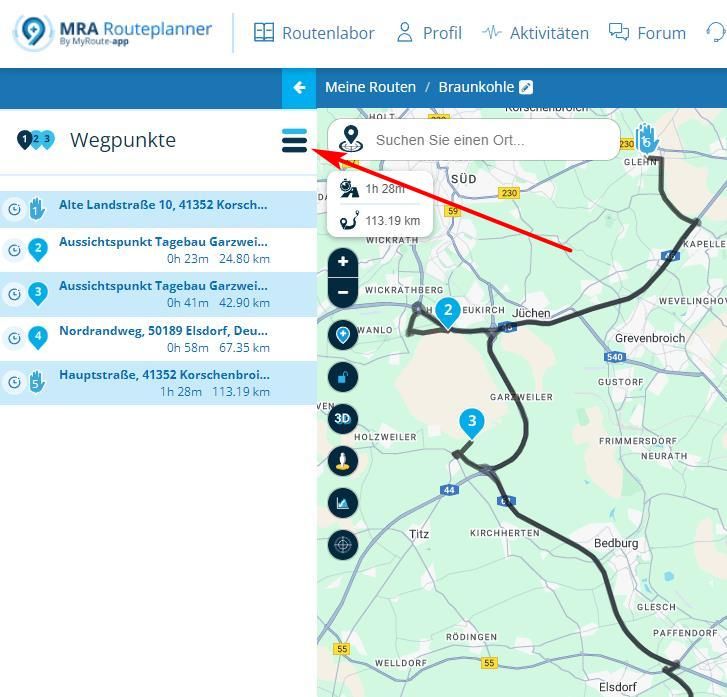
                  @Flavio-Silva Hi, in a route planning, click here to open the menu.
                  screen601.jpg

                  Then click on POI.

                  screen605.jpg

                  Select what you want to see and zoom into the map to see the POIs.

                  Hardware
                  iPhone 12 pro (iOS 26.2.1)
                  iPad (7.Gen.) 18.7.3
                  Oukitel RT3 Pro (Andr. 14)
                  Wireless CarPlay mit (Elebest C650)
                  Wired CarPlay (SEAT Arona - 2021)
                  MRA Workshops in Deutsch sind hier zu finden

                  1 Reply Last reply
                  0
                  • Frappawotsit Offline
                    Frappawotsit Offline
                    Frappawotsit
                    wrote on last edited by
                    #12

                    You can as Jurgen has shown display them in your route, but additionally, as you zoom in and examine any of interest along your route, you can also click on them and add the POI to your route.

                    This way, when you turn POI's off, just those you selected of interest will remain showing on your route.

                    They don't export with the .gpx file, but if you use the Navigation Next on your phone or CarPlay, I believe you should see them. (Somebody please correct me if I'm wrong)

                    Flavio Silva Guzzist 2 Replies Last reply
                    0
                    • Frappawotsit Frappawotsit

                      You can as Jurgen has shown display them in your route, but additionally, as you zoom in and examine any of interest along your route, you can also click on them and add the POI to your route.

                      This way, when you turn POI's off, just those you selected of interest will remain showing on your route.

                      They don't export with the .gpx file, but if you use the Navigation Next on your phone or CarPlay, I believe you should see them. (Somebody please correct me if I'm wrong)

                      Flavio Silva Offline
                      Flavio Silva Offline
                      Flavio Silva
                      wrote on last edited by
                      #13

                      @Frappawotsit Yes, I can see them. But what I´d like to do is to be warned when getting near to it, as it happens on Osmand. Is it possible on Next?

                      Regards,

                      Marinus van Deudekom 1 Reply Last reply
                      0
                      • Flavio Silva Flavio Silva

                        @Frappawotsit Yes, I can see them. But what I´d like to do is to be warned when getting near to it, as it happens on Osmand. Is it possible on Next?

                        Regards,

                        Marinus van Deudekom Offline
                        Marinus van Deudekom Offline
                        Marinus van Deudekom
                        RouteXpert
                        wrote on last edited by
                        #14

                        @Flavio-Silva That is not possible like that. You can get a warning if you set that POI as a waypoint and put some text in the textblock

                        Honda Goldwing GL1500,
                        Honda Silverwing GL 650
                        DMD2 T865X 8 inch Android tablet using MRA next for navigation
                        Garmin XT sold
                        Samsung S24FE mounted on a Quadlock and using Android Auto in my car

                        1 Reply Last reply
                        0
                        • Frappawotsit Frappawotsit

                          You can as Jurgen has shown display them in your route, but additionally, as you zoom in and examine any of interest along your route, you can also click on them and add the POI to your route.

                          This way, when you turn POI's off, just those you selected of interest will remain showing on your route.

                          They don't export with the .gpx file, but if you use the Navigation Next on your phone or CarPlay, I believe you should see them. (Somebody please correct me if I'm wrong)

                          Guzzist Offline
                          Guzzist Offline
                          Guzzist
                          Valued contributor
                          wrote on last edited by
                          #15

                          @Frappawotsit said in Points of interest near the route:

                          ...This way, when you turn POI's off, just those you selected of interest will remain showing on your route.

                          They don't export with the .gpx file, but if you use the Navigation Next on your phone or CarPlay, I believe you should see them. (Somebody please correct me if I'm wrong).

                          I believe this is wrong. If you select some of the internal POI into yor route, they will become a Waypoint and will be exportet with gpx file. If you select POI into your planning, but not as WP, you will see it on the map (not as WP!). If you export planned route by gpx, then the selected POI will be included. If you import p.e. in a Garmin device, you will see the route with WPs and as well the transmitted POIs on the map. Offcourse, for that POIs there will be no announcement during navigation, because the are no WPs. 🤓

                          Nothing is impossible ;-)
                          In past: GARMIN Zumo 210->GARMIN Zumo 395->GARMIN XT=> now: DMD T865-X + MyRoute-App, LocusMaps, OsmAnd.
                          In past: GARMIN MapSource ->GARMIN BaseCamp->Tyre->Kurviger->Calimoto=> now: MRA-Routplanner.

                          1 Reply Last reply
                          0

                          Hello! It looks like you're interested in this conversation, but you don't have an account yet.

                          Getting fed up of having to scroll through the same posts each visit? When you register for an account, you'll always come back to exactly where you were before, and choose to be notified of new replies (either via email, or push notification). You'll also be able to save bookmarks and upvote posts to show your appreciation to other community members.

                          With your input, this post could be even better 💗

                          Register Login

                          Reply
                          • Reply as topic
                          Log in to reply
                          • Oldest to Newest
                          • Newest to Oldest
                          • Most Votes


                          ACTIVE USERS
                          Jörgen
                          Jörgen
                          Marinus van Deudekom
                          Marinus van Deudekom
                          BertM
                          BertM
                          Guzzist
                          Guzzist
                          Guzt
                          Guzt
                          RideOnWithFriends
                          RideOnWithFriends
                          Frappawotsit
                          Frappawotsit
                          UltraStar
                          UltraStar
                          Flavio Silva
                          Flavio Silva
                          POPULAR TOPICS
                          • Drive app fails to send GPX file - again...
                            Thomas Schäfer
                            Thomas Schäfer
                            0
                            9
                            316

                          • I can't see Road Closures
                            Nick Carthew
                            Nick Carthew
                            0
                            5
                            106

                          • Max distance for scenic route generator in the Nav App
                            LennyO
                            LennyO
                            0
                            5
                            121

                          • App not opening
                            Rob Verhoeff
                            Rob Verhoeff
                            0
                            5
                            76

                          • transfer from phone to zoom xt
                            Mzokk
                            Mzokk
                            0
                            4
                            14

                          • App loopt vast
                            CD130
                            CD130
                            0
                            6
                            174

                          • Navigatiescherm telefoon bevriest
                            Rob Verhoeff
                            Rob Verhoeff
                            0
                            2
                            11

                          • Schermresoluties, beeldverhoudingen en schermgroottes
                            KeesV
                            KeesV
                            0
                            2
                            20

                          MY GROUPS
                          • Login

                          • Login or register to search.
                          • First post
                            Last post
                          0
                          • Categories
                          • Recent
                          • Popular
                          • Support
                          • MyRoute-app