Skip to content
  • Categories
  • Recent
  • Popular
  • Support
  • MyRoute-app
Collapse
Brand Logo

MRA Community Forum

  1. Home
  2. The MyRoute-app
  3. [App] Problems, Bugs and other Issues
  4. Trying to navigate from a GPX file in offline mode.

Trying to navigate from a GPX file in offline mode.

Scheduled Pinned Locked Moved [App] Problems, Bugs and other Issues
20 Posts 7 Posters 3.2k Views 4 Watching
  • Oldest to Newest
  • Newest to Oldest
  • Most Votes
Reply
  • Reply as topic
Log in to reply
This topic has been deleted. Only users with topic management privileges can see it.
  • Brian Martinundefined Brian Martin

    The route is loaded but get cannot calculate message. Any thoughts?

    nomkoundefined Offline
    nomkoundefined Offline
    nomko
    wrote on last edited by
    #2

    @Brian-Martin is it a route or a track?

    if you loaded is as a track, then you will not receive spoken message

    | MRA Gold Member |
    | Garmin Zumo XT + BMW K1200GT |
    | MRA Next + Kawasaki Z650 |

    Rob Verhoeffundefined Brian Martinundefined 2 Replies Last reply
    0
    • nomkoundefined nomko

      @Brian-Martin is it a route or a track?

      if you loaded is as a track, then you will not receive spoken message

      Rob Verhoeffundefined Offline
      Rob Verhoeffundefined Offline
      Rob Verhoeff
      Alpha tester
      wrote on last edited by Rob Verhoeff
      #3

      @Nomko-Nomden said in Trying to navigate from a GPX file in offline mode.:

      if you loaded is as a track, then you will not receive spoken message

      Driving a route as a track is actually one of the powerful new implementations of MRA. And voice guidance while riding that track simply works!
      Either I didn't understand TS's question, or I didn't understand your answer... ๐Ÿ˜‰

      ๐Ÿ๏ธ BMW K1600GT-P (2013) | Nolan N100-5 with Sena 30K
      ๐Ÿ“ฑ iOS on iPhone 13 & 16 (mounted on Quadlock or AliExpress extention on BMW-cradle)
      ๐Ÿš™ Apple CarPlay in VW T-Roc
      ๐Ÿ’ป Routelab on MacBook Air & iMac (Tahoe & Ventura)

      1 Reply Last reply
      0
      • nomkoundefined nomko

        @Brian-Martin is it a route or a track?

        if you loaded is as a track, then you will not receive spoken message

        Brian Martinundefined Offline
        Brian Martinundefined Offline
        Brian Martin
        wrote on last edited by
        #4

        @Nomko-Nomden the problem is not anything to do with audio. The problem is after opening the route in offline mode it won't navigate and get error message "unable to calculate route".

        Rob Verhoeffundefined 1 Reply Last reply
        0
        • Brian Martinundefined Brian Martin

          @Nomko-Nomden the problem is not anything to do with audio. The problem is after opening the route in offline mode it won't navigate and get error message "unable to calculate route".

          Rob Verhoeffundefined Offline
          Rob Verhoeffundefined Offline
          Rob Verhoeff
          Alpha tester
          wrote on last edited by
          #5

          @Brian-Martin said in Trying to navigate from a GPX file in offline mode.:

          "unable to calculate route"

          Which platform are you navigating on? iOS or Android? Have you downloaded all the maps for all the areas the route passes through? In a border area, it can sometimes be useful to have the map just across the border available as well. Do you have the maps stored on an SD card?

          ๐Ÿ๏ธ BMW K1600GT-P (2013) | Nolan N100-5 with Sena 30K
          ๐Ÿ“ฑ iOS on iPhone 13 & 16 (mounted on Quadlock or AliExpress extention on BMW-cradle)
          ๐Ÿš™ Apple CarPlay in VW T-Roc
          ๐Ÿ’ป Routelab on MacBook Air & iMac (Tahoe & Ventura)

          Brian Martinundefined 1 Reply Last reply
          0
          • Rob Verhoeffundefined Rob Verhoeff

            @Brian-Martin said in Trying to navigate from a GPX file in offline mode.:

            "unable to calculate route"

            Which platform are you navigating on? iOS or Android? Have you downloaded all the maps for all the areas the route passes through? In a border area, it can sometimes be useful to have the map just across the border available as well. Do you have the maps stored on an SD card?

            Brian Martinundefined Offline
            Brian Martinundefined Offline
            Brian Martin
            wrote on last edited by
            #6

            @Rob-Verhoeff Hi Rob, using Android and latest map.

            1 Reply Last reply
            0
            • Brian Martinundefined Brian Martin

              The route is loaded but get cannot calculate message. Any thoughts?

              Guzzistundefined Offline
              Guzzistundefined Offline
              Guzzist
              Valued contributor
              wrote on last edited by
              #7

              @Brian-Martin I strongly believe, it's because you did not download maps for ALL regions/countries the track or route passes through. Please check in the list of maps if ALL needed ones are downloaded.
              And check if all of them are up to date. You can see, which ones must be updatet! Not updated maps causes same error message.

              Nothing is impossible ;-)
              In past: GARMIN Zumo 210->GARMIN Zumo 395->GARMIN XT=> now: DMD T865-X + MyRoute-App, LocusMaps, OsmAnd.
              In past: GARMIN MapSource ->GARMIN BaseCamp->Tyre->Kurviger->Calimoto=> now: MRA-Routplanner.

              Brian Martinundefined 1 Reply Last reply
              0
              • Guzzistundefined Guzzist

                @Brian-Martin I strongly believe, it's because you did not download maps for ALL regions/countries the track or route passes through. Please check in the list of maps if ALL needed ones are downloaded.
                And check if all of them are up to date. You can see, which ones must be updatet! Not updated maps causes same error message.

                Brian Martinundefined Offline
                Brian Martinundefined Offline
                Brian Martin
                wrote on last edited by
                #8

                @Guzzist ok will check. Thanks

                Brian Martinundefined 1 Reply Last reply
                0
                • Jรถrgenundefined Offline
                  Jรถrgenundefined Offline
                  Jรถrgen
                  Valued contributor
                  wrote on last edited by
                  #9

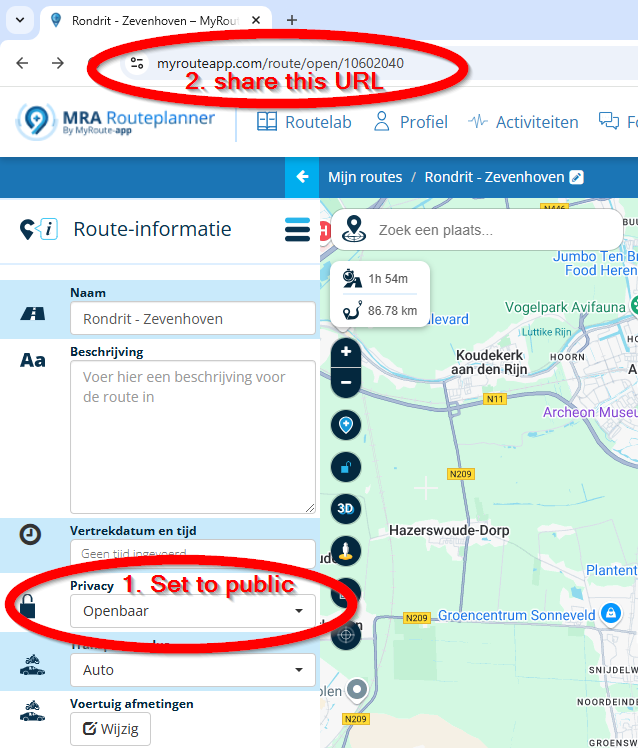
                  @Brian-Martin Please share the route, so we can have a look as well.
                  Make the route official and share the link.

                  Hardware
                  iPhone 12 pro (iOS 26.2.1)
                  iPad (7.Gen.) 18.7.3
                  Oukitel RT3 Pro (Andr. 14)
                  Wireless CarPlay mit (Elebest C650)
                  Wired CarPlay (SEAT Arona - 2021)
                  MRA Workshops in Deutsch sind hier zu finden

                  1 Reply Last reply
                  0
                  • Brian Martinundefined Brian Martin

                    @Guzzist ok will check. Thanks

                    Brian Martinundefined Offline
                    Brian Martinundefined Offline
                    Brian Martin
                    wrote on last edited by
                    #10

                    @Brian-Martin https://drive.google.com/file/d/1KYoFYJJOnKJHa7B8392jj4q_68A3HwkK/view?usp=drivesdk

                    Con Hennekensundefined 1 Reply Last reply
                    0
                    • Brian Martinundefined Brian Martin

                      @Brian-Martin https://drive.google.com/file/d/1KYoFYJJOnKJHa7B8392jj4q_68A3HwkK/view?usp=drivesdk

                      Con Hennekensundefined Offline
                      Con Hennekensundefined Offline
                      Con Hennekens
                      Alpha tester
                      wrote on last edited by
                      #11

                      @Brian-Martin, You are sharing a textfile in Google drive, not the route in MRA ๐Ÿ˜‰
                      2c403c2c-0434-45f0-bf7a-773518edc000-image.png

                      I am just an enthusiastic MRA user, and hope you will be one too!

                      Most motorcycle problems are caused by the nut that connects the handlebar to the saddle.

                      Check out RideSleepRepeat.eu, a biker community for sharing stays across Europe

                      Brian Martinundefined 1 Reply Last reply
                      0
                      • Con Hennekensundefined Con Hennekens

                        @Brian-Martin, You are sharing a textfile in Google drive, not the route in MRA ๐Ÿ˜‰

                        2c403c2c-0434-45f0-bf7a-773518edc000-image.png

                        Brian Martinundefined Offline
                        Brian Martinundefined Offline
                        Brian Martin
                        wrote on last edited by
                        #12

                        @Con-Hennekens sorry, not with it today as I have a stinking cold. Will try again later.

                        Brian Martinundefined 1 Reply Last reply
                        0
                        • Brian Martinundefined Brian Martin

                          @Con-Hennekens sorry, not with it today as I have a stinking cold. Will try again later.

                          Brian Martinundefined Offline
                          Brian Martinundefined Offline
                          Brian Martin
                          wrote on last edited by
                          #13

                          @Brian-Martin https://www.myrouteapp.com/en/social/route/10547614?mode=share

                          Marinus van Deudekomundefined Guzzistundefined 2 Replies Last reply
                          0
                          • Brian Martinundefined Brian Martin

                            @Brian-Martin https://www.myrouteapp.com/en/social/route/10547614?mode=share

                            Marinus van Deudekomundefined Offline
                            Marinus van Deudekomundefined Offline
                            Marinus van Deudekom
                            RouteXpert
                            wrote on last edited by
                            #14

                            @Brian-Martin Hi Brian
                            I'vew looked at your route
                            Most of the waypoints are not ON the route
                            Have you tried putting them ON the road
                            If you have downloaded the maps of that country you should be able to use that route and navigate is

                            Honda Goldwing GL1500,
                            Honda Silverwing GL 650
                            DMD2 T865X 8 inch Android tablet using MRA next for navigation
                            Garmin XT sold
                            Samsung S24FE mounted on a Quadlock and using Android Auto in my car

                            1 Reply Last reply
                            0
                            • Brian Martinundefined Brian Martin

                              @Brian-Martin https://www.myrouteapp.com/en/social/route/10547614?mode=share

                              Guzzistundefined Offline
                              Guzzistundefined Offline
                              Guzzist
                              Valued contributor
                              wrote on last edited by
                              #15

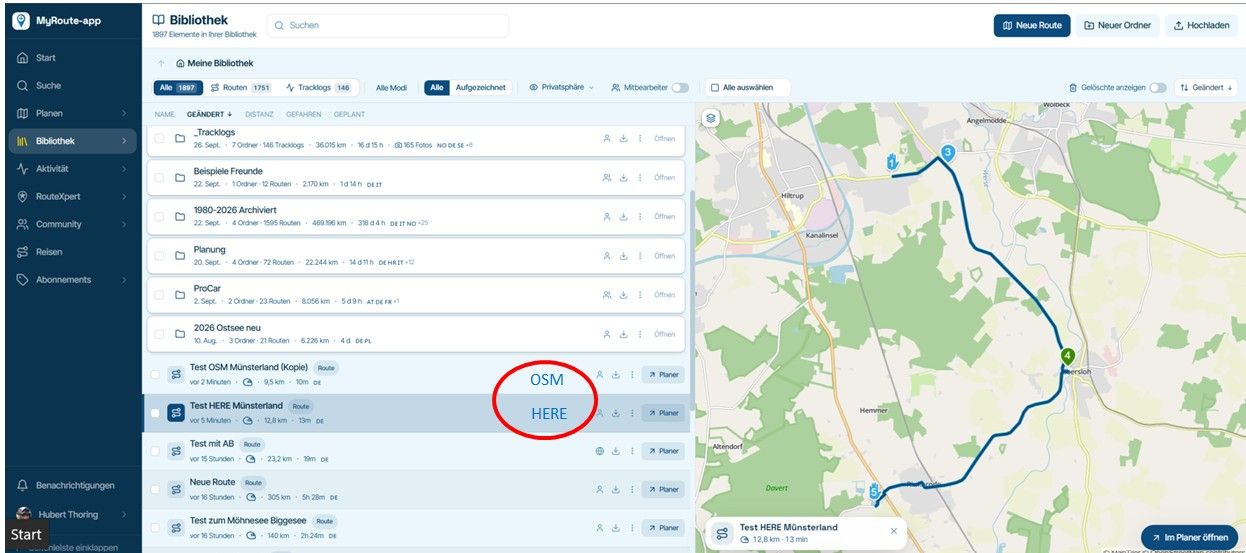
                              @Brian-Martin I also checked your route: same finding with WP not exactly on the road. Please use map engine HEERE to place the WP exactly.

                              I tried also to navigate with. By online navigation, it works fine. Just by offline navigation, I have got error message: "could not calculate a route" - but this is because I did not download a map for offline usage before.
                              So, everything works as designed for me ๐Ÿ™„

                              Nothing is impossible ;-)
                              In past: GARMIN Zumo 210->GARMIN Zumo 395->GARMIN XT=> now: DMD T865-X + MyRoute-App, LocusMaps, OsmAnd.
                              In past: GARMIN MapSource ->GARMIN BaseCamp->Tyre->Kurviger->Calimoto=> now: MRA-Routplanner.

                              Brian Martinundefined 1 Reply Last reply
                              0
                              • Guzzistundefined Guzzist

                                @Brian-Martin I also checked your route: same finding with WP not exactly on the road. Please use map engine HEERE to place the WP exactly.

                                I tried also to navigate with. By online navigation, it works fine. Just by offline navigation, I have got error message: "could not calculate a route" - but this is because I did not download a map for offline usage before.
                                So, everything works as designed for me ๐Ÿ™„

                                Brian Martinundefined Offline
                                Brian Martinundefined Offline
                                Brian Martin
                                wrote on last edited by
                                #16

                                @Guzzist Thanks for looking. How do you download for offline usage? I thought you just downloaded the GPX file to use for
                                off and online.

                                Guzzistundefined 1 Reply Last reply
                                0
                                • Brian Martinundefined Brian Martin

                                  @Guzzist Thanks for looking. How do you download for offline usage? I thought you just downloaded the GPX file to use for
                                  off and online.

                                  Guzzistundefined Offline
                                  Guzzistundefined Offline
                                  Guzzist
                                  Valued contributor
                                  wrote on last edited by Guzzist
                                  #17

                                  @Brian-Martin - oh, may I need to explain a little more ๐Ÿ˜Œ
                                  If you have planned a route in MRA Route Planner - or would like to use a track - than both would be available in myRoute-App as well for navigation. But it's needed to activate "synchronisation for all" in front of. (If you open a route in MyRoute-App, tap on 3 dots in top right corner and select "sync for all").

                                  By this, you can navigate with a route or with a track as long as you are online. If you intent to be offline later on, go online in front of your trip, goto your Account in MyRoute-App (tap 3 lines icon at top left corner, then Account icon at top right corner, then scroll down an select "offline maps" - and download maps for all regions/countries the route or track Passes trough you want to use. And keep them up to date further on!
                                  Just then, you can navigate with a route or track also offline ๐Ÿ˜

                                  Not sure what you intend with the downloaded gpx file. From where did you download to where to store? You can use a gpx file from elsewhere, but at first upload it from your computer to MRA Route Planner. Then - as I wrote above, if you have switched on "synch" - the route or track you have created or uploaded to MRA Route Planner will be available automatically at your p.e. Smartphone in MyRoute-App. There is no need to load the gpx file to your Smartphone.

                                  Nothing is impossible ;-)
                                  In past: GARMIN Zumo 210->GARMIN Zumo 395->GARMIN XT=> now: DMD T865-X + MyRoute-App, LocusMaps, OsmAnd.
                                  In past: GARMIN MapSource ->GARMIN BaseCamp->Tyre->Kurviger->Calimoto=> now: MRA-Routplanner.

                                  Brian Martinundefined 1 Reply Last reply
                                  0
                                  • Guzzistundefined Guzzist

                                    @Brian-Martin - oh, may I need to explain a little more ๐Ÿ˜Œ
                                    If you have planned a route in MRA Route Planner - or would like to use a track - than both would be available in myRoute-App as well for navigation. But it's needed to activate "synchronisation for all" in front of. (If you open a route in MyRoute-App, tap on 3 dots in top right corner and select "sync for all").

                                    By this, you can navigate with a route or with a track as long as you are online. If you intent to be offline later on, go online in front of your trip, goto your Account in MyRoute-App (tap 3 lines icon at top left corner, then Account icon at top right corner, then scroll down an select "offline maps" - and download maps for all regions/countries the route or track Passes trough you want to use. And keep them up to date further on!
                                    Just then, you can navigate with a route or track also offline ๐Ÿ˜

                                    Not sure what you intend with the downloaded gpx file. From where did you download to where to store? You can use a gpx file from elsewhere, but at first upload it from your computer to MRA Route Planner. Then - as I wrote above, if you have switched on "synch" - the route or track you have created or uploaded to MRA Route Planner will be available automatically at your p.e. Smartphone in MyRoute-App. There is no need to load the gpx file to your Smartphone.

                                    Brian Martinundefined Offline
                                    Brian Martinundefined Offline
                                    Brian Martin
                                    wrote on last edited by
                                    #18

                                    @Guzzist I did what you suggested and it seems to have worked, not able to get out onto the road yet but after opening route in MRA in offline mode it did calculate and started instructions. I usually download GPX files into Google Drive on my PC, phone, and Tablet I use for navigation. It's pretty seemless, as soon as I and file is added to the folder it's there straight away on all devices.
                                    Thanks for you help.

                                    Con Hennekensundefined 1 Reply Last reply
                                    0
                                    • Brian Martinundefined Brian Martin

                                      @Guzzist I did what you suggested and it seems to have worked, not able to get out onto the road yet but after opening route in MRA in offline mode it did calculate and started instructions. I usually download GPX files into Google Drive on my PC, phone, and Tablet I use for navigation. It's pretty seemless, as soon as I and file is added to the folder it's there straight away on all devices.
                                      Thanks for you help.

                                      Con Hennekensundefined Offline
                                      Con Hennekensundefined Offline
                                      Con Hennekens
                                      Alpha tester
                                      wrote on last edited by
                                      #19

                                      @Brian-Martin, the sync option @Guzzist explained takes the hassle out of "transferring routes to your device". That really is a thing of the past if you use MRA planner as well as MRA Navigation. ๐Ÿ˜‰

                                      I am just an enthusiastic MRA user, and hope you will be one too!

                                      Most motorcycle problems are caused by the nut that connects the handlebar to the saddle.

                                      Check out RideSleepRepeat.eu, a biker community for sharing stays across Europe

                                      Brian Martinundefined 1 Reply Last reply
                                      0
                                      • Con Hennekensundefined Con Hennekens

                                        @Brian-Martin, the sync option @Guzzist explained takes the hassle out of "transferring routes to your device". That really is a thing of the past if you use MRA planner as well as MRA Navigation. ๐Ÿ˜‰

                                        Brian Martinundefined Offline
                                        Brian Martinundefined Offline
                                        Brian Martin
                                        wrote on last edited by
                                        #20

                                        @Con-Hennekens I save the GPX files in Drive as I use different navigation programmes depending on what I'm doing so I have access to all. ๐Ÿ‘

                                        1 Reply Last reply
                                        1

                                        Hello! It looks like you're interested in this conversation, but you don't have an account yet.

                                        Getting fed up of having to scroll through the same posts each visit? When you register for an account, you'll always come back to exactly where you were before, and choose to be notified of new replies (either via email, or push notification). You'll also be able to save bookmarks and upvote posts to show your appreciation to other community members.

                                        With your input, this post could be even better ๐Ÿ’—

                                        Register Login
                                        Reply
                                        • Reply as topic
                                        Log in to reply
                                        • Oldest to Newest
                                        • Newest to Oldest
                                        • Most Votes


                                        ACTIVE USERS
                                        nomkoundefined
                                        nomko
                                        Marinus van Deudekomundefined
                                        Marinus van Deudekom
                                        Rob Verhoeffundefined
                                        Rob Verhoeff
                                        Guzzistundefined
                                        Guzzist
                                        Jรถrgenundefined
                                        Jรถrgen
                                        Con Hennekensundefined
                                        Con Hennekens
                                        Brian Martinundefined
                                        Brian Martin
                                        POPULAR TOPICS
                                        • Ontvangen route niet te rijden met de Myroute app
                                          nomkoundefined
                                          nomko
                                          0
                                          9
                                          134

                                        • Coordinaten
                                          Marinus van Deudekomundefined
                                          Marinus van Deudekom
                                          0
                                          11
                                          218

                                        • Layout My Routes
                                          Leike Lodiersundefined
                                          Leike Lodiers
                                          0
                                          4
                                          124

                                        • Blue haze on top of screen in free drive
                                          stuart marrittundefined
                                          stuart marritt
                                          0
                                          10
                                          309

                                        • Font for the distance to the next turn to smal
                                          Brian McGundefined
                                          Brian McG
                                          0
                                          3
                                          96

                                        • Route name column width
                                          Brian McGundefined
                                          Brian McG
                                          0
                                          8
                                          353

                                        • Battery life
                                          Jan Smerkeundefined
                                          Jan Smerke
                                          0
                                          8
                                          1.4k

                                        • Geen routelijn
                                          undefined
                                          0
                                          1
                                          14

                                        MY GROUPS
                                        • Login

                                        • Login or register to search.
                                        • First post
                                          Last post
                                        0
                                        • Categories
                                        • Recent
                                        • Popular
                                        • Support
                                        • MyRoute-app