
How to delete favourites?
-
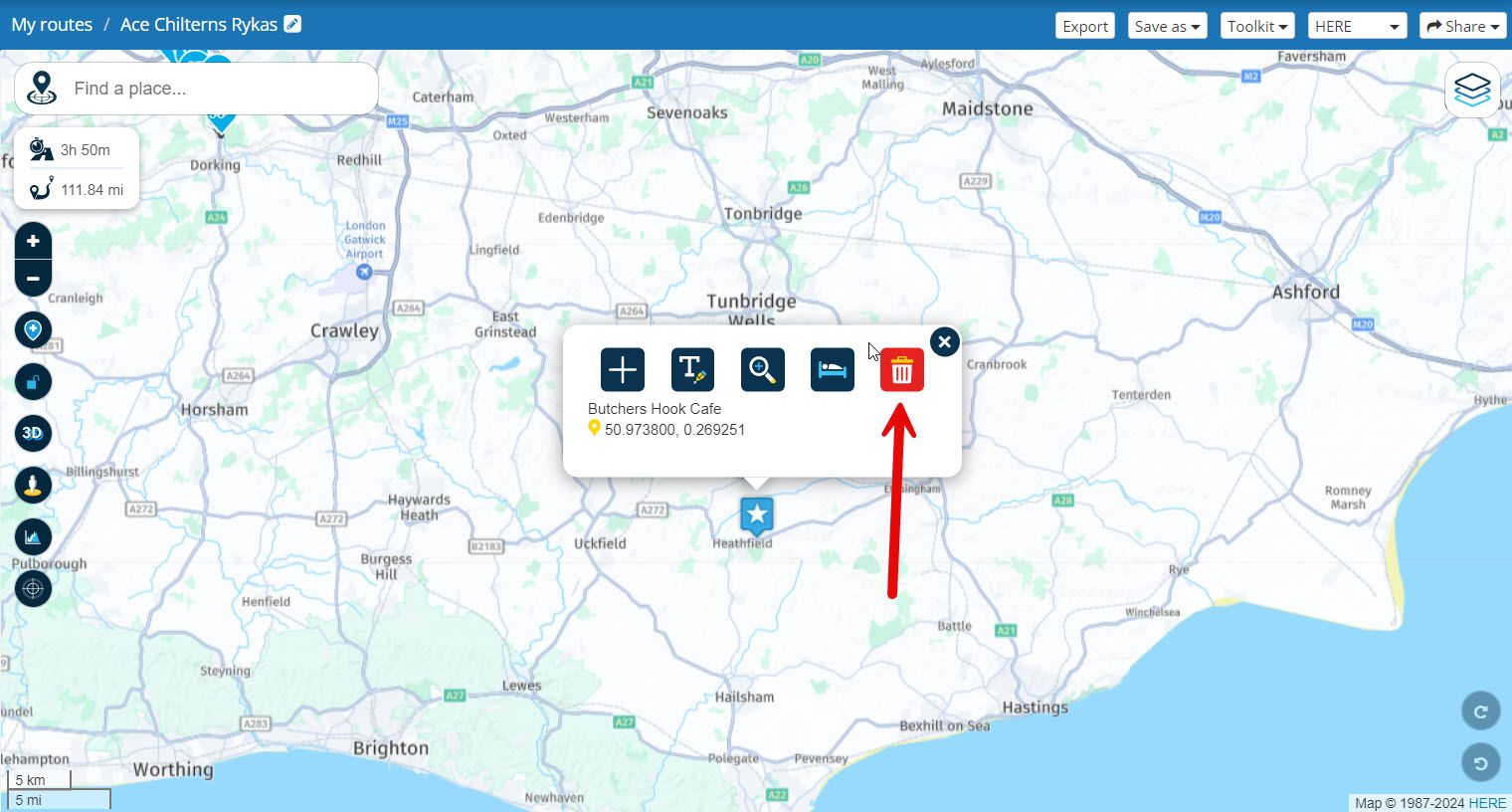
@Jeffrey-Poulter Open a route (any route) select a favourite that you want to delete and then click the trash can to delete. Unfortunately they have to be deleted individually.

I see a good point for improvement here.
You can easily remove a POI from your own POI list by clicking on the cross in the list.
Not because it is necessarily much better. But the method for removal does become more unambiguous.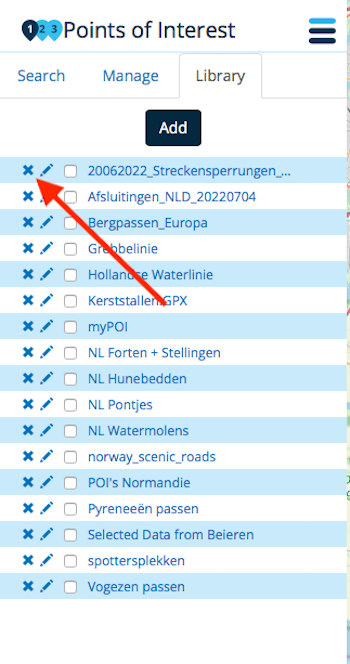
-

Thanks. chaps. So simple when you know how!
Odd, though, that 'How to delete favourite waypoint' produced zero response when entered into the help search box...
-
Thanks. chaps. So simple when you know how!
Odd, though, that 'How to delete favourite waypoint' produced zero response when entered into the help search box...
@Jeffrey-Poulter
Sorry @Jeffrey-Poulter but I can’t find that topic. -
ok,
I have the same question as Jeffrey Poulter, I have favourites that I cannot delete, I have read all the answers to his question, but I have NO dustbin or X to delete the favourite, it is driving me crazy, evenyone says just click dustbin BUT I haven't got a dustbin to delete the favourite.I am so frustrated it is crazy how I cannot delete

-
ok,
I have the same question as Jeffrey Poulter, I have favourites that I cannot delete, I have read all the answers to his question, but I have NO dustbin or X to delete the favourite, it is driving me crazy, evenyone says just click dustbin BUT I haven't got a dustbin to delete the favourite.I am so frustrated it is crazy how I cannot delete

-

You can delete them easily from the MyRoute-app.
Display the list of favourites
Click on the edit button for the one you want to delete
Click the red delete waste can button and then answer yes. -
@Lynchy67 Hi
I haven't got any of that which you are showing on your map, all it ask's to make another favourite or rename it? -
You can delete them easily from the MyRoute-app.
Display the list of favourites
Click on the edit button for the one you want to delete
Click the red delete waste can button and then answer yes.
@Doug-Robinson hi
I don't have any edit or delete, so I'm unable to do anything but live with the favourite: angry: -
ok, found it, open a new map, call it whatever you like, click the 3 horizontal bars at top, then all the info available is listed, including a favourites list which I can then delete any of my crap favourites.
I must admit this is not a particularly good user web friendly program, I would go as to say crap.
But it cost too much to not use
-
ok, found it, open a new map, call it whatever you like, click the 3 horizontal bars at top, then all the info available is listed, including a favourites list which I can then delete any of my crap favourites.
I must admit this is not a particularly good user web friendly program, I would go as to say crap.
But it cost too much to not use
@Fusebox666, relax. Suggestions for improvement of favorite management have already been issued. Later this year the planner website will get an overhaul. But given your profile name a little bit of angry is probably in your nature

-
Any updates to this feature? I followed @fusebox666's directions dated Feb 15 2024 and they work, although it took me some time to find this thread. A favorites manager would be much easier.
-
Any updates to this feature? I followed @fusebox666's directions dated Feb 15 2024 and they work, although it took me some time to find this thread. A favorites manager would be much easier.
@Tom.Fox, The current web planner is designed around the routing engine itself. Therefore some options are only available from within an open route. You do not need to create a new route to delete favorites, just open any route from your library (but not a track).
A completely new web planner platform is on the verge, you will most likely have seen that in your mailbox. In it things like favorites and POI have their own place in the main menu, and management of them has been greatly improved.

Hello! It looks like you're interested in this conversation, but you don't have an account yet.
Getting fed up of having to scroll through the same posts each visit? When you register for an account, you'll always come back to exactly where you were before, and choose to be notified of new replies (either via email, or push notification). You'll also be able to save bookmarks and upvote posts to show your appreciation to other community members.
With your input, this post could be even better 💗
Register Login
-
0669
-
 0568
0568
-
 057
057
-
 110392
-
06129
-
0363
-
03101
-
 03117
03117



