Skip to content
  • Categories
  • Recent
  • Popular
  • Support
  • MyRoute-app
Collapse
Brand Logo

MRA Community Forum

  1. Home
  2. The MyRoute-app
  3. [App] Problems, Bugs and other Issues
  4. POI - Distance to Fuel

POI - Distance to Fuel

Scheduled Pinned Locked Moved [App] Problems, Bugs and other Issues
7 Posts 3 Posters 2.0k Views 1 Watching
  • Oldest to Newest
  • Newest to Oldest
  • Most Votes
Reply
  • Reply as topic
Log in to reply
This topic has been deleted. Only users with topic management privileges can see it.
  • AlastairA
    AlastairA
    AlastairA
    wrote on last edited by
    #1

    Since the last upgrade all the POI's from my routes are not shown in the app when navigating. They are still visible on the web version.

    I use the POI information to mark fuel stops which is critical in remote areas. Also, the app used to have a "distance to fuel" icon when navigating which is no longer there.

    How do I get the POI's to display? Any help much appreciated.

    Rob Verhoeff Nick Carthew 2 Replies Last reply
    0
    • AlastairA AlastairA

      Since the last upgrade all the POI's from my routes are not shown in the app when navigating. They are still visible on the web version.

      I use the POI information to mark fuel stops which is critical in remote areas. Also, the app used to have a "distance to fuel" icon when navigating which is no longer there.

      How do I get the POI's to display? Any help much appreciated.

      Rob Verhoeff
      Rob Verhoeff
      Rob Verhoeff
      Alpha tester
      wrote on last edited by Rob Verhoeff
      #2

      @AlastairA said in POI - Distance to Fuel:

      Also, the app used to have a "distance to fuel" icon when navigating which is no longer there.

      This feature is comming back in the new app.

      As for the POI's, they are loading a bit of slow on my side. You have to right click on a POI to ad them to your route when making the route. They should pop-up when approaching them while you're navigating.

      ๐Ÿ๏ธ BMW K1600GT-P (2013) | Nolan N100-5 with Sena 30K
      ๐Ÿ“ฑ iOS on iPhone 13 & 16 (mounted on Quadlock or AliExpress extention on BMW-cradle)
      ๐Ÿš™ Apple CarPlay in VW T-Roc
      ๐Ÿ’ป Routelab on MacBook Air & iMac (Golden Gate & Ventura)

      1 Reply Last reply
      0
      • AlastairA AlastairA

        Since the last upgrade all the POI's from my routes are not shown in the app when navigating. They are still visible on the web version.

        I use the POI information to mark fuel stops which is critical in remote areas. Also, the app used to have a "distance to fuel" icon when navigating which is no longer there.

        How do I get the POI's to display? Any help much appreciated.

        Nick Carthew
        Nick Carthew
        Nick Carthew
        RouteXpert
        wrote on last edited by
        #3

        @AlastairA I use a red route point and fuel icon to indicate fuel stops. The distance to these is shown in the waypoint list. The distance is also dynamic, meaning the distance is shown from your current location.
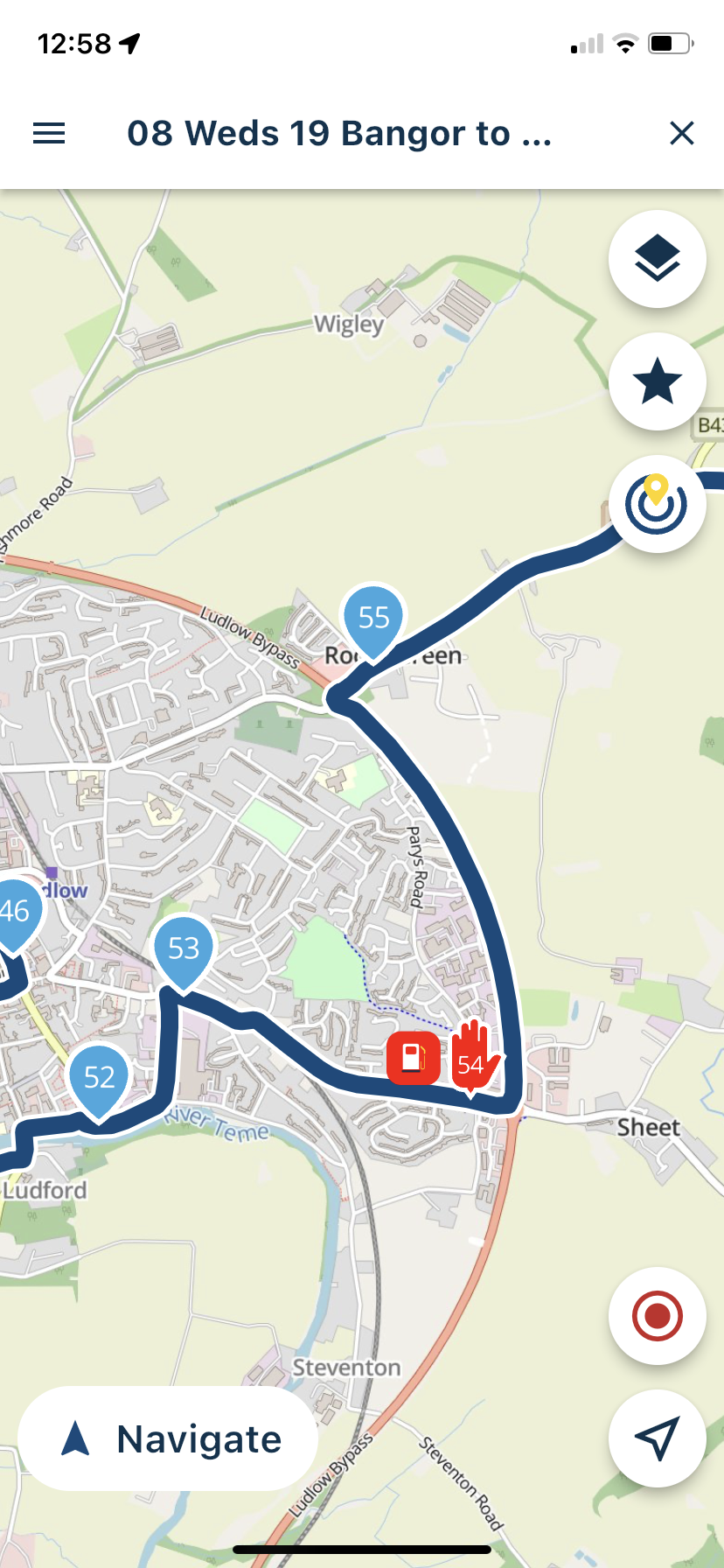
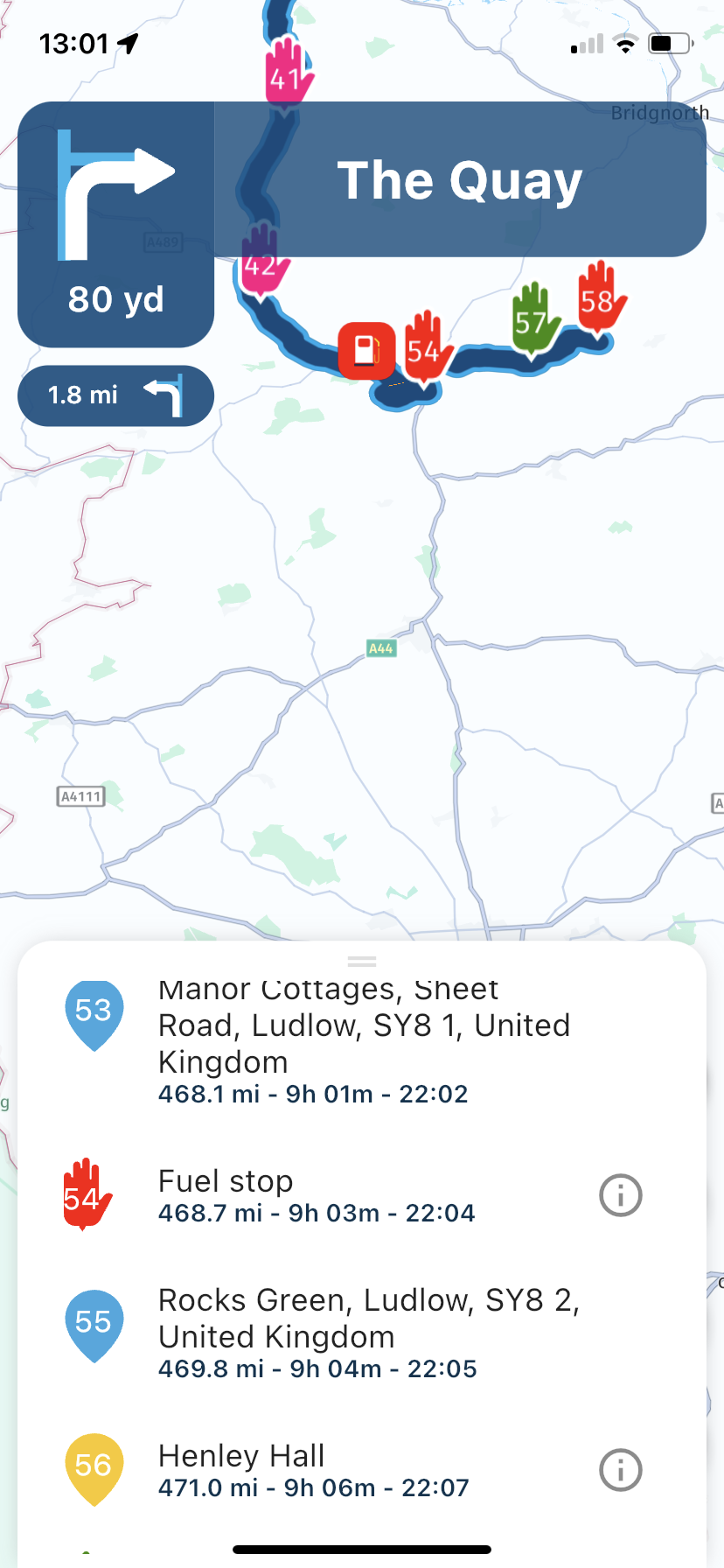
        IMG_2288.png

        IMG_2289.png

        Always willing to help if I can.
        Triumph Tiger 1200 XRT called Tina.
        MRA Navigation Next and SilverFox BJ8

        AlastairA 2 Replies Last reply
        2
        • Nick Carthew Nick Carthew

          @AlastairA I use a red route point and fuel icon to indicate fuel stops. The distance to these is shown in the waypoint list. The distance is also dynamic, meaning the distance is shown from your current location.

          IMG_2288.png

          IMG_2289.png

          AlastairA
          AlastairA
          AlastairA
          wrote on last edited by
          #4

          @Nick-Carthew Thats a great tip - thank you!

          1 Reply Last reply
          0
          • Nick Carthew Nick Carthew

            @AlastairA I use a red route point and fuel icon to indicate fuel stops. The distance to these is shown in the waypoint list. The distance is also dynamic, meaning the distance is shown from your current location.

            IMG_2288.png

            IMG_2289.png

            AlastairA
            AlastairA
            AlastairA
            wrote on last edited by
            #5

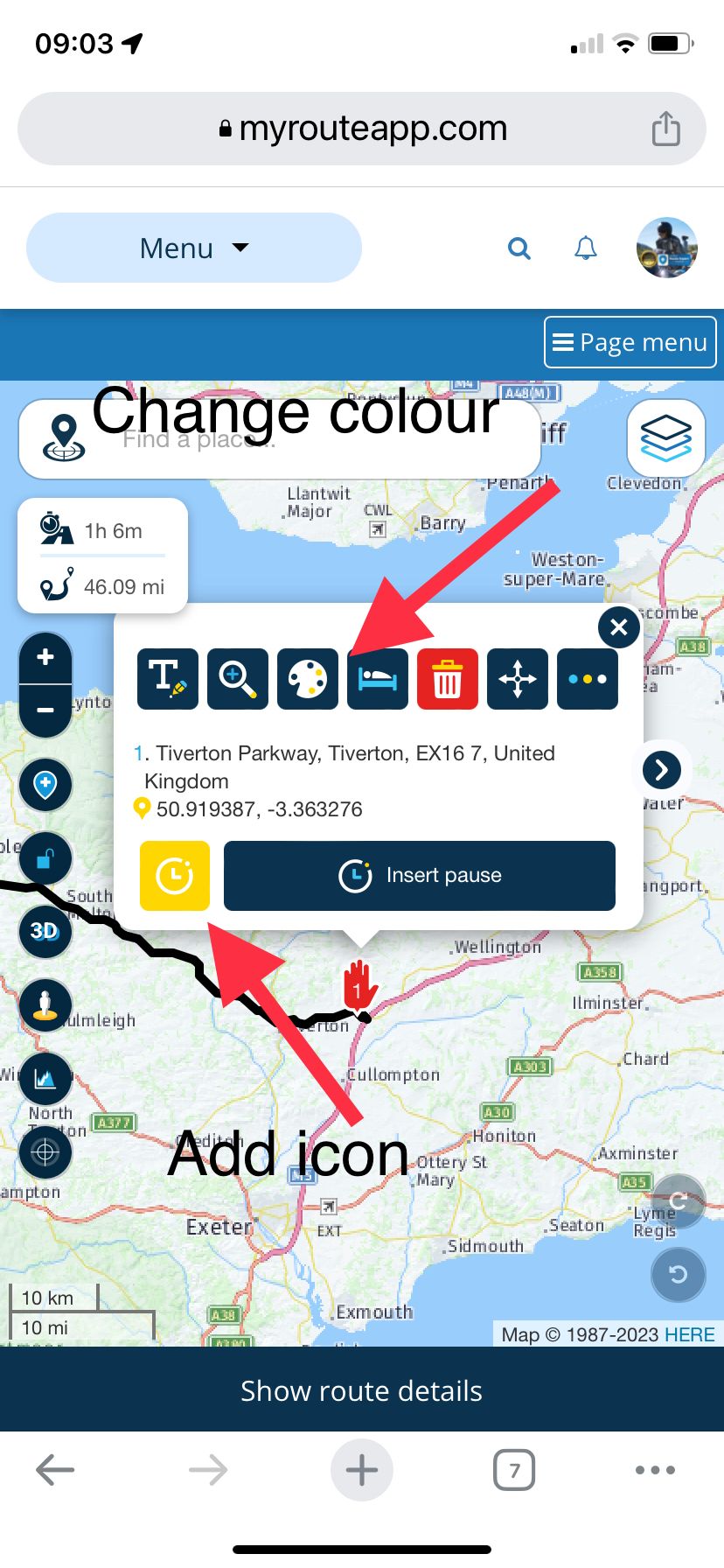
            @Nick-Carthew Although - how do you change the colour of waypoints! Can't seem to find an option to do that!!

            Nick Carthew 1 Reply Last reply
            0
            • AlastairA AlastairA

              @Nick-Carthew Although - how do you change the colour of waypoints! Can't seem to find an option to do that!!

              Nick Carthew
              Nick Carthew
              Nick Carthew
              RouteXpert
              wrote on last edited by
              #6

              @AlastairA

              IMG_2338.jpeg

              Always willing to help if I can.
              Triumph Tiger 1200 XRT called Tina.
              MRA Navigation Next and SilverFox BJ8

              AlastairA 1 Reply Last reply
              0
              • Nick Carthew Nick Carthew

                @AlastairA

                IMG_2338.jpeg

                AlastairA
                AlastairA
                AlastairA
                wrote on last edited by
                #7

                @Nick-Carthew Got it! Many thanks for your kind help Nick.
                1 Reply Last reply
                1

                Hello! It looks like you're interested in this conversation, but you don't have an account yet.

                Getting fed up of having to scroll through the same posts each visit? When you register for an account, you'll always come back to exactly where you were before, and choose to be notified of new replies (either via email, or push notification). You'll also be able to save bookmarks and upvote posts to show your appreciation to other community members.

                With your input, this post could be even better ๐Ÿ’—

                Register Login
                Reply
                • Reply as topic
                Log in to reply
                • Oldest to Newest
                • Newest to Oldest
                • Most Votes


                ACTIVE USERS
                Nick Carthew
                Nick Carthew
                Rob Verhoeff
                Rob Verhoeff
                AlastairA
                AlastairA
                POPULAR TOPICS
                • Elevation profile: cursor that follows the route on the map
                  Corrado Miniati
                  Corrado Miniati
                  0
                  9
                  37

                • Question on Beta access
                  BertM
                  BertM
                  0
                  11
                  217

                • Add "Upload File"
                  Hubert Thoring
                  Hubert Thoring
                  0
                  6
                  36

                • somewhat new to MRA, but have done research on this forum
                  BertM
                  BertM
                  0
                  14
                  405

                • Totaaltijd veranderd niet
                  Gerard Caspers
                  Gerard Caspers
                  0
                  3
                  16

                • Keep all routes visible when editing a route from a library folder
                  John Matthews 0
                  John Matthews 0
                  4
                  5
                  50

                • Device Limit โ€“ There Are Limits to My Understanding
                  BMcG
                  BMcG
                  0
                  2
                  48

                • A to B Navigation with Extra Stop.
                  BertM
                  BertM
                  0
                  4
                  138

                MY GROUPS
                • Login

                • Login or register to search.
                • First post
                  Last post
                0
                • Categories
                • Recent
                • Popular
                • Support
                • MyRoute-app