Skip to content
  • Categories
  • Recent
  • Popular
  • Support
  • MyRoute-app
Collapse
Brand Logo

MRA Community Forum

  1. Home
  2. MyRoute-app Routeplanner
  3. [Web] Problems, Bugs and other Issues
  4. foto's toevoegen lukt niet

foto's toevoegen lukt niet

Scheduled Pinned Locked Moved [Web] Problems, Bugs and other Issues
6 Posts 5 Posters 1.3k Views 3 Watching
  • Oldest to Newest
  • Newest to Oldest
  • Most Votes
Reply
  • Reply as topic
Log in to reply
This topic has been deleted. Only users with topic management privileges can see it.
  • kees van baest
    kees van baest
    kees van baest
    wrote on last edited by
    #1

    Als ik foto's wil toevoegen aan een bestaande route lukt dat niet. Is hier een handleiding voor?

    Guzzist nomko 2 Replies Last reply
    0
    • kees van baest kees van baest

      Als ik foto's wil toevoegen aan een bestaande route lukt dat niet. Is hier een handleiding voor?
      Guzzist
      Guzzist
      Guzzist
      Valued contributor
      wrote on last edited by
      #2

      @kees-van-baest You cannot attach a photo directly to a route; only to waypoints on a route.

      Or did you mean track? If you click on the line of a track, you can attach a photo at exactly this point.

      Je kunt een foto niet rechtstreeks aan een route toevoegen; alleen aan waypoints op een route.

      Of bedoelde je track? Als je op de lijn van een track klikt, kun je precies op dit punt een foto toevoegen.

      Nothing is impossible ;-)
      In past: GARMIN Zumo 210->GARMIN Zumo 395->GARMIN XT=> now: DMD T865-X + MyRoute-App, LocusMaps, OsmAnd.
      In past: GARMIN MapSource ->GARMIN BaseCamp->Tyre->Kurviger->Calimoto=> now: MRA-Routplanner.

      1 Reply Last reply
      0
      • kees van baest kees van baest

        Als ik foto's wil toevoegen aan een bestaande route lukt dat niet. Is hier een handleiding voor?

        nomko
        nomko
        nomko
        Banned
        wrote on last edited by
        #3

        @kees-van-baest Neem aan dat je een route bedoeld? OF probeer je dit in een track?

        Normaal is dit de procedure:
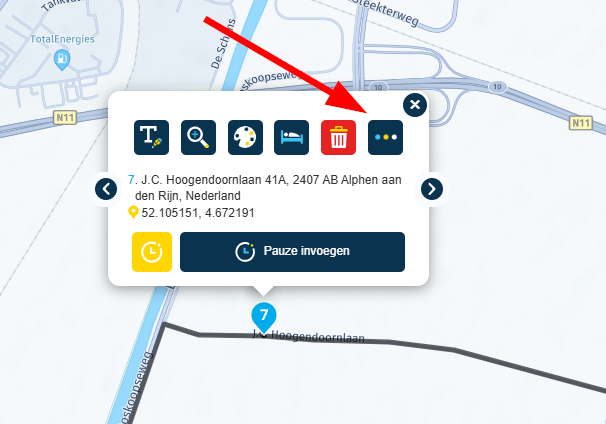
        Selecteer de routepunt waar je een foto bij wilt hebben en rechtsklik erop.

        Klik op de knop met de 3 liggende puntjes (screenshot 1).
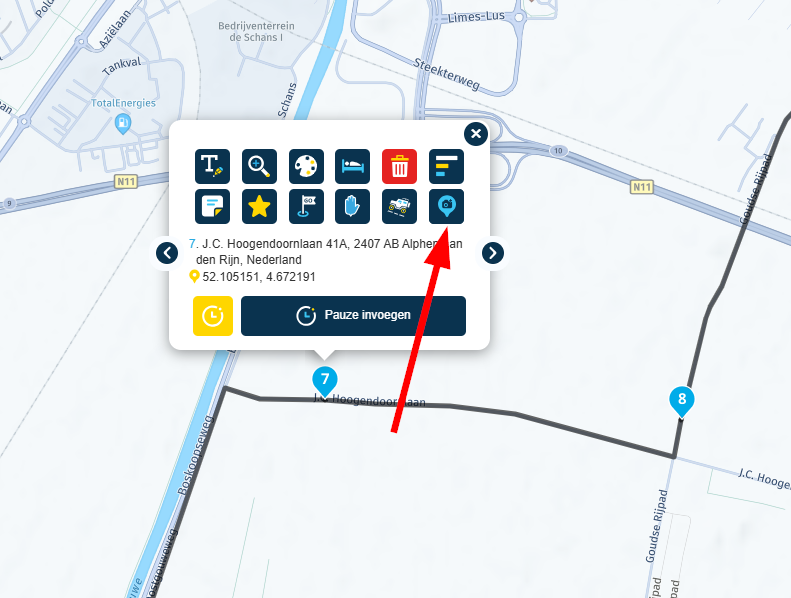
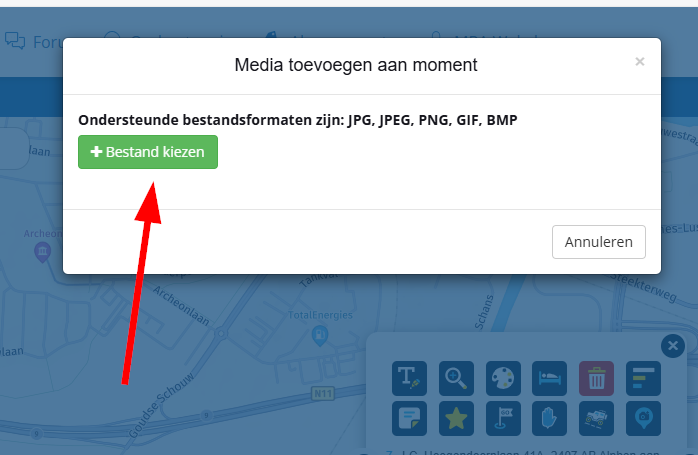
        Klik op het icoon rechtsonder (screenshot 2) en klik op de knop Bestand kiezen (screenshot 3) en selecteer de foto die je wilt toevoegen..

        SCREENSHOT 1
        6ba8b7b1-bad2-4a8d-a252-7f1e9ade5daa-image.png

        SCREENSHOT 2
        f8152a7e-0be0-4b7d-9967-bd0ab04395d2-image.png

        SCREENSHOT 3
        869ff170-7e07-46fd-92f2-436e40a95503-image.png

        1 Reply Last reply
        0
        • kees van baest
          kees van baest
          kees van baest
          wrote on last edited by
          #4

          Hallo,

          Ik bedoel inderdaad route, Ik heb deze 3 stappen genomen, maar de foto verschijnt niet in de route.

          Marinus van Deudekom Con Hennekens 2 Replies Last reply
          0
          • kees van baest kees van baest

            Hallo,

            Ik bedoel inderdaad route, Ik heb deze 3 stappen genomen, maar de foto verschijnt niet in de route.

            Marinus van Deudekom
            Marinus van Deudekom
            Marinus van Deudekom
            RouteXpert
            wrote on last edited by
            #5
            This post is deleted!
            1 Reply Last reply
            0
            • kees van baest kees van baest

              Hallo,

              Ik bedoel inderdaad route, Ik heb deze 3 stappen genomen, maar de foto verschijnt niet in de route.

              Con Hennekens
              Con Hennekens
              Con Hennekens
              Alpha tester
              wrote on last edited by
              #6

              @kees-van-baest, Voor zover ik weet worden je eigen foto's die je bij routepunten upload allen weergegeven als je op dat routepunt klikt. Tijdens het navigeren met MRA Navigation worden ze ook zichtbaar als je op het routepunt klikt. Net als de notitie dus. De foto's die je ziet op de web planner kaart zijn foto's die door gebruikers aan een tracklog zijn gekoppeld, en ook op public zijn gezet. Dat zijn dus twee verschillende dingen.

              I am just an enthusiastic MRA user, and hope you will be one too!

              Most motorcycle problems are caused by the nut that connects the handlebar to the saddle.

              Check out RideSleepRepeat.eu, a biker community for sharing stays across Europe

              1 Reply Last reply
              0

              Hello! It looks like you're interested in this conversation, but you don't have an account yet.

              Getting fed up of having to scroll through the same posts each visit? When you register for an account, you'll always come back to exactly where you were before, and choose to be notified of new replies (either via email, or push notification). You'll also be able to save bookmarks and upvote posts to show your appreciation to other community members.

              With your input, this post could be even better 💗

              Register Login
              Reply
              • Reply as topic
              Log in to reply
              • Oldest to Newest
              • Newest to Oldest
              • Most Votes


              ACTIVE USERS
              Con Hennekens
              Con Hennekens
              Marinus van Deudekom
              Marinus van Deudekom
              Guzzist
              Guzzist
              nomko
              nomko
              kees van baest
              kees van baest
              POPULAR TOPICS
              • [EN] MyRoute-app Routeplanner Next (Beta)
                Joe Hoss
                Joe Hoss
                8
                44
                467

              • [NL] MyRoute-app Routeplanner Next (Beta)
                Travellexxie
                Travellexxie
                4
                36
                438

              • Statement on map spinning
                a white mouse on the motorbike
                a white mouse on the motorbike
                18
                26
                1.8k

              • Feature request to change colour of the route-line in My Route Web
                Rob Verhoeff
                Rob Verhoeff
                6
                7
                509

              • MRA 6.0.0 (515) Track bar covered not displayed /// Streckenbalken überdeckt nicht angezeigt
                Hubert Thoring
                Hubert Thoring
                0
                4
                22

              • Hoe offline navigatie rijden
                Barto
                Barto
                0
                8
                712

              • New beta! 6.0.0 (514)
                Rob Verhoeff
                Rob Verhoeff
                12
                26
                237

              • MRA 6.0.0 (515) Night mode
                Jörgen
                Jörgen
                0
                5
                66

              MY GROUPS
              • Login

              • Login or register to search.
              • First post
                Last post
              0
              • Categories
              • Recent
              • Popular
              • Support
              • MyRoute-app