How can I change the pointer
-

How can i change the pointer? On the route i see different placec with photos but I can't click to see the picture the pointer will add a waypoint. It must be something very simple but can't figure it out.
HELP -
How can i change the pointer? On the route i see different placec with photos but I can't click to see the picture the pointer will add a waypoint. It must be something very simple but can't figure it out.
HELP
@Christian-Siegel You talk about the pictures shown in the planing App from other user?
Which Browser and operating system are you using?Hardware
iPhone 12 pro (iOS 26.2.1)
iPad (7.Gen.) 18.7.3
Oukitel RT3 Pro (Andr. 14)
Wireless CarPlay mit (Elebest C650)
Wired CarPlay (SEAT Arona - 2021)
MRA Workshops in Deutsch sind hier zu finden -
How can i change the pointer? On the route i see different placec with photos but I can't click to see the picture the pointer will add a waypoint. It must be something very simple but can't figure it out.
HELP
@Christian-Siegel, is this in the App, in the web planner? A screenshot might clear up what you are asking.
-
@Christian-Siegel You talk about the pictures shown in the planing App from other user?
Which Browser and operating system are you using?
@Jörgen mac os, on web app planner
-
@Christian-Siegel You talk about the pictures shown in the planing App from other user?
Which Browser and operating system are you using?
@Jörgen its mac Os, web planner app. its just showing the crosshair
-
@Jörgen its mac Os, web planner app. its just showing the crosshair
@Christian-Siegel, I think you are referring to this option then:
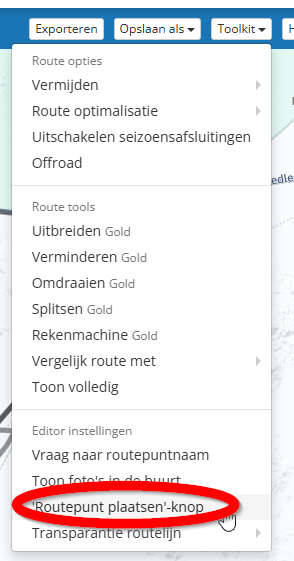
It's in the toolkit, English name would be something like "Waypoint placement button" (or similar).
Hello! It looks like you're interested in this conversation, but you don't have an account yet.
Getting fed up of having to scroll through the same posts each visit? When you register for an account, you'll always come back to exactly where you were before, and choose to be notified of new replies (either via email, or push notification). You'll also be able to save bookmarks and upvote posts to show your appreciation to other community members.
With your input, this post could be even better 💗
Register Login-
 1211106
-
 01054
01054
-
 013208
-
 0633
0633
-
 1637
1637
-
 16108
16108
-
0732
-
 15151
15151