Skip to content
  • Categories
  • Recent
  • Popular
  • Support
  • MyRoute-app
Collapse
Brand Logo

MRA Community Forum

  1. Home
  2. General Discussion
  3. How to delete favorites from my navigation app

How to delete favorites from my navigation app

Scheduled Pinned Locked Moved General Discussion
3 Posts 3 Posters 541 Views 2 Watching
  • Oldest to Newest
  • Newest to Oldest
  • Most Votes
Reply
  • Reply as topic
Log in to reply
This topic has been deleted. Only users with topic management privileges can see it.
  • Bas Kappertundefined Offline
    Bas Kappertundefined Offline
    Bas Kappert
    wrote on last edited by
    #1

    Hello,
    I have several favorites in my navigation app who I want to delete. Does anyone know How to do so?
    Regards,
    Bas

    Drabslabundefined Stefan Hummelinkundefined 2 Replies Last reply
    0
    • Bas Kappertundefined Bas Kappert

      Hello,
      I have several favorites in my navigation app who I want to delete. Does anyone know How to do so?
      Regards,
      Bas

      Drabslabundefined Offline
      Drabslabundefined Offline
      Drabslab
      wrote on last edited by
      #2

      @Bas-Kappert i have no experience with the navigation app but would expect that when you delete the favorites in the myrouteapp web application this will also impact the favorites on your phone

      It is not difficult, it is easy, it's a hobby

      1 Reply Last reply
      0
      • Bas Kappertundefined Bas Kappert

        Hello,
        I have several favorites in my navigation app who I want to delete. Does anyone know How to do so?
        Regards,
        Bas

        Stefan Hummelinkundefined Offline
        Stefan Hummelinkundefined Offline
        Stefan Hummelink
        Alpha tester
        wrote on last edited by Stefan Hummelink
        #3

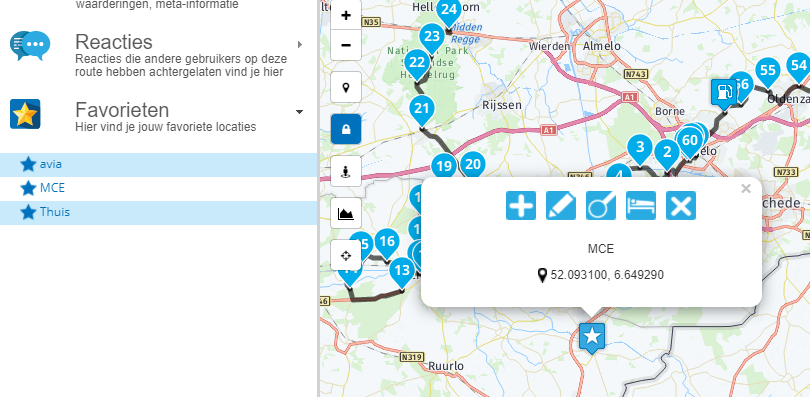
        @Bas-Kappert Hi Bas, as @Drabslab mentioned, the favorites you make in Navigation are also present in the favorites in the MRA Web environment and vice versa.

        If you want to delete the favorites only from Nav: that's not possible. Favorites can be deleted through the favorites menu. Clicking the favorite in question, in this case I clicked MCE, and then clicking the big X in the routepoint menu as shown:
        bb1f20b8-4945-4f43-bd03-d52ac1db0a61-image.png

        Manks bu'j te bange.

        1 Reply Last reply
        0
        Reply
        • Reply as topic
        Log in to reply
        • Oldest to Newest
        • Newest to Oldest
        • Most Votes


        ACTIVE USERS
        Stefan Hummelinkundefined
        Stefan Hummelink
        Drabslabundefined
        Drabslab
        Bas Kappertundefined
        Bas Kappert
        POPULAR TOPICS
        • Unable to calculate route
          David Rudgleyundefined
          David Rudgley
          0
          48
          2.1k

        • iPhone v Carplay: Definitive list of differences/limitations?
          white.mouseundefined
          white.mouse
          0
          10
          106

        • Underwhelmed by the Route Library
          David Rudgleyundefined
          David Rudgley
          0
          8
          142

        • stops
          white.mouseundefined
          white.mouse
          0
          7
          216

        • Problem? Question? Read this first!
          Jörgenundefined
          Jörgen
          -2
          4
          3.5k

        • Mejora en la estabilidad en Android Auto Wireless
          b0hd1undefined
          b0hd1
          1
          3
          145

        • Route planner waypoint removal bug
          b0hd1undefined
          b0hd1
          0
          11
          973

        • New beta! 5.0.3 (447)
          Con Hennekensundefined
          Con Hennekens
          7
          87
          486
        MY GROUPS
        • Login

        • Login or register to search.
        • First post
          Last post
        0
        • Categories
        • Recent
        • Popular
        • Support
        • MyRoute-app