Skip to content
  • Categories
  • Recent
  • Popular
  • Support
  • MyRoute-app
Collapse
Brand Logo

MRA Community Forum

  1. Home
  2. MyRoute-app Routeplanner
  3. [Web] Suggestions and Discussion
  4. Change the starting point on a route

Change the starting point on a route

Scheduled Pinned Locked Moved [Web] Suggestions and Discussion
2 Posts 2 Posters 821 Views 2 Watching
  • Oldest to Newest
  • Newest to Oldest
  • Most Votes
Reply
  • Reply as topic
Log in to reply
This topic has been deleted. Only users with topic management privileges can see it.
  • Peter Dorr 0undefined Offline
    Peter Dorr 0undefined Offline
    Peter Dorr 0
    wrote on last edited by
    #1

    I downloaded a nice route but I live halfway the track.

    The route has 42 waypoints and I want to change the route to start at point 21 instead of the current nr 1

    How do I do that ?

    Rob Verhoeffundefined 1 Reply Last reply
    0
    • Peter Dorr 0undefined Peter Dorr 0

      I downloaded a nice route but I live halfway the track.

      The route has 42 waypoints and I want to change the route to start at point 21 instead of the current nr 1

      How do I do that ?

      Rob Verhoeffundefined Offline
      Rob Verhoeffundefined Offline
      Rob Verhoeff
      Alpha tester
      wrote on last edited by
      #2

      @Peter-Dorr-0 In the route planner, open the context menu of the waypoint where you want to start. Then, click on the three dots and select the flag with 'Go.'
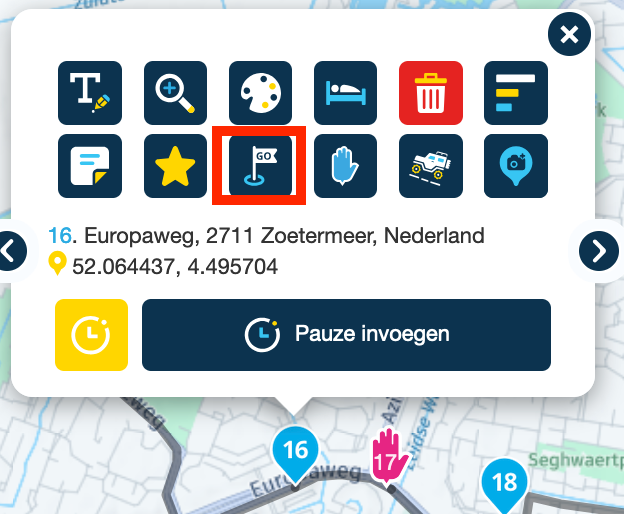
      waypoint_context_menu.png

      If you find this too complicated and want to start driving immediately, you can press and hold the waypoint where you want to start in the navigation app, starting from your address. That will become the point you are guided to, and from there, the app will pick up the route on its own. However, you'll miss the first part of the route. You will still finish the route at the endpoint.

      BMW K1600GT-P (2013) with BMW Navigator | Nolan N100-5 with Sena 30K
      iOS on iPhone 13 & 16 (mounted on Quadlock)
      Apple CarPlay in VW T-Roc (wired)
      Routelab on MacBook Air & iMac (Tahoe & Ventura)

      1 Reply Last reply
      0
      Reply
      • Reply as topic
      Log in to reply
      • Oldest to Newest
      • Newest to Oldest
      • Most Votes


      ACTIVE USERS
      Rob Verhoeffundefined
      Rob Verhoeff
      Peter Dorr 0undefined
      Peter Dorr 0
      POPULAR TOPICS
      • Imported POI files visible in App
        Keith Hofgartnerundefined
        Keith Hofgartner
        0
        7
        118

      • How to exclude short time road blocks during navigation
        Axel Härtlundefined
        Axel Härtl
        0
        6
        85

      • The route is planned to go the wrong way round the roundabout
        Guzzistundefined
        Guzzist
        0
        4
        142

      • Geen routeberekening
        Nick Carthewundefined
        Nick Carthew
        0
        5
        142

      • Onbegrijpelijke omweg
        Lex.Kloet.RXundefined
        Lex.Kloet.RX
        0
        3
        101

      • Apple Carplay. MRA Navigation stops after re-calculating
        Marinus van Deudekomundefined
        Marinus van Deudekom
        0
        2
        84

      • Truck / Camper Dimensions
        Herman Veldhuizenundefined
        Herman Veldhuizen
        0
        2
        84

      • MRA V5.0.3 (449) The contrast is not sufficient
        Steve 2vundefined
        Steve 2v
        0
        24
        226
      MY GROUPS
      • Login

      • Login or register to search.
      • First post
        Last post
      0
      • Categories
      • Recent
      • Popular
      • Support
      • MyRoute-app