Is it possible to drag a section of a route when editing?
-

I would like to change an existing route - there is a road that the planner showed as joining up with another road but in fact, the road was a dead end. The only way that I have found so far is to add additional way points but in doing so, the entire route changes. My route had us riding mostly dirt roads off a paved main road so we would intersect with the main road, ride a bit and then turn off the main road onto another dirt road. Now the route planner has us riding mostly the main road. I would prefer to not have to remove all the waypoints further down the main road if possible. Thank you for any help.
-
I would like to change an existing route - there is a road that the planner showed as joining up with another road but in fact, the road was a dead end. The only way that I have found so far is to add additional way points but in doing so, the entire route changes. My route had us riding mostly dirt roads off a paved main road so we would intersect with the main road, ride a bit and then turn off the main road onto another dirt road. Now the route planner has us riding mostly the main road. I would prefer to not have to remove all the waypoints further down the main road if possible. Thank you for any help.

@Barb-Miller, I don't understand your question. If you have route with waypoints, you can easily move waypoints, or add or delete them?
-
I would like to change an existing route - there is a road that the planner showed as joining up with another road but in fact, the road was a dead end. The only way that I have found so far is to add additional way points but in doing so, the entire route changes. My route had us riding mostly dirt roads off a paved main road so we would intersect with the main road, ride a bit and then turn off the main road onto another dirt road. Now the route planner has us riding mostly the main road. I would prefer to not have to remove all the waypoints further down the main road if possible. Thank you for any help.

@Barb-Miller You can click on a route point and drag it, you can also click on the route line and drag it, a new route point will be added after dragging the route line.
-
I would like to change an existing route - there is a road that the planner showed as joining up with another road but in fact, the road was a dead end. The only way that I have found so far is to add additional way points but in doing so, the entire route changes. My route had us riding mostly dirt roads off a paved main road so we would intersect with the main road, ride a bit and then turn off the main road onto another dirt road. Now the route planner has us riding mostly the main road. I would prefer to not have to remove all the waypoints further down the main road if possible. Thank you for any help.

I think I understand what you are asking:
MRA planner on website has an option for waypoints that is a "4x4 car". This option draws a straight line from this point to previous one. This is useful for offroad tracks or others than Mra map in use does not knows nothing about.
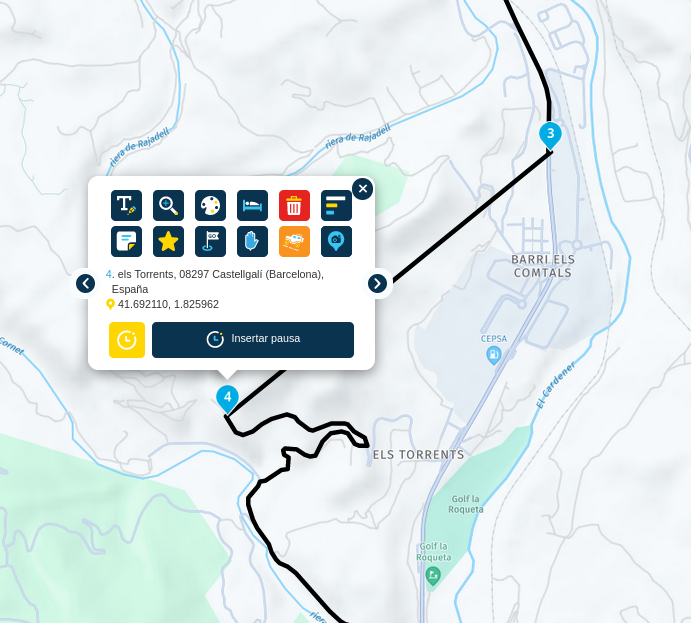
In this route, point 4 has a straight line, because I know a secret track to use, but MRA not

This only works on planner, nor in Next.
Is this what you mean?
Hello! It looks like you're interested in this conversation, but you don't have an account yet.
Getting fed up of having to scroll through the same posts each visit? When you register for an account, you'll always come back to exactly where you were before, and choose to be notified of new replies (either via email, or push notification). You'll also be able to save bookmarks and upvote posts to show your appreciation to other community members.
With your input, this post could be even better 💗
Register Login-
 011781
-
 0416
0416
-
09112
-
 05219
05219
-
0315
-
0251
-
111581
-
 0272
0272