Skip to content
  • Categories
  • Recent
  • Popular
  • Support
  • MyRoute-app
Collapse
Brand Logo

MRA Community Forum

  1. Home
  2. MyRoute-app Routeplanner
  3. [Web] Problems, Bugs and other Issues
  4. My choice is not taken!

My choice is not taken!

Scheduled Pinned Locked Moved [Web] Problems, Bugs and other Issues
6 Posts 4 Posters 931 Views 3 Watching
  • Oldest to Newest
  • Newest to Oldest
  • Most Votes
Reply
  • Reply as topic
Log in to reply
This topic has been deleted. Only users with topic management privileges can see it.
  • Cookie On Tourundefined Offline
    Cookie On Tourundefined Offline
    Cookie On Tour
    wrote on last edited by Cookie On Tour
    #1

    Hello,

    I have chosen this as my map and overlay to be displayed:
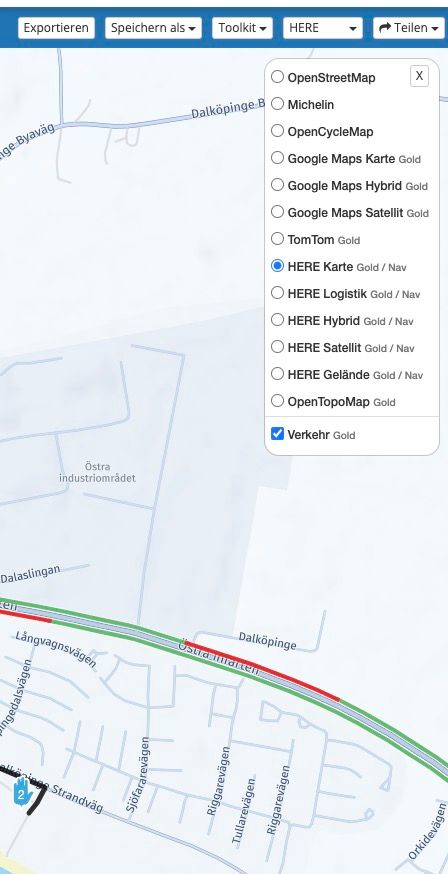
    Bildschirmfoto 2024-09-12 um 17.33.12.jpg

    and made the setting, that this should be my default:
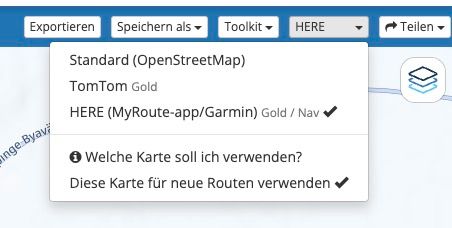
    Bildschirmfoto 2024-09-12 um 17.33.24.jpg

    However, when I exit my planning and return to my route, and/or start creating a new route I am always seeing and getting this overlay:
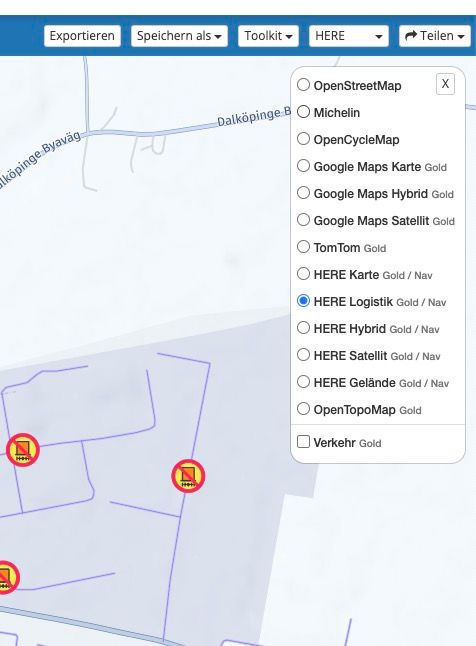
    Bildschirmfoto 2024-09-12 um 17.33.45.jpg

    Why is it always defaulting to the logistics overlay and not keeping the traffic information?

    I do use the vehicle type motor home, but even with this, I am not interested in seeing the logistics overlay? Any idea? Is this a bug or a setting that I need to tweak, that I could not find so far?

    Please help!

    Mit freundlichen Gruessen / Met vriendelijke groet / Best regards

    Joerg
    (Cookie-On-Tour.de)

    Duster Lauréate SCe 115 LPG 4x2 · Everest Minicamp by Niewiadow (B1300)
    Carpuride W701 Pro · iPhone 15 Pro Max

    Nick Carthewundefined 1 Reply Last reply
    1
    • Cookie On Tourundefined Cookie On Tour

      Hello,

      I have chosen this as my map and overlay to be displayed:

      Bildschirmfoto 2024-09-12 um 17.33.12.jpg

      and made the setting, that this should be my default:

      Bildschirmfoto 2024-09-12 um 17.33.24.jpg

      However, when I exit my planning and return to my route, and/or start creating a new route I am always seeing and getting this overlay:

      Bildschirmfoto 2024-09-12 um 17.33.45.jpg

      Why is it always defaulting to the logistics overlay and not keeping the traffic information?

      I do use the vehicle type motor home, but even with this, I am not interested in seeing the logistics overlay? Any idea? Is this a bug or a setting that I need to tweak, that I could not find so far?

      Please help!

      Nick Carthewundefined Offline
      Nick Carthewundefined Offline
      Nick Carthew
      RouteXpert
      wrote on last edited by
      #2

      @Cookie-On-Tour You have semi answered the question yourself, the Logistic overlay map opens because you have motorhome selected as your transport mode. Switching overlays is only two clicks 😊

      Always willing to help if I can.
      Triumph Tiger 1200 XRT called Tina.
      MRA Navigation Next and SilverFox BJ8

      Cookie On Tourundefined GT JWRundefined 2 Replies Last reply
      0
      • Nick Carthewundefined Nick Carthew

        @Cookie-On-Tour You have semi answered the question yourself, the Logistic overlay map opens because you have motorhome selected as your transport mode. Switching overlays is only two clicks 😊

        Cookie On Tourundefined Offline
        Cookie On Tourundefined Offline
        Cookie On Tour
        wrote on last edited by Cookie On Tour
        #3

        @Nick-Carthew yes, you are right, just tested it by having a different type of vehicle set. Well, I basically, do not need motorhome (RV) as type, because I drive a car with a trailer. But here I can't set the maximum speed and or give the height and other measurements.

        I know changing is just a few clicks, but if you split the entire route into parts and frequently jump in and out, it is always just these two clicks which become annoying clicks. I dislike being forced to see the logistics map, an RV is not a truck!

        And at the end, I do have thirty something routes I have to jump in and out and to get to my final setting, I always need to open all routes and make changes in the settings. like either change the overlay or at the end to change to vehicle type - wasting time and getting nerved by this 😄

        Mit freundlichen Gruessen / Met vriendelijke groet / Best regards

        Joerg
        (Cookie-On-Tour.de)

        Duster Lauréate SCe 115 LPG 4x2 · Everest Minicamp by Niewiadow (B1300)
        Carpuride W701 Pro · iPhone 15 Pro Max

        1 Reply Last reply
        0
        • Nick Carthewundefined Nick Carthew

          @Cookie-On-Tour You have semi answered the question yourself, the Logistic overlay map opens because you have motorhome selected as your transport mode. Switching overlays is only two clicks 😊
          GT JWRundefined Offline
          GT JWRundefined Offline
          GT JWR
          Valued contributor
          wrote on last edited by
          #4

          @Nick-Carthew happens in motorcyle and car mode as well. 😞

          1 Reply Last reply
          0
          • Jörgenundefined Offline
            Jörgenundefined Offline
            Jörgen
            Valued contributor
            wrote on last edited by
            #5

            Traffic „on“ will not be stored as default, just the map that is used for route calculation. 🤷🏻‍♂️

            Hardware
            iPhone 12 pro (iOS 26.2.1)
            iPad (7.Gen.) 18.7.3
            Oukitel RT3 Pro (Andr. 14)
            Wireless CarPlay mit (Elebest C650)
            Wired CarPlay (SEAT Arona - 2021)
            MRA Workshops in Deutsch sind hier zu finden

            Cookie On Tourundefined 1 Reply Last reply
            0
            • Jörgenundefined Jörgen

              Traffic „on“ will not be stored as default, just the map that is used for route calculation. 🤷🏻‍♂️

              Cookie On Tourundefined Offline
              Cookie On Tourundefined Offline
              Cookie On Tour
              wrote on last edited by Cookie On Tour
              #6

              @Jörgen said in My choice is not taken!:

              Traffic „on“ will not be stored as default, just the map that is used for route calculation. 🤷🏻‍♂️

              With that I can live, but please do not force the Logistic map to be displayed (or any other). The user should know best, which map is best for him, so please waive the dependency between any vehicle type and specific map overlays!

              Mit freundlichen Gruessen / Met vriendelijke groet / Best regards

              Joerg
              (Cookie-On-Tour.de)

              Duster Lauréate SCe 115 LPG 4x2 · Everest Minicamp by Niewiadow (B1300)
              Carpuride W701 Pro · iPhone 15 Pro Max

              1 Reply Last reply
              0

              Hello! It looks like you're interested in this conversation, but you don't have an account yet.

              Getting fed up of having to scroll through the same posts each visit? When you register for an account, you'll always come back to exactly where you were before, and choose to be notified of new replies (either via email, or push notification). You'll also be able to save bookmarks and upvote posts to show your appreciation to other community members.

              With your input, this post could be even better 💗

              Register Login
              Reply
              • Reply as topic
              Log in to reply
              • Oldest to Newest
              • Newest to Oldest
              • Most Votes


              ACTIVE USERS
              Jörgenundefined
              Jörgen
              Nick Carthewundefined
              Nick Carthew
              Cookie On Tourundefined
              Cookie On Tour
              GT JWRundefined
              GT JWR
              POPULAR TOPICS
              • Update 5.1 - CarPlay / Android Auto improvements and more!
                Corjan Meijerinkundefined
                Corjan Meijerink
                13
                24
                720

              • Anyone tried Ridernav R7M with MRA via AA yet?
                PieterGundefined
                PieterG
                0
                29
                3.0k

              • Altitude does not match
                M. Schrijverundefined
                M. Schrijver
                0
                4
                29

              • Niet kunnen inloggen met AppleID op MRA-app na update
                Corjan Meijerinkundefined
                Corjan Meijerink
                0
                3
                59

              • Navigatie moto mia van guzzi
                Rob Verhoeffundefined
                Rob Verhoeff
                0
                2
                112

              • Exporting to Garmin Zumo XT2.
                undefined
                0
                1
                20

              • Selecteren stem bij navigatie
                ron van dooremolenundefined
                ron van dooremolen
                0
                11
                1.7k

              • Fullscreen Switch No function
                Marinus van Deudekomundefined
                Marinus van Deudekom
                0
                3
                44

              MY GROUPS
              • Login

              • Login or register to search.
              • First post
                Last post
              0
              • Categories
              • Recent
              • Popular
              • Support
              • MyRoute-app