Skip to content
  • Categories
  • Recent
  • Popular
  • Support
  • MyRoute-app
Collapse
Brand Logo

MRA Community Forum

  1. Home
  2. The MyRoute-app
  3. [App] Suggestions and Discussion
  4. Remotek-one firmware 2.0.0

Remotek-one firmware 2.0.0

Scheduled Pinned Locked Moved [App] Suggestions and Discussion
38 Posts 8 Posters 18.4k Views 6 Watching
  • Oldest to Newest
  • Newest to Oldest
  • Most Votes
Reply
  • Reply as topic
Log in to reply
This topic has been deleted. Only users with topic management privileges can see it.
  • Corjan Meijerink Corjan Meijerink

    https://support.myrouteapp.com/nl/support/solutions/articles/12000100670-bluetooth-controllers

    Stanisław Offline
    Stanisław Offline
    Stanisław
    Valued contributor
    wrote on last edited by Stanisław
    #9

    @Corjan-Meijerink Thank you, I didn't know about this site.
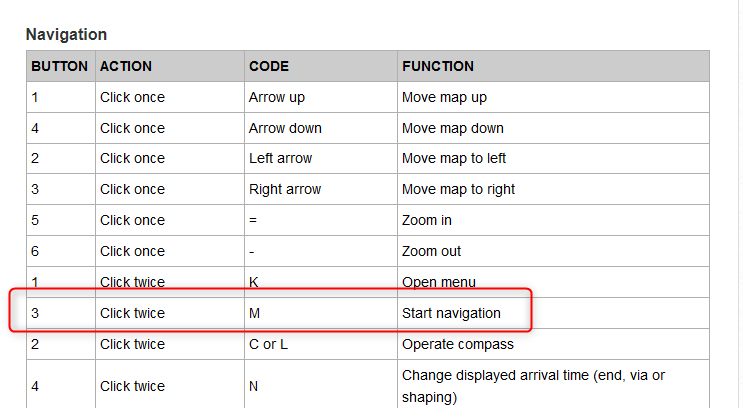
    Maybe it needs a correction because in the navigation mode Left DC does open the menu as navigation is already started.
    2024-09-13_09h38_20.png

    --
    Regards
    Staszek

    1 Reply Last reply
    0
    • Corjan Meijerink Corjan Meijerink

      https://support.myrouteapp.com/nl/support/solutions/articles/12000100670-bluetooth-controllers

      Brian McG Offline
      Brian McG Offline
      Brian McG
      wrote on last edited by
      #10

      thanks @Corjan-Meijerink & @Stanisław
      the knowledge is often there, the trick is in finding it 😂

      BlackView BV7100, Android 12
      Navigate "Routes as Tracks" in Offline mode with Offline Maps
      No Wifi, no internet, no interruptions, works well

      Brian McG 1 Reply Last reply
      1
      • Brian McG Brian McG

        thanks @Corjan-Meijerink & @Stanisław
        the knowledge is often there, the trick is in finding it 😂

        Brian McG Offline
        Brian McG Offline
        Brian McG
        wrote on last edited by
        #11

        & with a little knowledge comes great danger ..... or at least a lot of more questions

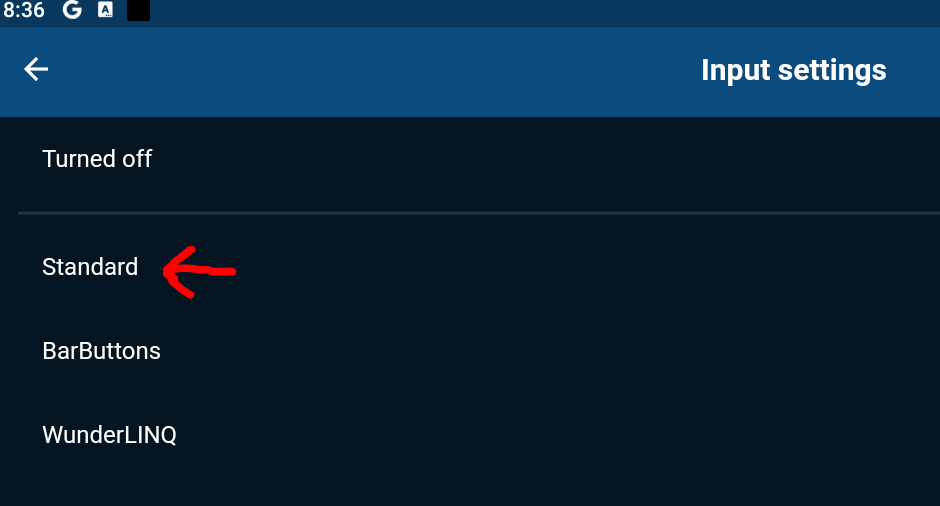
        1. In the "Input Settings" section of MRA settings there is the option "Standard"
        cf227fee-3a90-4578-973d-0d2b767c046f-image.png
        The url "Bluetooth Controllers" does not mention anything about what "Standard" means.
        I understand it is difficult to relate a key press number as in the other controller tables when just describing a generic controller but is there a Standard Code = Function table?

        1. The Remotek controller works pretty much exactly as described in the table except for as @Stanisław says double click right arrow (3) is reserved by the controller to toggle between navigation apps selected in the Remotek app.
          This is quite a nice idea as it means it is possible to switch quickly & easily between MRA & Osmand, so it might work that you could be navigating with dual apps & switch between them with a simple click. So the documentation here for the Remotek controller is not correct.

        2. & this is the real reason for posting ...... there seems to be no input key mapped in the MRA Remotek setting for the function Skip Waypoint.
          Other controllers seem to be using a key code D for this function.
          Could MRA's Remotek Input settings table be configured to accept a key input, possibly a LongPress down arrow (4) to generate a code D so that it was possible to Skip Points ?
          (or is there skip point key code already?)

        3. I think something should be possible as I have used the KeyMapper app to set long press down arrow (4) to generate a code D & much to my surprise this allows me to Skip Points when I have the Input Setting set to "Standard"
          So Standard maybe almost a more useful setting to use when navigating with a Remotek
          Some other functions are different in Standard, the menu button seems to be double click down (4), hence my question 1

        For me option 3 where the MRA input setting table is modified to include a Skip Waypoint code for the Remotek controller would be the best solution

        BlackView BV7100, Android 12
        Navigate "Routes as Tracks" in Offline mode with Offline Maps
        No Wifi, no internet, no interruptions, works well

        1 Reply Last reply
        0
        • Stanisław Offline
          Stanisław Offline
          Stanisław
          Valued contributor
          wrote on last edited by
          #12

          @Corjan-Meijerink
          I have just tested it with the 2.0 Remotek firmware and MRA 382 version. The doubleclick action still does not seem to work. With the 1.xx firmware doubleclick up opens the MRA menu, doubleclik down changes ETA selection. Should it work with 2.0 firmware as well?

          --
          Regards
          Staszek

          1 Reply Last reply
          0
          • Hubert Thoring Offline
            Hubert Thoring Offline
            Hubert Thoring
            Valued contributor
            wrote on last edited by Hubert Thoring
            #13

            Hello everyone,
            I've been using the Remotek One with an iPhone Xr for a while, and it still has version 1.x.x.

            With the new MRA version from V4.3.6 it works very well now, and skipping WP now works with my solution.

            Important: Under Settings on the iPhone!!

            • Under: Accessibility \ Keyboards & text input \ set the keyboard control to "Off". Otherwise I have the problem that the MRA crashes outside of navigation. But with the setting selected here to "Off" it always works very well.

            With the MRA input setting, then as a Remotek One, the following works very well, but you have to make sure that the BT Remotek One keyboard is set to iOS, i.e. press the two arrow keys at the top and bottom together and wait to see if it flashes red and green for iOS. If it's green and green you have to repeat it again and then the red and green flashes briefly. "red, green stands for BT button as iOS" because "green, green stands for BT button as Android.

            Result of my application in the MRA navigation under iOS:

            • Arrows "left, right, up, down," pan over the map.
            • Arrow "+" / "-" corresponds to zooming
            • Arrow DC right, click twice quickly then release, = skip WP.
            • and other functions which I will describe separately....

            The correctly selected basic settings are important, if the above does not work, the BT keyboard must be reset once by pressing "arrow up, and + and -" at the same time for more than 5 seconds until it flashes red. Then delete the pairing under BT in the iPhone and pair it again on the iPhone. Then set it up for iOS as described above, etc.

            Good luck, I am very happy with my iOS solution.
            Best wishes from Münster

            Hallo zusammen,
            ich hab ja schon länger das Remotek One mit einem iPhone Xr im Einsatz, dieses immer noch mit der Version 1.x.x.

            Mit der neuen MRA Version ab V4.3.6 geht es jetzt sehr gut, auch das WP überspringen geht jetzt mit meiner Lösung.

            Wichtig: Unter Einstellungen am iPhone !!

            • Unter : Bedienhilfen \ Tastaturen & Texteingabe \ die Tastatursteuerung auf "Aus" zu stellen. Ich habe sonst das Problem das die MRA außerhalb der Navigation abstürzt. Mit der aber hier gewählten Einstellung auf "Aus" geht es immer sehr gut.

            Bei der MRA Eingabeeinstellung, dann als Remotek One geht folgendes sehr gut, dabei ist aber darauf zu achten das die BT Remotek One Tastatur auf iOS steht heißt, die zwei Pfeiltaste oben unten zusammen drücken und warten ob es kurz rot, grün für iOS blinkt, bei grün, grün muss man es noch einmal wiederholen dann kommt das kurz rot, grün blinken. "rot, grün steht für BT Taste als iOS" denn "grün, grün steht für BT Taste als Android.

            Ergebnis bei meiner Anwendung in der MRA Navigation unter iOS:

            • Pfeile "links, rechts, oben, unter," über die Karte schwenken.
            • Pfeil "+" / "-" entspricht dem Zoomen
            • Pfeil DC rechts, zwei mal kurz klick dann loslassen, = WP überspringen.
            • und weitere Funktionen die beschreibe ich aber separat....

            Wichtig sind die richtig gewählten Grundeinstellungen, wenn das oben beschriebene nicht gehen sollte muss die BT Tastatur einmal resettet werden indem man "Pfeil oben, und + und - " gleichzeitig für mehr als 5sek. drückt, bis es rot blinkt. Danach auch die Kopplung unter BT im iPhone löschen und neu am iPhone koppeln. Danach dann wie oben beschrieben für iOS einstellen usw.

            Viel Erfolg, ich bin für meine iOS Lösung damit sehr zufrieden.
            VG aus Münster

            VG Hubert
            Beta Test "Next App" dazu die Hardware .
            iPad 9. Gen iOS 26.5.2/ iPhone 16e iOS 26.5.2/ Navi iPhone Xr iOS 18.7.9 / PC mit MS Win11 /❗️MyRoute-App im Cradel und Remotek-One❗️ Info zu MRA & Remotek One

            Stanisław 1 Reply Last reply
            0
            • Hubert Thoring Hubert Thoring

              Hello everyone,
              I've been using the Remotek One with an iPhone Xr for a while, and it still has version 1.x.x.

              With the new MRA version from V4.3.6 it works very well now, and skipping WP now works with my solution.

              Important: Under Settings on the iPhone!!

              • Under: Accessibility \ Keyboards & text input \ set the keyboard control to "Off". Otherwise I have the problem that the MRA crashes outside of navigation. But with the setting selected here to "Off" it always works very well.

              With the MRA input setting, then as a Remotek One, the following works very well, but you have to make sure that the BT Remotek One keyboard is set to iOS, i.e. press the two arrow keys at the top and bottom together and wait to see if it flashes red and green for iOS. If it's green and green you have to repeat it again and then the red and green flashes briefly. "red, green stands for BT button as iOS" because "green, green stands for BT button as Android.

              Result of my application in the MRA navigation under iOS:

              • Arrows "left, right, up, down," pan over the map.
              • Arrow "+" / "-" corresponds to zooming
              • Arrow DC right, click twice quickly then release, = skip WP.
              • and other functions which I will describe separately....

              The correctly selected basic settings are important, if the above does not work, the BT keyboard must be reset once by pressing "arrow up, and + and -" at the same time for more than 5 seconds until it flashes red. Then delete the pairing under BT in the iPhone and pair it again on the iPhone. Then set it up for iOS as described above, etc.

              Good luck, I am very happy with my iOS solution.
              Best wishes from Münster

              Hallo zusammen,
              ich hab ja schon länger das Remotek One mit einem iPhone Xr im Einsatz, dieses immer noch mit der Version 1.x.x.

              Mit der neuen MRA Version ab V4.3.6 geht es jetzt sehr gut, auch das WP überspringen geht jetzt mit meiner Lösung.

              Wichtig: Unter Einstellungen am iPhone !!

              • Unter : Bedienhilfen \ Tastaturen & Texteingabe \ die Tastatursteuerung auf "Aus" zu stellen. Ich habe sonst das Problem das die MRA außerhalb der Navigation abstürzt. Mit der aber hier gewählten Einstellung auf "Aus" geht es immer sehr gut.

              Bei der MRA Eingabeeinstellung, dann als Remotek One geht folgendes sehr gut, dabei ist aber darauf zu achten das die BT Remotek One Tastatur auf iOS steht heißt, die zwei Pfeiltaste oben unten zusammen drücken und warten ob es kurz rot, grün für iOS blinkt, bei grün, grün muss man es noch einmal wiederholen dann kommt das kurz rot, grün blinken. "rot, grün steht für BT Taste als iOS" denn "grün, grün steht für BT Taste als Android.

              Ergebnis bei meiner Anwendung in der MRA Navigation unter iOS:

              • Pfeile "links, rechts, oben, unter," über die Karte schwenken.
              • Pfeil "+" / "-" entspricht dem Zoomen
              • Pfeil DC rechts, zwei mal kurz klick dann loslassen, = WP überspringen.
              • und weitere Funktionen die beschreibe ich aber separat....

              Wichtig sind die richtig gewählten Grundeinstellungen, wenn das oben beschriebene nicht gehen sollte muss die BT Tastatur einmal resettet werden indem man "Pfeil oben, und + und - " gleichzeitig für mehr als 5sek. drückt, bis es rot blinkt. Danach auch die Kopplung unter BT im iPhone löschen und neu am iPhone koppeln. Danach dann wie oben beschrieben für iOS einstellen usw.

              Viel Erfolg, ich bin für meine iOS Lösung damit sehr zufrieden.
              VG aus Münster

              Stanisław Offline
              Stanisław Offline
              Stanisław
              Valued contributor
              wrote on last edited by
              #14

              @Hubert-Thoring thank you for the info, I will test it with my backup phone which is an old Iphone. Currently my main solution for MRA is an Android phone and it works fine with 1.xx firmware. My question was triggered by the info that 2.xx is now supported by MRA, I wanted to check it.

              --
              Regards
              Staszek

              Dave J 0 1 Reply Last reply
              0
              • Stanisław Stanisław

                @Hubert-Thoring thank you for the info, I will test it with my backup phone which is an old Iphone. Currently my main solution for MRA is an Android phone and it works fine with 1.xx firmware. My question was triggered by the info that 2.xx is now supported by MRA, I wanted to check it.

                Dave J 0 Offline
                Dave J 0 Offline
                Dave J 0
                Valued contributor
                wrote on last edited by
                #15

                @Stanisław There is a Remotek Firmware 2.1 in beta at the moment and the DC functionality works correctly as previously stated in the MRA Support Area.

                Kind Regards. Help where I can.
                Ducati Multistrada V4 Rally
                iPhone 15 Pro
                CHIGEE AIO-6 LTE
                Google Pixel 6 Pro - mounted on SP Connect Plus
                Ex Garmin XT2 and XT1 as well as Ex TomTom Rider User

                Stanisław 1 Reply Last reply
                0
                • Dave J 0 Dave J 0

                  @Stanisław There is a Remotek Firmware 2.1 in beta at the moment and the DC functionality works correctly as previously stated in the MRA Support Area.

                  Stanisław Offline
                  Stanisław Offline
                  Stanisław
                  Valued contributor
                  wrote on last edited by
                  #16

                  @Dave-J-0 Where is it accessible? I can see nothing more then 2.0 in the remotek application nor on www.remotek.no website.

                  --
                  Regards
                  Staszek

                  Dave J 0 1 Reply Last reply
                  0
                  • Stanisław Stanisław

                    @Dave-J-0 Where is it accessible? I can see nothing more then 2.0 in the remotek application nor on www.remotek.no website.

                    Dave J 0 Offline
                    Dave J 0 Offline
                    Dave J 0
                    Valued contributor
                    wrote on last edited by
                    #17

                    @Stanisław There was a mention recently on Remotek Facebook saying about the new firmware and about gaining access to the new firmware beta if you wanted to test. The link to the post: https://m.facebook.com/story.php?story_fbid=pfbid0ty4HfaUsQSxyq8XoawKJHG37ztswACjNVP4aX76QXccD3AFBajqnYiw5NYoGkc3Bl&id=100086173189244

                    Kind Regards. Help where I can.
                    Ducati Multistrada V4 Rally
                    iPhone 15 Pro
                    CHIGEE AIO-6 LTE
                    Google Pixel 6 Pro - mounted on SP Connect Plus
                    Ex Garmin XT2 and XT1 as well as Ex TomTom Rider User

                    Stanisław 1 Reply Last reply
                    0
                    • Dave J 0 Dave J 0

                      @Stanisław There was a mention recently on Remotek Facebook saying about the new firmware and about gaining access to the new firmware beta if you wanted to test. The link to the post: https://m.facebook.com/story.php?story_fbid=pfbid0ty4HfaUsQSxyq8XoawKJHG37ztswACjNVP4aX76QXccD3AFBajqnYiw5NYoGkc3Bl&id=100086173189244

                      Stanisław Offline
                      Stanisław Offline
                      Stanisław
                      Valued contributor
                      wrote on last edited by
                      #18

                      @Dave-J-0 Yes, I have already found it on FB, thanks!

                      --
                      Regards
                      Staszek

                      Hubert Thoring 1 Reply Last reply
                      0
                      • Stanisław Stanisław

                        @Dave-J-0 Yes, I have already found it on FB, thanks!

                        Hubert Thoring Offline
                        Hubert Thoring Offline
                        Hubert Thoring
                        Valued contributor
                        wrote on last edited by Hubert Thoring
                        #19

                        @Stanisław
                        @Dave-J-0
                        @Brian-McG
                        @Corjan-Meijerink

                        For your information:
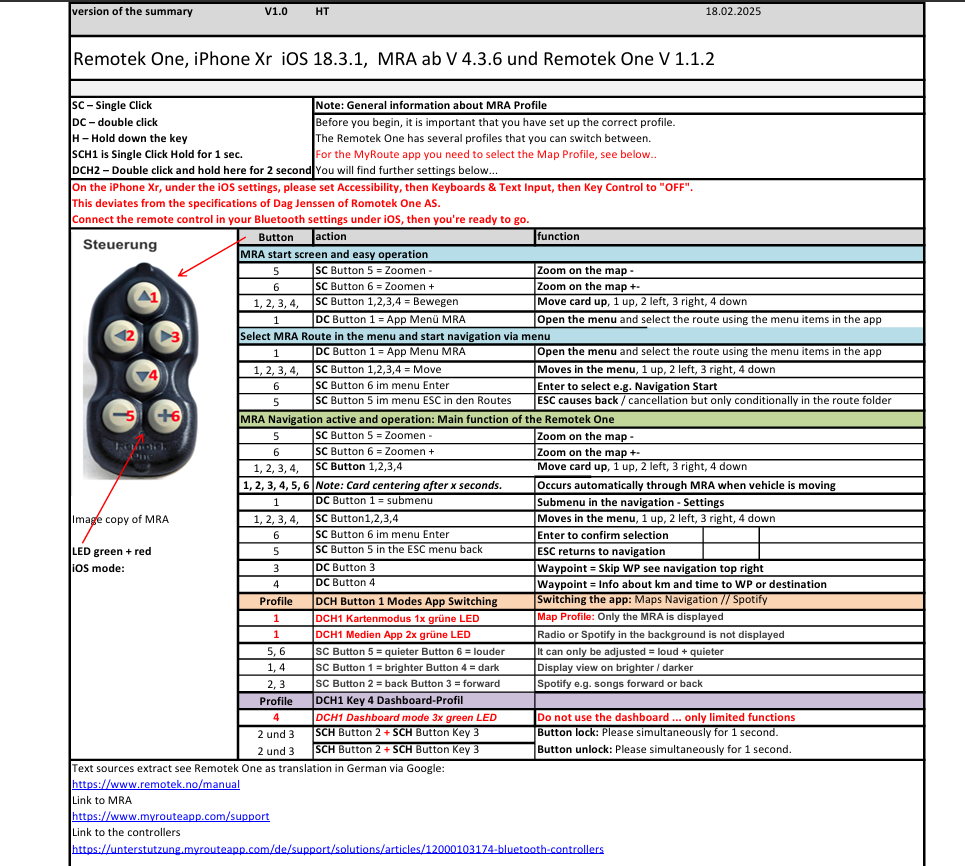
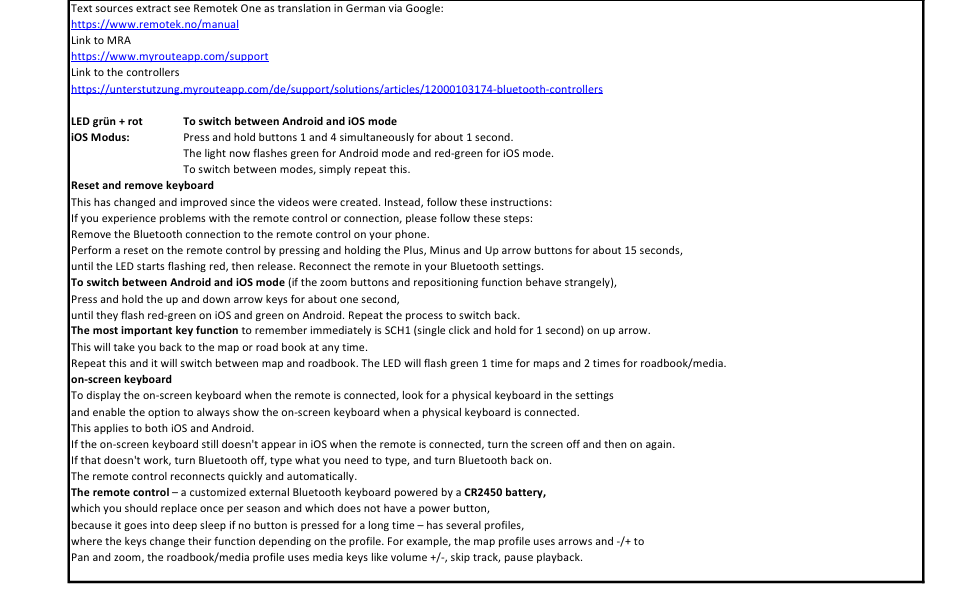
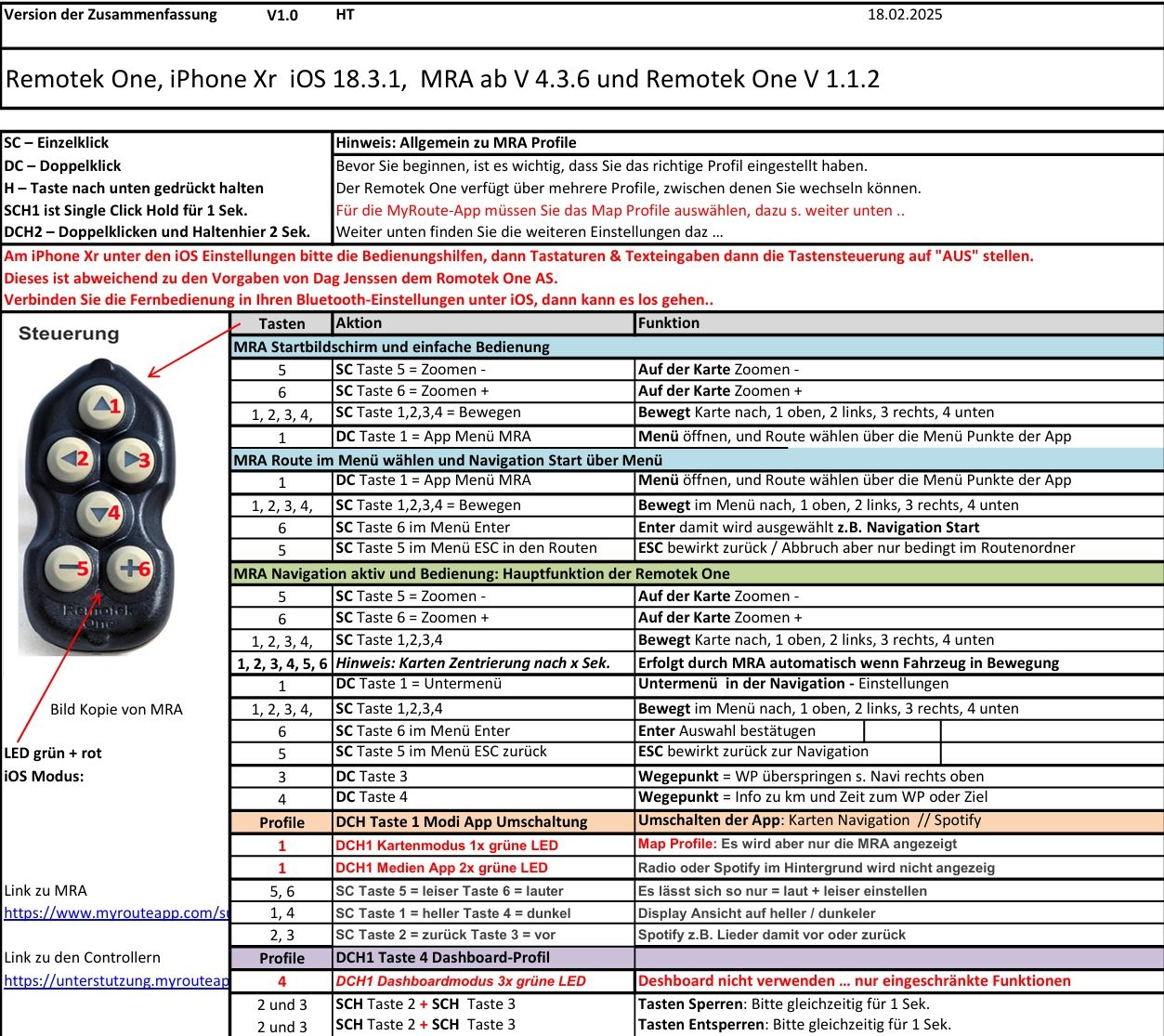
                        This now works as described in the appendix, after the new MRA update V 4.3.6 with the Remotek One V 1.1.2.

                        Thanks for this @Corjan-Meijerink , a translation into English will be provided later.
                        Seite 1 Funktionen_18-2-2025_195836_.jpeg

                        Seite 2 Funktionen_18-2-2025_195850_.jpeg

                        VG Hubert
                        Beta Test "Next App" dazu die Hardware .
                        iPad 9. Gen iOS 26.5.2/ iPhone 16e iOS 26.5.2/ Navi iPhone Xr iOS 18.7.9 / PC mit MS Win11 /❗️MyRoute-App im Cradel und Remotek-One❗️ Info zu MRA & Remotek One

                        Hubert Thoring 1 Reply Last reply
                        1
                        • Hubert Thoring Hubert Thoring

                          @Stanisław
                          @Dave-J-0
                          @Brian-McG
                          @Corjan-Meijerink

                          For your information:
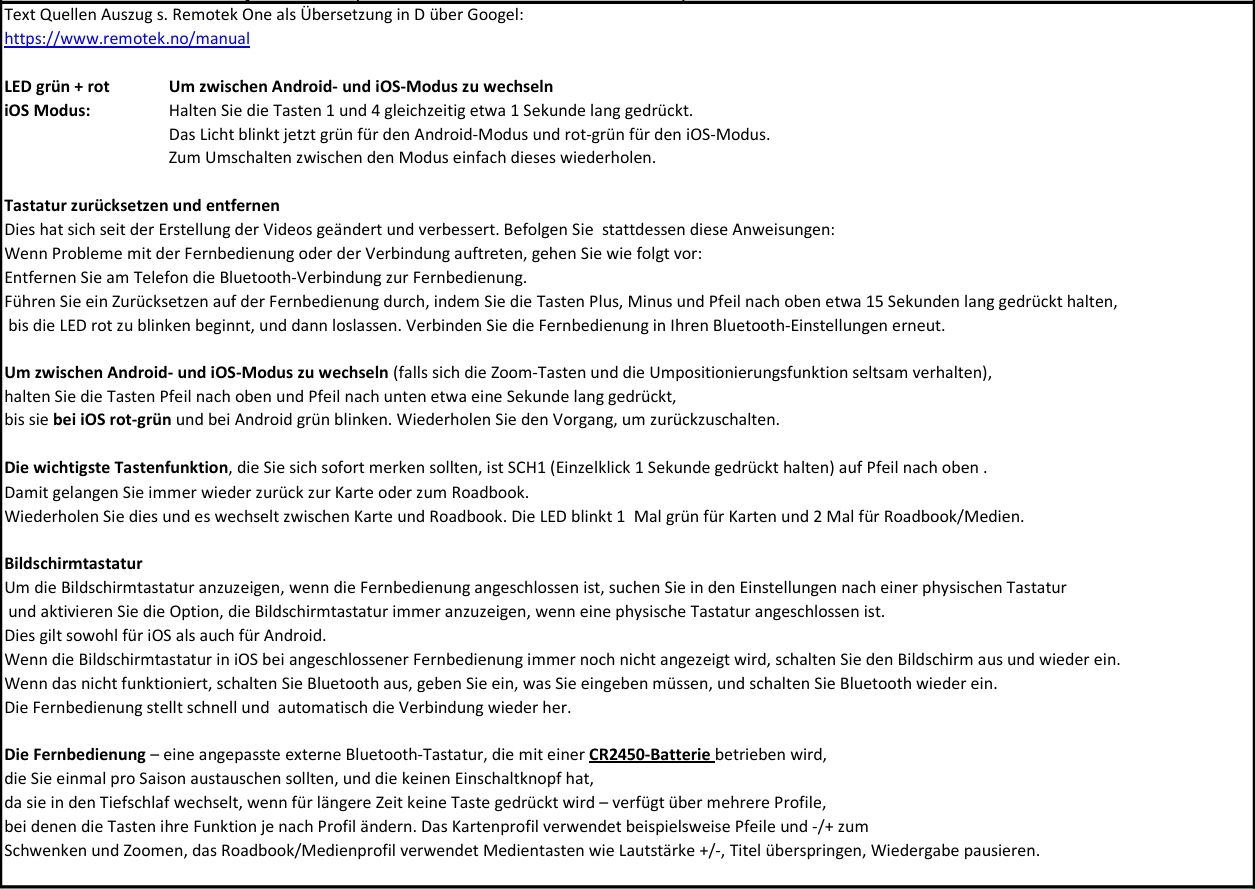
                          This now works as described in the appendix, after the new MRA update V 4.3.6 with the Remotek One V 1.1.2.

                          Thanks for this @Corjan-Meijerink , a translation into English will be provided later.
                          Seite 1 Funktionen_18-2-2025_195836_.jpeg

                          Seite 2 Funktionen_18-2-2025_195850_.jpeg

                          Hubert Thoring Offline
                          Hubert Thoring Offline
                          Hubert Thoring
                          Valued contributor
                          wrote on last edited by
                          #20

                          @Corjan-Meijerink :
                          How can I upload a file as a PDF here?

                          VG Hubert
                          Beta Test "Next App" dazu die Hardware .
                          iPad 9. Gen iOS 26.5.2/ iPhone 16e iOS 26.5.2/ Navi iPhone Xr iOS 18.7.9 / PC mit MS Win11 /❗️MyRoute-App im Cradel und Remotek-One❗️ Info zu MRA & Remotek One

                          Corjan Meijerink 1 Reply Last reply
                          0
                          • Hubert Thoring Hubert Thoring

                            @Corjan-Meijerink :
                            How can I upload a file as a PDF here?

                            Corjan Meijerink Offline
                            Corjan Meijerink Offline
                            Corjan Meijerink
                            Developer
                            wrote on last edited by
                            #21

                            @Hubert-Thoring pdf is not possible.
                            Glad it all works as intended 🙂

                            Hubert Thoring 2 Replies Last reply
                            0
                            • Corjan Meijerink Corjan Meijerink

                              @Hubert-Thoring pdf is not possible.
                              Glad it all works as intended 🙂

                              Hubert Thoring Offline
                              Hubert Thoring Offline
                              Hubert Thoring
                              Valued contributor
                              wrote on last edited by
                              #22

                              @Stanisław
                              @Dave-J-0
                              @Brian-McG
                              @Corjan-Meijerink

                              For your information:
                              This now works as described in the appendix, after the new MRA update V 4.3.6 with the Remotek One V 1.1.2.

                              a translation into English ....

                              EN Seite 1 vom 2025-02-19 184254.png

                              EN Seite 2 vom 2025-02-19 184306.png

                              VG Hubert
                              Beta Test "Next App" dazu die Hardware .
                              iPad 9. Gen iOS 26.5.2/ iPhone 16e iOS 26.5.2/ Navi iPhone Xr iOS 18.7.9 / PC mit MS Win11 /❗️MyRoute-App im Cradel und Remotek-One❗️ Info zu MRA & Remotek One

                              1 Reply Last reply
                              0
                              • Stanisław Offline
                                Stanisław Offline
                                Stanisław
                                Valued contributor
                                wrote on last edited by
                                #23

                                I tested Remotek-one yesterday with new android tablet and +/- buttons don't work properly, no zoom but panning instead of it. Tested with both 2.1 and 1.1.2 firmware versions, with the phone the same. Could anyone confirm that it is a problem of the new version of MRA?

                                --
                                Regards
                                Staszek

                                Corjan Meijerink 1 Reply Last reply
                                1
                                • Stanisław Stanisław

                                  I tested Remotek-one yesterday with new android tablet and +/- buttons don't work properly, no zoom but panning instead of it. Tested with both 2.1 and 1.1.2 firmware versions, with the phone the same. Could anyone confirm that it is a problem of the new version of MRA?

                                  Corjan Meijerink Offline
                                  Corjan Meijerink Offline
                                  Corjan Meijerink
                                  Developer
                                  wrote on last edited by
                                  #24

                                  @Stanisław Have you selected Remotek One as input device in MRA?

                                  Stanisław 1 Reply Last reply
                                  0
                                  • Corjan Meijerink Corjan Meijerink

                                    @Stanisław Have you selected Remotek One as input device in MRA?

                                    Stanisław Offline
                                    Stanisław Offline
                                    Stanisław
                                    Valued contributor
                                    wrote on last edited by
                                    #25

                                    @Corjan-Meijerink yes, of course, and before it worked correctly with firmware 1.1.2. What's more - zooming does work on initial screen with the map but not in the navigation mode, that's why I suppose it can be related to the recent changes in the app.

                                    --
                                    Regards
                                    Staszek

                                    Corjan Meijerink Hubert Thoring 3 Replies Last reply
                                    0
                                    • Stanisław Stanisław

                                      @Corjan-Meijerink yes, of course, and before it worked correctly with firmware 1.1.2. What's more - zooming does work on initial screen with the map but not in the navigation mode, that's why I suppose it can be related to the recent changes in the app.

                                      Corjan Meijerink Offline
                                      Corjan Meijerink Offline
                                      Corjan Meijerink
                                      Developer
                                      wrote on last edited by
                                      #26

                                      @Stanisław hmm no clue then.
                                      As discussed in this thread, it all worked as intended and we haven’t changed anything regarding this.

                                      Maybe @Hubert-Thoring can test his.

                                      1 Reply Last reply
                                      0
                                      • Stanisław Stanisław

                                        @Corjan-Meijerink yes, of course, and before it worked correctly with firmware 1.1.2. What's more - zooming does work on initial screen with the map but not in the navigation mode, that's why I suppose it can be related to the recent changes in the app.

                                        Hubert Thoring Offline
                                        Hubert Thoring Offline
                                        Hubert Thoring
                                        Valued contributor
                                        wrote on last edited by Hubert Thoring
                                        #27

                                        @Stanisław
                                        @Corjan-Meijerink

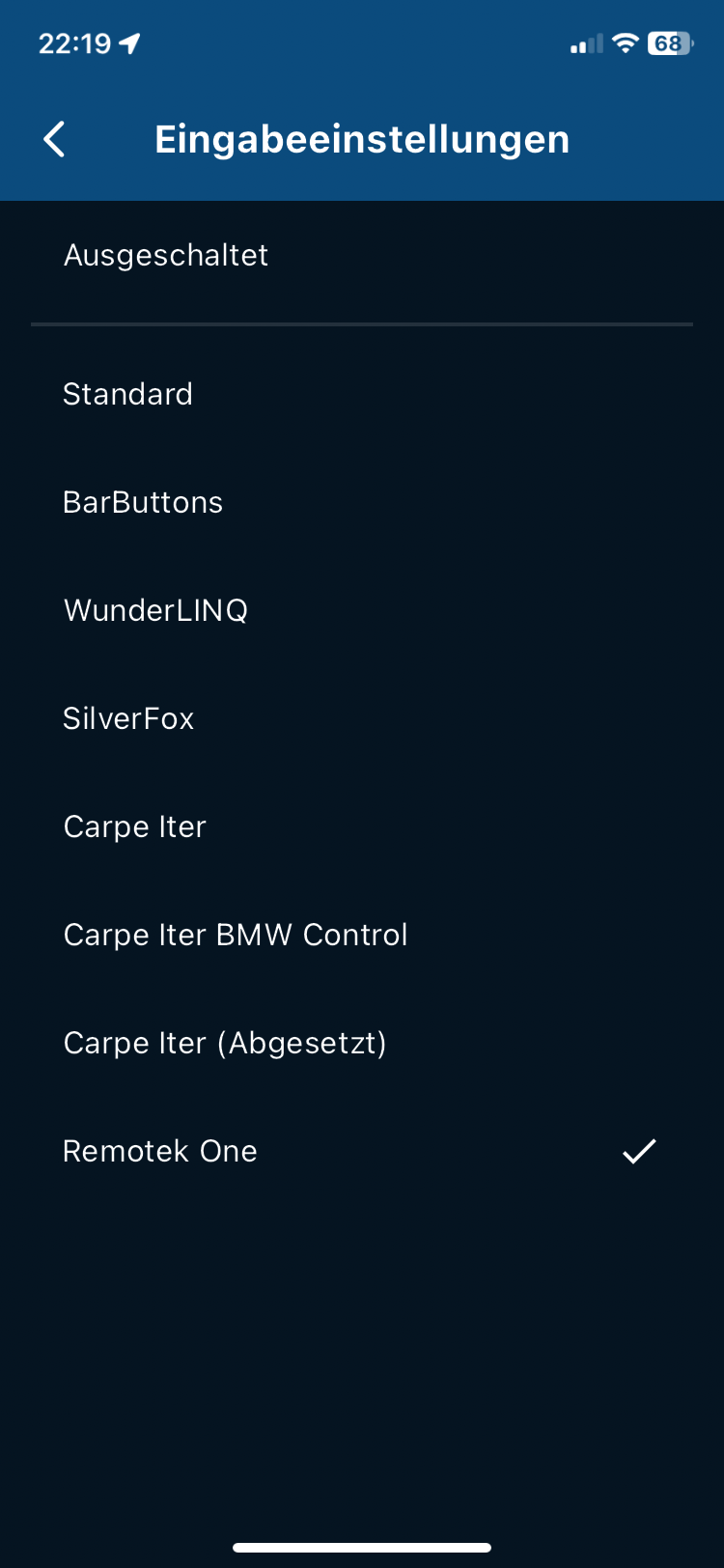
                                        So, everything is going very well for me since the V4.3.6 also more than zooming and panning the map, the same applies to the latest app V4.3.8 still exactly as described in the previous list here in the thread.

                                        Note: I use iOS with an iPhone Xr with the old Remotek One version 1.x.x as delivered in 6.6.2024. I have no indication of the version, for that I would need an Android phone and the Remotek One app which is not available for iOS.

                                        Important: with iOS iPhone mobile phone

                                        • Keyboard Control Off

                                        • Input keyboard on Remotek

                                        • Set Remotek One to iOS

                                        I can only give my support for iOS / iPhone application.
                                        IMG_0559.png

                                        Best regards Hubert 👋

                                        VG Hubert
                                        Beta Test "Next App" dazu die Hardware .
                                        iPad 9. Gen iOS 26.5.2/ iPhone 16e iOS 26.5.2/ Navi iPhone Xr iOS 18.7.9 / PC mit MS Win11 /❗️MyRoute-App im Cradel und Remotek-One❗️ Info zu MRA & Remotek One

                                        1 Reply Last reply
                                        0
                                        • Stanisław Stanisław

                                          @Corjan-Meijerink yes, of course, and before it worked correctly with firmware 1.1.2. What's more - zooming does work on initial screen with the map but not in the navigation mode, that's why I suppose it can be related to the recent changes in the app.

                                          Hubert Thoring Offline
                                          Hubert Thoring Offline
                                          Hubert Thoring
                                          Valued contributor
                                          wrote on last edited by Hubert Thoring
                                          #28

                                          @Stanisław
                                          @Corjan-Meijerink

                                          Here's a video, for a better view, it works more than well for me 👋

                                          Link zum Video von Remotek One und MRA V4.3.8

                                          VG Hubert
                                          Beta Test "Next App" dazu die Hardware .
                                          iPad 9. Gen iOS 26.5.2/ iPhone 16e iOS 26.5.2/ Navi iPhone Xr iOS 18.7.9 / PC mit MS Win11 /❗️MyRoute-App im Cradel und Remotek-One❗️ Info zu MRA & Remotek One

                                          Stanisław 1 Reply Last reply
                                          0

                                          Hello! It looks like you're interested in this conversation, but you don't have an account yet.

                                          Getting fed up of having to scroll through the same posts each visit? When you register for an account, you'll always come back to exactly where you were before, and choose to be notified of new replies (either via email, or push notification). You'll also be able to save bookmarks and upvote posts to show your appreciation to other community members.

                                          With your input, this post could be even better 💗

                                          Register Login
                                          Reply
                                          • Reply as topic
                                          Log in to reply
                                          • Oldest to Newest
                                          • Newest to Oldest
                                          • Most Votes


                                          • 1
                                          • 2
                                          ACTIVE USERS
                                          Brian McG
                                          Brian McG
                                          Hubert Thoring
                                          Hubert Thoring
                                          Dave J 0
                                          Dave J 0
                                          Corjan Meijerink
                                          Corjan Meijerink
                                          Jörgen
                                          Jörgen
                                          Stanisław
                                          Stanisław
                                          martin-phogel.de
                                          martin-phogel.de
                                          TenWheels
                                          TenWheels
                                          POPULAR TOPICS
                                          • The compas direction on the elevation circle is wrong
                                            LennyO
                                            LennyO
                                            0
                                            41
                                            1.3k

                                          • Linker in MRA kleurt blauw (alles geselecteerd)
                                            LennyO
                                            LennyO
                                            0
                                            23
                                            482

                                          • New update 5.2.1
                                            M. Schrijver
                                            M. Schrijver
                                            16
                                            21
                                            879

                                          • Wegwerkzaamheden / Road works
                                            Travellexxie
                                            Travellexxie
                                            0
                                            6
                                            116

                                          • die selbe Route/Strecke zurückfahren, wie vorgehen bei Generierung der Navi Daten
                                            Travellexxie
                                            Travellexxie
                                            0
                                            4
                                            36

                                          • Hiding home address / waypoint for shared routes
                                            Travellexxie
                                            Travellexxie
                                            0
                                            4
                                            38

                                          • Problem with Route Animate/Video maker
                                            Guzzist
                                            Guzzist
                                            0
                                            5
                                            87

                                          • Points of interest
                                            Guzzist
                                            Guzzist
                                            0
                                            3
                                            61

                                          MY GROUPS
                                          • Login

                                          • Login or register to search.
                                          • First post
                                            Last post
                                          0
                                          • Categories
                                          • Recent
                                          • Popular
                                          • Support
                                          • MyRoute-app