Route recalculation on the fly.
-

Hi.
When a road is blocked or I decide not to follow MRA's route or I miss a change of direction, the strangest thing can sometimes happen: first of all, there is no warning I left the route - could display a message stating I have to make a U-turn asap for example - but instead, if there is a route recalculation, it can send me back 5 km through a completely different or the same route and the tell me I have to do a U-turn.
As for me, it seems there is a big recalculation problem of the route on the fly, and I can't believe I'm the only one facing that.
Unless you all stick to the planned route and never encounter a closed road.
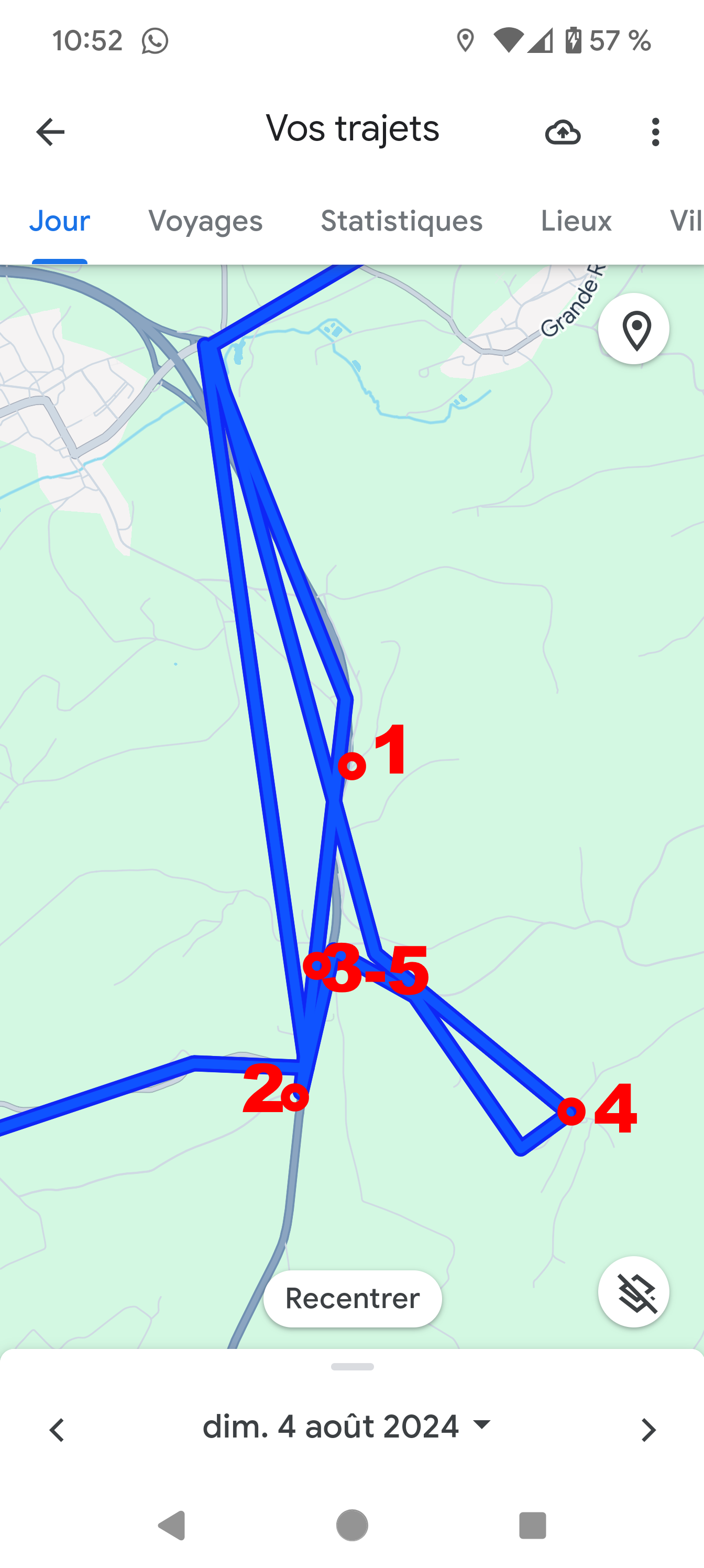
Picture explained:
- I miss point 1
- MRA sends me to point 2 by riding about 3 km further and going back about 5 km. At point 2, there was nothing special, just a route coming from the right. I do a u-turn, but stops at point 3 (a parking area....) to relaunch the program.
-It sends me to point 4 through a very narrow road in the woods. At point 4, It tells me to make a u-turn and come back to point 3 (now also point 5) and go right.
This didn't make any sense as I was already on the earlier planned road, and facing the correct direction.
Just to make things clear, I use at least the first option for curvy roads...
This kind of behaviour, I encounter almost every time I use MRA.
-
Hi.
When a road is blocked or I decide not to follow MRA's route or I miss a change of direction, the strangest thing can sometimes happen: first of all, there is no warning I left the route - could display a message stating I have to make a U-turn asap for example - but instead, if there is a route recalculation, it can send me back 5 km through a completely different or the same route and the tell me I have to do a U-turn.
As for me, it seems there is a big recalculation problem of the route on the fly, and I can't believe I'm the only one facing that.
Unless you all stick to the planned route and never encounter a closed road.
Picture explained:
- I miss point 1
- MRA sends me to point 2 by riding about 3 km further and going back about 5 km. At point 2, there was nothing special, just a route coming from the right. I do a u-turn, but stops at point 3 (a parking area....) to relaunch the program.
-It sends me to point 4 through a very narrow road in the woods. At point 4, It tells me to make a u-turn and come back to point 3 (now also point 5) and go right.
This didn't make any sense as I was already on the earlier planned road, and facing the correct direction.
Just to make things clear, I use at least the first option for curvy roads...
This kind of behaviour, I encounter almost every time I use MRA.

@ATLast I'd like to see the message that does pop up to revert or skip a way point stay on the screen until I interact with it. It self clears so fast that if I am not actively watching the screen I have no chance to make up my mind. Maybe this would help with your issue too?
-
@ATLast I'd like to see the message that does pop up to revert or skip a way point stay on the screen until I interact with it. It self clears so fast that if I am not actively watching the screen I have no chance to make up my mind. Maybe this would help with your issue too?
@PatsAdventuresTravels said in Route recalculation on the fly.:
@ATLast I'd like to see the message that does pop up to revert or skip a way point stay on the screen until I interact with it. It self clears so fast that if I am not actively watching the screen I have no chance to make up my mind. Maybe this would help with your issue too?
I have ever never seen that....
Hello! It looks like you're interested in this conversation, but you don't have an account yet.
Getting fed up of having to scroll through the same posts each visit? When you register for an account, you'll always come back to exactly where you were before, and choose to be notified of new replies (either via email, or push notification). You'll also be able to save bookmarks and upvote posts to show your appreciation to other community members.
With your input, this post could be even better 💗
Register Login-
 0518
0518
-
 0521
0521
-
 0746
0746
-
 039
039
-
0312
-
0311
-
034
-
1219