Skip to content
  • Categories
  • Recent
  • Popular
  • Support
  • MyRoute-app
Collapse
Brand Logo

MRA Community Forum

  1. Home
  2. MyRoute-app Routeplanner
  3. [Web] Problems, Bugs and other Issues
  4. BMW connected navigator does not work with MRA GPX files,

BMW connected navigator does not work with MRA GPX files,

Scheduled Pinned Locked Moved [Web] Problems, Bugs and other Issues
23 Posts 9 Posters 12.5k Views 1 Watching
  • Oldest to Newest
  • Newest to Oldest
  • Most Votes
Reply
  • Reply as topic
Log in to reply
This topic has been deleted. Only users with topic management privileges can see it.
  • HABVEN aka MrMRA HABVEN aka MrMRA

    @Håkan-Ohlström

    Just updated the BMW ConnectedRide Navigator. Create a route in the MRA planner, use the TomTom map, make sure the route points are on the road. Save the route as gpx 1.1 on your PC. Then copy and paste the gpx file of your route into the "Routes" folder on the BMW ConnectedRide Navigator.
    Then go to Navigation, then start, then click on the 3 dots in the top right corner and click on import, the route you just placed in the "Routes folder" will be imported into the BMW ConnectedRide Navigator.

    Now first drive a route to see how the ConnectedRide Navigator behaves with regard to the route points.

    To be continued...

    TorqueRider
    TorqueRider
    TorqueRider
    wrote on last edited by
    #9

    @Hans-van-de-Ven-MRA-Master
    I understood that the BMW Motorrad Connected app on the smartphone automatically synchronizes with the ConnectedRide Navigator if you use a BMW ID.
    Have you tried that yet?
    I use the MRA App to export routes directly in the BMW Motorrad Connected app.
    So no hassle with cables and copy and paste.

    HABVEN aka MrMRA 1 Reply Last reply
    0
    • TorqueRider TorqueRider

      @Hans-van-de-Ven-MRA-Master
      I understood that the BMW Motorrad Connected app on the smartphone automatically synchronizes with the ConnectedRide Navigator if you use a BMW ID.
      Have you tried that yet?
      I use the MRA App to export routes directly in the BMW Motorrad Connected app.
      So no hassle with cables and copy and paste.

      HABVEN aka MrMRA
      HABVEN aka MrMRA
      HABVEN aka MrMRA
      Valued contributor
      wrote on last edited by
      #10

      @Jack-van-Tilburg

      Tried it, but no result

      BMW BMW Connected Ride Navigator/Garmin Zumo XT3/XT2/XT//Tourstart/ MyRouteapp (The App)/...
      Een dag niet gelachen is een dag niet geleefd / Een route is net zo goed als deze uitgezet is.

      Raymond Bayol TorqueRider 2 Replies Last reply
      0
      • HABVEN aka MrMRA HABVEN aka MrMRA

        @Jack-van-Tilburg

        Tried it, but no result

        Raymond Bayol
        Raymond Bayol
        Raymond Bayol
        wrote on last edited by
        #11

        @Hans-van-de-Ven-MRA-Master Hello, i have find the solution.
        At first make your way on your computer and when y've finished, close it (don't export, just close).
        On your cellphone, open MyRoute and go to "itineraire", find the way and select "export", choose .gpx 1.0, download and after choose export, choose Connected BMW and in connected, you have 2 choices, you must choose the track with the more points and after select import.
        You find your way in track importation.

        HABVEN aka MrMRA Simon Gentilli 2 Replies Last reply
        0
        • HABVEN aka MrMRA HABVEN aka MrMRA

          @Jack-van-Tilburg

          Tried it, but no result

          TorqueRider
          TorqueRider
          TorqueRider
          wrote on last edited by
          #12

          @Hans-van-de-Ven-MRA-Master
          That's sad. Synchronization is one of the features that BMW promotes.

          HABVEN aka MrMRA 2 Replies Last reply
          0
          • Raymond Bayol Raymond Bayol

            @Hans-van-de-Ven-MRA-Master Hello, i have find the solution.
            At first make your way on your computer and when y've finished, close it (don't export, just close).
            On your cellphone, open MyRoute and go to "itineraire", find the way and select "export", choose .gpx 1.0, download and after choose export, choose Connected BMW and in connected, you have 2 choices, you must choose the track with the more points and after select import.
            You find your way in track importation.

            HABVEN aka MrMRA
            HABVEN aka MrMRA
            HABVEN aka MrMRA
            Valued contributor
            wrote on last edited by
            #13

            @Raymond-Bayol

            I did all that, the gpx file is added in the connected app, but not in the connectedRide Navigator.
            The connected ride navigator can handle routes with routepoints, so I don’t use the track

            BMW BMW Connected Ride Navigator/Garmin Zumo XT3/XT2/XT//Tourstart/ MyRouteapp (The App)/...
            Een dag niet gelachen is een dag niet geleefd / Een route is net zo goed als deze uitgezet is.

            1 Reply Last reply
            0
            • TorqueRider TorqueRider

              @Hans-van-de-Ven-MRA-Master
              That's sad. Synchronization is one of the features that BMW promotes.

              HABVEN aka MrMRA
              HABVEN aka MrMRA
              HABVEN aka MrMRA
              Valued contributor
              wrote on last edited by
              #14

              @Jack-van-Tilburg

              Still testing….

              BMW BMW Connected Ride Navigator/Garmin Zumo XT3/XT2/XT//Tourstart/ MyRouteapp (The App)/...
              Een dag niet gelachen is een dag niet geleefd / Een route is net zo goed als deze uitgezet is.

              HABVEN aka MrMRA 1 Reply Last reply
              1
              • HABVEN aka MrMRA HABVEN aka MrMRA

                @Jack-van-Tilburg

                Still testing….

                HABVEN aka MrMRA
                HABVEN aka MrMRA
                HABVEN aka MrMRA
                Valued contributor
                wrote on last edited by
                #15

                @Hans-van-de-Ven-MRA-Master
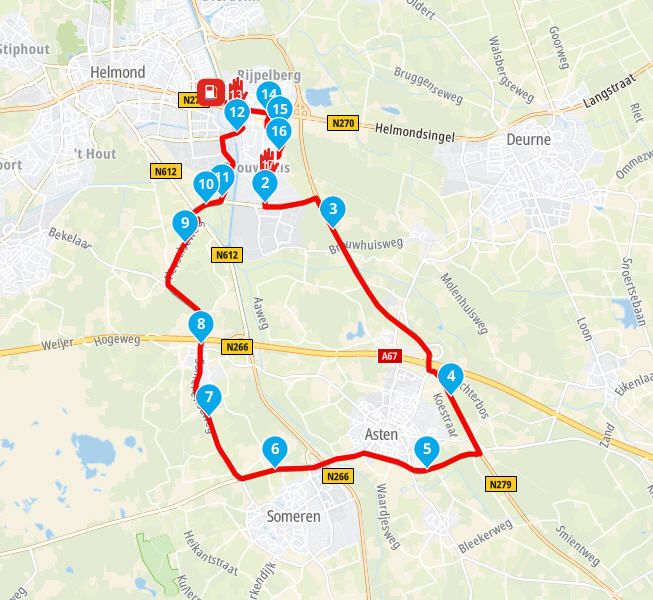
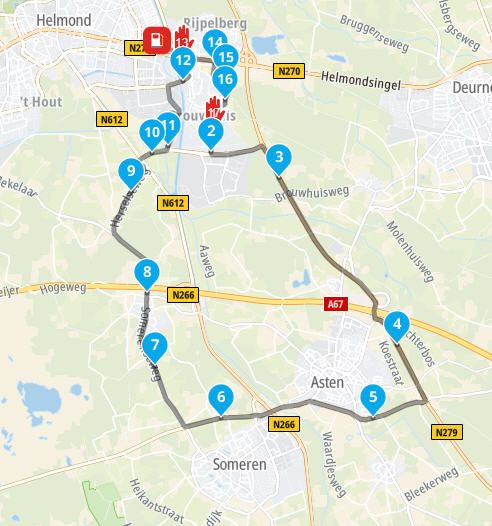
                Did a test drive today, 30KM, 14 training points and 3 via points in the route. Route saved as a gpx 1.1 file and placed from the downloads folder on my PC in the routes folder on the Navigator. You can then import these routes via the Navigation menu. A route and track file is imported. Started the route and drove the route without deviations.

                2nd picture the planned route, first picture the recorded track placed over the route.

                Now I just have to figure out whether the route can also be displayed in the navigator via the connected app and how I get the via points on the screen, perhaps save them as POI..

                To be continued again.Test_Route_met_Opgenomen_Track.jpg Test_route.jpg

                BMW BMW Connected Ride Navigator/Garmin Zumo XT3/XT2/XT//Tourstart/ MyRouteapp (The App)/...
                Een dag niet gelachen is een dag niet geleefd / Een route is net zo goed als deze uitgezet is.

                1 Reply Last reply
                0
                • TorqueRider TorqueRider

                  @Hans-van-de-Ven-MRA-Master
                  That's sad. Synchronization is one of the features that BMW promotes.

                  HABVEN aka MrMRA
                  HABVEN aka MrMRA
                  HABVEN aka MrMRA
                  Valued contributor
                  wrote on last edited by
                  #16

                  @Jack-van-Tilburg

                  Logged in again to the Connected app, so that it was linked again and voila, the routes can be downloaded to the navigator via the app.

                  So, if you use MyRoute-app, then: Plan a route in MRA, via the MRA app, export the route to the connected app.

                  BMW BMW Connected Ride Navigator/Garmin Zumo XT3/XT2/XT//Tourstart/ MyRouteapp (The App)/...
                  Een dag niet gelachen is een dag niet geleefd / Een route is net zo goed als deze uitgezet is.

                  TorqueRider 1 Reply Last reply
                  0
                  • HABVEN aka MrMRA HABVEN aka MrMRA

                    @Jack-van-Tilburg

                    Logged in again to the Connected app, so that it was linked again and voila, the routes can be downloaded to the navigator via the app.

                    So, if you use MyRoute-app, then: Plan a route in MRA, via the MRA app, export the route to the connected app.

                    TorqueRider
                    TorqueRider
                    TorqueRider
                    wrote on last edited by
                    #17

                    @Hans-van-de-Ven-MRA-Master
                    I have an RT and therefore use the TFT for navigation.
                    The export function from MRA to BMW Connected is absolutely fantastic and easy to use (experience since '21)

                    1 Reply Last reply
                    1
                    • Mark Jaffe
                      Mark Jaffe
                      Mark Jaffe
                      wrote on last edited by
                      #18

                      I am not having an issue importing GPX files to the Connected ride navigator but i cant seem to get it to see the way points in the gpx file. they import as supported points and therefore you cant skip them as they are not way points. any ideas

                      1 Reply Last reply
                      0
                      • TorqueRider
                        TorqueRider
                        TorqueRider
                        wrote on last edited by
                        #19

                        @Mark-Jaffe
                        Maybe you get more information about this when you reed this topic
                        MRA and the BMW Connected App

                        1 Reply Last reply
                        0
                        • Tony Baker
                          Tony Baker
                          Tony Baker
                          wrote on last edited by
                          #20

                          I have had no issue exporting routes to the BMW Navigator app. However, it is totally useless if you venture off road as the BMW app does nor recognise tracks and will start recalculating. I am just using the MRA app now on carplay with my phone mounted where my NAV 6 used to be. I am going to try the chigee CarPlay screen but it is only 5", if only they made a 7 or 8" version.

                          1 Reply Last reply
                          0
                          • Håkan Ohlström Håkan Ohlström

                            Unable to export MRA gpx files to connected ride navigator, what to do?

                            Best regards
                            Håkan Ohlström

                            Terry Weller
                            Terry Weller
                            Terry Weller
                            wrote on last edited by
                            #21

                            @Håkan-Ohlström
                            I find that if I export my route to OneDrive I can then import it into BMW Connect app and it will work.

                            HABVEN aka MrMRA 1 Reply Last reply
                            0
                            • Terry Weller Terry Weller

                              @Håkan-Ohlström
                              I find that if I export my route to OneDrive I can then import it into BMW Connect app and it will work.

                              HABVEN aka MrMRA
                              HABVEN aka MrMRA
                              HABVEN aka MrMRA
                              Valued contributor
                              wrote on last edited by
                              #22

                              @Terry-Weller
                              You can export the route directly to the connected app via the app

                              BMW BMW Connected Ride Navigator/Garmin Zumo XT3/XT2/XT//Tourstart/ MyRouteapp (The App)/...
                              Een dag niet gelachen is een dag niet geleefd / Een route is net zo goed als deze uitgezet is.

                              1 Reply Last reply
                              1
                              • Raymond Bayol Raymond Bayol

                                @Hans-van-de-Ven-MRA-Master Hello, i have find the solution.
                                At first make your way on your computer and when y've finished, close it (don't export, just close).
                                On your cellphone, open MyRoute and go to "itineraire", find the way and select "export", choose .gpx 1.0, download and after choose export, choose Connected BMW and in connected, you have 2 choices, you must choose the track with the more points and after select import.
                                You find your way in track importation.

                                Simon Gentilli
                                Simon Gentilli
                                Simon Gentilli
                                wrote on last edited by
                                #23

                                @Raymond-Bayol that works for me too. I have used a dedicated phone for the bike, a Pixel 5, which seems to work better than my regular iPhone, it also fits in the cubbyhole on my 1250rt more easily

                                1 Reply Last reply
                                0
                                • HABVEN aka MrMRA HABVEN aka MrMRA locked this topic on

                                Hello! It looks like you're interested in this conversation, but you don't have an account yet.

                                Getting fed up of having to scroll through the same posts each visit? When you register for an account, you'll always come back to exactly where you were before, and choose to be notified of new replies (either via email, or push notification). You'll also be able to save bookmarks and upvote posts to show your appreciation to other community members.

                                With your input, this post could be even better 💗

                                Register Login
                                Reply
                                • Reply as topic
                                Log in to reply
                                • Oldest to Newest
                                • Newest to Oldest
                                • Most Votes


                                • 1
                                • 2
                                ACTIVE USERS
                                HABVEN aka MrMRA
                                HABVEN aka MrMRA
                                MTC-Zeilberg
                                MTC-Zeilberg
                                TorqueRider
                                TorqueRider
                                Simon Gentilli
                                Simon Gentilli
                                Terry Weller
                                Terry Weller
                                Tony Baker
                                Tony Baker
                                Mark Jaffe
                                Mark Jaffe
                                Raymond Bayol
                                Raymond Bayol
                                Håkan Ohlström
                                Håkan Ohlström
                                POPULAR TOPICS
                                • A20 Edit tracklog – adjust the start or end point, and clean up zig-zag patterns.
                                  Corjan Meijerink
                                  Corjan Meijerink
                                  0
                                  6
                                  21

                                • MRA Studio export speed
                                  Hubert Thoring
                                  Hubert Thoring
                                  1
                                  8
                                  33

                                • Map colours and side roads
                                  Nick Carthew
                                  Nick Carthew
                                  0
                                  5
                                  78

                                • MRA 6.0.0 (526) - Offline Calculation Problem
                                  Bouke Ent
                                  Bouke Ent
                                  0
                                  10
                                  87

                                • Maps Michelin
                                  Tegel Werner
                                  Tegel Werner
                                  1
                                  6
                                  231

                                • opslaan naar Plan-TomTom werkt niet meer; wat is er gewijzigd!
                                  a white mouse on the motorbike
                                  a white mouse on the motorbike
                                  0
                                  2
                                  26

                                • Control screen font size
                                  Corjan Meijerink
                                  Corjan Meijerink
                                  0
                                  2
                                  37

                                • MyRoute-app offline
                                  BlauweFJR
                                  BlauweFJR
                                  8
                                  15
                                  55.3k

                                MY GROUPS
                                • Login

                                • Login or register to search.
                                • First post
                                  Last post
                                0
                                • Categories
                                • Recent
                                • Popular
                                • Support
                                • MyRoute-app