Skip to content
  • Categories
  • Recent
  • Popular
  • Support
  • MyRoute-app
Collapse
Brand Logo

MRA Community Forum

  1. Home
  2. The MyRoute-app
  3. [App] Problems, Bugs and other Issues
  4. Upcoming waypoint - disabled, yet still displaying in route

Upcoming waypoint - disabled, yet still displaying in route

Scheduled Pinned Locked Moved [App] Problems, Bugs and other Issues
3 Posts 2 Posters 710 Views
  • Oldest to Newest
  • Newest to Oldest
  • Most Votes
Reply
  • Reply as topic
Log in to reply
This topic has been deleted. Only users with topic management privileges can see it.
  • Rajpundefined Offline
    Rajpundefined Offline
    Rajp
    wrote on last edited by
    #1
    • MyRoute-app (v4.0.2 - 203)
    • Lifetime subscriber to the route planner and the navigation app.
    • Online navigation

    I’ve toggled off “Upcoming waypoint” in screen layout menu, but I still see the waypoints on the map itself and in the next direction area - is this feature mean‘t to hide shaping points from the map and route instructions? If not, what is the purpose of this setting?
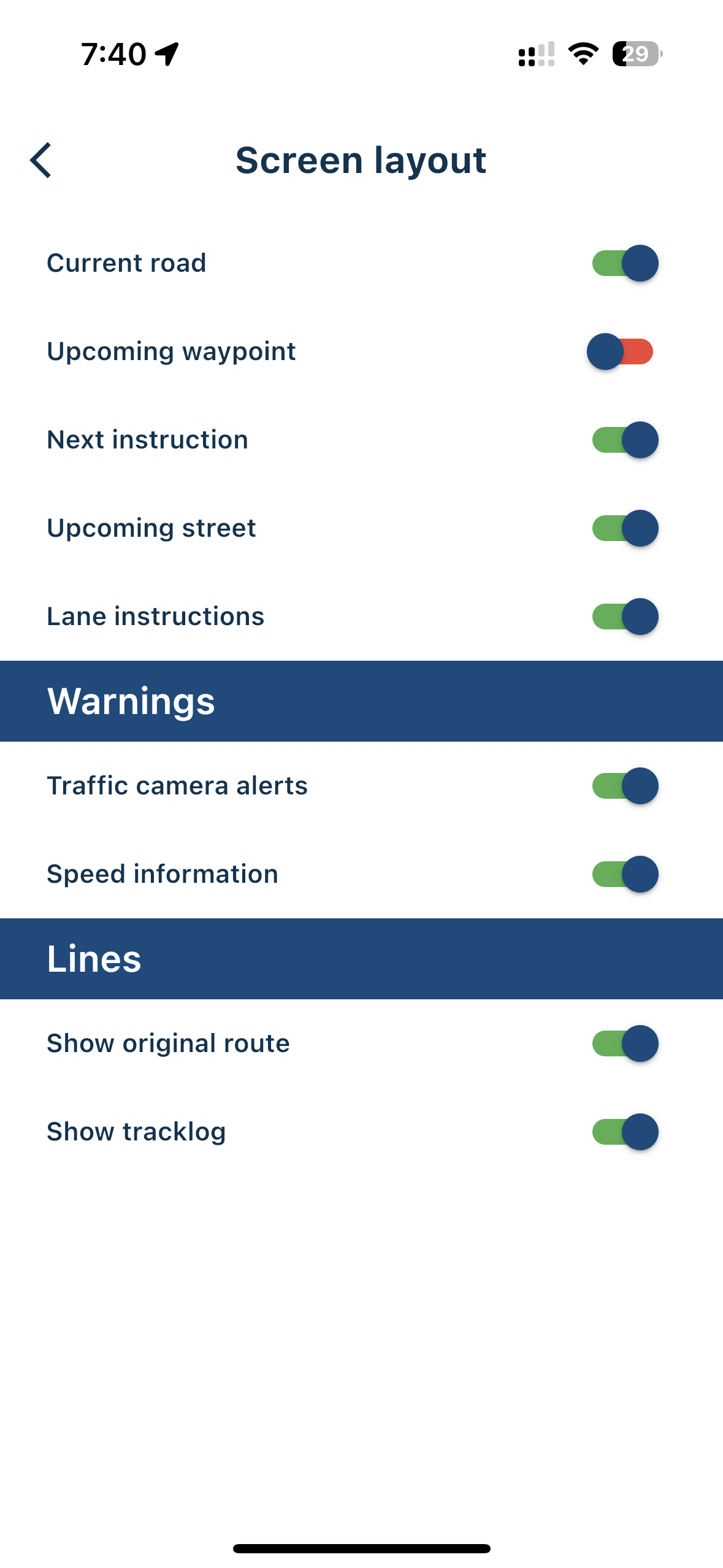
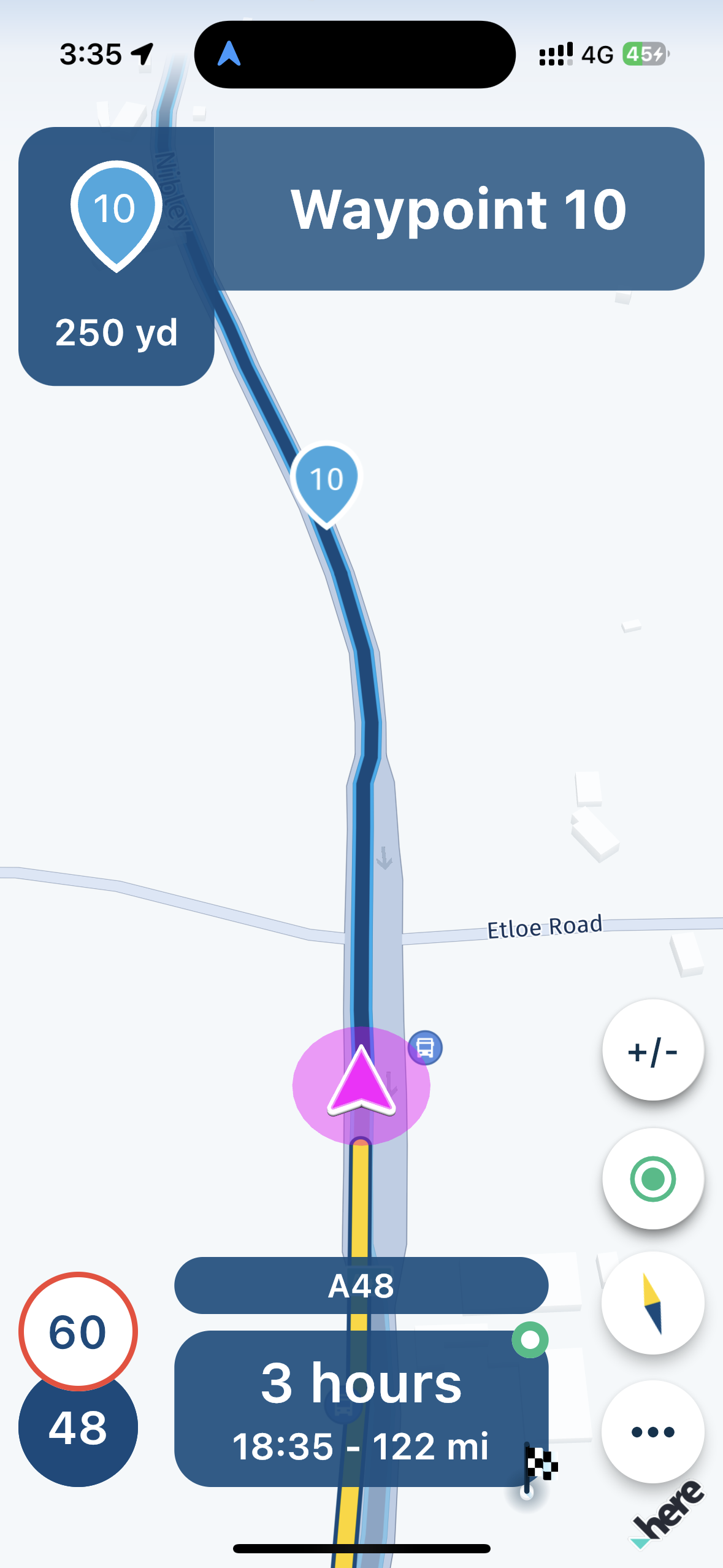
    IMG_4188.png IMG_4183.png

    Corjan Meijerinkundefined 1 Reply Last reply
    0
    • Rajpundefined Rajp
      • MyRoute-app (v4.0.2 - 203)
      • Lifetime subscriber to the route planner and the navigation app.
      • Online navigation

      I’ve toggled off “Upcoming waypoint” in screen layout menu, but I still see the waypoints on the map itself and in the next direction area - is this feature mean‘t to hide shaping points from the map and route instructions? If not, what is the purpose of this setting?

      IMG_4188.png IMG_4183.png

      Corjan Meijerinkundefined Offline
      Corjan Meijerinkundefined Offline
      Corjan Meijerink
      Developer
      wrote on last edited by
      #2

      @Rajp Thanks for asking this!

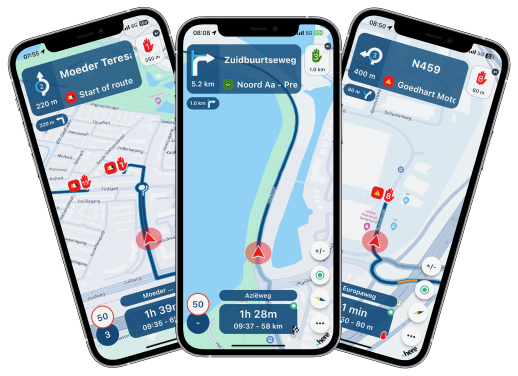
      The setting you disabled only hides the waypoint box in the top right of your screen. See the image below.
      render_wp_info.png

      Waypoints on the map are never hidden.
      The display of the waypoint top left (where you instructions should be) is improved in version 4.0.3 which will be released this week. The screenshot above nicely shows how it will be displayed as of then! 🎉

      Rajpundefined 1 Reply Last reply
      0
      • Corjan Meijerinkundefined Corjan Meijerink

        @Rajp Thanks for asking this!

        The setting you disabled only hides the waypoint box in the top right of your screen. See the image below.

        render_wp_info.png

        Waypoints on the map are never hidden.
        The display of the waypoint top left (where you instructions should be) is improved in version 4.0.3 which will be released this week. The screenshot above nicely shows how it will be displayed as of then! 🎉

        Rajpundefined Offline
        Rajpundefined Offline
        Rajp
        wrote on last edited by
        #3

        @Corjan-Meijerink Thanks for clarifying - look forward to the next release 👍

        1 Reply Last reply
        0

        Hello! It looks like you're interested in this conversation, but you don't have an account yet.

        Getting fed up of having to scroll through the same posts each visit? When you register for an account, you'll always come back to exactly where you were before, and choose to be notified of new replies (either via email, or push notification). You'll also be able to save bookmarks and upvote posts to show your appreciation to other community members.

        With your input, this post could be even better 💗

        Register Login
        Reply
        • Reply as topic
        Log in to reply
        • Oldest to Newest
        • Newest to Oldest
        • Most Votes


        ACTIVE USERS
        Corjan Meijerinkundefined
        Corjan Meijerink
        Rajpundefined
        Rajp
        POPULAR TOPICS
        • Manual Zoom
          Guzzistundefined
          Guzzist
          0
          11
          114

        • Na 5000km MyRoute-app: helemaal klaar met deze Bugware
          Corjan Meijerinkundefined
          Corjan Meijerink
          -4
          36
          941

        • Geen snelheidsweergave bij Android Auto
          Koen Vandecauter 0undefined
          Koen Vandecauter 0
          0
          10
          167

        • Back from vacation
          Corjan Meijerinkundefined
          Corjan Meijerink
          13
          13
          221

        • WunderLinQ: BMW Wonderwheel to the left for a long time does not work
          Mopetenpitundefined
          Mopetenpit
          0
          10
          1.3k

        • fuel stops when using track navigation
          Con Hennekensundefined
          Con Hennekens
          0
          3
          100

        • Wunderlinq mive keft
          Nick Carthewundefined
          Nick Carthew
          0
          3
          43

        • Hello, i want to make a trip to the Dolomieten (cortina )from Halle 1500(Belgium) in about 3 days. came somebody tell me a nice route or what i must avoid?Thanks
          Travellexxieundefined
          Travellexxie
          0
          8
          711

        MY GROUPS
        • Login

        • Login or register to search.
        • First post
          Last post
        0
        • Categories
        • Recent
        • Popular
        • Support
        • MyRoute-app