How to make satnav flag up my coffee stops?
-

I have a BMW Nav V (ie Garmin) GPS, and use it with GPX v1.1 files downloaded from MRA. So I use shaping points to define the overall routes, with waypoints set at fixed points where I want to stop, eg for coffee or meal breaks.
My question - how do I persuade the GPS to display some useful info about the waypoints? Like, their name, or the distance to them? Right now I get nothing, and it's quite common for me to ride straight past waypoints where I'd earmarked a stop. I feel sure I must be doing something wrong?
-
I have a BMW Nav V (ie Garmin) GPS, and use it with GPX v1.1 files downloaded from MRA. So I use shaping points to define the overall routes, with waypoints set at fixed points where I want to stop, eg for coffee or meal breaks.
My question - how do I persuade the GPS to display some useful info about the waypoints? Like, their name, or the distance to them? Right now I get nothing, and it's quite common for me to ride straight past waypoints where I'd earmarked a stop. I feel sure I must be doing something wrong?

@David-P-0
I'm afraid that won't work with MRA planner.
When I still had a Garmin I used Garmin POI Loader for that.
But that's actually quite a lot of work. -
@David-P-0 would it work if you convert the shaping point into a via point? You can toggle any route waypoint between these two sub-types by clicking the icon in the waypoint menu (see below, it's the hand icon on the second row of icons in the menu).
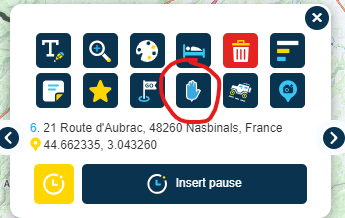
If you create it as a via point (where the point is displayed on the map with a hand icon not a "guitar pick" icon), you can configure the Garmin to display distance/time to next and get alerts on arrival.
-
I have a BMW Nav V (ie Garmin) GPS, and use it with GPX v1.1 files downloaded from MRA. So I use shaping points to define the overall routes, with waypoints set at fixed points where I want to stop, eg for coffee or meal breaks.
My question - how do I persuade the GPS to display some useful info about the waypoints? Like, their name, or the distance to them? Right now I get nothing, and it's quite common for me to ride straight past waypoints where I'd earmarked a stop. I feel sure I must be doing something wrong?

@David-P-0
hij have the same Nation V and always urs the GPX 1.2 format for the simple reason that I then only see (all The) via points and no shaping points. -
@David-P-0
I'm afraid that won't work with MRA planner.
When I still had a Garmin I used Garmin POI Loader for that.
But that's actually quite a lot of work.
@Jack-van-Tilburg
It does work Including the names of the via points that you use in MyRoute App. You have to use the GPX for at for that.
 -
@David-P-0 would it work if you convert the shaping point into a via point? You can toggle any route waypoint between these two sub-types by clicking the icon in the waypoint menu (see below, it's the hand icon on the second row of icons in the menu).
If you create it as a via point (where the point is displayed on the map with a hand icon not a "guitar pick" icon), you can configure the Garmin to display distance/time to next and get alerts on arrival.
In addition you can give the via point a name with the upper left icon in the screendump above.
Hello! It looks like you're interested in this conversation, but you don't have an account yet.
Getting fed up of having to scroll through the same posts each visit? When you register for an account, you'll always come back to exactly where you were before, and choose to be notified of new replies (either via email, or push notification). You'll also be able to save bookmarks and upvote posts to show your appreciation to other community members.
With your input, this post could be even better 💗
Register Login-
012156
-
 17363.5k
-
 1320190
-
 0631
0631
-
 0642
0642
-
0594
-
0524
-
 05157
05157